Explore/GitHub Agent Apps Campaign/CookSleep/gpt_image_playground
Image generation playgroundSandbox, from sourcesucceeded

CookSleep/gpt_image_playground

CookSleep/gpt_image_playgroundat da4fda8

Open-source bring-your-own-key playground for GPT image models with a gallery, favorite folders, search and API settings. Run from its repository in the DeepQA sandbox.

Tested byDeepQA TeamfromCookSleep/gpt_image_playgroundat da4fda8onSep 20, 2026

Run #1model gemini-balanced (vertex)took 9m

11 of 12 scenarios passed, 1 failed, no issues after the audit.

Share on X
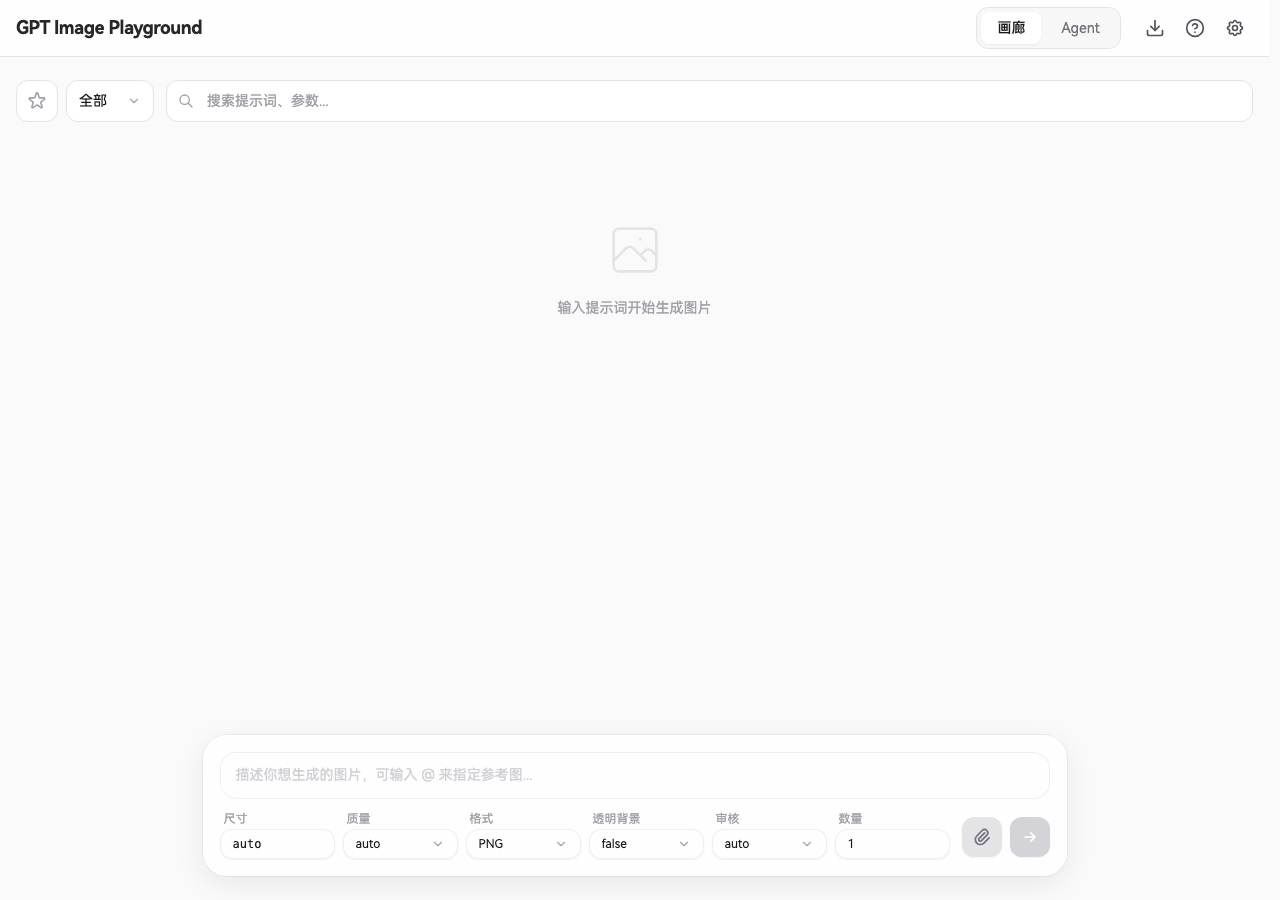
CookSleep/gpt_image_playground in the browser during the run

By the numbers

11 of 12
scenarios passed, 1 failed
220
browser actions
46
screenshots
209
model calls
9.2
minutes
12
scenarios
11
passed
1
failed
0
blocked
0
issues

Walkthrough

Every scenario DeepQA drove in the browser, in plan order, with the 42 screenshots it captured along the way. A passing scenario is evidence too.

  1. S1
    Create a new favorite folder

    4 steps, 4 screenshots

    pass
    S1-1.png
    S1 · Create a new favorite folder
    S1-3.png
    S1 · Create a new favorite folder
    S1-6.png
    S1 · Create a new favorite folder
    S1-10.png
    S1 · Create a new favorite folder
    • Clicked the 收藏夹 button and viewed the favorite folder view with 管理收藏夹 button.
    • Navigated to home page and opened 收藏夹 filter view.
    • Opened 管理收藏夹 modal.
    • Entered 'Test Folder' in the '新建收藏夹...' input field and clicked '新建'.
    • Observed that 'Test Folder' was created and successfully displayed in both the management modal and the favorite folders list.
  2. S2
    Rename an existing favorite folder

    5 steps, 3 screenshots

    pass
    S2-2.png
    S2 · Rename an existing favorite folder
    S2-8.png
    S2 · Rename an existing favorite folder
    S2-13.png
    S2 · Rename an existing favorite folder
    • Opened the Manage Favorites (管理收藏夹) dialog modal.
    • Created folder 'Rename Target' in favorites management.
    • Navigated to favorites view by clicking the '收藏夹' button.
    • Opened the Manage Favorites modal by clicking '管理收藏夹'.
    • Created a new folder named 'Rename Target' using the creation input and '新建' button.
    • Clicked the rename button ('重命名') for 'Rename Target', updated the folder name to 'Renamed Folder', and confirmed.
    • Verified that 'Renamed Folder' is displayed in both the modal management list and the main favorites list, and 'Rename Target' is no longer visible.
  3. S3
    Delete a favorite folder

    4 steps, 4 screenshots

    pass
    S3-2.png
    S3 · Delete a favorite folder
    S3-5.png
    S3 · Delete a favorite folder
    S3-9.png
    S3 · Delete a favorite folder
    S3-11.png
    S3 · Delete a favorite folder
    • Opened the favorites view showing the list of favorite folders.
    • Created 'Delete Target' favorite folder and verified it appears in the management list.
    • Navigated to favorites view by clicking the '收藏夹' button.
    • Opened '管理收藏夹' management modal.
    • Created folder 'Delete Target' by entering the name into '新建收藏夹...' input and clicking '新建'.
    • Verified 'Delete Target' appeared in both the management list and the main favorites list.
    • Clicked the delete affordance for 'Delete Target' and confirmed deletion via the '确认删除' confirmation dialog button.
    • Observed that 'Delete Target' folder was immediately and completely removed from the favorite folders list.
  4. S4
    Favorite folders persist across page reloads

    5 steps, 4 screenshots

    pass
    S4-1.png
    S4 · Favorite folders persist across page reloads
    S4-3.png
    S4 · Favorite folders persist across page reloads
    S4-9.png
    S4 · Favorite folders persist across page reloads
    S4-11.png
    S4 · Favorite folders persist across page reloads
    • Opened the favorites panel and found the '管理收藏夹' button.
    • Created favorite folder 'Persistent Folder' successfully.
    • Created favorite folder named 'Persistent Folder'.
    • Reloaded the page via navigation to http://localhost:5173/.
    • Reopened the favorites panel and confirmed 'Persistent Folder' persists and is present in the list.
  5. S5
    Prevent creating a favorite folder with an empty name

    4 steps, 4 screenshots

    pass
    S5-2.png
    S5 · Prevent creating a favorite folder with an empty name
    S5-5.png
    S5 · Prevent creating a favorite folder with an empty name
    S5-9.png
    S5 · Prevent creating a favorite folder with an empty name
    S5-12.png
    S5 · Prevent creating a favorite folder with an empty name
    • Opened the favorite folders management panel.
    • Opened the 管理收藏夹 modal and verified the 新建 button is disabled when the input is empty.
    • Clicked '收藏夹' and opened the '管理收藏夹' modal.
    • Observed that with an empty folder name input field, the '新建' button is disabled.
    • Entered whitespace characters into the folder name input and confirmed that the '新建' button remained disabled and pressing Enter did not create a folder.
    • Verified that no nameless folder was created or added to the list.
  6. S6
    Prevent creating a favorite folder with whitespace only

    4 steps, 3 screenshots

    pass
    S6-2.png
    S6 · Prevent creating a favorite folder with whitespace only
    S6-5.png
    S6 · Prevent creating a favorite folder with whitespace only
    S6-9.png
    S6 · Prevent creating a favorite folder with whitespace only
    • Opened the favorites view and clicked 管理收藏夹.
    • Typed whitespace into the '新建收藏夹...' input; the '新建' button remained disabled and pressing Enter did not create a folder.
    • Opened favorites panel and clicked '管理收藏夹' to open the favorite management dialog.
    • Entered whitespace ' ' into the '新建收藏夹...' input field.
    • Verified that the '新建' button remains disabled and pressing Enter does not trigger submission, preventing creation of whitespace-only folders.
  7. S7
    Prevent creating duplicate favorite folders

    4 steps, 4 screenshots

    pass
    S7-2.png
    S7 · Prevent creating duplicate favorite folders
    S7-5.png
    S7 · Prevent creating duplicate favorite folders
    S7-9.png
    S7 · Prevent creating duplicate favorite folders
    S7-13.png
    S7 · Prevent creating duplicate favorite folders
    • Opened the favorites view showing existing folders and manage button.
    • Opened the Manage Favorites modal displaying current folders and create folder input.
    • Navigated to the favorites view by clicking the '收藏夹' button.
    • Opened the '管理收藏夹' modal dialog.
    • Entered 'Duplicate Test' in the '新建收藏夹...' input field and clicked '新建', creating the first folder named 'Duplicate Test'.
    • Entered 'Duplicate Test' in the '新建收藏夹...' input field again and clicked '新建'.
    • Verified that no second 'Duplicate Test' folder was created, preventing duplicate folder creation.
  8. S8
    Set a favorite folder as the default

    4 steps, 3 screenshots

    pass
    S8-2.png
    S8 · Set a favorite folder as the default
    S8-10.png
    S8 · Set a favorite folder as the default
    S8-13.png
    S8 · Set a favorite folder as the default
    • Clicked the '收藏夹' filter button and opened the favorites management overlay ('管理收藏夹').
    • Created a new folder named 'Default Folder' using the input and '新建' button.
    • Clicked '设为默认收藏夹' on 'Default Folder' and confirmed the confirmation dialog.
    • The UI successfully updated to indicate 'Default Folder' is the default folder (displaying '取消默认收藏夹' instead of '设为默认收藏夹').
  9. S9
    Filter the gallery using the search form

    3 steps, 3 screenshots

    pass
    S9-1.png
    S9 · Filter the gallery using the search form
    S9-5.png
    S9 · Filter the gallery using the search form
    S9-8.png
    S9 · Filter the gallery using the search form
    • Initial view of gallery showing empty state with '输入提示词开始生成图片' and search input '搜索提示词、参数...'.
    • Typed keyword 'cat' into the search input, and the gallery view updated from '输入提示词开始生成图片' to '没有找到匹配的任务'.
    • Cleared the search input, and the gallery view returned to the initial empty state '输入提示词开始生成图片'.
    • The gallery search input dynamically filters results: typing a non-matching query displays '没有找到匹配的任务', and clearing the input restores the default empty gallery state '输入提示词开始生成图片'.
  10. S10
    Validate required API Key in Settings

    6 steps, 3 screenshots

    fail
    S10-3.png
    S10 · Validate required API Key in Settings
    S10-8.png
    S10 · Validate required API Key in Settings
    S10-10.png
    S10 · Validate required API Key in Settings
    • Opened Settings modal to inspect API Key configuration and validation.
    • Cleared the API Key field in Settings modal; no inline validation error or warning is displayed.
    • Opened the Settings modal and inspected the 'API Key' field.
    • Cleared the API Key input field and observed that no validation message, warning outline, or helper text appeared.
    • Closed the Settings modal without error; the main generation button reflects '请先配置 API'.
  11. S11
    Exit favorites view and return to gallery

    4 steps, 4 screenshots

    pass
    S11-1.png
    S11 · Exit favorites view and return to gallery
    S11-3.png
    S11 · Exit favorites view and return to gallery
    S11-5.png
    S11 · Exit favorites view and return to gallery
    S11-8.png
    S11 · Exit favorites view and return to gallery
    • Viewed the initial gallery page with the '收藏夹' (Favorites) button visible.
    • Entered favorites view where '管理收藏夹' and '退出收藏夹' buttons are displayed.
    • Opened the '管理收藏夹' (Manage Favorites) dialog overlay.
    • Closed the favorite folders management dialog overlay.
    • Clicked '退出收藏夹' and verified that the main gallery view was restored with '收藏夹' button and search prompt box.
  12. S12
    Open and close API configuration settings

    3 steps, 3 screenshots

    pass
    S12-1.png
    S12 · Open and close API configuration settings
    S12-4.png
    S12 · Open and close API configuration settings
    S12-6.png
    S12 · Open and close API configuration settings
    • Opened settings modal and observed the current API URL field value is 'https://api.openai.com/v1'.
    • Clicked the '关闭' button; the settings modal closed immediately and returned to the main dashboard.
    • The settings modal opens cleanly when clicking '设置', showing default API URL 'https://api.openai.com/v1'.
    • Clicking '关闭' without modifying any fields closes the modal and returns to the main dashboard without errors.

Issues

Findings that survived the Critic's audit. Security-class issues stay summary-only until the maintainers ship a fix.

lowwithdrawnfunctionalF1 · S10

Settings modal silently accepts empty API Key without validation warning

The scenario's own observations confirm that clearing the API key updates the main generation button to read '请先配置 API' (Please configure API first). This shows the empty state is deliberately and gracefully handled by the application, making an inline validation error unnecessary.

Expected

The application should display a validation error or warning when the API Key field is empty or cleared in Settings.

Actual

The Settings modal silently accepts an empty API Key field without displaying any inline validation error or warning.

Repro · 4 steps
  1. Click the '设置' button on the top banner.
  2. Locate the 'API Key' field in the 'API 配置' tab.
  3. Enter a key and then clear the 'API Key' input field.
  4. Observe that no validation warning or error appears on the field or form.

Critic audit

An adversarial second pass over every finding before it reaches the report.

1
findings reviewed
0
re-verified live
1
withdrawn
  • F1withdrawn

    The scenario's own observations confirm that clearing the API key updates the main generation button to read '请先配置 API' (Please configure API first). This shows the empty state is deliberately and gracefully handled by the application, making an inline validation error unnecessary.

  • F1 was withdrawn because the Tester's own observations demonstrate that the application handles the cleared API key by updating the main screen's call-to-action, contradicting the claim of silent acceptance.

Report

QA report: CookSleep/gpt_image_playground at da4fda8

Testing concluded with no confirmed defects across the application's core workflows.

Deep feature testing evaluated the application's favorites management, gallery search filtering, persistence across page reloads, and settings configuration dialogs across twelve scenarios.

A single finding was initially flagged regarding empty API key validation in the settings modal, but it was withdrawn during audit because clearing the key appropriately updates the main interface state rather than silently accepting it without response.

With eleven passing scenarios and no remaining active issues, the tested gallery and favorites management features demonstrated stable behavior.

Run summary
MetricCount
Scenarios executed12
Passed11
Failed1
Blocked0
Findings raised1
Issues after the audit0
Withdrawn by the audit1
Critical / high / medium / low0 / 0 / 0 / 0

Target: http://localhost:5173 · Testing level: deep_feature · Stack: node / npm (vite)

Issues

No issues survived the audit.

Withdrawn findings

The Critic re-examined these claims and found the evidence did not support them. They are kept here rather than deleted.

  • Settings modal silently accepts empty API Key without validation warning (S10, low): The scenario's own observations confirm that clearing the API key updates the main generation button to read '请先配置 API' (Please configure API first). This shows the empty state is deliberately and gracefully handled by the application, making an inline validation error unnecessary.
Scenario results
ScenarioPriorityResultIssues
S1 Create a new favorite folderhighpassnone
S2 Rename an existing favorite folderhighpassnone
S3 Delete a favorite folderhighpassnone
S4 Favorite folders persist across page reloadshighpassnone
S5 Prevent creating a favorite folder with an empty namemediumpassnone
S6 Prevent creating a favorite folder with whitespace onlymediumpassnone
S7 Prevent creating duplicate favorite foldersmediumpassnone
S8 Set a favorite folder as the defaultmediumpassnone
S9 Filter the gallery using the search formmediumpassnone
S10 Validate required API Key in Settingsmediumfailnone
S11 Exit favorites view and return to gallerylowpassnone
S12 Open and close API configuration settingslowpassnone
The audit

The Critic reviewed 1 finding and re-verified 0 of them live in the browser, replaying the reported steps on a fresh page.

  • F1 was withdrawn because the Tester's own observations demonstrate that the application handles the cleared API key by updating the main screen's call-to-action, contradicting the claim of silent acceptance.
Coverage and caveats

In scope: Favorites folder lifecycle (create, rename, set default, delete); Favorites folder form validation; Local persistence of favorite folders; Gallery search functionality; Settings API panel inspection and validation.

Not covered: Image generation execution (requires valid external OpenAI API keys); Agent mode execution (requires active Responses API configuration); Backup/Restore file handling (relies on OS-level file dialogs outside basic browser automation).

  • Image generation features are mocked or excluded to prevent blocking on network errors to external endpoints.
  • The application relies on local storage/IndexedDB, meaning data created in one scenario persists to the next unless explicitly cleaned up or isolated.
  • Form inputs like '新建收藏夹...' have standard UI affordances for renaming and deleting folders.
By the numbers
MetricValue
Scenarios11 passed, 1 failed, 0 blocked of 12 (50 planned steps)
Browser actions220 (66 clicks, 18 inputs, 15 navigations, 121 snapshots)
Screenshots46 (4 explore, 42 scenario, 0 critic), 42 captioned
Coverage1 pages, 3 forms, 4 flows, 0 console errors
Audit1 findings, 0 re-verified live, 0 confirmed, 0 promoted, 1 withdrawn
Model calls209
Tokens1,061,745 input, 8,310 output, 15,616 thinking
Time9 min
StageCallsInputOutputThinkingSeconds
explore37195,0551,7741,452106
plan13,3132,0355,23850
test169857,1424,1786,581373
critique14,7351841,96218
report11,5001393835

Run log

stagecallstokenstime
Explore37198.3k1m 46s
Plan110.6k50s
Test169867.9k6m 13s
Critique16.9k18s
Report12k5s
Total2091.1M9m 11s
Intake
Explore
Plan
Test
Critique
Report
  • 02:34:42Zexploreexplore started
  • 02:44:01ZexploreExplored / (12 controls, 0 forms)
  • 02:44:01ZexploreMapped 1 pages, 3 forms, 4 flows in 37 turns.
  • 02:44:01Zexploreexplore completed in 106s.
  • 02:44:01Zplanplan started
  • 02:44:01ZplanPlanned 12 scenarios (4 high, 6 medium, 2 low).
  • 02:44:01Zplanplan completed in 50s.
  • 02:44:01Ztesttest started
  • 02:44:01ZtestS1 executed (pass)
  • 02:44:01ZtestS2 executed (pass)
  • 02:44:01ZtestS3 executed (pass)
  • 02:44:01ZtestS4 executed (pass)
  • 02:44:01ZtestS5 executed (pass)
  • 02:44:01ZtestS6 executed (pass)
  • 02:44:01ZtestS7 executed (pass)
  • 02:44:01ZtestS8 executed (pass)
  • 02:44:01ZtestS9 executed (pass)
  • 02:44:01ZtestS10 executed (fail), 1 finding
  • 02:44:01ZtestS11 executed (pass)
  • 02:44:01ZtestS12 executed (pass)
  • 02:44:01ZtestExecuted 12 scenarios: 11 passed, 1 failed, 0 blocked, 1 finding.
  • 02:44:01Ztesttest completed in 373s.
  • 02:44:01Zcritiquecritique started
  • 02:44:01ZcritiqueReviewed 1 findings; 0 possible defects spotted in passed scenarios.
  • 02:44:01ZcritiqueAudit complete: 0 confirmed, 1 withdrawn, 0 promoted, 0 re-verified live.
  • 02:44:01Zcritiquecritique completed in 18s.
  • 02:44:01Zreportreport started
  • 02:44:01ZreportReported 0 issues (0 critical, 0 high, 0 medium, 0 low) from 1 finding.
  • 02:44:01Zreportreport completed in 5s.

Put an agent team on your next pull request.

Connect a repo, dispatch a Run, and read an audited, evidence-backed report the same day.