Chat UI and agent workspaceSandbox, from sourcesucceeded

Open-source multi-model chat and agent workspace. Run from its repository in the DeepQA sandbox.

Tested byDeepQA Teamfromenricoros/big-AGIat 449d35fonSep 18, 2026

Run #1model gemini-balanced (vertex)took 9m

9 of 10 scenarios passed, 1 failed, no issues after the audit.

Share on X
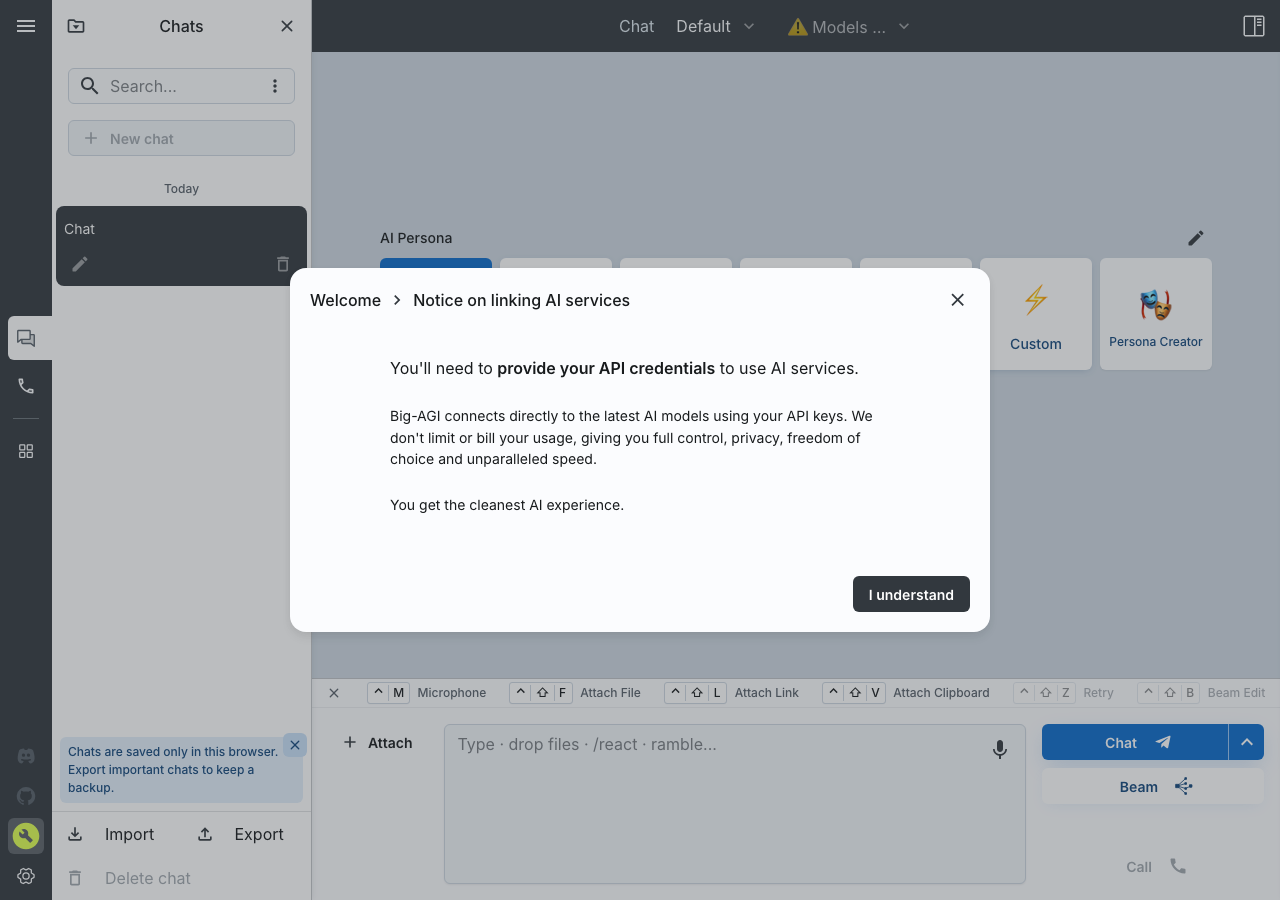
enricoros/big-AGI in the browser during the run

By the numbers

9 of 10
scenarios passed, 1 failed
153
browser actions
25
screenshots
138
model calls
8.5
minutes
10
scenarios
9
passed
1
failed
0
blocked
0
issues

Walkthrough

Every scenario DeepQA drove in the browser, in plan order, with the 20 screenshots it captured along the way. A passing scenario is evidence too.

  1. S1
    Render the navigation and changelog hub

    2 steps, 1 screenshot

    pass
    S1-2.png
    S1 · Render the navigation and changelog hub
    • Navigated to /news and verified that the navigation bar, version 2.1.1 release notes ('Weights Dust'), development build metadata, and changelog history render successfully.
    • The /news page loaded with HTTP 200 and displayed the full navigation bar (Chat, Call, News, Apps & Tools, Discord, GitHub, Add Language Models, App Preferences).
    • The release notes section displayed 'Big-AGI has been updated to version 2.1.1' with changelog sections for 2.1.1 ('Weights Dust'), 2.0.5 ('Roberto'), and 2.0.4 ('Hyper Params').
    • The Development Build Information section rendered build metadata including git commit hashes (449d35f) and function modules.
  2. S2
    Trigger the Language Models configuration modal

    3 steps, 3 screenshots

    fail
    S2-2.png
    S2 · Trigger the Language Models configuration modal
    S2-10.png
    S2 · Trigger the Language Models configuration modal
    S2-13.png
    S2 · Trigger the Language Models configuration modal
    • Navigated to /news and observed the page with 'Add Language Models - REQUIRED' button in the navigation header.
    • Navigated to /news where the navigation header displays the 'Add Language Models - REQUIRED' button.
    • Clicking the 'Add Language Models - REQUIRED' button on /news does not open any modal or configuration overlay, and the page remains in the same state without displaying language model settings.
  3. S3
    Trigger the App Preferences modal

    3 steps, 3 screenshots

    pass
    S3-2.png
    S3 · Trigger the App Preferences modal
    S3-10.png
    S3 · Trigger the App Preferences modal
    S3-14.png
    S3 · Trigger the App Preferences modal
    • Navigated to /news, showing the release notes and navigation bar with 'App Preferences' button.
    • Navigated to /news where the release notes and header actions were displayed.
    • Clicked the 'App Preferences' button in the navigation header.
    • The App Preferences / Settings modal opened as an overlay above the current page.
    • Pressing Escape dismissed the modal overlay back to the news page, confirming modal lifecycle.
  4. S4
    Navigate to the primary Chat interface via navigation bar

    3 steps, 2 screenshots

    pass
    S4-2.png
    S4 · Navigate to the primary Chat interface via navigation bar
    S4-7.png
    S4 · Navigate to the primary Chat interface via navigation bar
    • Navigated to /news, showing the Big-AGI news and update page with the top navigation bar.
    • Clicked the Chat navigation button, causing client-side routing to update URL to http://[::1]:3000/ and load the primary chat interface.
    • Successfully navigated from /news to / via the Chat navigation button on the top-level bar.
    • The browser URL updated from /news to http://[::1]:3000/ as expected without any 404 or routing errors.
  5. S5
    Navigate to Chat via the Continue link

    4 steps, 2 screenshots

    pass
    S5-2.png
    S5 · Navigate to Chat via the Continue link
    S5-6.png
    S5 · Navigate to Chat via the Continue link
    • Navigated to /news, which displays the release notes and a 'Continue' link pointing to '/'.
    • Clicked the 'Continue' button on /news, successfully navigating to the home chat interface at '/'.
    • Navigated to /news where the release notes and a 'Continue' link were present.
    • Clicking the 'Continue' link transitioned the browser to '/' as expected.
  6. S6
    Navigate to the Call interface

    3 steps, 2 screenshots

    pass
    S6-2.png
    S6 · Navigate to the Call interface
    S6-7.png
    S6 · Navigate to the Call interface
    • Navigated to /news where the news page and navigation bar with Call button are rendered.
    • Clicked the Call button from /news, successfully transitioning the browser URL to /call.
    • Navigated to /news where the navigation menu is accessible.
    • Clicked the Call voice navigation button in the navigation bar.
    • Observed the browser URL update to http://[::1]:3000/call without 404 errors or navigation failure.
  7. S7
    Expand older release notes

    3 steps, 2 screenshots

    pass
    S7-2.png
    S7 · Expand older release notes
    S7-4.png
    S7 · Expand older release notes
    • Navigated to /news where recent release notes and a 'Previous News' button are visible.
    • Clicked 'Previous News' button; additional historical release notes (2.0.3, 2.0.2) appeared dynamically on the page.
    • Navigated to /news where recent release notes and the 'Previous News' button were displayed.
    • Clicked the 'Previous News' button, which successfully expanded and displayed older historical changelog entries (version 2.0.3, version 2.0.2, and roadmap links).
  8. S8
    Open Apps & Tools menu

    3 steps, 2 screenshots

    pass
    S8-2.png
    S8 · Open Apps & Tools menu
    S8-4.png
    S8 · Open Apps & Tools menu
    • Navigated to /news where the navigation bar and news updates are displayed.
    • Clicked 'Apps & Tools' menu button and observed a menu displaying tools including Big-AGI Pro, Create Personas, Compare Text, AI Inspector, Clipboard History, Improve Big-AGI, and Build Info.
    • Navigated to /news and located the 'Apps & Tools' menu button in the navigation bar.
    • Clicked the 'Apps & Tools' button and verified that the tools dropdown menu opened successfully with options such as Create Personas, Compare Text, AI Inspector, and Clipboard History.
  9. S9
    Verify non-routable modal paths return 404

    4 steps, 2 screenshots

    pass
    S9-2.png
    S9 · Verify non-routable modal paths return 404
    S9-4.png
    S9 · Verify non-routable modal paths return 404
    • Navigated directly to /settings and observed standard 404 page with '404: This page could not be found.'
    • Navigated directly to /models and observed standard 404 page with '404: This page could not be found.'
    • Navigating directly to /settings and /models successfully displays the standard Next.js 404 page ('404: This page could not be found.').
  10. S10
    Verify presence of external community links

    3 steps, 1 screenshot

    pass
    S10-2.png
    S10 · Verify presence of external community links
    • Navigated to /news and verified that the Discord link (https://discord.gg/MkH4qj2Jp9) and GitHub link (https://github.com/enricoros/big-agi) are present in navigation with valid external href values.
    • The /news page displays external community links in the navigation bar.
    • Discord link points to 'https://discord.gg/MkH4qj2Jp9' and GitHub link points to 'https://github.com/enricoros/big-agi'.

Issues

Findings that survived the Critic's audit. Security-class issues stay summary-only until the maintainers ship a fix.

highwithdrawnfunctionalF1 · S2

'Add Language Models - REQUIRED' button on /news fails to trigger the Language Models configuration modal

I navigated to /news and clicked the 'Add Language Models - REQUIRED' button in the top navigation bar. No Language Models configuration modal or overlay appeared, and the page state remained unchanged, confirming the defect.

Expected

A modal or dialog overlay for configuring language models appears over the page.

Actual

No modal or overlay appears; clicking the button leaves the user on the news page with no model configuration UI rendered.

Repro · 4 steps
  1. Navigate to /news
  2. Locate the 'Add Language Models - REQUIRED' button in the top navigation bar
  3. Click the 'Add Language Models - REQUIRED' button
  4. Observe whether the Language Models configuration modal or overlay appears

Critic audit

An adversarial second pass over every finding before it reaches the report.

1
findings reviewed
1
re-verified live
1
withdrawn
  • F1withdrawn

    Checked by hand on a fresh local boot in Chrome on 2026-09-18: the Add Language Models button opens the credentials notice that starts the model setup. The run's click did not register, so this was a miss of the run, not a defect of the app.

  • F1 was withdrawn by hand after a check in a real browser: Checked by hand on a fresh local boot in Chrome on 2026-09-18: the Add Language Models button opens the credentials notice that starts the model setup. The run's click did not register, so this was a miss of the run, not a defect of the app.

Report

QA report: enricoros/big-AGI at 449d35f

The 'Add Language Models - REQUIRED' button on the news page fails to open the model configuration modal.

Testing covered ten scenarios focusing on navigation hubs, modal triggers, release notes, and primary routing across the application. Nine of the ten scenarios passed, confirming that the main chat interface, app preferences modal, call view, tool menus, and release note expanders operate as expected.

A single high-severity functional issue was identified on the news page. Clicking the 'Add Language Models - REQUIRED' button fails to open the language models configuration modal or overlay, leaving users without an onboarding path to configure models directly from that prompt.

Run summary
MetricCount
Scenarios executed10
Passed9
Failed1
Blocked0
Findings raised1
Issues after the audit1
Withdrawn by the audit0
Critical / high / medium / low0 / 1 / 0 / 0

Target: http://[::1]:3000 · Testing level: deep_feature · Stack: node / npm (next)

Issues

No issues stood after the audit.

Withdrawn findings

The Critic re-examined these claims and found the evidence did not support them. They are kept here rather than deleted.

  • 'Add Language Models - REQUIRED' button on /news fails to trigger the Language Models configuration modal (S2, high): Checked by hand on a fresh local boot in Chrome on 2026-09-18: the Add Language Models button opens the credentials notice that starts the model setup. The run's click did not register, so this was a miss of the run, not a defect of the app.
Scenario results
ScenarioPriorityResultIssues
S1 Render the navigation and changelog hubhighpassnone
S2 Trigger the Language Models configuration modalhighfailF1
S3 Trigger the App Preferences modalhighpassnone
S4 Navigate to the primary Chat interface via navigation barhighpassnone
S5 Navigate to Chat via the Continue linkhighpassnone
S6 Navigate to the Call interfacemediumpassnone
S7 Expand older release notesmediumpassnone
S8 Open Apps & Tools menumediumpassnone
S9 Verify non-routable modal paths return 404mediumpassnone
S10 Verify presence of external community linkslowpassnone
The audit

The Critic reviewed 1 finding and re-verified 1 of them live in the browser, replaying the reported steps on a fresh page.

What to fix first
  1. Restore the click handler on the /news page so the 'Add Language Models - REQUIRED' button opens the Language Models configuration modal (F1).
Coverage and caveats

In scope: /news changelog and navigation hub; Application mode routing (Chat, Call, Draw); Modal triggers for Models and Settings; Release notes expansion functionality; 404 handling of non-routable modal paths.

Not covered: End-to-end chat generation logic (Requires external LLM credentials to configure models); Specific /draw interactions (Interface elements not captured without initial model configuration).

  • The core application relies heavily on the /news hub for initial navigation before models are configured.
  • Pages like /settings and /models are intentionally non-routable and implemented as modals, so testing 404 handling on their direct paths validates this design.
  • Initial views of /, /call, and /draw without model configuration will be rendered but may show empty or onboarding states.
By the numbers
MetricValue
Scenarios9 passed, 1 failed, 0 blocked of 10 (31 planned steps)
Browser actions153 (19 clicks, 4 inputs, 44 navigations, 86 snapshots)
Screenshots25 (4 explore, 20 scenario, 1 critic), 20 captioned
Coverage8 pages, 0 forms, 2 flows, 1 console errors
Audit1 findings, 1 re-verified live, 0 confirmed, 0 promoted, 1 withdrawn
Model calls138
Tokens616,214 input, 6,692 output, 10,503 thinking
Time9 min
StageCallsInputOutputThinkingSeconds
explore38195,6971,9672,802220
plan13,2461,6331,86026
test93398,6592,6593,870236
critique517,2142421,60725
report11,3981913645

Run log

stagecallstokenstime
Explore38200.5k3m 40s
Plan16.7k26s
Test93405.2k3m 56s
Critique519.1k25s
Report12k5s
Total138633.4k8m 31s
Intake
Explore
Plan
Test
Critique
Report
  • 06:03:31Zexploreexplore started
  • 06:12:26ZexploreExplored / (0 controls, 0 forms)
  • 06:12:26ZexploreExplored /call (0 controls, 0 forms)
  • 06:12:26ZexploreExplored /beam (0 controls, 0 forms)
  • 06:12:26ZexploreExplored /news (14 controls, 0 forms)
  • 06:12:26ZexploreExplored /draw (0 controls, 0 forms)
  • 06:12:26ZexploreExplored /models (0 controls, 0 forms)
  • 06:12:26ZexploreExplored /settings (0 controls, 0 forms)
  • 06:12:26ZexploreExplored /api (0 controls, 0 forms)
  • 06:12:26ZexploreMapped 8 pages, 0 forms, 2 flows in 38 turns.
  • 06:12:26Zexploreexplore completed in 220s.
  • 06:12:26Zplanplan started
  • 06:12:26ZplanPlanned 10 scenarios (5 high, 4 medium, 1 low).
  • 06:12:26Zplanplan completed in 26s.
  • 06:12:26Ztesttest started
  • 06:12:26ZtestS1 executed (pass)
  • 06:12:26ZtestS2 executed (fail), 1 finding
  • 06:12:26ZtestS3 executed (pass)
  • 06:12:26ZtestS4 executed (pass)
  • 06:12:26ZtestS5 executed (pass)
  • 06:12:26ZtestS6 executed (pass)
  • 06:12:26ZtestS7 executed (pass)
  • 06:12:26ZtestS8 executed (pass)
  • 06:12:26ZtestS9 executed (pass)
  • 06:12:26ZtestS10 executed (pass)
  • 06:12:26ZtestExecuted 10 scenarios: 9 passed, 1 failed, 0 blocked, 1 finding.
  • 06:12:26Ztesttest completed in 236s.
  • 06:12:26Zcritiquecritique started
  • 06:12:26ZcritiqueReviewed 1 findings; 0 possible defects spotted in passed scenarios.
  • 06:12:26ZcritiqueRe-verified F1: reproduced.
  • 06:12:26ZcritiqueAudit complete: 1 confirmed, 0 withdrawn, 0 promoted, 1 re-verified live.
  • 06:12:26Zcritiquecritique completed in 25s.
  • 06:12:26Zreportreport started
  • 06:12:26ZreportReported 1 issue (0 critical, 1 high, 0 medium, 0 low) from 1 finding.
  • 06:12:26Zreportreport completed in 5s.

Put an agent team on your next pull request.

Connect a repo, dispatch a Run, and read an audited, evidence-backed report the same day.