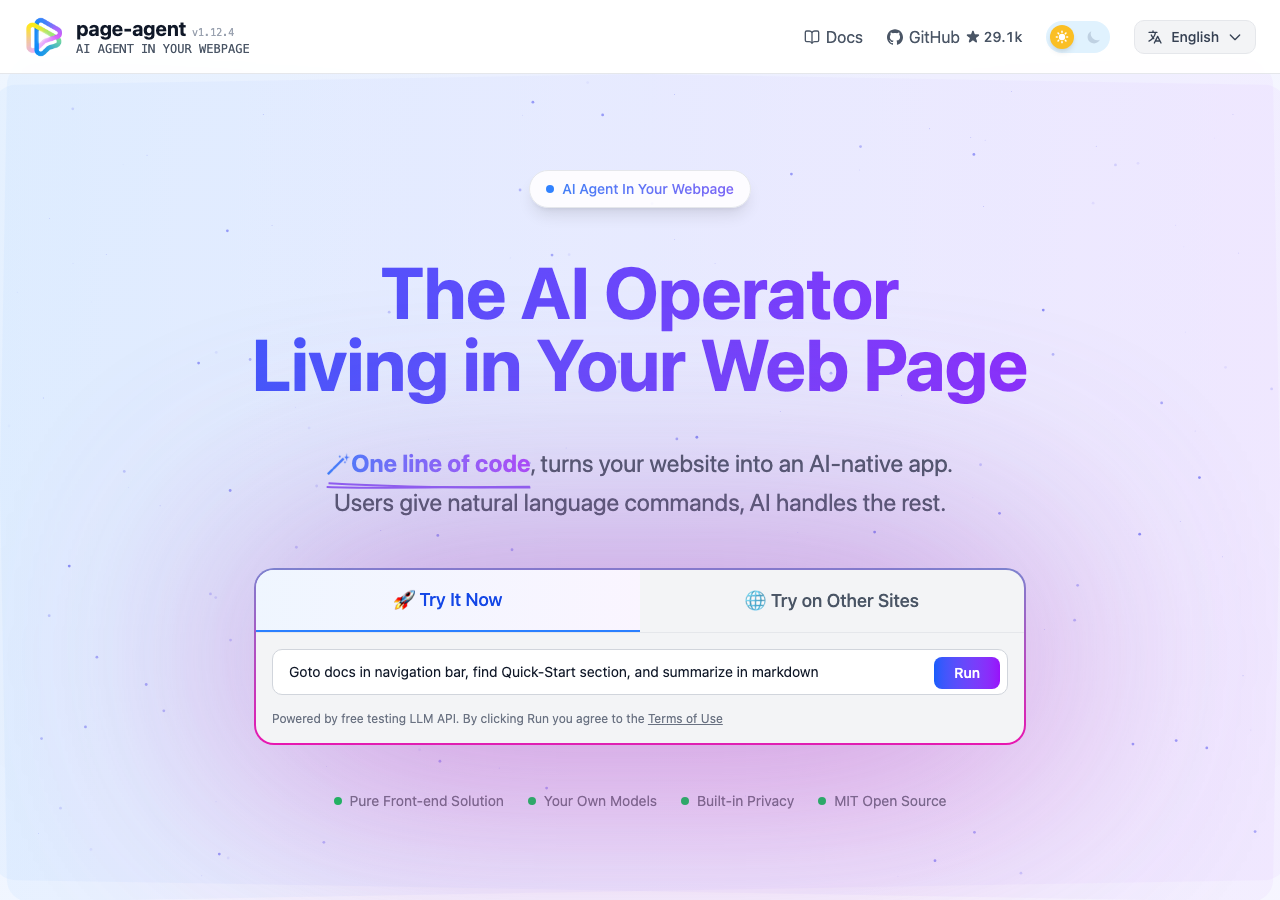
Hosted appIn-page browser agentHosted, in placesucceeded

Public showcase of Page Agent by Alibaba, an open-source agent that operates the page it is embedded in. Tested in place.

Tested in place byDeepQA Teamatalibaba.github.io/page-agent/onSep 20, 2026

Run #1model gemini-balanced (vertex)took 5m

All 8 scenarios passed, no issues after the audit.

Share on X
Page Agent demo in the browser during the run

By the numbers

8 of 8
scenarios passed
107
browser actions
31
screenshots
119
model calls
5.0
minutes
8
scenarios
8
passed
0
failed
0
blocked
0
issues

Walkthrough

Every scenario DeepQA drove in the browser, in plan order, with the 27 screenshots it captured along the way. A passing scenario is evidence too.

  1. S1
    Execute prompt runner task

    4 steps, 4 screenshots

    pass
    S1-1.png
    S1 · Execute prompt runner task
    S1-5.png
    S1 · Execute prompt runner task
    S1-7.png
    S1 · Execute prompt runner task
    S1-9.png
    S1 · Execute prompt runner task
    • Entered prompt 'Click the switch to dark mode button' into the Agent prompt input.
    • Clicked Run agent button; agent UI controls (status bar, stop button, indexed overlay markers) appeared and began executing the prompt.
    • The agent successfully identified the dark mode switch, executed the click, toggled the theme to dark mode, and displayed the completion log and status 'Task completed'.
    • Entered prompt 'Click the switch to dark mode button' into the Agent prompt input on the landing page and clicked Run.
    • The PageAgent overlay appeared, annotated page elements, and showed status updates (Ready -> Thinking -> Step 1 -> Step 2).
    • The agent accurately identified the switch element, clicked it, successfully toggling the theme to dark mode (button changed to 'Switch to light mode').
    • Task completed successfully with full step-by-step logs and completion confirmation displayed in the floating agent UI.
  2. S2
    Toggle Try on Other Sites demo view

    4 steps, 3 screenshots

    pass
    S2-1.png
    S2 · Toggle Try on Other Sites demo view
    S2-3.png
    S2 · Toggle Try on Other Sites demo view
    S2-5.png
    S2 · Toggle Try on Other Sites demo view
    • Landed on the page-agent homepage showing the interactive prompt runner view with 'Try It Now' selected.
    • Clicked 'Try on Other Sites' and observed bookmarklet setup steps (Step 1 bookmarks bar shortcut, Step 2 draggable bookmarklet link with region selector, Step 3 activation instruction, and limitations list).
    • Clicked '🚀 Try It Now' and verified the view successfully toggled back to the interactive prompt runner with prompt input textbox and Run button.
    • The '🌐 Try on Other Sites' button switches the hero section view to display bookmarklet instructions (Step 1 keyboard shortcuts, Step 2 draggable bookmarklet script button with region dropdown, Step 3 activation guide, and limitations list).
    • The '🚀 Try It Now' button switches the view back to the interactive prompt runner with prompt input textbox and Run button.
  3. S3
    Switch CDN script mirror in Quick Start

    6 steps, 3 screenshots

    pass
    S3-2.png
    S3 · Switch CDN script mirror in Quick Start
    S3-5.png
    S3 · Switch CDN script mirror in Quick Start
    S3-8.png
    S3 · Switch CDN script mirror in Quick Start
    • Navigated to Quick Start page with default CDN mirror 'international' showing script src 'https://cdn.jsdelivr.net/npm/page-agent@1.12.4/dist/iife/page-agent.demo.js?lang=en-US'.
    • Selected 'china' mirror option and observed script src changed to 'https://registry.npmmirror.com/page-agent/1.12.4/files/dist/iife/page-agent.demo.js?lang=en-US'.
    • Selected 'international' mirror option and observed script src changed back to 'https://cdn.jsdelivr.net/npm/page-agent@1.12.4/dist/iife/page-agent.demo.js?lang=en-US'.
    • Navigating to Quick Start shows the CDN Mirror dropdown with 'international' selected by default and jsdelivr CDN URL in the script snippet.
    • Selecting 'china' updates the script tag src to use registry.npmmirror.com.
    • Selecting 'international' updates the script tag src back to cdn.jsdelivr.net.
  4. S4
    Prevent empty prompt submission

    3 steps, 3 screenshots

    pass
    S4-1.png
    S4 · Prevent empty prompt submission
    S4-4.png
    S4 · Prevent empty prompt submission
    S4-6.png
    S4 · Prevent empty prompt submission
    • Loaded home page with pre-filled prompt in the input textbox.
    • Verified that clicking the Run button with an empty or whitespace-only prompt does not submit or trigger agent execution.
    • Navigated to https://alibaba.github.io/page-agent/ where the demo prompt textbox was initially pre-filled.
    • Cleared the prompt input textbox so that it was completely empty.
    • Clicked the 'Run' button with an empty input and verified that the application cleanly prevented submission without errors or unhandled exceptions.
    • Also tested whitespace-only input and confirmed that submission remained prevented.
  5. S5
    Switch display language

    5 steps, 4 screenshots

    pass
    S5-1.png
    S5 · Switch display language
    S5-3.png
    S5 · Switch display language
    S5-5.png
    S5 · Switch display language
    S5-8.png
    S5 · Switch display language
    • Navigated to page-agent home page in English.
    • Opened the language switch dropdown menu displaying English and 中文 options.
    • Selected 中文; navigation bar, main hero content, buttons, placeholder text, feature list, and footer translated cleanly to Chinese.
    • Switched back to English; all elements reverted to English cleanly without layout or visual defects.
    • The language switcher correctly re-renders the navigation bar, hero headings, description texts, input field placeholders/sample values, feature lists, and footer links between English and Chinese immediately without requiring a full page reload or showing visual defects.
  6. S6
    Toggle dark and light color theme

    4 steps, 4 screenshots

    pass
    S6-1.png
    S6 · Toggle dark and light color theme
    S6-3.png
    S6 · Toggle dark and light color theme
    S6-5.png
    S6 · Toggle dark and light color theme
    S6-8.png
    S6 · Toggle dark and light color theme
    • Initial page loaded with theme toggle showing 'Switch to light mode' (dark mode currently active).
    • Clicked theme toggle; switch label updated to 'Switch to dark mode' and theme transitioned to light mode.
    • Verified theme toggle on docs page toggles correctly between light and dark modes with proper accessible names.
    • The color theme toggle in the header smoothly switches between light mode and dark mode.
    • The accessible switch label dynamically updates between 'Switch to light mode' and 'Switch to dark mode'.
    • Theme switching works consistently across both the landing page and documentation routes without rendering issues.
  7. S7
    Navigate documentation using sidebar

    3 steps, 2 screenshots

    pass
    S7-2.png
    S7 · Navigate documentation using sidebar
    S7-4.png
    S7 · Navigate documentation using sidebar
    • Navigated to the Overview docs page at /page-agent/docs/introduction/overview.
    • Clicked on the 'Models' sidebar link and verified that the Models documentation page loaded with title 'Models - PageAgent' and lists supported LLM providers.
    • The documentation sidebar navigation link 'Models' correctly loaded the Models page at /page-agent/docs/features/models with title 'Models - PageAgent'.
    • The loaded page displays detailed documentation on supported LLM models and providers (such as Qwen, OpenAI, DeepSeek, Anthropic, Google, etc.) and configuration examples without errors.
  8. S8
    Persist theme selection across reloads

    4 steps, 4 screenshots

    pass
    S8-1.png
    S8 · Persist theme selection across reloads
    S8-3.png
    S8 · Persist theme selection across reloads
    S8-5.png
    S8 · Persist theme selection across reloads
    S8-8.png
    S8 · Persist theme selection across reloads
    • Initial page loaded with theme toggle labeled 'Switch to dark mode'.
    • Switched theme to dark mode; toggle label updated to 'Switch to light mode'.
    • Reloaded the page and confirmed the theme persisted in dark mode (toggle remained 'Switch to light mode').
    • Toggled back to light mode and reloaded; light mode persisted successfully.
    • The theme toggle switch reliably switches between light and dark modes.
    • Theme preference persists across page reload (both dark mode and light mode persist upon refresh).

Issues

No finding survived the audit. Nothing to fix from this run.

Critic audit

An adversarial second pass over every finding before it reaches the report.

0
findings reviewed
0
re-verified live
0
withdrawn
    • The execution successfully verified core frontend functionalities, including localization, theme persistence, and the embedded agent prompt runner demo without raising any defects.
    • Scenarios S6 and S8 noted different initial color themes on page load, which aligns with expected behavior if local storage is cleared between sessions or simulated system preferences vary.

    Report

    QA report: external/alibaba.github.io at hosted

    All 8 tested scenarios passed with zero issues identified across documentation and demo workflows.

    Testing exercised the core interactive and static functionality of the page-agent site. This included executing prompt runner tasks, toggling the interactive demo view, switching CDN script mirrors, and validating that empty prompt submissions are prevented.

    Navigation and UI preference handling were also verified, covering documentation sidebar navigation, display language switching, color theme toggling, and the persistence of theme selections across reloads.

    All scenarios passed successfully with no functional defects, validation failures, or blocking issues observed.

    Run summary
    MetricCount
    Scenarios executed8
    Passed8
    Failed0
    Blocked0
    Findings raised0
    Issues after the audit0
    Withdrawn by the audit0
    Critical / high / medium / low0 / 0 / 0 / 0

    Target: https://alibaba.github.io/page-agent/ · Testing level: deep_feature · Stack: unknown

    Issues

    No issues survived the audit.

    Scenario results
    ScenarioPriorityResultIssues
    S1 Execute prompt runner taskhighpassnone
    S2 Toggle Try on Other Sites demo viewhighpassnone
    S3 Switch CDN script mirror in Quick Starthighpassnone
    S4 Prevent empty prompt submissionmediumpassnone
    S5 Switch display languagemediumpassnone
    S6 Toggle dark and light color thememediumpassnone
    S7 Navigate documentation using sidebarmediumpassnone
    S8 Persist theme selection across reloadslowpassnone
    The audit

    The Critic reviewed 0 findings and re-verified 0 of them live in the browser, replaying the reported steps on a fresh page.

    • The execution successfully verified core frontend functionalities, including localization, theme persistence, and the embedded agent prompt runner demo without raising any defects.
    • Scenarios S6 and S8 noted different initial color themes on page load, which aligns with expected behavior if local storage is cleared between sessions or simulated system preferences vary.
    Coverage and caveats

    In scope: Interactive prompt runner functionality; Demo view toggles (Try It Now vs Try on Other Sites); Documentation interactive elements (CDN mirror switcher); Site-wide UI controls (Theme toggle, Language switcher); Documentation sidebar navigation.

    Not covered: External links to GitHub and Chrome Web Store (out of scope for in-place application testing); Authentication or user accounts (none exist on this static documentation origin).

    • The free testing LLM endpoint backing the prompt runner is available and responsive.
    • User preferences like theme and language are stored in local storage or cookies and can be tested for persistence across page reloads.
    By the numbers
    MetricValue
    Scenarios8 passed, 0 failed, 0 blocked of 8 (33 planned steps)
    Browser actions107 (29 clicks, 6 inputs, 15 navigations, 57 snapshots)
    Screenshots31 (4 explore, 27 scenario, 0 critic), 27 captioned
    Coverage6 pages, 1 forms, 4 flows, 0 console errors
    Audit0 findings, 0 re-verified live, 0 confirmed, 0 promoted, 0 withdrawn
    Model calls119
    Tokens702,329 input, 6,218 output, 8,144 thinking
    Time5 min
    StageCallsInputOutputThinkingSeconds
    explore23169,9771,7171,47755
    plan13,4931,5192,10426
    test93523,5632,7463,466209
    critique14,033937609
    report11,2631433374

    Run log

    stagecallstokenstime
    Explore23173.2k55s
    Plan17.1k26s
    Test93529.8k3m 29s
    Critique14.9k9s
    Report11.7k4s
    Total119716.7k5m 3s
    Intake
    Explore
    Plan
    Test
    Critique
    Report
    • 00:54:24Zexploreexplore started
    • 00:59:27ZexploreExplored /page-agent/ (17 controls, 0 forms)
    • 00:59:27ZexploreExplored /page-agent/docs/introduction/overview (9 controls, 0 forms)
    • 00:59:27ZexploreExplored /page-agent/docs/introduction/quick-start (27 controls, 0 forms)
    • 00:59:27ZexploreExplored /page-agent/docs/features/chrome-extension (29 controls, 0 forms)
    • 00:59:27ZexploreExplored /page-agent/docs/features/models/ (28 controls, 0 forms)
    • 00:59:27ZexploreExplored /page-agent/docs/advanced/custom-ui/ (25 controls, 0 forms)
    • 00:59:27ZexploreMapped 6 pages, 1 forms, 4 flows in 23 turns.
    • 00:59:27Zexploreexplore completed in 55s.
    • 00:59:27Zplanplan started
    • 00:59:27ZplanPlanned 8 scenarios (3 high, 4 medium, 1 low).
    • 00:59:27Zplanplan completed in 26s.
    • 00:59:27Ztesttest started
    • 00:59:27ZtestS1 executed (pass)
    • 00:59:27ZtestS2 executed (pass)
    • 00:59:27ZtestS3 executed (pass)
    • 00:59:27ZtestS4 executed (pass)
    • 00:59:27ZtestS5 executed (pass)
    • 00:59:27ZtestS6 executed (pass)
    • 00:59:27ZtestS7 executed (pass)
    • 00:59:27ZtestS8 executed (pass)
    • 00:59:27ZtestExecuted 8 scenarios: 8 passed, 0 failed, 0 blocked, 0 findings.
    • 00:59:27Ztesttest completed in 209s.
    • 00:59:27Zcritiquecritique started
    • 00:59:27ZcritiqueReviewed 0 findings; 0 possible defects spotted in passed scenarios.
    • 00:59:27ZcritiqueAudit complete: 0 confirmed, 0 withdrawn, 0 promoted, 0 re-verified live.
    • 00:59:27Zcritiquecritique completed in 9s.
    • 00:59:27Zreportreport started
    • 00:59:27ZreportReported 0 issues (0 critical, 0 high, 0 medium, 0 low) from 0 findings.
    • 00:59:27Zreportreport completed in 4s.

    Put an agent team on your next pull request.

    Connect a repo, dispatch a Run, and read an audited, evidence-backed report the same day.