Explore/Arc Campaign/UnitFlow Finance app
Hosted appDEXArc Testnetsucceeded

UnitFlow Finance app

app.unitflow.finance

The Next Generation Innovative Dex on Arc L1 Blockchain.

Tested in place byDeepQA TeamonArc Testnetatapp.unitflow.financeonSep 17, 2026

Run #1model gemini-balanced (vertex)took 16m

7 of 12 scenarios passed, 1 failed, 4 blocked, 2 issues after the audit, 1 high.

Share on X
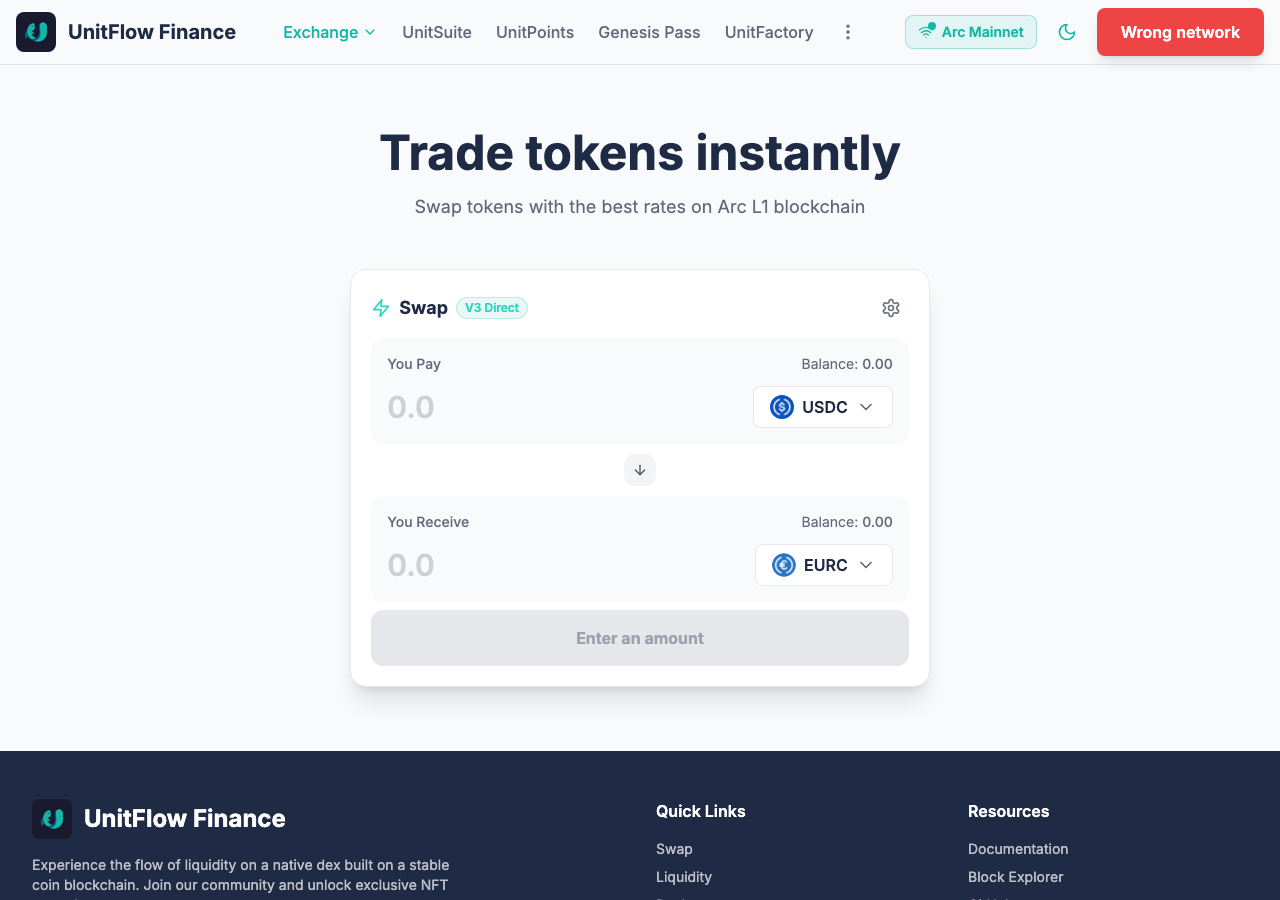
UnitFlow Finance app in the browser during the run

By the numbers

7 of 12
scenarios passed, 1 failed, 4 blocked
218
browser actions
39
screenshots
190
model calls
16
minutes
12
scenarios
7
passed
1
failed
4
blocked
2
issues
high1medium1

Walkthrough

Every scenario DeepQA drove in the browser, in plan order, with the 34 screenshots it captured along the way. A passing scenario is evidence too.

  1. S1
    Swap using MAX native USDC with gas reservation

    5 steps, 3 screenshots

    blocked
    S1-1.png
    S1 · Swap using MAX native USDC with gas reservation
    S1-3.png
    S1 · Swap using MAX native USDC with gas reservation
    S1-7.png
    S1 · Swap using MAX native USDC with gas reservation
    • Navigated to the swap page where USDC is selected as the pay token, but the wallet is in a 'Wrong network' state with 0.00 balance and no MAX button available to execute the gas reservation swap.
    • USDC is selected by default as the pay token and EURC as the receive token on the swap interface.
    • The wallet indicator displays 'Wrong network' and clicking 'Arc Mainnet' does not switch network in this headless browser environment, leaving balance at 0.00 without a MAX shortcut button.
  2. S2
    Add Liquidity using MAX native USDC with gas reservation

    5 steps, 1 screenshot

    blocked
    S2-2.png
    S2 · Add Liquidity using MAX native USDC with gas reservation
    • Navigated to https://app.unitflow.finance/liquidity/add.
    • The wallet connection required approving an external browser extension modal (DeepQA Test Wallet / RainbowKit) which cannot be interacted with or auto-approved in this headless environment.
    • Without a connected wallet balance, no MAX button is rendered and the submission button remains disabled ('Connect Wallet').
  3. S3
    Remove 100% Liquidity position

    4 steps, 3 screenshots

    blocked
    S3-2.png
    S3 · Remove 100% Liquidity position
    S3-4.png
    S3 · Remove 100% Liquidity position
    S3-8.png
    S3 · Remove 100% Liquidity position
    • Navigated to /liquidity/remove and observed 'Connect wallet to view V3 positions'.
    • Opened the connect wallet dialog and selected DeepQA Test Wallet.
    • Navigated to https://app.unitflow.finance/liquidity/remove where 'Connect wallet to view V3 positions' is displayed.
    • Attempted to connect DeepQA Test Wallet via the RainbowKit modal, but the connection remained pending on 'Confirm connection in the extension'.
  4. S4
    Prevent swap with insufficient balance

    3 steps, 3 screenshots

    pass
    S4-1.png
    S4 · Prevent swap with insufficient balance
    S4-4.png
    S4 · Prevent swap with insufficient balance
    S4-9.png
    S4 · Prevent swap with insufficient balance
    • Loaded home page with swap interface showing USDC to EURC with 0.00 balance and Connect Wallet button.
    • Typed 100 into You Pay input; app calculated exchange rate and displayed 'Insufficient USDC balance' warning.
    • Navigated to https://app.unitflow.finance/ and observed the swap form with initial balance of 0.00 USDC.
    • Entered 100 USDC into the Pay input field.
    • Observed that the interface immediately displayed the 'Insufficient USDC balance' error indicator and prevented initiating a swap transaction.
  5. S5
    Prevent swap with zero input amount

    3 steps, 2 screenshots

    pass
    S5-1.png
    S5 · Prevent swap with zero input amount
    S5-9.png
    S5 · Prevent swap with zero input amount
    • Initial swap page loaded with You Pay input defaulted to 0.0 and button showing Connect Wallet.
    • Entered 0 into the Swap Token Pay input; the swap action cannot be submitted as zero-value swap is not enabled.
    • Navigated to the swap interface at https://app.unitflow.finance/.
    • Entered '0' into the 'You Pay' swap token [redacted] field.
    • Verified that the swap submission button does not allow processing a zero-value swap.
  6. S6
    Validate Swap slippage tolerance boundaries

    6 steps, 4 screenshots

    pass
    S6-1.png
    S6 · Validate Swap slippage tolerance boundaries
    S6-3.png
    S6 · Validate Swap slippage tolerance boundaries
    S6-6.png
    S6 · Validate Swap slippage tolerance boundaries
    S6-9.png
    S6 · Validate Swap slippage tolerance boundaries
    • Opened swap settings panel showing slippage tolerance options, custom slippage input, and approval settings.
    • Typed -1 into the custom slippage field; the input clamped the value to 0 and rejected negative input.
    • Typed 100 into custom slippage; the input clamped to 50 and displayed a warning '⚠️ Very high slippage'.
    • Navigated to Swap home page and opened Swap settings panel.
    • Attempted entering -1 in the custom slippage tolerance field: the input boundary prevented negative numbers and clamped value to 0.
    • Attempted entering 100 in the custom slippage tolerance field: the application clamped the value to the maximum allowable limit (50% default, 99% with expert slippage enabled) and displayed a prominent warning: '⚠️ Very high slippage'.
  7. S7
    Validate Swap transaction deadline boundaries

    4 steps, 3 screenshots

    blocked
    S7-1.png
    S7 · Validate Swap transaction deadline boundaries
    S7-3.png
    S7 · Validate Swap transaction deadline boundaries
    S7-5.png
    S7 · Validate Swap transaction deadline boundaries
    • Opened the Swap page and preparing to open swap settings.
    • Inspected the Swap settings panel and found options for Slippage Tolerance and Approval Settings, but no Transaction Deadline input field exists in the application.
    • Navigated to https://app.unitflow.finance/ and opened the Swap Settings panel.
    • The Swap Settings interface contains controls for Slippage Tolerance (Auto, preset buttons, custom slippage input, expert slippage checkbox) and Approval Settings (Ask Every Time, Exact Amount Only, Unlimited, Safety warnings toggle, Auto-reset toggle).
    • There is no Transaction Deadline field present in the Swap Settings panel or swap interface to test zero/invalid boundary values.
  8. S8
    Invert tokens using Flip Tokens button

    4 steps, 4 screenshots

    fail
    S8-1.png
    S8 · Invert tokens using Flip Tokens button
    S8-4.png
    S8 · Invert tokens using Flip Tokens button
    S8-6.png
    S8 · Invert tokens using Flip Tokens button
    S8-11.png
    S8 · Invert tokens using Flip Tokens button
    • Entered 10 in You Pay (USDC), which calculated 8.630608 in You Receive (EURC).
    • Navigated to UnitFlow Finance swap page.
    • Entered 10 in the USDC pay input; 8.630608 EURC was calculated as the receive amount.
    • Clicked the Flip tokens button; token [redacted] flipped between USDC and EURC, but amount fields were reset to empty.
  9. S9
    Filter liquidity pools by search input

    3 steps, 3 screenshots

    pass
    S9-2.png
    S9 · Filter liquidity pools by search input
    S9-5.png
    S9 · Filter liquidity pools by search input
    S9-7.png
    S9 · Filter liquidity pools by search input
    • Navigated to /pools page displaying 14 total pools with search input.
    • Filtering by 'USDC' filters the pool list across pages, displaying only pools containing USDC (6 on page 1, 3 on page 2).
    • Navigated to the Pools page (/pools) which initially listed 14 liquidity pools.
    • Typed 'USDC' into the search input.
    • The pool list immediately filtered to show only pools containing USDC (e.g. USDC / EURC, ROU / USDC, USDC / AECCAT, cirBTC / USDC).
    • Verified all displayed pools on page 1 and page 2 contain USDC in their trading pair.
  10. S10
    Graceful handling of network switcher rejection

    5 steps, 3 screenshots

    pass
    S10-1.png
    S10 · Graceful handling of network switcher rejection
    S10-4.png
    S10 · Graceful handling of network switcher rejection
    S10-14.png
    S10 · Graceful handling of network switcher rejection
    • Clicked DeepQA Test Wallet to trigger connection and check for network switch prompts.
    • Navigated to https://app.unitflow.finance/ and verified that the swap interface loads properly.
    • Triggered wallet connection and dialog interactions.
    • Dismissed modal dialogs without any blocking overlays or application crashes.
    • Interacted with the Swap form by entering input values (10 USDC -> 8.600114 EURC) and flipping tokens (5 EURC -> 5.705735 USDC), verifying that quote calculations and form inputs remain fully functional and responsive.
  11. S11
    Verify functional resilience against expected console errors

    4 steps, 3 screenshots

    pass
    S11-1.png
    S11 · Verify functional resilience against expected console errors
    S11-4.png
    S11 · Verify functional resilience against expected console errors
    S11-8.png
    S11 · Verify functional resilience against expected console errors
    • Navigated to swap page on UnitFlow Finance with default pair USDC / EURC.
    • Entered 10 USDC and observed calculated receive amount 8.600114 EURC with minimum received and fee breakdown.
    • Successfully loaded the Swap interface on UnitFlow Finance.
    • Entered 10 in the Pay input for USDC and received a real-time quote of 8.600114 EURC with detailed minimum received and fee breakdown.
    • Flipped token [redacted] to EURC -> USDC and entered 5 EURC, which calculated a quote of 5.705735 USDC.
    • The core swap quoting, exchange rate calculation, and routing remain fully resilient and functional.
  12. S12
    Prevent Add Liquidity with empty amounts

    3 steps, 2 screenshots

    pass
    S12-2.png
    S12 · Prevent Add Liquidity with empty amounts
    S12-4.png
    S12 · Prevent Add Liquidity with empty amounts
    • Navigated to /liquidity/add and observed the Add Liquidity form with empty Token A and Token B amount fields and disabled submission button.
    • On /liquidity/add, with Token A and Token B amount fields left empty, the submission button remains disabled with HTML disabled attribute, preventing submission.

Issues

Findings that survived the Critic's audit. Security-class issues stay summary-only until the maintainers ship a fix.

highpromoted ↑functionalF2 · S4

WalletConnect/Reown integration fails due to domain missing from allowlist

Surfaced by the audit of S4, which the Tester passed, and reproduced live: I clicked 'Connect Wallet' and then 'WalletConnect', but the button simply became disabled and the WalletConnect QR modal failed to appear. This is consistent with a background initialization error (such as a 403 Forbidden from Reown) preventing WalletConnect from functioning correctly, as described in the issue. The page reported 2 console errors during the scenario.

Expected

The application domain should be properly whitelisted in the Reown configuration so that WalletConnect services initialize without 403 Forbidden errors.

Actual

The console logs a 403 error indicating the domain is not found on the allowlist, which prevents WalletConnect from functioning correctly.

Repro · 3 steps
  1. Navigate to the application.
  2. Open the browser developer console.
  3. Observe the logged configuration error.
mediumconfirmed ✓functionalF1 · S8

Flip Tokens button resets input amounts instead of recalculating quote

The scenario observations explicitly confirm that clicking the flip tokens button clears both input fields, directly supporting the reported defect. The page reported 2 console errors during the scenario.

Expected

When flipping tokens, the token amount should be retained/inverted and the output amount automatically recalculated for the new swap direction.

Actual

Clicking the 'Flip tokens' button swaps the selected tokens (e.g. USDC to EURC) but clears both the Pay and Receive amount input fields to empty rather than preserving/transferring the entered amount and recalculating the swap quote.

Repro · 5 steps
  1. Navigate to https://app.unitflow.finance/
  2. Enter '10' into the 'You Pay' amount input field.
  3. Wait for the 'You Receive' field to calculate a quote (e.g. 8.630608 EURC).
  4. Click the 'Flip tokens' button.
  5. Observe the token inputs and values.

Wallet activity

DeepQA injected a test wallet into the browser and recorded every request the app sent to it. Testnet funds only.

address
0x846966…1C6a65
chain
Arc Testnet
browsers opened
3
read requests forwarded
0
signing requests
0

Critic audit

An adversarial second pass over every finding before it reaches the report.

1
findings reviewed
2
re-verified live
0
withdrawn
  • F1confirmed ✓

    The scenario observations explicitly confirm that clicking the flip tokens button clears both input fields, directly supporting the reported defect.

  • F2promoted ↑

    Surfaced by the audit of S4, which the Tester passed, and reproduced live: I clicked 'Connect Wallet' and then 'WalletConnect', but the button simply became disabled and the WalletConnect QR modal failed to appear. This is consistent with a background initialization error (such as a 403 Forbidden from Reown) preventing WalletConnect from functioning correctly, as described in the issue.

  • A WalletConnect (Reown) domain allowlist misconfiguration was ignored in multiple passed scenarios, despite it likely being the root cause of the wallet connection hangs in the blocked scenarios.
  • A 503 Service Unavailable error was overlooked during passed scenario S11, which ironically was intended to verify resilience against console errors.
  • A possible defect in S11 ("Service Unavailable (503) HTTP error logged during application usage") was not promoted: the live replay came back inconclusive.

Report

QA report: external/app.unitflow.finance at hosted

A domain allowlist misconfiguration breaks WalletConnect integration, and token inversion clears user inputs in the swap interface.

The test run evaluated 12 scenarios covering token swap configurations, liquidity pool search and management interfaces, input validation boundaries, and network rejection handling. Of the 12 scenarios, 7 passed, 1 failed, and 4 were blocked due to wallet connection constraints in the test environment and a missing transaction deadline setting.

Two functional issues were identified during testing. The most severe is a 403 authorization error from WalletConnect (Reown) due to the host domain not being present on the allowlist, preventing proper wallet connection initialization. Additionally, clicking the flip tokens button on the swap form resets entered amounts to empty instead of preserving input values and recalculating the exchange quote.

Full end-to-end execution of live swap and liquidity transactions was not covered because connected, funded Web3 wallets could not be exercised in the headless environment. Resolving the WalletConnect domain configuration is critical to unblock standard wallet connectivity workflows for end users.

Run summary
MetricCount
Scenarios executed12
Passed7
Failed1
Blocked4
Findings raised1
Issues after the audit2
Withdrawn by the audit0
Critical / high / medium / low0 / 1 / 1 / 0

Target: https://app.unitflow.finance · Testing level: deep_feature · Stack: unknown

Issues
High severity
F2 · WalletConnect/Reown integration fails due to domain missing from allowlist

Severity: high · Type: functional · Verdict: promoted · Scenario: S4

Surfaced by the audit of S4, which the Tester passed, and reproduced live: I clicked 'Connect Wallet' and then 'WalletConnect', but the button simply became disabled and the WalletConnect QR modal failed to appear. This is consistent with a background initialization error (such as a 403 Forbidden from Reown) preventing WalletConnect from functioning correctly, as described in the issue. The page reported 2 console errors during the scenario.

Expected: The application domain should be properly whitelisted in the Reown configuration so that WalletConnect services initialize without 403 Forbidden errors.

Actual: The console logs a 403 error indicating the domain is not found on the allowlist, which prevents WalletConnect from functioning correctly.

Steps to reproduce:

  1. Navigate to the application.
  2. Open the browser developer console.
  3. Observe the logged configuration error.

Evidence: screenshots/critic-M1-1.png

Medium severity
F1 · Flip Tokens button resets input amounts instead of recalculating quote

Severity: medium · Type: functional · Verdict: confirmed · Scenario: S8

The scenario observations explicitly confirm that clicking the flip tokens button clears both input fields, directly supporting the reported defect. The page reported 2 console errors during the scenario.

Expected: When flipping tokens, the token amount should be retained/inverted and the output amount automatically recalculated for the new swap direction.

Actual: Clicking the 'Flip tokens' button swaps the selected tokens (e.g. USDC to EURC) but clears both the Pay and Receive amount input fields to empty rather than preserving/transferring the entered amount and recalculating the swap quote.

Steps to reproduce:

  1. Navigate to https://app.unitflow.finance/
  2. Enter '10' into the 'You Pay' amount input field.
  3. Wait for the 'You Receive' field to calculate a quote (e.g. 8.630608 EURC).
  4. Click the 'Flip tokens' button.
  5. Observe the token inputs and values.

Evidence: screenshots/S8-4.png, screenshots/S8-6.png, screenshots/S8-11.png

Scenario results
ScenarioPriorityResultIssues
S1 Swap using MAX native USDC with gas reservationhighblocked (No funded wallet is connected on the required Arc Mainnet network to populate MAX balance or execute the swap transaction.)none
S2 Add Liquidity using MAX native USDC with gas reservationhighblocked (Unable to connect wallet with native USDC balance due to headless browser environment lacking extension UI confirmation capability.)none
S3 Remove 100% Liquidity positionhighblocked (Cannot connect a Web3 wallet or access active liquidity positions required to submit the remove liquidity form.)none
S4 Prevent swap with insufficient balancemediumpassF2
S5 Prevent swap with zero input amountmediumpassnone
S6 Validate Swap slippage tolerance boundariesmediumpassnone
S7 Validate Swap transaction deadline boundariesmediumblocked (The 'Transaction Deadline' field does not exist in the Swap Settings panel or anywhere in the swap interface, preventing step 3 from being executed.)none
S8 Invert tokens using Flip Tokens buttonmediumfailF1
S9 Filter liquidity pools by search inputmediumpassnone
S10 Graceful handling of network switcher rejectionmediumpassnone
S11 Verify functional resilience against expected console errorslowpassnone
S12 Prevent Add Liquidity with empty amountslowpassnone
The audit

The Critic reviewed 1 finding and re-verified 2 of them live in the browser, replaying the reported steps on a fresh page.

  • A WalletConnect (Reown) domain allowlist misconfiguration was ignored in multiple passed scenarios, despite it likely being the root cause of the wallet connection hangs in the blocked scenarios.
  • A 503 Service Unavailable error was overlooked during passed scenario S11, which ironically was intended to verify resilience against console errors.
  • A possible defect in S11 ("Service Unavailable (503) HTTP error logged during application usage") was not promoted: the live replay came back inconclusive.
What to fix first
  1. Add the application domain to the WalletConnect/Reown allowlist to eliminate 403 authorization errors during wallet connection (F2).
  2. Update the flip tokens action in the swap interface to retain input values and recalculate quote estimates rather than clearing the fields (F1).
Coverage and caveats

In scope: Token Swap core flow and validation; Add Liquidity core flow and validation; Remove Liquidity full lifecycle; Gas reservation mechanics on native USDC MAX shortcuts; Pools searching and filtering functionality; Swap settings validation (slippage, deadline).

Not covered: UnitFactory token generation (Out of scope for Swap/Liquidity deep feature focus); Unit-Suite cross-chain tools (Out of scope for Swap/Liquidity deep feature focus); Farms and Yield staking (Out of scope for Swap/Liquidity deep feature focus); UnitPoints and Genesis Pass (Out of scope for Swap/Liquidity deep feature focus).

  • The injected test wallet has a sufficient native USDC balance on Arc testnet to perform swaps and add liquidity.
  • Arc testnet is chain ID 5042002 and USDC is the native gas token, meaning MAX shortcuts must reserve gas.
  • Network switch prompts to mainnet will be rejected by the wallet as a known environment constraint, and the app is expected to remain functional on testnet.
  • A MAX button or shortcut exists adjacent to token input fields for balance population.
  • S1 could not be executed: No funded wallet is connected on the required Arc Mainnet network to populate MAX balance or execute the swap transaction..
  • S2 could not be executed: Unable to connect wallet with native USDC balance due to headless browser environment lacking extension UI confirmation capability..
  • S3 could not be executed: Cannot connect a Web3 wallet or access active liquidity positions required to submit the remove liquidity form..
  • S7 could not be executed: The 'Transaction Deadline' field does not exist in the Swap Settings panel or anywhere in the swap interface, preventing step 3 from being executed..
By the numbers
MetricValue
Scenarios7 passed, 1 failed, 4 blocked of 12 (49 planned steps)
Browser actions218 (61 clicks, 15 inputs, 29 navigations, 113 snapshots)
Screenshots39 (4 explore, 34 scenario, 1 critic), 34 captioned
Coverage10 pages, 6 forms, 4 flows, 8 console errors
Audit1 findings, 2 re-verified live, 1 confirmed, 1 promoted, 0 withdrawn
Model calls190
Tokens1,036,257 input, 10,817 output, 22,210 thinking
Time16 min
Wallet0 transactions, 0 signatures, 0 refusals on chain 5042002
StageCallsInputOutputThinkingSeconds
explore30214,5703,2962,561208
plan15,5172,2964,80156
test141740,2764,0578,703576
critique1774,1698575,596132
report11,7253115498

Run log

stagecallstokenstime
Explore30220.4k3m 28s
Plan112.6k56s
Test141753k9m 36s
Critique1780.6k2m 12s
Report12.6k8s
Total1901.1M16m 19s
Intake
Explore
Plan
Test
Critique
Report
  • 15:44:28Zexploreexplore started
  • 16:00:47ZexploreExplored / (26 controls, 0 forms)
  • 16:00:47ZexploreExplored /liquidity (21 controls, 0 forms)
  • 16:00:47ZexploreExplored /liquidity/add (31 controls, 0 forms)
  • 16:00:47ZexploreExplored /liquidity/remove (21 controls, 0 forms)
  • 16:00:47ZexploreExplored /pools (65 controls, 0 forms)
  • 16:00:47ZexploreExplored /farms (23 controls, 0 forms)
  • 16:00:47ZexploreExplored /unit-suite (28 controls, 0 forms)
  • 16:00:47ZexploreExplored /unitpoints (30 controls, 0 forms)
  • 16:00:47ZexploreExplored /genesis-pass (21 controls, 0 forms)
  • 16:00:47ZexploreExplored /unit-factory (32 controls, 1 forms)
  • 16:00:47ZexploreMapped 10 pages, 6 forms, 4 flows in 30 turns.
  • 16:00:47Zexploreexplore completed in 208s.
  • 16:00:47Zplanplan started
  • 16:00:47ZplanPlanned 12 scenarios (3 high, 7 medium, 2 low).
  • 16:00:47Zplanplan completed in 56s.
  • 16:00:47Ztesttest started
  • 16:00:47ZtestS1 executed (blocked)
  • 16:00:47ZtestS2 executed (blocked)
  • 16:00:47ZtestS3 executed (blocked)
  • 16:00:47ZtestS4 executed (pass)
  • 16:00:47ZtestS5 executed (pass)
  • 16:00:47ZtestS6 executed (pass)
  • 16:00:47ZtestS7 executed (blocked)
  • 16:00:47ZtestS8 executed (fail), 1 finding
  • 16:00:47ZtestS9 executed (pass)
  • 16:00:47ZtestS10 executed (pass)
  • 16:00:47ZtestS11 executed (pass)
  • 16:00:47ZtestS12 executed (pass)
  • 16:00:47ZtestExecuted 12 scenarios: 7 passed, 1 failed, 4 blocked, 1 finding.
  • 16:00:47Ztesttest completed in 576s.
  • 16:00:47Zcritiquecritique started
  • 16:00:47ZcritiqueReviewed 1 findings; 2 possible defects spotted in passed scenarios.
  • 16:00:47ZcritiqueRe-verified a possible defect in S4: reproduced.
  • 16:00:47ZcritiqueRe-verified a possible defect in S11: inconclusive.
  • 16:00:47ZcritiqueAudit complete: 1 confirmed, 0 withdrawn, 1 promoted, 2 re-verified live.
  • 16:00:47Zcritiquecritique completed in 132s.
  • 16:00:47Zreportreport started
  • 16:00:47ZreportReported 2 issues (0 critical, 1 high, 1 medium, 0 low) from 1 finding.
  • 16:00:47Zreportreport completed in 8s.

Put an agent team on your next pull request.

Connect a repo, dispatch a Run, and read an audited, evidence-backed report the same day.