Explore/Arc Campaign/Sender MultiSend
Hosted appBatch paymentsArc Testnetsucceeded

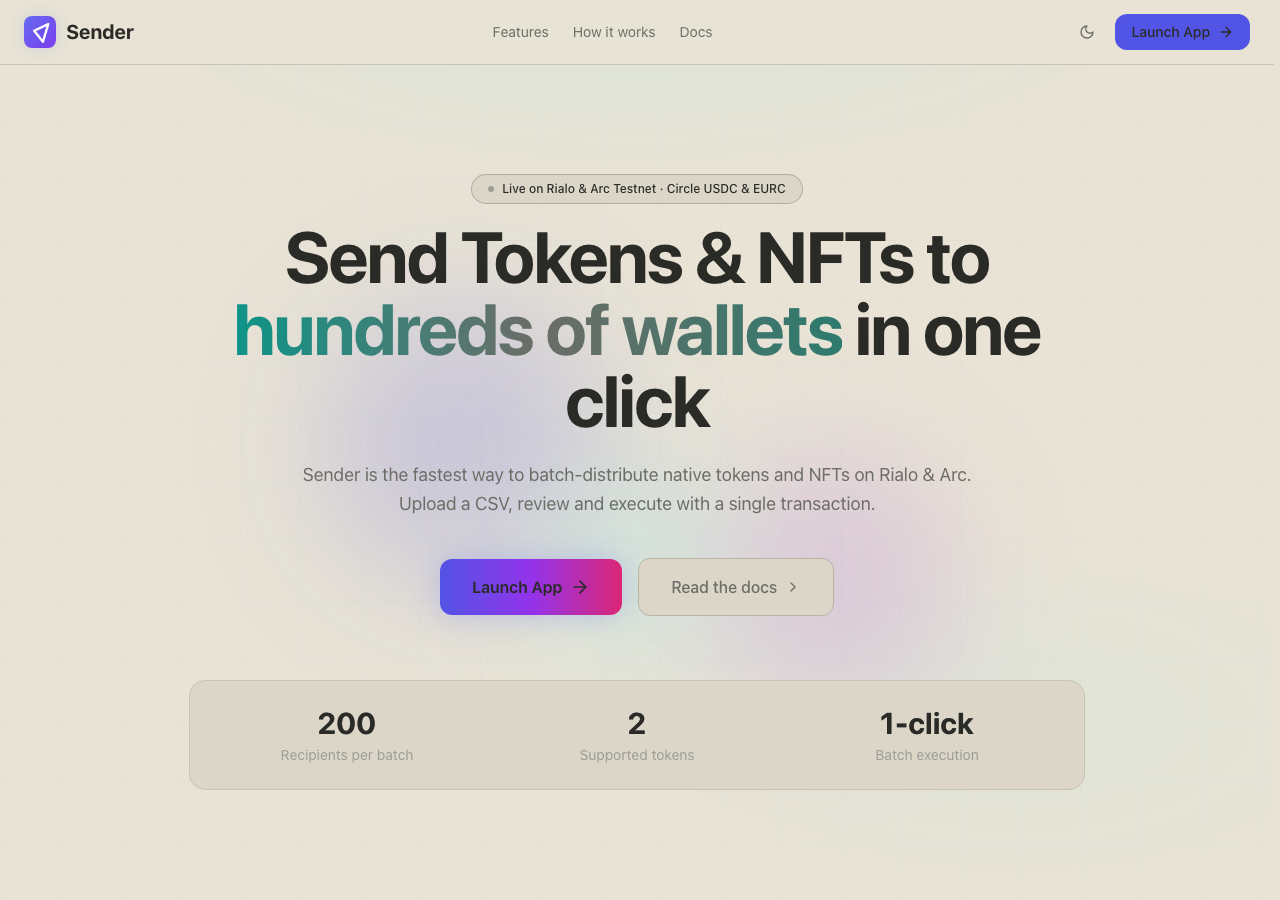
Sender MultiSend

arcsender.xyz

Send tokens to hundreds of wallets in a single transaction. Built for Arc Testnet with Circle USDC & EURC.

Tested in place byDeepQA TeamonArc Testnetatarcsender.xyz/onSep 17, 2026

Run #1model gemini-balanced (vertex)took 12m

10 of 12 scenarios passed, 2 failed, 3 issues after the audit, 2 high.

Share on X
Sender MultiSend in the browser during the run

By the numbers

10 of 12
scenarios passed, 2 failed
192
browser actions
41
screenshots
202
model calls
12
minutes
12
scenarios
10
passed
2
failed
0
blocked
3
issues
high2medium1

Walkthrough

Every scenario DeepQA drove in the browser, in plan order, with the 34 screenshots it captured along the way. A passing scenario is evidence too.

  1. S1
    Single Token Batch Execution

    6 steps, 3 screenshots

    pass
    S1-2.png
    S1 · Single Token Batch Execution
    S1-7.png
    S1 · Single Token Batch Execution
    S1-9.png
    S1 · Single Token Batch Execution
    • Navigated to the App dashboard showing the recipient entry table, connected wallet balances (2.79004 USDC), and empty Summary panel.
    • Entered recipient 0xd8dA6BF26964aF9D7eEd9e03E53415D37aA96045 with 1 USDC; Summary panel shows 1 USDC Total, 1 Recipient, Protocol Fee of 0.001 USDC, and enables the Execute Batch button.
    • Clicked Execute Batch; the app transitioned to an 'In progress' pending state with 'Waiting for approval…' step for token [redacted]
    • Navigated to /app with wallet connected.
    • Entered a valid recipient address (0xd8dA6BF26964aF9D7eEd9e03E53415D37aA96045), 1 as Amount, and USDC as Token.
    • Summary panel correctly displayed total 1 USDC, 1 recipient, and a 0.001 USDC protocol fee with estimated gas.
    • Clicked Execute Batch, successfully triggering the batch transaction process in a pending state displaying 'Waiting for approval…'.
  2. S2
    Multi-Recipient Fee and Total Math

    5 steps, 2 screenshots

    pass
    S2-2.png
    S2 · Multi-Recipient Fee and Total Math
    S2-13.png
    S2 · Multi-Recipient Fee and Total Math
    • Configured two recipient rows with 1 USDC and 2 USDC; observed Summary panel displaying USDC Total of 3 and Protocol Fee of 0.002 USDC for 2 recipients.
    • Navigated to https://arcsender.xyz/app.
    • Entered valid address '0x71C836056B347eF89B206a5b8D95c27D2f01B514' with amount '1' into the first recipient row.
    • Added a second recipient row with address '0x2222222222222222222222222222222222222222' and amount '2'.
    • Verified the Summary panel accurately displays a total transfer amount of 3 USDC (1 + 2) and a protocol fee of exactly 0.002 USDC (0.001 USDC per recipient for 2 recipients).
  3. S3
    Valid CSV Paste Import

    5 steps, 4 screenshots

    pass
    S3-2.png
    S3 · Valid CSV Paste Import
    S3-5.png
    S3 · Valid CSV Paste Import
    S3-8.png
    S3 · Valid CSV Paste Import
    S3-10.png
    S3 · Valid CSV Paste Import
    • Navigated to /app and observed initial dashboard with Paste CSV button available.
    • Entered '0x1111111111111111111111111111111111111111,5,USDC' into the Paste CSV textbox.
    • Clicked 'Import Recipients', modal closed, toast 'Imported 1 recipients' appeared, and recipient row was populated with 0x1111111111111111111111111111111111111111, amount 5, USDC token.
    • Navigated to https://arcsender.xyz/app.
    • Opened the Paste CSV modal.
    • Entered valid CSV row '0x1111111111111111111111111111111111111111,5,USDC'.
    • Clicked 'Import Recipients' button to submit the modal.
    • Observed the modal closed and a new recipient row appeared with address 0x1111111111111111111111111111111111111111, amount 5, and USDC token [redacted], with the summary updating appropriately.
  4. S4
    Insufficient Balance Validation

    4 steps, 2 screenshots

    pass
    S4-2.png
    S4 · Insufficient Balance Validation
    S4-6.png
    S4 · Insufficient Balance Validation
    • Navigated to /app dashboard showing recipient table and summary panel.
    • Entered recipient address and amount 999999999999; summary displayed 'Insufficient' warning with 'Balance: 0 USDC' and Execute Batch button is disabled.
    • When a recipient address and an amount exceeding the available balance (999999999999) are entered, the Summary panel displays an 'Insufficient' badge alongside the token [redacted] ('Balance: 0 USDC') and the 'Execute Batch' button is disabled.
  5. S5
    Invalid Wallet Address Format

    4 steps, 2 screenshots

    fail
    S5-2.png
    S5 · Invalid Wallet Address Format
    S5-7.png
    S5 · Invalid Wallet Address Format
    • Navigated to /app dashboard showing recipient table and disabled Execute Batch button.
    • Entered 'not-an-address' into the Wallet Address field and '1' into the Amount field; the row status shows 'Ready' without any invalid address error.
    • Navigated to /app where the recipient table initialized with empty address and amount fields.
    • Entered 'not-an-address' in the Wallet Address input and '1' in the Amount input.
    • Observed that the row status displayed 'Ready' instead of displaying an invalid address error, and updated the summary to 1 recipient.
  6. S6
    NFT Batch Manual Configuration

    4 steps, 3 screenshots

    pass
    S6-2.png
    S6 · NFT Batch Manual Configuration
    S6-4.png
    S6 · NFT Batch Manual Configuration
    S6-11.png
    S6 · NFT Batch Manual Configuration
    • Navigated to /app dashboard showing Token and NFT tabs.
    • Switched to NFT tab, displaying NFT Recipients table, NFT Launchpad, NFT Holdings, and NFT Summary.
    • Entered contract address, token ID, and recipient address; summary updated to show Total NFTs: 1, ERC-721: 1 token, Contracts: 1, Recipients: 1, and Execute NFT Batch button became enabled.
    • Navigated to https://arcsender.xyz/app and switched to the NFT tab.
    • Entered contract address (0x1234567890123456789012345678901234567890), token ID (1), and recipient address (0xabcdefabcdefabcdefabcdefabcdefabcdefabcd) in the NFT Recipient row.
    • Observed the recipient row status marked as 'Ready'.
    • NFT Summary dynamically updated to show Total NFTs: 1, ERC-721: 1 token, Contracts: 1, Recipients: 1.
    • The 'Execute NFT Batch' button became enabled upon valid input configuration.
  7. S7
    Invalid CSV Paste Format

    4 steps, 4 screenshots

    pass
    S7-2.png
    S7 · Invalid CSV Paste Format
    S7-5.png
    S7 · Invalid CSV Paste Format
    S7-8.png
    S7 · Invalid CSV Paste Format
    S7-10.png
    S7 · Invalid CSV Paste Format
    • Navigated to /app dashboard showing recipient table and CSV options.
    • Opened the Paste CSV Data modal.
    • Entered 'bad_address,not_a_number,USDC' into the CSV Data field.
    • Submitting invalid CSV data showed 'No valid rows found in pasted CSV' validation message and prevented execution or row import.
    • Navigated to https://arcsender.xyz/app and opened the 'Paste CSV' modal.
    • Entered invalid CSV data 'bad_address,not_a_number,USDC' into the CSV input field.
    • Clicked 'Import Recipients' and observed the validation error toast/status 'No valid rows found in pasted CSV'.
    • Verified that no invalid recipient rows were added to the recipient table and the 'Execute Batch' button remained disabled.
  8. S8
    NFT Missing Required Fields

    4 steps, 3 screenshots

    pass
    S8-2.png
    S8 · NFT Missing Required Fields
    S8-4.png
    S8 · NFT Missing Required Fields
    S8-9.png
    S8 · NFT Missing Required Fields
    • Navigated to /app dashboard showing Token and NFT tabs.
    • Switched to NFT tab displaying NFT Recipients table and Execute NFT Batch button.
    • Entered contract address with empty Token ID and Recipient Address; Execute NFT Batch button remains disabled and batch summary requires valid recipients.
    • Navigated to /app and opened the NFT tab.
    • Entered Contract Address 0x1234567890123456789012345678901234567890 while leaving Token ID and Recipient Address blank.
    • Observed that the Execute NFT Batch button remains disabled and the summary indicates recipients must be added.
  9. S9
    Zero Token Amount Rejection

    4 steps, 3 screenshots

    fail
    S9-2.png
    S9 · Zero Token Amount Rejection
    S9-7.png
    S9 · Zero Token Amount Rejection
    S9-9.png
    S9 · Zero Token Amount Rejection
    • Entered valid wallet address 0x71C84107b34571779E6390637174E6619a583A09 and amount 0; the row status remained Ready, summary showed 0 USDC, and Execute Batch button became enabled.
    • Navigated to /app on ArcSender.
    • Entered valid wallet address 0x71C84107b34571779E6390637174E6619a583A09 and amount 0.
    • Row status was displayed as 'Ready' and 'Execute Batch' button was enabled instead of disabled.
    • Clicking 'Execute Batch' triggered an error toast and marked the row invalid, but Execute Batch remained enabled.
  10. S10
    History Tab Graceful Degradation

    3 steps, 2 screenshots

    pass
    S10-2.png
    S10 · History Tab Graceful Degradation
    S10-5.png
    S10 · History Tab Graceful Degradation
    • Navigated to /app/history; the page shows 'Loading history from Blockscout…' and the Refresh button is initially disabled.
    • Clicked the Refresh button; the page handled the failed Blockscout fetch gracefully, showing 'Failed to fetch' without crashing or turning into a blank screen.
    • Navigated to /app/history, which initially rendered the loading state and header controls without issue.
    • When the API request to Blockscout failed due to network/CORS error, the UI gracefully rendered the error message 'Failed to fetch'.
    • Clicking the Refresh button re-attempted the request and maintained UI responsiveness without any white-screen crash or freeze.
  11. S11
    Unsupported Network Switch Denial

    3 steps, 3 screenshots

    pass
    S11-2.png
    S11 · Unsupported Network Switch Denial
    S11-5.png
    S11 · Unsupported Network Switch Denial
    S11-10.png
    S11 · Unsupported Network Switch Denial
    • Navigated to /app dashboard showing the Switch network button and wallet interface.
    • Opened the Switch network menu, which only presents the designated supported network (Arc) and prevents selection of unsupported chains.
    • Wallet menu confirms connection status strictly locked to Arc Testnet.
    • Navigated to /app and opened the network switcher.
    • Verified the switch network selector only exposes the designated Arc testnet, precluding selection or switching to unsupported networks.
    • Verified the wallet status confirms connection is locked to Arc Testnet.
  12. S12
    Summary Reset on Row Clear

    5 steps, 3 screenshots

    pass
    S12-2.png
    S12 · Summary Reset on Row Clear
    S12-6.png
    S12 · Summary Reset on Row Clear
    S12-10.png
    S12 · Summary Reset on Row Clear
    • Entered valid address and amount 1; Summary updated to USDC Total 1 and Protocol Fee 0.001 USDC.
    • Cleared Wallet Address and Amount fields; Summary panel reset to empty state 'Add recipients to see a summary' and recipient count reset to 0.
    • Navigated to /app and observed empty recipient row with initial summary prompt 'Add recipients to see a summary'.
    • Entered a valid address and 1 USDC amount, which accurately updated the Summary to show 1 USDC total and 0.001 USDC protocol fee.
    • Cleared both the address and amount inputs, which correctly triggered live recalculation, resetting recipient count to 0, resetting the summary back to 'Add recipients to see a summary', and disabling the Execute Batch button.

Issues

Findings that survived the Critic's audit. Security-class issues stay summary-only until the maintainers ship a fix.

highconfirmed ✓functionalF1 · S5

Wallet address field accepts invalid address format without displaying validation error

I navigated to /app, entered 'not-an-address' into the Wallet Address field, and '1' into the Amount field. The application accepted the input without any invalid address error, displayed a 'Ready' status for the row, and added the entry to the batch summary with 1 recipient and a 1 USDC total. The page reported 1 console error during the scenario.

Expected

The row should validate the Ethereum/EVM address format and display an invalid address error.

Actual

The application accepted 'not-an-address' as a recipient without validation, displayed status 'Ready', and included the entry in the batch summary with 1 recipient and 1 USDC total.

Repro · 4 steps
  1. Navigate to https://arcsender.xyz/app
  2. Type 'not-an-address' into the Wallet Address input field in the recipient row
  3. Type '1' into the Amount input field
  4. Observe the row status and validation messaging
highpromoted ↑functionalF3 · S10

History tab API request blocked by CORS policy

Surfaced by the audit of S10, which the Tester passed, and reproduced live: Navigated to /app/history and observed that the transaction history fails to load. The UI displays 'Failed to fetch', preventing history data from loading. The page reported 2 console errors during the scenario.

Expected

The application should successfully fetch and display the transaction history without CORS errors.

Actual

The API request is blocked by a CORS policy error, preventing history data from loading, which the tester improperly excused as 'graceful degradation'.

Repro · 2 steps
  1. Navigate to /app/history
  2. Observe the console errors and the UI state indicating 'Failed to fetch'
mediumconfirmed ✓functionalF2 · S9

Recipient row with zero token amount shows Ready status and enables Execute Batch button

The tester's notes confirm that entering '0' enables the Execute Batch button, and clicking it shows a validation error but leaves the button enabled, confirming a functional defect. The page reported 1 console error during the scenario.

Expected

The UI should immediately flag an amount of '0' as invalid (must be greater than 0) and keep the 'Execute Batch' button disabled.

Actual

Entering an amount of '0' results in the row status showing 'Ready' and the 'Execute Batch' button becoming enabled. Only after clicking 'Execute Batch' does the validation message 'Amount must be greater than 0' appear, but 'Execute Batch' remains enabled.

Repro · 4 steps
  1. Navigate to https://arcsender.xyz/app
  2. Enter a valid wallet address in the recipient row (e.g. 0x71C84107b34571779E6390637174E6619a583A09)
  3. Type '0' in the Amount field
  4. Observe the row status and Execute Batch button state

Wallet activity

DeepQA injected a test wallet into the browser and recorded every request the app sent to it. Testnet funds only.

address
0x181568…0B2c27
chain
Arc Testnet
browsers opened
3
read requests forwarded
0
signing requests
0

Critic audit

An adversarial second pass over every finding before it reaches the report.

2
findings reviewed
3
re-verified live
0
withdrawn
  • F1confirmed ✓

    I navigated to /app, entered 'not-an-address' into the Wallet Address field, and '1' into the Amount field. The application accepted the input without any invalid address error, displayed a 'Ready' status for the row, and added the entry to the batch summary with 1 recipient and a 1 USDC total.

  • F2confirmed ✓

    The tester's notes confirm that entering '0' enables the Execute Batch button, and clicking it shows a validation error but leaves the button enabled, confirming a functional defect.

  • F3promoted ↑

    Surfaced by the audit of S10, which the Tester passed, and reproduced live: Navigated to /app/history and observed that the transaction history fails to load. The UI displays 'Failed to fetch', preventing history data from loading.

  • The tester excused a critical API failure due to CORS on the History tab as 'graceful degradation', conflating error handling with working functionality.
  • Console logs consistently show HTTP 429 Too Many Requests errors across almost all scenarios, which may indicate an overly aggressive polling mechanism or unauthenticated rate limiting on the backend.
  • A possible defect in S6 ("NFT data and collections fetch requests blocked by CORS policy") was not promoted: the live replay came back inconclusive.

Report

QA report: external/arcsender.xyz at hosted

Arcsender permits invalid recipient addresses and zero-amount entries to reach execution readiness, while cross-origin policy failures break transaction history retrieval.

Testing exercised token and NFT batch transfers, CSV import parsing, input validation bounds, network switching denials, and transaction history retrieval across twelve scenarios. Ten scenarios passed, while two failed due to input validation flaws.

The application accepts invalid recipient address strings without error, marks them as ready, and tallies them into batch execution totals. Similarly, zero-token amounts display a ready status and activate the execution button before late-stage validation triggers. In addition, the history tab is broken because API requests are blocked by a CORS policy error.

Allowing invalid addresses and zero-value transactions to enter ready execution states presents direct operational risks for users managing crypto assets. Input validation on the transfer builder and CORS configurations for API endpoints must be corrected before shipping.

Run summary
MetricCount
Scenarios executed12
Passed10
Failed2
Blocked0
Findings raised2
Issues after the audit3
Withdrawn by the audit0
Critical / high / medium / low0 / 2 / 1 / 0

Target: https://arcsender.xyz/ · Testing level: deep_feature · Stack: unknown

Issues
High severity
F1 · Wallet address field accepts invalid address format without displaying validation error

Severity: high · Type: functional · Verdict: confirmed · Scenario: S5

I navigated to /app, entered 'not-an-address' into the Wallet Address field, and '1' into the Amount field. The application accepted the input without any invalid address error, displayed a 'Ready' status for the row, and added the entry to the batch summary with 1 recipient and a 1 USDC total. The page reported 1 console error during the scenario.

Expected: The row should validate the Ethereum/EVM address format and display an invalid address error.

Actual: The application accepted 'not-an-address' as a recipient without validation, displayed status 'Ready', and included the entry in the batch summary with 1 recipient and 1 USDC total.

Steps to reproduce:

  1. Navigate to https://arcsender.xyz/app
  2. Type 'not-an-address' into the Wallet Address input field in the recipient row
  3. Type '1' into the Amount input field
  4. Observe the row status and validation messaging

Evidence: screenshots/S5-7.png

F3 · History tab API request blocked by CORS policy

Severity: high · Type: functional · Verdict: promoted · Scenario: S10

Surfaced by the audit of S10, which the Tester passed, and reproduced live: Navigated to /app/history and observed that the transaction history fails to load. The UI displays 'Failed to fetch', preventing history data from loading. The page reported 2 console errors during the scenario.

Expected: The application should successfully fetch and display the transaction history without CORS errors.

Actual: The API request is blocked by a CORS policy error, preventing history data from loading, which the tester improperly excused as 'graceful degradation'.

Steps to reproduce:

  1. Navigate to /app/history
  2. Observe the console errors and the UI state indicating 'Failed to fetch'

Evidence: screenshots/critic-M1-1.png

Medium severity
F2 · Recipient row with zero token amount shows Ready status and enables Execute Batch button

Severity: medium · Type: functional · Verdict: confirmed · Scenario: S9

The tester's notes confirm that entering '0' enables the Execute Batch button, and clicking it shows a validation error but leaves the button enabled, confirming a functional defect. The page reported 1 console error during the scenario.

Expected: The UI should immediately flag an amount of '0' as invalid (must be greater than 0) and keep the 'Execute Batch' button disabled.

Actual: Entering an amount of '0' results in the row status showing 'Ready' and the 'Execute Batch' button becoming enabled. Only after clicking 'Execute Batch' does the validation message 'Amount must be greater than 0' appear, but 'Execute Batch' remains enabled.

Steps to reproduce:

  1. Navigate to https://arcsender.xyz/app
  2. Enter a valid wallet address in the recipient row (e.g. 0x71C84107b34571779E6390637174E6619a583A09)
  3. Type '0' in the Amount field
  4. Observe the row status and Execute Batch button state

Evidence: screenshots/S9-7.png, screenshots/S9-9.png

Scenario results
ScenarioPriorityResultIssues
S1 Single Token Batch Executionhighpassnone
S2 Multi-Recipient Fee and Total Mathhighpassnone
S3 Valid CSV Paste Importhighpassnone
S4 Insufficient Balance Validationhighpassnone
S5 Invalid Wallet Address FormathighfailF1
S6 NFT Batch Manual Configurationmediumpassnone
S7 Invalid CSV Paste Formatmediumpassnone
S8 NFT Missing Required Fieldsmediumpassnone
S9 Zero Token Amount RejectionmediumfailF2
S10 History Tab Graceful DegradationlowpassF3
S11 Unsupported Network Switch Deniallowpassnone
S12 Summary Reset on Row Clearlowpassnone
The audit

The Critic reviewed 2 findings and re-verified 3 of them live in the browser, replaying the reported steps on a fresh page.

  • The tester excused a critical API failure due to CORS on the History tab as 'graceful degradation', conflating error handling with working functionality.
  • Console logs consistently show HTTP 429 Too Many Requests errors across almost all scenarios, which may indicate an overly aggressive polling mechanism or unauthenticated rate limiting on the backend.
  • A possible defect in S6 ("NFT data and collections fetch requests blocked by CORS policy") was not promoted: the live replay came back inconclusive.
What to fix first
  1. Implement client-side validation to reject invalid wallet address formats and prevent malformed rows from becoming ready (F1).
  2. Configure backend CORS headers to permit transaction history API requests to load successfully (F3).
  3. Prevent recipient rows with zero token amounts from displaying ready status or enabling the batch execution button (F2).
Coverage and caveats

In scope: Token batch transfer form and summary calculations; CSV paste import parsing and validation; Protocol fee and balance checks for USDC; NFT batch manual entry validation; Graceful error handling for history API CORS issues.

Not covered: End-to-end confirmation of NFT transfers, as the test wallet may not possess the required testnet NFTs; Transfers using EURC or cirBTC, as the test wallet only holds test USDC; CSV file upload via file system (testing focuses on the Paste CSV equivalent).

  • The test wallet is pre-funded with enough test USDC to cover small transfers and the 0.001 USDC per-recipient protocol fee
  • Clearing the text fields of a recipient row removes it from the summary calculation, as no explicit delete button was mapped
  • History fetching and NFT collection auto-discovery will fail due to observed CORS errors from arcscan.app, so testing focuses on the application's ability to not crash
By the numbers
MetricValue
Scenarios10 passed, 2 failed, 0 blocked of 12 (51 planned steps)
Browser actions192 (35 clicks, 27 inputs, 35 navigations, 95 snapshots)
Screenshots41 (4 explore, 34 scenario, 3 critic), 34 captioned
Coverage4 pages, 3 forms, 3 flows, 7 console errors
Audit2 findings, 3 re-verified live, 2 confirmed, 1 promoted, 0 withdrawn
Model calls202
Tokens951,796 input, 11,503 output, 18,830 thinking
Time12 min
Wallet0 transactions, 0 signatures, 0 refusals on chain 5042002
StageCallsInputOutputThinkingSeconds
explore24129,1991,7511,32999
plan14,0102,3303,02045
test156740,1545,9848,972463
critique2076,7441,1544,82393
report11,68928468611

Run log

stagecallstokenstime
Explore24132.3k1m 39s
Plan19.4k45s
Test156755.1k7m 43s
Critique2082.7k1m 33s
Report12.7k11s
Total202982.1k11m 51s
Intake
Explore
Plan
Test
Critique
Report
  • 17:24:42Zexploreexplore started
  • 17:36:33ZexploreExplored / (8 controls, 0 forms)
  • 17:36:33ZexploreExplored /app (23 controls, 0 forms)
  • 17:36:33ZexploreExplored /app/history (9 controls, 0 forms)
  • 17:36:33ZexploreExplored /app/docs (13 controls, 0 forms)
  • 17:36:33ZexploreMapped 4 pages, 3 forms, 3 flows in 24 turns.
  • 17:36:33Zexploreexplore completed in 99s.
  • 17:36:33Zplanplan started
  • 17:36:33ZplanPlanned 12 scenarios (5 high, 4 medium, 3 low).
  • 17:36:33Zplanplan completed in 45s.
  • 17:36:33Ztesttest started
  • 17:36:33ZtestS1 executed (pass)
  • 17:36:33ZtestS2 executed (pass)
  • 17:36:33ZtestS3 executed (pass)
  • 17:36:33ZtestS4 executed (pass)
  • 17:36:33ZtestS5 executed (fail), 1 finding
  • 17:36:33ZtestS6 executed (pass)
  • 17:36:33ZtestS7 executed (pass)
  • 17:36:33ZtestS8 executed (pass)
  • 17:36:33ZtestS9 executed (fail), 1 finding
  • 17:36:33ZtestS10 executed (pass)
  • 17:36:33ZtestS11 executed (pass)
  • 17:36:33ZtestS12 executed (pass)
  • 17:36:33ZtestExecuted 12 scenarios: 10 passed, 2 failed, 0 blocked, 2 findings.
  • 17:36:33Ztesttest completed in 463s.
  • 17:36:33Zcritiquecritique started
  • 17:36:33ZcritiqueReviewed 2 findings; 2 possible defects spotted in passed scenarios.
  • 17:36:33ZcritiqueRe-verified F1: reproduced.
  • 17:36:33ZcritiqueRe-verified a possible defect in S10: reproduced.
  • 17:36:33ZcritiqueRe-verified a possible defect in S6: inconclusive.
  • 17:36:33ZcritiqueAudit complete: 2 confirmed, 0 withdrawn, 1 promoted, 3 re-verified live.
  • 17:36:33Zcritiquecritique completed in 93s.
  • 17:36:33Zreportreport started
  • 17:36:33ZreportReported 3 issues (0 critical, 2 high, 1 medium, 0 low) from 2 findings.
  • 17:36:33Zreportreport completed in 11s.

Put an agent team on your next pull request.

Connect a repo, dispatch a Run, and read an audited, evidence-backed report the same day.