Hosted appRAG chatHosted, in placesucceeded

LangChain's open-source documentation chat agent. Tested in place on its hosted instance.

Tested in place byDeepQA Teamatchat.langchain.com/onSep 20, 2026

Run #1model gemini-balanced (vertex)took 7m

All 12 scenarios passed, no issues after the audit.

Share on X
Chat LangChain in the browser during the run

By the numbers

12 of 12
scenarios passed
176
browser actions
37
screenshots
177
model calls
7.4
minutes
12
scenarios
12
passed
0
failed
0
blocked
0
issues

Walkthrough

Every scenario DeepQA drove in the browser, in plan order, with the 33 screenshots it captured along the way. A passing scenario is evidence too.

  1. S1
    Guest Access Flow

    3 steps, 2 screenshots

    pass
    S1-1.png
    S1 · Guest Access Flow
    S1-3.png
    S1 · Guest Access Flow
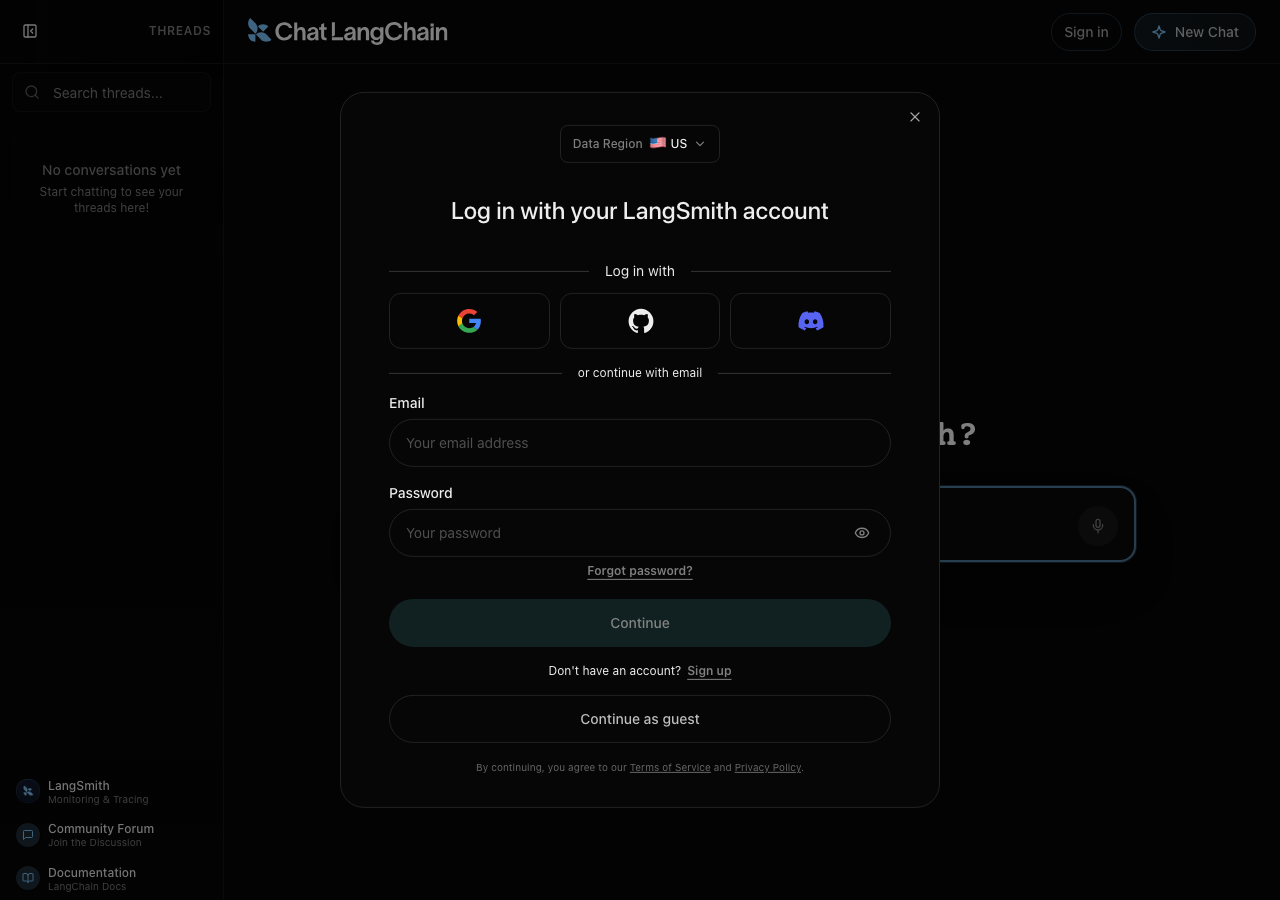
    • A dialog asking to agree to a registration or a purchase ("Log in with your LangSmith account") covered the page on load. It was left open: the run agrees to neither.
    • Observed the LangSmith login / guest modal displayed on initial page load with a 'Continue as guest' option.
    • Clicked 'Continue as guest', which dismissed the login modal and revealed the chat interface with an enabled 'Ask me anything about LangChain...' input textbox.
    • The login modal appeared on load offering options to log in with LangSmith, third-party providers, email, or continue as guest.
    • Clicking 'Continue as guest' successfully dismissed the modal and unlocked the main chat interface.
    • The 'Ask me anything about LangChain...' textbox is visible and enabled for input.
  2. S2
    Ask Question and Generate Response

    3 steps, 4 screenshots

    pass
    S2-1.png
    S2 · Ask Question and Generate Response
    S2-3.png
    S2 · Ask Question and Generate Response
    S2-6.png
    S2 · Ask Question and Generate Response
    S2-10.png
    S2 · Ask Question and Generate Response
    • A dialog asking to agree to a registration or a purchase ("Log in with your LangSmith account") covered the page on load. It was left open: the run agrees to neither.
    • Dismissed the login modal by selecting 'Continue as guest' to reach the main chat interface.
    • The question 'What is a LangChain agent?' was processed, streaming 5 agent planning/search steps and rendering an explanation with Python code and documentation reference links.
    • The login modal was dismissed by clicking 'Continue as guest'.
    • Submitted the query 'What is a LangChain agent?' through the main input field.
    • The assistant streamed agent steps (planning, searching documentation, reading documentation, checking links) and produced an accurate response with code examples and links to documentation guides.
    • Thread history in the sidebar updated with the new conversation item.
  3. S3
    New Chat Creation

    1 step, 3 screenshots

    pass
    S3-1.png
    S3 · New Chat Creation
    S3-3.png
    S3 · New Chat Creation
    S3-9.png
    S3 · New Chat Creation
    • A dialog asking to agree to a registration or a purchase ("Log in with your LangSmith account") covered the page on load. It was left open: the run agrees to neither.
    • Continued as guest and landed on the chat interface with threadId in URL.
    • Clicked 'New Chat' button; the chat area cleared to the initial prompt screen and a new threadId was assigned to the URL.
    • Dismissed initial login modal by choosing 'Continue as guest'.
    • Observed initial URL with threadId '1bcf1453-04ff-4e30-b090-e81b3d434da8'.
    • Clicked 'New Chat' button in the banner.
    • The application generated a new threadId ('cf2a5c63-b4f2-401a-a4b6-fc04eba2c40c' / 'bfe03f89-951b-41aa-a696-b904f6e5b804') in the URL and reset the chat UI to the initial state ('What can I help with?').
  4. S4
    Empty Chat Prompt Validation

    3 steps, 2 screenshots

    pass
    S4-2.png
    S4 · Empty Chat Prompt Validation
    S4-6.png
    S4 · Empty Chat Prompt Validation
    • A dialog asking to agree to a registration or a purchase ("Log in with your LangSmith account") covered the page on load. It was left open: the run agrees to neither.
    • Dismissed login modal by continuing as guest to reach the main chat interface.
    • Typed multiple spaces into the prompt input and pressed Enter; the application ignored the submission and created no blank message bubble.
    • The prompt input ignored whitespace-only text when Enter was pressed, preventing empty messages from being submitted or displayed in the conversation thread.
  5. S5
    Thread Search Filter - Matching Topic

    1 step, 2 screenshots

    pass
    S5-2.png
    S5 · Thread Search Filter - Matching Topic
    S5-9.png
    S5 · Thread Search Filter - Matching Topic
    • A dialog asking to agree to a registration or a purchase ("Log in with your LangSmith account") covered the page on load. It was left open: the run agrees to neither.
    • Continued as guest and observed the sidebar containing a previous thread titled 'What is a LangChain agent' under Today.
    • Searched for matching keyword 'agent' and the sidebar thread list updated to display 'What is a LangChain agent', while non-matching searches display 'No results found'.
    • Dismissed the login modal by selecting Continue as guest.
    • Verified that the thread list contains a thread titled 'What is a LangChain agent'.
    • Typed 'agent' into the 'Search threads...' input in the sidebar and verified the matching thread remained displayed.
    • Typed a non-matching string into the search input and verified the thread list updated to show 'No results found'.
    • Re-typed 'agent' and confirmed the matching thread 'What is a LangChain agent' was displayed.
  6. S6
    Thread Search Filter - Empty State

    1 step, 2 screenshots

    pass
    S6-2.png
    S6 · Thread Search Filter - Empty State
    S6-5.png
    S6 · Thread Search Filter - Empty State
    • A dialog asking to agree to a registration or a purchase ("Log in with your LangSmith account") covered the page on load. It was left open: the run agrees to neither.
    • Dismissed login modal by continuing as guest; sidebar shows search input and existing thread list.
    • Typed 'xyzzy12345' into Search threads input; the thread list updated to show 'No results found' and 'Try a different search term'.
    • Entering a non-matching query ('xyzzy12345') into the thread search box correctly filtered the thread list and rendered a clear empty state with 'No results found' and 'Try a different search term'.
  7. S7
    Sidebar Toggle Functionality

    1 step, 4 screenshots

    pass
    S7-2.png
    S7 · Sidebar Toggle Functionality
    S7-4.png
    S7 · Sidebar Toggle Functionality
    S7-6.png
    S7 · Sidebar Toggle Functionality
    S7-8.png
    S7 · Sidebar Toggle Functionality
    • A dialog asking to agree to a registration or a purchase ("Log in with your LangSmith account") covered the page on load. It was left open: the run agrees to neither.
    • Dismissed the login modal to enter guest mode; sidebar is currently expanded showing Threads, search, history, and links.
    • Clicked the sidebar toggle button; the sidebar collapsed into a minimal icon-only view and can be expanded again by clicking the toggle icon.
    • The sidebar toggle button in the top left collapses the expanded sidebar into a minimal icon-only view containing only the toggle icon.
    • Clicking the toggle icon again expands the sidebar back to its full view with threads, search, and navigation links.
  8. S8
    Sign-in Modal Dismissal

    3 steps, 4 screenshots

    pass
    S8-1.png
    S8 · Sign-in Modal Dismissal
    S8-3.png
    S8 · Sign-in Modal Dismissal
    S8-5.png
    S8 · Sign-in Modal Dismissal
    S8-7.png
    S8 · Sign-in Modal Dismissal
    • A dialog asking to agree to a registration or a purchase ("Log in with your LangSmith account") covered the page on load. It was left open: the run agrees to neither.
    • The LangSmith login modal is open on the page with title 'Log in with your LangSmith account'.
    • Pressed Escape key and observed the login modal dismiss immediately, returning to the interactive chat interface.
    • Clicked 'Sign in' button in the top banner and the LangSmith login modal opened with account options.
    • Verified chat input textbox is fully interactive and accepts user typing after login modal dismissal via Escape key.
    • The LangSmith login modal opens upon clicking 'Sign in' in the top banner.
    • Pressing the Escape key immediately dismisses the modal and returns focus to the chat interface.
    • The chat input field and surrounding controls remain completely interactive after modal dismissal.
  9. S9
    Sign-in Form Required Field Validation

    3 steps, 3 screenshots

    pass
    S9-1.png
    S9 · Sign-in Form Required Field Validation
    S9-6.png
    S9 · Sign-in Form Required Field Validation
    S9-11.png
    S9 · Sign-in Form Required Field Validation
    • A dialog asking to agree to a registration or a purchase ("Log in with your LangSmith account") covered the page on load. It was left open: the run agrees to neither.
    • Opened login modal showing Email and Password fields empty, with the Continue submit button disabled.
    • With only email entered and password left empty, the Continue button remains disabled preventing submission.
    • With password entered but email left empty, the Continue button remains disabled preventing submission.
    • The login modal enforces required fields on client-side by keeping the 'Continue' submission button disabled when either or both the Email and Password fields are empty.
    • Pressing Enter or attempting submission on empty fields does not cause a page reload or backend request.
  10. S10
    Very Long Chat Prompt Handling

    2 steps, 4 screenshots

    pass
    S10-2.png
    S10 · Very Long Chat Prompt Handling
    S10-6.png
    S10 · Very Long Chat Prompt Handling
    S10-9.png
    S10 · Very Long Chat Prompt Handling
    S10-11.png
    S10 · Very Long Chat Prompt Handling
    • A dialog asking to agree to a registration or a purchase ("Log in with your LangSmith account") covered the page on load. It was left open: the run agrees to neither.
    • Entered guest mode and prepared a 3000-character test prompt about LangChain agents.
    • The 3000-character input was accepted and processed cleanly without layout breakages or client errors, streaming a full response with code examples and references.
    • The application successfully accepted a 3000-character prompt in guest mode without errors.
    • The chat UI maintained correct layout formatting, handled agent planning steps, and streamed a complete response with code snippets and documentation links.
  11. S11
    External Links Navigation Check

    2 steps, 1 screenshot

    pass
    S11-2.png
    S11 · External Links Navigation Check
    • A dialog asking to agree to a registration or a purchase ("Log in with your LangSmith account") covered the page on load. It was left open: the run agrees to neither.
    • Observed sidebar links: LangSmith (https://smith.langchain.com), Community Forum (https://forum.langchain.com/), and Documentation (https://docs.langchain.com/oss/python/langchain/overview).
    • Dismissed the login modal by clicking 'Continue as guest'.
    • Located the sidebar navigation containing the external resource links.
    • Inspected href attributes: 'LangSmith' points to 'https://smith.langchain.com', 'Community Forum' points to 'https://forum.langchain.com/', and 'Documentation' points to 'https://docs.langchain.com/oss/python/langchain/overview'.
    • All external links are present and point to valid external URLs.
  12. S12
    Graceful Degradation on Trace URL 403

    3 steps, 2 screenshots

    pass
    S12-1.png
    S12 · Graceful Degradation on Trace URL 403
    S12-3.png
    S12 · Graceful Degradation on Trace URL 403
    • A dialog asking to agree to a registration or a purchase ("Log in with your LangSmith account") covered the page on load. It was left open: the run agrees to neither.
    • Clicked Continue as guest and reached the chat interface.
    • Opened https://chat.langchain.com/ and selected 'Continue as guest' to bypass the login modal.
    • Submitted a query 'What is a LangChain Runnable?' in the chat prompt.
    • Observed the agent actively planning steps, searching documentation, and executing steps smoothly without any UI crashes or client-side failure.

Issues

No finding survived the audit. Nothing to fix from this run.

Environment limitations

These failures came from the test environment, not from the application: a credential the sandbox does not hold, a demo nobody may write to, a resource it cannot reach. They are not counted as issues.

  • S2 could not exercise this: LangSmith trace API returns 403 Forbidden. A 403 Forbidden error is logged to the console from the LangSmith trace sharing API. The audit recorded the test environment as the cause, so it is not counted as an issue.

Critic audit

An adversarial second pass over every finding before it reaches the report.

0
findings reviewed
0
re-verified live
0
withdrawn
    • All scenarios passed successfully, demonstrating solid client-side functionality and graceful degradation.
    • A 403 Forbidden console error from the LangSmith API was observed during chat interactions; this is an environment limitation due to the sandbox lacking the necessary API credentials.

    Report

    QA report: external/chat.langchain.com at hosted

    All 12 test scenarios passed with no defects identified across the evaluated chat and interface workflows.

    Testing covered guest access, chat prompt handling and generation, thread creation, search filtering, sidebar toggling, sign-in modal validation, and external link navigation. Input edge cases such as empty submissions and very long prompts were also exercised.

    No application issues were encountered during the run. An environment limitation prevented full trace sharing verification, as the test sandbox lacked credentials for the LangSmith API, resulting in expected 403 responses that the client handled gracefully without disrupting chat functionality.

    The tested user interface and guest workflows are operating reliably and handle input validation and API degradation as expected.

    Run summary
    MetricCount
    Scenarios executed12
    Passed12
    Failed0
    Blocked0
    Findings raised0
    Issues after the audit0
    Withdrawn by the audit0
    Critical / high / medium / low0 / 0 / 0 / 0

    Target: https://chat.langchain.com/ · Testing level: deep_feature · Stack: unknown

    Issues

    No issues survived the audit.

    Environment limitations

    These failures came from the test environment, not from the application: a credential the sandbox does not hold, a demo nobody may write to, a resource it cannot reach. They are not counted as issues. They record what this run could not exercise.

    • S2 could not exercise this: LangSmith trace API returns 403 Forbidden. A 403 Forbidden error is logged to the console from the LangSmith trace sharing API. The audit recorded the test environment as the cause, so it is not counted as an issue.
    Scenario results
    ScenarioPriorityResultIssues
    S1 Guest Access Flowhighpassnone
    S2 Ask Question and Generate Responsehighpassnone
    S3 New Chat Creationhighpassnone
    S4 Empty Chat Prompt Validationhighpassnone
    S5 Thread Search Filter - Matching Topicmediumpassnone
    S6 Thread Search Filter - Empty Statemediumpassnone
    S7 Sidebar Toggle Functionalitymediumpassnone
    S8 Sign-in Modal Dismissalmediumpassnone
    S9 Sign-in Form Required Field Validationmediumpassnone
    S10 Very Long Chat Prompt Handlingmediumpassnone
    S11 External Links Navigation Checklowpassnone
    S12 Graceful Degradation on Trace URL 403lowpassnone
    The audit

    The Critic reviewed 0 findings and re-verified 0 of them live in the browser, replaying the reported steps on a fresh page.

    • All scenarios passed successfully, demonstrating solid client-side functionality and graceful degradation.
    • A 403 Forbidden console error from the LangSmith API was observed during chat interactions; this is an environment limitation due to the sandbox lacking the necessary API credentials.
    Coverage and caveats

    In scope: Guest access and modal dismissal; Core chat interactions and streaming; Thread management and search; Sidebar UI functionality; Form validations for chat and login.

    Not covered: Authenticating with LangSmith or third-party providers (needs an account, out of scope for a hosted run); Voice input interactions (requires hardware/browser permissions testing beyond basic automation).

    • Guest users are allowed to send at least a few messages without hitting immediate rate limits.
    • The 403 console error related to trace URLs noted in the AppMap does not entirely disable chat functionality.
    By the numbers
    MetricValue
    Scenarios12 passed, 0 failed, 0 blocked of 12 (26 planned steps)
    Browser actions176 (28 clicks, 25 inputs, 14 navigations, 109 snapshots)
    Screenshots37 (4 explore, 33 scenario, 0 critic), 33 captioned
    Coverage1 pages, 3 forms, 5 flows, 2 console errors
    Audit0 findings, 0 re-verified live, 0 confirmed, 0 promoted, 0 withdrawn
    Model calls177
    Tokens816,590 input, 8,814 output, 12,950 thinking
    Time7 min
    StageCallsInputOutputThinkingSeconds
    explore37196,6161,7342,06586
    plan13,5911,8462,58233
    test137609,5384,6826,438304
    critique15,3863841,49214
    report11,4591683735

    Run log

    stagecallstokenstime
    Explore37200.4k1m 26s
    Plan18k33s
    Test137620.7k5m 4s
    Critique17.3k14s
    Report12k5s
    Total177838.4k7m 22s
    Intake
    Explore
    Plan
    Test
    Critique
    Report
    • 01:01:29Zexploreexplore started
    • 01:08:51ZexploreExplored / (14 controls, 0 forms)
    • 01:08:51ZexploreA dialog asking to agree to a registration or a purchase ("Log in with your LangSmith account") covered the page on load. It was left open: the run agrees to neither.
    • 01:08:51ZexploreMapped 1 pages, 3 forms, 5 flows in 37 turns.
    • 01:08:51Zexploreexplore completed in 86s.
    • 01:08:51Zplanplan started
    • 01:08:51ZplanPlanned 12 scenarios (4 high, 6 medium, 2 low).
    • 01:08:51Zplanplan completed in 33s.
    • 01:08:51Ztesttest started
    • 01:08:51ZtestS1 executed (pass)
    • 01:08:51ZtestS2 executed (pass)
    • 01:08:51ZtestS3 executed (pass)
    • 01:08:51ZtestS4 executed (pass)
    • 01:08:51ZtestS5 executed (pass)
    • 01:08:51ZtestS6 executed (pass)
    • 01:08:51ZtestS7 executed (pass)
    • 01:08:51ZtestS8 executed (pass)
    • 01:08:51ZtestS9 executed (pass)
    • 01:08:51ZtestS10 executed (pass)
    • 01:08:51ZtestS11 executed (pass)
    • 01:08:51ZtestS12 executed (pass)
    • 01:08:51ZtestExecuted 12 scenarios: 12 passed, 0 failed, 0 blocked, 0 findings.
    • 01:08:51Ztesttest completed in 304s.
    • 01:08:51Zcritiquecritique started
    • 01:08:51ZcritiqueReviewed 0 findings; 1 possible defect spotted in passed scenarios.
    • 01:08:51ZcritiqueAudit complete: 0 confirmed, 0 withdrawn, 0 promoted, 0 re-verified live.
    • 01:08:51Zcritique1 failure came from the test environment rather than the application. It is reported as an environment limitation, not an issue.
    • 01:08:51Zcritiquecritique completed in 14s.
    • 01:08:51Zreportreport started
    • 01:08:51ZreportReported 0 issues (0 critical, 0 high, 0 medium, 0 low) from 0 findings.
    • 01:08:51Zreportreport completed in 5s.

    Put an agent team on your next pull request.

    Connect a repo, dispatch a Run, and read an audited, evidence-backed report the same day.