Hosted appRAG chat UIHosted, in placesucceeded

Open-source RAG chat UI with document upload and settings, on its public Hugging Face Space. Tested in place.

Tested in place byDeepQA Teamatcin-model-kotaemon-demo.hf.spaceonSep 18, 2026

Run #1model gemini-balanced (vertex)took 12m

10 of 11 scenarios passed, 1 failed, 1 low UX issue after the audit.

Share on X
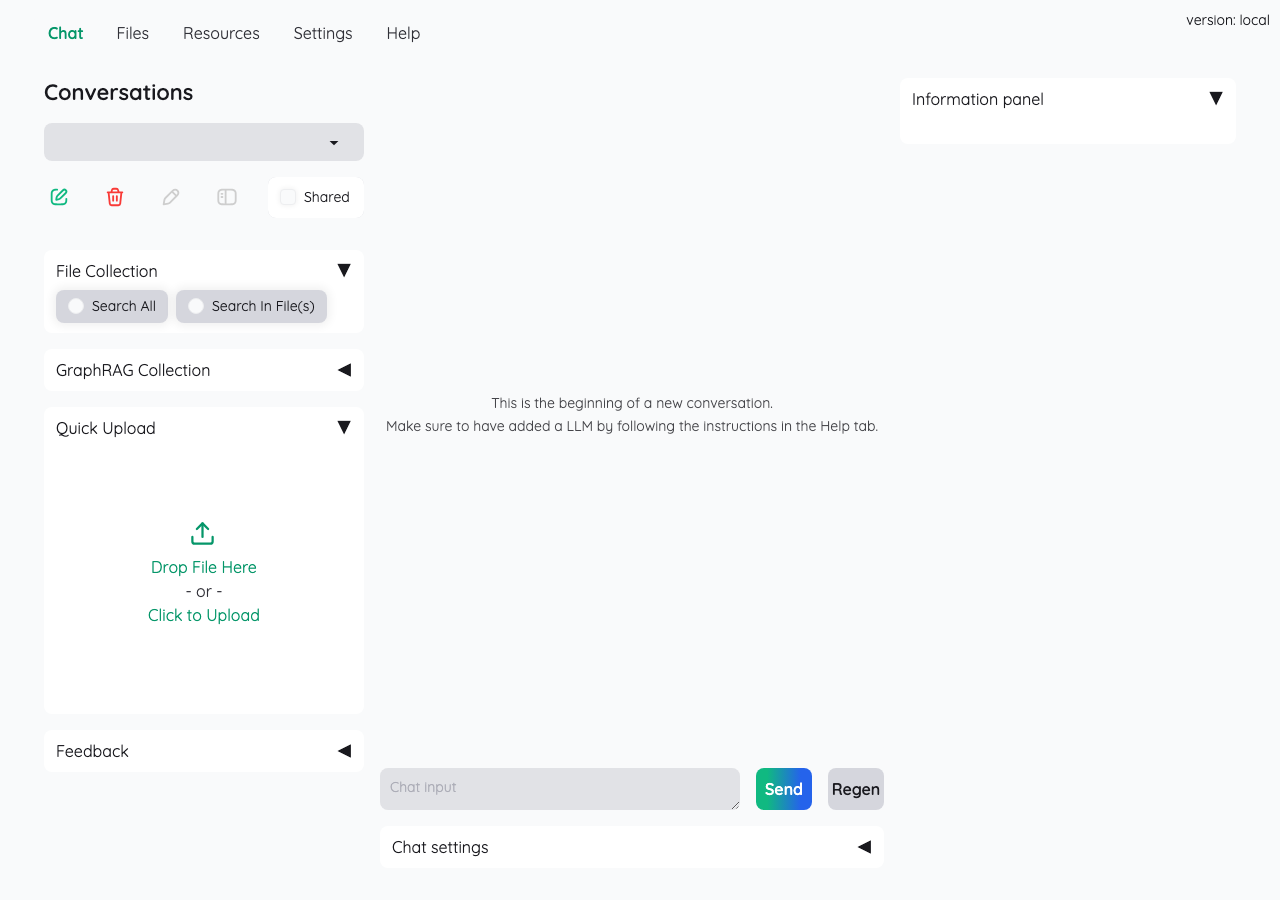
Kotaemon in the browser during the run

By the numbers

10 of 11
scenarios passed, 1 failed
150
browser actions
40
screenshots
155
model calls
12
minutes
11
scenarios
10
passed
1
failed
0
blocked
1
issues
low1

Walkthrough

Every scenario DeepQA drove in the browser, in plan order, with the 35 screenshots it captured along the way. A passing scenario is evidence too.

  1. S1
    Application Load and Tab Navigation

    5 steps, 4 screenshots

    pass
    S1-1.png
    S1 · Application Load and Tab Navigation
    S1-3.png
    S1 · Application Load and Tab Navigation
    S1-5.png
    S1 · Application Load and Tab Navigation
    S1-7.png
    S1 · Application Load and Tab Navigation
    • The application loaded initially on the Chat tab showing Conversations sidebar, file upload options, and chat interface.
    • The Files tab rendered successfully with File Upload controls, indexing options, and File List table.
    • The Resources tab rendered successfully with sub-tabs for Index Collections, LLMs, and Embeddings, and the collections grid displayed.
    • The Settings tab rendered successfully with Retrieval settings and Reasoning settings forms, chunk retrieve controls, and checkboxes.
    • The Help tab rendered successfully showing About Kotaemon, links, and the complete User Guide with images and instructions.
    • All primary navigation tabs (Chat, Files, Resources, Settings, Help) switched cleanly and rendered their respective forms and views without errors.
  2. S2
    Chat Query Form Empty Submission Validation

    4 steps, 3 screenshots

    pass
    S2-1.png
    S2 · Chat Query Form Empty Submission Validation
    S2-3.png
    S2 · Chat Query Form Empty Submission Validation
    S2-7.png
    S2 · Chat Query Form Empty Submission Validation
    • Navigated to Chat tab with empty chat input box.
    • Clicked Send and pressed Enter on empty chat input textbox; no empty message bubble was created and no error was displayed.
    • The application ignores empty submissions when clicking the Send button or pressing Enter, preventing empty messages from appearing in the conversation log without throwing errors.
  3. S3
    Chat Query Valid Submission

    4 steps, 3 screenshots

    pass
    S3-1.png
    S3 · Chat Query Valid Submission
    S3-4.png
    S3 · Chat Query Valid Submission
    S3-12.png
    S3 · Chat Query Valid Submission
    • Navigated to the Chat interface on https://cin-model-kotaemon-demo.hf.space/ with the Chat tab active.
    • Entered query 'What is the capital of France?' into the chat input textbox.
    • Navigated to the Kotaemon Chat tab at https://cin-model-kotaemon-demo.hf.space/.
    • Observed the clear message indicating model requirements: 'This is the beginning of a new conversation. Make sure to have added a LLM by following the instructions in the Help tab.'
    • Entered query 'What is the capital of France?' into the chat textbox and clicked Send.
    • Verified the application does not crash, hang indefinitely, or display a raw traceback when submitted without configured external LLM keys.
  4. S4
    Document Upload Empty Submission Validation

    4 steps, 3 screenshots

    pass
    S4-1.png
    S4 · Document Upload Empty Submission Validation
    S4-3.png
    S4 · Document Upload Empty Submission Validation
    S4-5.png
    S4 · Document Upload Empty Submission Validation
    • Loaded the main application interface showing the Chat tab.
    • Switched to Files tab with Drop File Here zone empty.
    • Clicked Upload and Index with no file selected; received validation notification 'No uploaded file'.
    • Navigated to the Files tab where the file drop zone was empty.
    • Clicked 'Upload and Index' without choosing any file.
    • The application gracefully rejected the empty submission and displayed an informational notification stating 'No uploaded file'.
  5. S5
    Add LLM Model Missing Fields Validation

    5 steps, 4 screenshots

    pass
    S5-1.png
    S5 · Add LLM Model Missing Fields Validation
    S5-3.png
    S5 · Add LLM Model Missing Fields Validation
    S5-5.png
    S5 · Add LLM Model Missing Fields Validation
    S5-7.png
    S5 · Add LLM Model Missing Fields Validation
    • Navigated to the Resources tab where Index Collections, LLMs, and Embeddings sub-tabs are displayed.
    • Selected the LLMs tab within Resources.
    • Opened the Add LLM form leaving the Name and Provider/vendor fields empty.
    • Clicked Add LLM with empty fields; an error notification 'Failed to create LLM : None' appeared, blocking creation.
    • Navigated to Resources > LLMs > Add tab.
    • Left the Name, Provider/Vendor, and Specification fields empty and clicked 'Add LLM'.
    • Application blocked the LLM creation and displayed an error toast 'Failed to create LLM : None'.
    • Verified on the View tab that no blank LLM record was created or added to the list.
  6. S6
    Add LLM Model Missing Provider Validation

    6 steps, 4 screenshots

    pass
    S6-2.png
    S6 · Add LLM Model Missing Provider Validation
    S6-5.png
    S6 · Add LLM Model Missing Provider Validation
    S6-8.png
    S6 · Add LLM Model Missing Provider Validation
    S6-10.png
    S6 · Add LLM Model Missing Provider Validation
    • Navigated to Resources > LLMs tab.
    • Opened Add LLM form with LLM name and LLM vendors options.
    • Clicked Add LLM with empty provider; application displayed an error 'Failed to create LLM Test Model: None' and did not save the model.
    • Navigated to Resources > LLMs > Add tab.
    • Entered 'Test Model' in the LLM name field and left the vendor/provider field unselected/empty.
    • Clicked 'Add LLM' button.
    • Observed error notification 'Failed to create LLM Test Model: None'.
    • Verified in LLMs View tab that 'Test Model' was not saved or added to the LLMs list.
  7. S7
    Modify System Prompt and Save

    5 steps, 4 screenshots

    pass
    S7-1.png
    S7 · Modify System Prompt and Save
    S7-3.png
    S7 · Modify System Prompt and Save
    S7-5.png
    S7 · Modify System Prompt and Save
    S7-8.png
    S7 · Modify System Prompt and Save
    • Opened Settings tab showing Retrieval settings and Reasoning settings tabs.
    • Navigated to Reasoning settings tab, where System Prompt field is currently set to 'This is a question answering system'.
    • Entered 'You are a helpful assistant.' into the System Prompt field.
    • Clicked 'Save changes' button; the System Prompt field maintained its value 'You are a helpful assistant.' with no errors thrown.
    • Navigated to Settings -> Reasoning settings tab.
    • Observed the default System Prompt field populated with 'This is a question answering system'.
    • Successfully edited the System Prompt textbox to 'You are a helpful assistant.'.
    • Clicked 'Save changes' button.
    • Verified the updated text 'You are a helpful assistant.' remained in the System Prompt field without errors or reverting.
  8. S8
    Toggle Chat Settings Accordion

    3 steps, 2 screenshots

    pass
    S8-1.png
    S8 · Toggle Chat Settings Accordion
    S8-3.png
    S8 · Toggle Chat Settings Accordion
    • Navigated to Chat tab and located the Chat settings accordion button.
    • Clicked 'Chat settings ▼' accordion and verified that it expanded showing additional configuration options including Reasoning method and Model dropdowns.
    • The Chat tab is selected by default on load.
    • Clicking 'Chat settings ▼' successfully expands the accordion section displaying 'Reasoning method' and 'Model' configuration dropdowns without UI layout issues.
  9. S9
    Toggle Information Panel Accordion

    3 steps, 4 screenshots

    fail
    S9-1.png
    S9 · Toggle Information Panel Accordion
    S9-3.png
    S9 · Toggle Information Panel Accordion
    S9-8.png
    S9 · Toggle Information Panel Accordion
    S9-11.png
    S9 · Toggle Information Panel Accordion
    • Clicked the 'Information panel ▼' accordion button on the Chat tab; no child components or citation UI/placeholder content appeared.
    • Navigated to https://cin-model-kotaemon-demo.hf.space/ and confirmed the Chat tab is active.
    • Observed other accordions such as 'Chat settings ▼' and 'Feedback ▼' expand properly with nested controls and options.
    • Clicked 'Information panel ▼' multiple times; no placeholder content, citation UI, or sub-elements were displayed under the accordion.
  10. S10
    Change File Collection Scope

    3 steps, 2 screenshots

    pass
    S10-1.png
    S10 · Change File Collection Scope
    S10-3.png
    S10 · Change File Collection Scope
    • Initial page loaded with File Collection radio options visible under the Chat tab.
    • Selected 'Search In File(s)' radio option, which became checked and revealed the 'Files' selection input field.
    • The File Collection radio options were present on the left sidebar of the Chat interface.
    • Clicking 'Search In File(s)' successfully updated the radio button to the checked state and dynamically displayed a 'Files' selection input.
  11. S11
    Regenerate Answer Without Context

    3 steps, 2 screenshots

    pass
    S11-1.png
    S11 · Regenerate Answer Without Context
    S11-3.png
    S11 · Regenerate Answer Without Context
    • Loaded the Chat tab with an empty conversation and located the Regen button.
    • Clicked the Regen button on an empty conversation, which triggered warning notifications ('No conversation selected' and 'Empty chat') rather than a backend traceback.
    • When clicking the 'Regen' button with no messages in the chat history, the application gracefully handled the action by displaying warning messages ('No conversation selected' and 'Empty chat') without throwing any backend errors or tracebacks.

Issues

Findings that survived the Critic's audit. Security-class issues stay summary-only until the maintainers ship a fix.

lowpromoted ↑uxF2 · S5

Missing field validation error exposes raw 'None' value instead of user-friendly message

Surfaced by the audit of S5, which the Tester passed, and reproduced live: I navigated to Resources > LLMs tab and opened the Add LLM form. Leaving the fields empty and clicking 'Add LLM' resulted in the error message 'Failed to create LLM : None' being displayed, reproducing the reported behaviour. The page reported 1 console error during the scenario.

Expected

The application displays a user-friendly validation error specifying which fields are required.

Actual

The application displays an unpolished error string 'Failed to create LLM : None', exposing the internal Python null representation.

Repro · 4 steps
  1. Navigate to Resources > LLMs tab
  2. Open the Add LLM form
  3. Leave the Name and Provider/vendor fields empty
  4. Click the Add LLM button
lowwithdrawnuxF1 · S9

Information panel accordion does not display any placeholder content or citation UI when expanded

The 'Information panel' is designed to show document citations and retrieval metadata for active chat responses. Expanding it before a query has been made naturally reveals nothing, and lacking an explicit placeholder is not a defect. The page reported 1 console error during the scenario.

Expected

The Information panel accordion should expand to reveal citation UI or placeholder content.

Actual

Clicking the 'Information panel ▼' accordion button does not reveal any child components, placeholder text, or citation UI elements in the interface.

Repro · 3 steps
  1. Navigate to https://cin-model-kotaemon-demo.hf.space/
  2. Ensure the Chat tab is selected
  3. Click the 'Information panel ▼' accordion button

Environment limitations

These failures came from the test environment, not from the application: a credential the sandbox does not hold, a demo nobody may write to, a resource it cannot reach. They are not counted as issues.

  • S1 could not exercise this: Console logs package build error for PDF viewer component. A package build error for 'pdfjs-viewer-element' is logged to the console. The audit recorded the test environment as the cause, so it is not counted as an issue.

Critic audit

An adversarial second pass over every finding before it reaches the report.

1
findings reviewed
1
re-verified live
1
withdrawn
  • F1withdrawn

    The 'Information panel' is designed to show document citations and retrieval metadata for active chat responses. Expanding it before a query has been made naturally reveals nothing, and lacking an explicit placeholder is not a defect.

  • F2promoted ↑

    Surfaced by the audit of S5, which the Tester passed, and reproduced live: I navigated to Resources > LLMs tab and opened the Add LLM form. Leaving the fields empty and clicking 'Add LLM' resulted in the error message 'Failed to create LLM : None' being displayed, reproducing the reported behaviour.

  • Finding F1 was withdrawn because expecting static placeholder text in an inherently dynamic citation panel that has no context yet is an invalid test expectation.
  • A missed UX defect was filed for the LLM creation form exposing a backend 'None' string to the user during validation.
  • A console error regarding a PDF viewer package failure was captured but flagged as an environment limitation.

Report

QA report: external/cin-model-kotaemon-demo.hf.space at hosted

The application is mostly functional, with a single low-severity validation message issue in the model configuration form.

Deep feature testing evaluated application navigation, chat query workflows, system prompt configuration, collection scoping, response regeneration, and model creation forms across 11 scenarios.

The primary interactive and configuration features functioned as expected, with ten scenarios passing. The only confirmed defect is a low-severity user experience issue where submitting the LLM creation form with missing fields displays an unpolished error string containing a raw backend 'None' value. One finding concerning empty placeholder content in the information accordion was withdrawn during audit as an invalid test expectation.

A console build error affecting the 'pdfjs-viewer-element' component was recorded as an environment limitation, preventing the run from exercising embedded PDF document viewing functionality.

Run summary
MetricCount
Scenarios executed11
Passed10
Failed1
Blocked0
Findings raised1
Issues after the audit1
Withdrawn by the audit1
Critical / high / medium / low0 / 0 / 0 / 1

Target: https://cin-model-kotaemon-demo.hf.space · Testing level: deep_feature · Stack: unknown

Issues
Low severity
F2 · Missing field validation error exposes raw 'None' value instead of user-friendly message

Severity: low · Type: ux · Verdict: promoted · Scenario: S5

Surfaced by the audit of S5, which the Tester passed, and reproduced live: I navigated to Resources > LLMs tab and opened the Add LLM form. Leaving the fields empty and clicking 'Add LLM' resulted in the error message 'Failed to create LLM : None' being displayed, reproducing the reported behaviour. The page reported 1 console error during the scenario.

Expected: The application displays a user-friendly validation error specifying which fields are required.

Actual: The application displays an unpolished error string 'Failed to create LLM : None', exposing the internal Python null representation.

Steps to reproduce:

  1. Navigate to Resources > LLMs tab
  2. Open the Add LLM form
  3. Leave the Name and Provider/vendor fields empty
  4. Click the Add LLM button

Evidence: screenshots/critic-M2-1.png

Environment limitations

These failures came from the test environment, not from the application: a credential the sandbox does not hold, a demo nobody may write to, a resource it cannot reach. They are not counted as issues. They record what this run could not exercise.

  • S1 could not exercise this: Console logs package build error for PDF viewer component. A package build error for 'pdfjs-viewer-element' is logged to the console. The audit recorded the test environment as the cause, so it is not counted as an issue.
Withdrawn findings

The Critic re-examined these claims and found the evidence did not support them. They are kept here rather than deleted.

  • Information panel accordion does not display any placeholder content or citation UI when expanded (S9, low): The 'Information panel' is designed to show document citations and retrieval metadata for active chat responses. Expanding it before a query has been made naturally reveals nothing, and lacking an explicit placeholder is not a defect. The page reported 1 console error during the scenario.
Scenario results
ScenarioPriorityResultIssues
S1 Application Load and Tab Navigationhighpassnone
S2 Chat Query Form Empty Submission Validationhighpassnone
S3 Chat Query Valid Submissionhighpassnone
S4 Document Upload Empty Submission Validationhighpassnone
S5 Add LLM Model Missing Fields ValidationmediumpassF2
S6 Add LLM Model Missing Provider Validationmediumpassnone
S7 Modify System Prompt and Savemediumpassnone
S8 Toggle Chat Settings Accordionlowpassnone
S9 Toggle Information Panel Accordionlowfailnone
S10 Change File Collection Scopelowpassnone
S11 Regenerate Answer Without Contextlowpassnone
The audit

The Critic reviewed 1 finding and re-verified 1 of them live in the browser, replaying the reported steps on a fresh page.

  • Finding F1 was withdrawn because expecting static placeholder text in an inherently dynamic citation panel that has no context yet is an invalid test expectation.
  • A missed UX defect was filed for the LLM creation form exposing a backend 'None' string to the user during validation.
  • A console error regarding a PDF viewer package failure was captured but flagged as an environment limitation.
What to fix first
  1. Replace the raw backend 'None' string in the LLM creation error banner with a user-friendly field validation message (F2).
Coverage and caveats

In scope: Application tab navigation and state rendering; Chat Query form validation and execution attempts; Document upload form validation; Resource and model configuration validation; Reasoning settings modification and persistence; UI accordion and state toggles.

Not covered: End-to-end RAG chat execution with live documents (requires valid external API keys which cannot be provided); Successful indexing of a specific PDF document (out of scope for an automated UI surface test without file fixtures).

  • The application is a Single Page Application (Gradio) where all navigation happens via tabs without full page reloads
  • Without valid API keys, the chat submission will fail gracefully rather than crashing
  • An upload button or submit action named 'Upload and Index' exists on the Document Upload form as implied by the flows
By the numbers
MetricValue
Scenarios10 passed, 1 failed, 0 blocked of 11 (45 planned steps)
Browser actions150 (54 clicks, 5 inputs, 13 navigations, 78 snapshots)
Screenshots40 (4 explore, 35 scenario, 1 critic), 35 captioned
Coverage1 pages, 5 forms, 4 flows, 1 console errors
Audit1 findings, 1 re-verified live, 0 confirmed, 1 promoted, 1 withdrawn
Model calls155
Tokens653,362 input, 8,282 output, 13,913 thinking
Time12 min
StageCallsInputOutputThinkingSeconds
explore2396,7671,8061,738135
plan13,7271,9183,39038
test123531,8913,6096,129488
critique719,3097252,14550
report11,6682245117

Run log

stagecallstokenstime
Explore23100.3k2m 15s
Plan19k38s
Test123541.6k8m 8s
Critique722.2k50s
Report12.4k7s
Total155675.6k11m 57s
Intake
Explore
Plan
Test
Critique
Report
  • 06:05:24Zexploreexplore started
  • 06:17:21ZexploreExplored / (22 controls, 0 forms)
  • 06:17:21ZexploreMapped 1 pages, 5 forms, 4 flows in 23 turns.
  • 06:17:21Zexploreexplore completed in 135s.
  • 06:17:21Zplanplan started
  • 06:17:21ZplanPlanned 11 scenarios (4 high, 3 medium, 4 low).
  • 06:17:21Zplanplan completed in 38s.
  • 06:17:21Ztesttest started
  • 06:17:21ZtestS1 executed (pass)
  • 06:17:21ZtestS2 executed (pass)
  • 06:17:21ZtestS3 executed (pass)
  • 06:17:21ZtestS4 executed (pass)
  • 06:17:21ZtestS5 executed (pass)
  • 06:17:21ZtestS6 executed (pass)
  • 06:17:21ZtestS7 executed (pass)
  • 06:17:21ZtestS8 executed (pass)
  • 06:17:21ZtestS9 executed (fail), 1 finding
  • 06:17:21ZtestS10 executed (pass)
  • 06:17:21ZtestS11 executed (pass)
  • 06:17:21ZtestExecuted 11 scenarios: 10 passed, 1 failed, 0 blocked, 1 finding.
  • 06:17:21Ztesttest completed in 488s.
  • 06:17:21Zcritiquecritique started
  • 06:17:21ZcritiqueReviewed 1 findings; 2 possible defects spotted in passed scenarios.
  • 06:17:21ZcritiqueRe-verified a possible defect in S5: reproduced.
  • 06:17:21ZcritiqueAudit complete: 0 confirmed, 1 withdrawn, 1 promoted, 1 re-verified live.
  • 06:17:21Zcritique1 failure came from the test environment rather than the application. It is reported as an environment limitation, not an issue.
  • 06:17:21Zcritiquecritique completed in 50s.
  • 06:17:21Zreportreport started
  • 06:17:21ZreportReported 1 issue (0 critical, 0 high, 0 medium, 1 low) from 1 finding.
  • 06:17:21Zreportreport completed in 7s.

Put an agent team on your next pull request.

Connect a repo, dispatch a Run, and read an audited, evidence-backed report the same day.