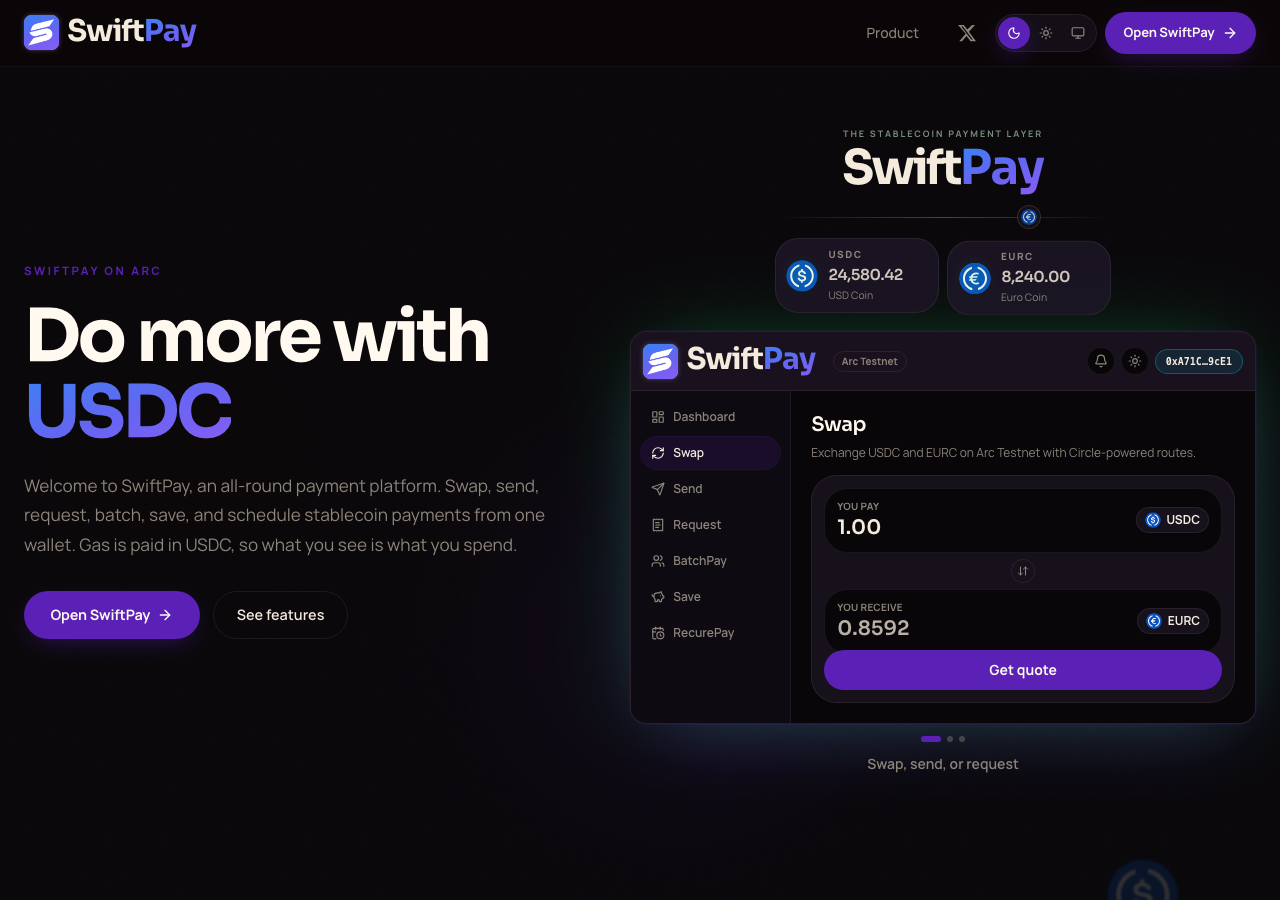
Hosted appPaymentsArc Testnetsucceeded

Money movement infrastructure for the internet. Send, batch, request, swap, and settle stablecoins on Arc Testnet.

Tested in place byDeepQA TeamonArc Testnetatgetswiftpay.xyz/onSep 17, 2026

Run #1model gemini-balanced (vertex)took 7m

9 of 10 scenarios passed, 1 failed, no issues after the audit.

Share on X
SwiftPay in the browser during the run

By the numbers

9 of 10
scenarios passed, 1 failed
112
browser actions
29
screenshots
114
model calls
7.0
minutes
10
scenarios
9
passed
1
failed
0
blocked
0
issues

Walkthrough

Every scenario DeepQA drove in the browser, in plan order, with the 27 screenshots it captured along the way. A passing scenario is evidence too.

  1. S1
    Connect External Wallet

    3 steps, 4 screenshots

    fail
    S1-1.png
    S1 · Connect External Wallet
    S1-3.png
    S1 · Connect External Wallet
    S1-7.png
    S1 · Connect External Wallet
    S1-11.png
    S1 · Connect External Wallet
    • Navigated to SwiftPay landing page.
    • Clicked Open SwiftPay header button, opening the 'Choose how to sign in' dialog.
    • Navigated to https://getswiftpay.xyz/ landing page.
    • Clicked 'Open SwiftPay' button in the header, which opened the 'Choose how to sign in' modal dialog.
    • Clicked 'Connect wallet' under the External Wallet option in the modal.
    • The 'Connect wallet' button does not trigger any wallet connection flow, modal update, or authentication redirect, leaving the dialog open on the landing page in an unauthenticated state.
  2. S2
    Route Protection via Footer Swap Link

    2 steps, 2 screenshots

    pass
    S2-1.png
    S2 · Route Protection via Footer Swap Link
    S2-3.png
    S2 · Route Protection via Footer Swap Link
    • Clicked the Footer Swap Link (/swap) while unauthenticated and observed redirect to /?next=%2Fswap.
    • Navigated to https://getswiftpay.xyz/ and clicked the 'Swap' link in the footer (href='/swap').
    • The unauthenticated request was successfully intercepted and redirected to '/?next=%2Fswap'.
  3. S3
    Route Protection via Footer Batch Settlement Link

    2 steps, 2 screenshots

    pass
    S3-1.png
    S3 · Route Protection via Footer Batch Settlement Link
    S3-3.png
    S3 · Route Protection via Footer Batch Settlement Link
    • Loaded the SwiftPay home page and located the 'Batch settlement' link in the footer pointing to /swiftBatch.
    • Clicked 'Batch settlement' link and the application redirected the unauthenticated user to https://getswiftpay.xyz/?next=%2FswiftBatch.
    • Navigating to the footer 'Batch settlement' link (/swiftBatch) redirects unauthenticated visitors to https://getswiftpay.xyz/?next=%2FswiftBatch, preserving route protection and retaining the intended destination via query parameter.
  4. S4
    Dismiss Sign-In Modal

    3 steps, 4 screenshots

    pass
    S4-1.png
    S4 · Dismiss Sign-In Modal
    S4-3.png
    S4 · Dismiss Sign-In Modal
    S4-5.png
    S4 · Dismiss Sign-In Modal
    S4-7.png
    S4 · Dismiss Sign-In Modal
    • Clicked 'Open SwiftPay' in header, which opened the 'Choose how to sign in' modal dialog with a 'Close sign in' button.
    • Clicked 'Close sign in' button: modal dialog closed cleanly and underlying landing page remained fully interactive, verified by expanding an FAQ item.
    • Navigated to https://getswiftpay.xyz/ and observed the initial landing page.
    • Clicked 'Open SwiftPay' in the header navigation, which opened the 'Choose how to sign in' modal dialog.
    • Clicked the 'Close sign in' button inside the modal dialog.
    • Verified the sign-in modal closed immediately and the landing page remained responsive and interactive (tested by expanding an FAQ section).
  5. S5
    Toggle Dark Theme

    2 steps, 2 screenshots

    pass
    S5-1.png
    S5 · Toggle Dark Theme
    S5-3.png
    S5 · Toggle Dark Theme
    • Navigated to SwiftPay homepage with theme controls visible in the header.
    • Clicked the Dark theme button and switched visual theme to dark mode.
    • The Dark theme button in the header responds immediately to user interaction and applies dark mode styling.
  6. S6
    Toggle Light Theme

    2 steps, 2 screenshots

    pass
    S6-1.png
    S6 · Toggle Light Theme
    S6-3.png
    S6 · Toggle Light Theme
    • Initial landing page loaded showing the theme toggle buttons (Dark, Light, System) in the top navigation bar.
    • Clicked the Light theme button in the top navigation bar, switching the visual theme to light mode.
    • Navigated to https://getswiftpay.xyz/ and observed the theme switcher controls (Dark, Light, System) in the header navigation.
    • Clicked the Light theme button, triggering the application's light theme stylesheet/attributes.
  7. S7
    Toggle System Theme

    2 steps, 4 screenshots

    pass
    S7-1.png
    S7 · Toggle System Theme
    S7-3.png
    S7 · Toggle System Theme
    S7-5.png
    S7 · Toggle System Theme
    S7-7.png
    S7 · Toggle System Theme
    • Loaded the SwiftPay homepage with theme toggle options visible in the navigation banner.
    • Clicked the System theme button; the interface remained stable without UI errors or breaks.
    • Loaded https://getswiftpay.xyz/ and verified theme controls in header banner.
    • Clicked the System theme button, successfully toggling theme selection.
    • Verified switching between Light, Dark, and System theme modes functioned cleanly without UI disruption or console errors.
  8. S8
    FAQ Accordion - Dashboard Overview

    2 steps, 2 screenshots

    pass
    S8-1.png
    S8 · FAQ Accordion - Dashboard Overview
    S8-3.png
    S8 · FAQ Accordion - Dashboard Overview
    • Navigated to landing page and located FAQ section with accordion items.
    • Clicked 'What is on the dashboard?' accordion button and verified that the explanation text expanded and became visible.
    • The FAQ accordion for 'What is on the dashboard?' successfully expanded upon click, revealing the descriptive text: 'Use the dashboard for portfolio value, token [redacted], direct sends, beneficiaries, transaction receipts, and wallet activity. The send panel is organized as a step-by-step payment flow.'
  9. S9
    FAQ Accordion - Network and Assets

    2 steps, 2 screenshots

    pass
    S9-1.png
    S9 · FAQ Accordion - Network and Assets
    S9-3.png
    S9 · FAQ Accordion - Network and Assets
    • Clicked the 'What network and assets does SwiftPay use?' FAQ item and verified it expands to display information about Arc Testnet, USDC-native gas, and USDC/EURC workflows.
    • The FAQ accordion item 'What network and assets does SwiftPay use?' successfully expanded when clicked, revealing the text: 'The app is built around Arc Testnet with USDC-native gas and stablecoin workflows such as USDC and EURC. Transactions expose ArcScan context where available.'
  10. S10
    Multiple FAQ Accordions

    3 steps, 3 screenshots

    pass
    S10-1.png
    S10 · Multiple FAQ Accordions
    S10-3.png
    S10 · Multiple FAQ Accordions
    S10-5.png
    S10 · Multiple FAQ Accordions
    • Navigated to SwiftPay homepage and located FAQ accordion items.
    • Clicked 'Which pages are available?' FAQ accordion and verified it expanded displaying the list of available pages.
    • Clicked 'How are Swift+Save and Earn different?' FAQ accordion and verified it expanded properly to show its explanation text without layout degradation.
    • Both FAQ accordion items ('Which pages are available?' and 'How are Swift+Save and Earn different?') expanded properly and rendered their text cleanly without breaking layout or state.

Issues

Findings that survived the Critic's audit. Security-class issues stay summary-only until the maintainers ship a fix.

criticalwithdrawnfunctionalF1 · S1

External wallet 'Connect wallet' button does not trigger wallet connection or authentication flow

The 401 and 403 console errors indicate the automation harness was blocked by a bot challenge or WAF, preventing the application's scripts from loading and the button from functioning. The audit recorded that a block on automation kept this interaction from working, so the evidence describes our harness, not the application. The page reported 3 console errors during the scenario.

Expected

Clicking 'Connect wallet' should initiate a Web3 wallet connection prompt and navigate or update the page to an authenticated state upon connecting.

Actual

Clicking 'Connect wallet' produces no action, no wallet prompt, no feedback, and remains on the unauthenticated modal.

Repro · 3 steps
  1. Navigate to https://getswiftpay.xyz/
  2. Click 'Open SwiftPay' in the top header
  3. Click 'Connect wallet' under External wallet in the sign-in modal

Wallet activity

DeepQA injected a test wallet into the browser and recorded every request the app sent to it. Testnet funds only.

address
0x28C278…7c39AF
chain
Arc Testnet
browsers opened
3
read requests forwarded
0
signing requests
0

Critic audit

An adversarial second pass over every finding before it reaches the report.

1
findings reviewed
1
re-verified live
1
withdrawn
  • F1withdrawn

    The 401 and 403 console errors indicate the automation harness was blocked by a bot challenge or WAF, preventing the application's scripts from loading and the button from functioning. The audit recorded that a block on automation kept this interaction from working, so the evidence describes our harness, not the application.

  • Widespread 403 console errors indicate a bot challenge or WAF is blocking the automation from accessing some site resources.

Report

QA report: external/getswiftpay.xyz at hosted

No confirmed defects were found across the ten audited scenarios.

Testing on getswiftpay.xyz covered 10 scenarios focusing on UI theme switching, FAQ accordion interactions, sign-in modal behavior, route protection on footer navigation links, and external wallet connection. Nine scenarios passed and one failed during automated execution.

A single critical finding concerning the external wallet connection flow was initially raised but subsequently withdrawn upon audit review, leaving zero confirmed defects.

Coverage was limited to unauthenticated public pages and UI components, as automated interactions faced bot protection and WAF restrictions that prevented deeper authenticated feature exploration.

Run summary
MetricCount
Scenarios executed10
Passed9
Failed1
Blocked0
Findings raised1
Issues after the audit0
Withdrawn by the audit1
Critical / high / medium / low0 / 0 / 0 / 0

Target: https://getswiftpay.xyz/ · Testing level: deep_feature · Stack: unknown

Issues

No issues survived the audit.

Withdrawn findings

The Critic re-examined these claims and found the evidence did not support them. They are kept here rather than deleted.

  • External wallet 'Connect wallet' button does not trigger wallet connection or authentication flow (S1, critical): The 401 and 403 console errors indicate the automation harness was blocked by a bot challenge or WAF, preventing the application's scripts from loading and the button from functioning. The audit recorded that a block on automation kept this interaction from working, so the evidence describes our harness, not the application. The page reported 3 console errors during the scenario.
Scenario results
ScenarioPriorityResultIssues
S1 Connect External Wallethighfailnone
S2 Route Protection via Footer Swap Linkhighpassnone
S3 Route Protection via Footer Batch Settlement Linkhighpassnone
S4 Dismiss Sign-In Modalmediumpassnone
S5 Toggle Dark Thememediumpassnone
S6 Toggle Light Thememediumpassnone
S7 Toggle System Thememediumpassnone
S8 FAQ Accordion - Dashboard Overviewlowpassnone
S9 FAQ Accordion - Network and Assetslowpassnone
S10 Multiple FAQ Accordionslowpassnone
The audit

The Critic reviewed 1 finding and re-verified 1 of them live in the browser, replaying the reported steps on a fresh page.

  • Widespread 403 console errors indicate a bot challenge or WAF is blocking the automation from accessing some site resources.
Coverage and caveats

In scope: Landing page UI and theme switching; FAQ accordion functionality; Authentication modal presentation and dismissal; External wallet connection flow; Deep link route protection and redirection.

Not covered: Google OAuth sign-in flow (off-origin redirection); Post-authentication dashboard features (unmapped in Explorer phase).

  • The injected test wallet will automatically connect when the External Wallet option is chosen in the sign-in modal.
  • Dashboard and deep application pages were not mapped because the Explorer did not complete the authentication step.
By the numbers
MetricValue
Scenarios9 passed, 1 failed, 0 blocked of 10 (23 planned steps)
Browser actions112 (37 clicks, 2 inputs, 17 navigations, 56 snapshots)
Screenshots29 (1 explore, 27 scenario, 1 critic), 27 captioned
Coverage1 pages, 1 forms, 2 flows, 3 console errors
Audit1 findings, 1 re-verified live, 0 confirmed, 0 promoted, 1 withdrawn
Model calls114
Tokens781,519 input, 5,973 output, 8,921 thinking
Time7 min
Wallet0 transactions, 0 signatures, 0 refusals on chain 5042002
StageCallsInputOutputThinkingSeconds
explore28269,9791,5802,013137
plan13,2451,4701,82526
test79482,6582,5083,320225
critique524,3322661,42528
report11,3051493385

Run log

stagecallstokenstime
Explore28273.6k2m 17s
Plan16.5k26s
Test79488.5k3m 45s
Critique526k28s
Report11.8k5s
Total114796.4k7m 2s
Intake
Explore
Plan
Test
Critique
Report
  • 19:04:22Zexploreexplore started
  • 19:11:23ZexploreExplored / (33 controls, 0 forms)
  • 19:11:23ZexploreExplored /v3/signin/identifier (9 controls, 0 forms)
  • 19:11:23ZexploreMapped 1 pages, 1 forms, 2 flows in 28 turns.
  • 19:11:23Zexploreexplore completed in 137s.
  • 19:11:23Zplanplan started
  • 19:11:23ZplanPlanned 10 scenarios (3 high, 4 medium, 3 low).
  • 19:11:23Zplanplan completed in 26s.
  • 19:11:23Ztesttest started
  • 19:11:23ZtestS1 executed (fail), 1 finding
  • 19:11:23ZtestS2 executed (pass)
  • 19:11:23ZtestS3 executed (pass)
  • 19:11:23ZtestS4 executed (pass)
  • 19:11:23ZtestS5 executed (pass)
  • 19:11:23ZtestS6 executed (pass)
  • 19:11:23ZtestS7 executed (pass)
  • 19:11:23ZtestS8 executed (pass)
  • 19:11:23ZtestS9 executed (pass)
  • 19:11:23ZtestS10 executed (pass)
  • 19:11:23ZtestExecuted 10 scenarios: 9 passed, 1 failed, 0 blocked, 1 finding.
  • 19:11:23Ztesttest completed in 225s.
  • 19:11:23Zcritiquecritique started
  • 19:11:23ZcritiqueReviewed 1 findings; 0 possible defects spotted in passed scenarios.
  • 19:11:23ZcritiqueRe-verified F1: reproduced.
  • 19:11:23ZcritiqueAudit complete: 0 confirmed, 1 withdrawn, 0 promoted, 1 re-verified live.
  • 19:11:23Zcritiquecritique completed in 28s.
  • 19:11:23Zreportreport started
  • 19:11:23ZreportReported 0 issues (0 critical, 0 high, 0 medium, 0 low) from 1 finding.
  • 19:11:23Zreportreport completed in 5s.

Put an agent team on your next pull request.

Connect a repo, dispatch a Run, and read an audited, evidence-backed report the same day.