
Hosted appChat UIHosted, in placesucceeded

Public Hugging Face Space of ChuanhuChatGPT, an open-source multi-model chat UI with history, templates, file upload and agent tools. Tested in place.

Tested in place byDeepQA Teamatjohnsmith9982-chuanhuchatgpt.hf.spaceonSep 20, 2026

Run #1model gemini-balanced (vertex)took 6m

All 12 scenarios passed, no issues after the audit.

Share on X
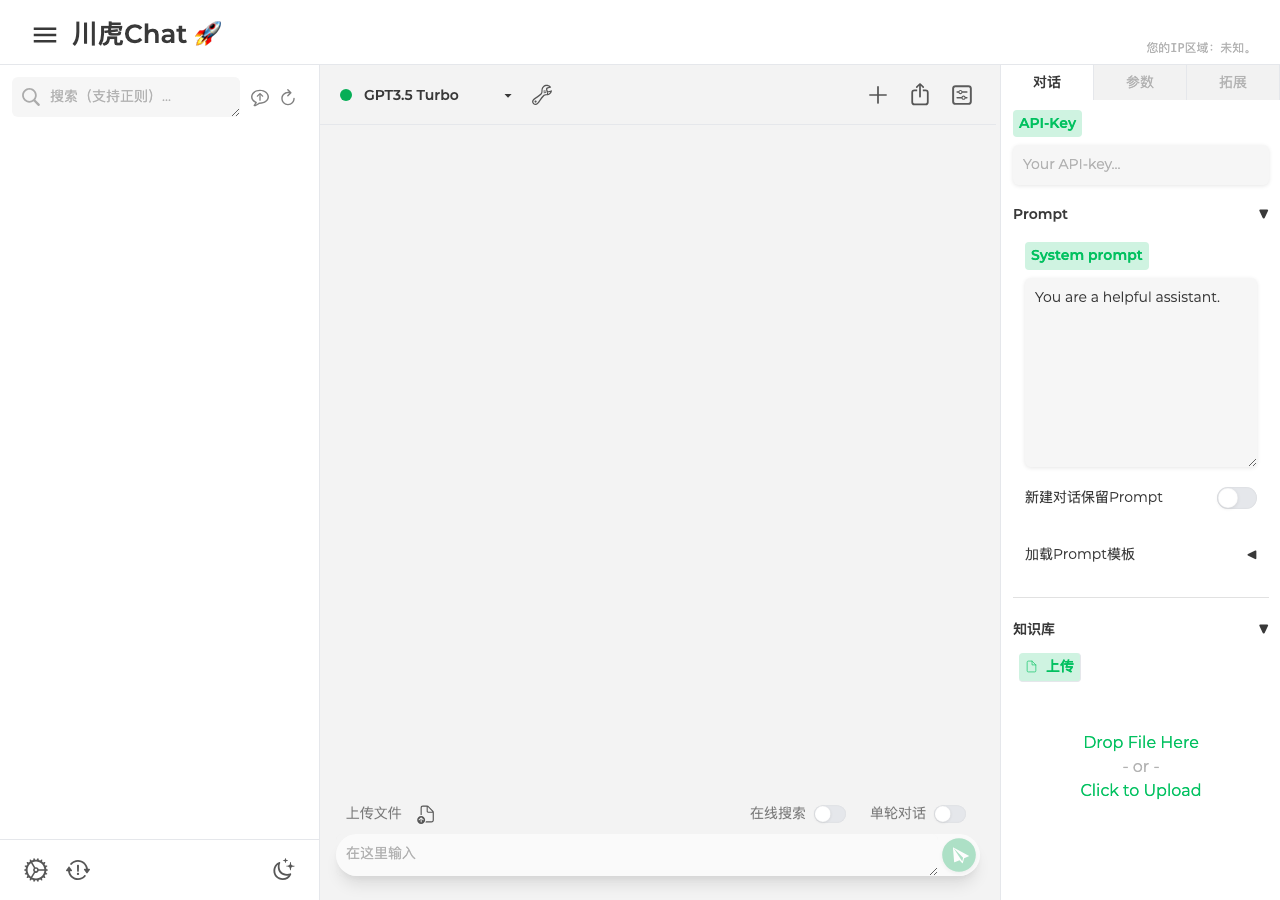
ChuanhuChatGPT in the browser during the run

By the numbers

12 of 12
scenarios passed
123
browser actions
35
screenshots
138
model calls
6.3
minutes
12
scenarios
12
passed
0
failed
0
blocked
0
issues

Walkthrough

Every scenario DeepQA drove in the browser, in plan order, with the 31 screenshots it captured along the way. A passing scenario is evidence too.

  1. S1
    Verify application load and security console errors

    2 steps, 1 screenshot

    pass
    S1-2.png
    S1 · Verify application load and security console errors
    • The application loaded successfully with page title '川虎Chat 🚀' and all primary UI elements rendered.
    • Navigated to https://johnsmith9982-chuanhuchatgpt.hf.space/ and observed the page title '川虎Chat 🚀'.
    • The application interface rendered properly including model selection, conversation controls, prompt configuration, and knowledge base upload panels.
  2. S2
    Chat submission with default invalid API key

    4 steps, 2 screenshots

    pass
    S2-1.png
    S2 · Chat submission with default invalid API key
    S2-7.png
    S2 · Chat submission with default invalid API key
    • Typed message 'Hello, how are you?' and clicked send; the chat history properly displayed the 401 invalid_api_key authentication error from the API instead of crashing.
    • The chat input was populated with 'Hello, how are you?' and submitted.
    • The application streamed a graceful error message indicating an invalid API key (401 invalid_api_key) with a link to platform.openai.com without hanging or crashing.
  3. S3
    Chat submission validation with empty input

    4 steps, 2 screenshots

    pass
    S3-1.png
    S3 · Chat submission validation with empty input
    S3-5.png
    S3 · Chat submission validation with empty input
    • Navigated to the home page; observing the chat interface and the chat message textbox.
    • With an empty message textbox, the submit button is disabled and pressing Enter does not add an empty message bubble or trigger an API error.
    • When the chat message textbox is empty, the send button is disabled by default.
    • Attempting to submit an empty prompt via Enter key or button click does not add an empty message bubble to the chat stream or generate any API errors.
  4. S4
    Change model selection

    4 steps, 3 screenshots

    pass
    S4-1.png
    S4 · Change model selection
    S4-3.png
    S4 · Change model selection
    S4-7.png
    S4 · Change model selection
    • Navigated to the home page where the default model was 'GPT3.5 Turbo'.
    • Opened the model selection dropdown and selected 'GPT4 Turbo'.
    • Verified that the model dropdown updated to 'GPT4 Turbo' and status displayed '模型设置为了: GPT4 Turbo'.
    • The model dropdown correctly opened, allowed selection of a new model (GPT4 Turbo), updated its displayed value, and showed confirmation '模型设置为了: GPT4 Turbo'.
  5. S5
    Test custom API-Key injection and restore

    6 steps, 4 screenshots

    pass
    S5-1.png
    S5 · Test custom API-Key injection and restore
    S5-4.png
    S5 · Test custom API-Key injection and restore
    S5-9.png
    S5 · Test custom API-Key injection and restore
    S5-12.png
    S5 · Test custom API-Key injection and restore
    • Navigated to the application and entered '[redacted]' into the API-Key input.
    • Sent a 'Test message' to the model.
    • The application attempted the request using the custom API key and returned an authentication error: 'Incorrect API key provided: sk-test1****6789'.
    • Cleared the API-Key input to restore the initial state, confirmed by the notification and empty input field.
  6. S6
    System Prompt persistence during chat

    5 steps, 3 screenshots

    pass
    S6-1.png
    S6 · System Prompt persistence during chat
    S6-6.png
    S6 · System Prompt persistence during chat
    S6-9.png
    S6 · System Prompt persistence during chat
    • Entered 'You are a strict code reviewer' into the System prompt input field.
    • Entered 'Review this' into the Chat message textbox.
    • After the chat response cycle completed, the System prompt textbox retained the value 'You are a strict code reviewer'.
    • Navigated to Chuanhu Chat on Hugging Face Spaces.
    • Typed 'You are a strict code reviewer' into the System prompt input field.
    • Entered 'Review this' into the Chat message textbox and clicked the Send button.
    • Observed the chat cycle complete and verified that the System prompt field retained 'You are a strict code reviewer' without resetting.
  7. S7
    Modify and persist generation hyperparameters

    6 steps, 4 screenshots

    pass
    S7-1.png
    S7 · Modify and persist generation hyperparameters
    S7-3.png
    S7 · Modify and persist generation hyperparameters
    S7-8.png
    S7 · Modify and persist generation hyperparameters
    S7-10.png
    S7 · Modify and persist generation hyperparameters
    • Navigated to the Parameters ('参数') tab, where temperature is 1 and top-p is 1.
    • Modified temperature to 0.7 and top-p to 0.9 in the Parameters tab.
    • Switched to the Chat ('对话') tab.
    • Navigated to the Parameters ('参数') tab and modified temperature to 0.7 and top-p to 0.9.
    • Switched back to the Chat ('对话') tab.
    • Switched back to the Parameters ('参数') tab and observed that temperature remained 0.7 and top-p remained 0.9, successfully preserving modified hyperparameter values across tab navigation.
  8. S8
    Knowledge Base file upload affordance

    4 steps, 2 screenshots

    pass
    S8-1.png
    S8 · Knowledge Base file upload affordance
    S8-3.png
    S8 · Knowledge Base file upload affordance
    • Loaded the home page with the '对话' (Chat) tab active and located the '上传文件' (Upload File) button.
    • Clicked the '上传文件' (Upload File) button; the button is enabled and responsive, providing the standard file upload affordance alongside the knowledge base dropzone ('Drop File Here Click to Upload').
    • Navigated to the application root where the '对话' (Chat) tab was active by default.
    • The '上传文件' (Upload File) button was enabled and clickable.
    • Knowledge base file upload dropzone ('Drop File Here Click to Upload') and upload controls are present and interactive.
  9. S9
    Knowledge Base summarization empty state

    4 steps, 2 screenshots

    pass
    S9-1.png
    S9 · Knowledge Base summarization empty state
    S9-6.png
    S9 · Knowledge Base summarization empty state
    • Loaded the application with Chat tab active and located the Summarize (总结) button under Knowledge Base (知识库) with no files uploaded.
    • Clicking the Summarize (总结) button without uploading files is ignored gracefully without freezing or crashing the UI, and tab switching remains responsive.
    • Verified that clicking '总结' (Summarize) under the Knowledge Base section without any uploaded files does not trigger an infinite spinner or freeze the application UI.
    • Verified UI interactivity remains intact after clicking Summarize on empty state.
  10. S10
    Toggle Single-turn Chat setting

    4 steps, 3 screenshots

    pass
    S10-1.png
    S10 · Toggle Single-turn Chat setting
    S10-4.png
    S10 · Toggle Single-turn Chat setting
    S10-6.png
    S10 · Toggle Single-turn Chat setting
    • Navigated to the home page and identified the Single-turn Chat checkbox (单轮对话).
    • Clicked the '单轮对话' (Single-turn Chat) checkbox and verified it became checked.
    • Clicked the '单轮对话' (Single-turn Chat) checkbox again and verified it toggled back to unchecked.
    • The '单轮对话' (Single-turn Chat) checkbox is interactive and successfully toggles between unchecked and checked states when clicked.
  11. S11
    Toggle Online Search setting

    4 steps, 3 screenshots

    pass
    S11-1.png
    S11 · Toggle Online Search setting
    S11-4.png
    S11 · Toggle Online Search setting
    S11-6.png
    S11 · Toggle Online Search setting
    • Loaded the main interface and located the 在线搜索 (Online Search) checkbox.
    • Clicked the 在线搜索 checkbox and verified it transitioned from unchecked to checked.
    • Clicked the 在线搜索 checkbox again and verified it transitioned back to unchecked.
    • The 在线搜索 (Online Search) checkbox is interactive and successfully toggles between unchecked and checked states upon clicking.
  12. S12
    Verify Extensions tab placeholder content

    3 steps, 2 screenshots

    pass
    S12-1.png
    S12 · Verify Extensions tab placeholder content
    S12-3.png
    S12 · Verify Extensions tab placeholder content
    • Navigated to 拓展 (Extensions) tab and verified that it displays the placeholder text 'Will be here soon... (We hope)'.
    • Loaded application and clicked the '拓展' (Extensions) tab.
    • The tab panel successfully displayed the expected placeholder text 'Will be here soon... (We hope)'.

Issues

No finding survived the audit. Nothing to fix from this run.

Critic audit

An adversarial second pass over every finding before it reaches the report.

0
findings reviewed
1
re-verified live
0
withdrawn
    • The test environment does not contain a valid OpenAI API key, which results in 401 errors during chat submission and limits the ability to test successful chat completions.
    • A mixed content error for 'spin.js' is consistently present across all scenarios.
    • A possible defect in S1 ("Mixed content error blocks spin.js script from loading") was not promoted: the live replay came back inconclusive.

    Report

    QA report: external/johnsmith9982-chuanhuchatgpt.hf.space at hosted

    All twelve evaluated scenarios passed with no confirmed defects across the application.

    Testing exercised twelve core scenarios covering user interface loading, model selection, custom API key input, system prompt persistence, generation hyperparameters, knowledge base upload controls, and various feature toggles.

    All scenarios passed successfully, with zero defects confirmed after audit. Input validation, control states, and interface interactions functioned consistently throughout the test run.

    Because the test environment lacked a valid OpenAI API key, chat execution was tested against expected authentication error handling rather than end-to-end successful model completions.

    Run summary
    MetricCount
    Scenarios executed12
    Passed12
    Failed0
    Blocked0
    Findings raised0
    Issues after the audit0
    Withdrawn by the audit0
    Critical / high / medium / low0 / 0 / 0 / 0

    Target: https://johnsmith9982-chuanhuchatgpt.hf.space · Testing level: deep_feature · Stack: unknown

    Issues

    No issues survived the audit.

    Scenario results
    ScenarioPriorityResultIssues
    S1 Verify application load and security console errorshighpassnone
    S2 Chat submission with default invalid API keyhighpassnone
    S3 Chat submission validation with empty inputhighpassnone
    S4 Change model selectionmediumpassnone
    S5 Test custom API-Key injection and restoremediumpassnone
    S6 System Prompt persistence during chatmediumpassnone
    S7 Modify and persist generation hyperparametersmediumpassnone
    S8 Knowledge Base file upload affordancemediumpassnone
    S9 Knowledge Base summarization empty statemediumpassnone
    S10 Toggle Single-turn Chat settinglowpassnone
    S11 Toggle Online Search settinglowpassnone
    S12 Verify Extensions tab placeholder contentlowpassnone
    The audit

    The Critic reviewed 0 findings and re-verified 1 of them live in the browser, replaying the reported steps on a fresh page.

    • The test environment does not contain a valid OpenAI API key, which results in 401 errors during chat submission and limits the ability to test successful chat completions.
    • A mixed content error for 'spin.js' is consistently present across all scenarios.
    • A possible defect in S1 ("Mixed content error blocks spin.js script from loading") was not promoted: the live replay came back inconclusive.
    Coverage and caveats

    In scope: Load integrity and security console errors; Chat interface core interactions and validations; API key and system prompt configuration; Generation parameters adjustment; Knowledge base upload and summarize controls; Feature toggles (Single-turn chat, Online search); Extensions tab placeholder.

    Not covered: Successful LLM completions (requires a valid, funded third-party API key, out of scope for a hosted run).

    • Assuming the default API key is invalid or exhausted, causing authentications errors to be the expected result for chat submission.
    • Assuming the Gradio UI state updates immediately upon interaction without requiring a separate save button for checkboxes and dropdowns.
    By the numbers
    MetricValue
    Scenarios12 passed, 0 failed, 0 blocked of 12 (50 planned steps)
    Browser actions123 (29 clicks, 13 inputs, 14 navigations, 67 snapshots)
    Screenshots35 (3 explore, 31 scenario, 1 critic), 31 captioned
    Coverage1 pages, 3 forms, 3 flows, 1 console errors
    Audit0 findings, 1 re-verified live, 0 confirmed, 0 promoted, 0 withdrawn
    Model calls138
    Tokens713,027 input, 7,428 output, 12,281 thinking
    Time6 min
    StageCallsInputOutputThinkingSeconds
    explore1693,0171,52089939
    plan13,7042,2803,49837
    test115598,5723,0485,647270
    critique516,2794381,75626
    report11,4551424817

    Run log

    stagecallstokenstime
    Explore1695.4k39s
    Plan19.5k37s
    Test115607.3k4m 30s
    Critique518.5k26s
    Report12.1k7s
    Total138732.7k6m 19s
    Intake
    Explore
    Plan
    Test
    Critique
    Report
    • 01:10:59Zexploreexplore started
    • 01:17:17ZexploreExplored / (25 controls, 0 forms)
    • 01:17:17ZexploreMapped 1 pages, 3 forms, 3 flows in 16 turns.
    • 01:17:17Zexploreexplore completed in 39s.
    • 01:17:17Zplanplan started
    • 01:17:17ZplanPlanned 12 scenarios (3 high, 6 medium, 3 low).
    • 01:17:17Zplanplan completed in 37s.
    • 01:17:17Ztesttest started
    • 01:17:17ZtestS1 executed (pass)
    • 01:17:17ZtestS2 executed (pass)
    • 01:17:17ZtestS3 executed (pass)
    • 01:17:17ZtestS4 executed (pass)
    • 01:17:17ZtestS5 executed (pass)
    • 01:17:17ZtestS6 executed (pass)
    • 01:17:17ZtestS7 executed (pass)
    • 01:17:17ZtestS8 executed (pass)
    • 01:17:17ZtestS9 executed (pass)
    • 01:17:17ZtestS10 executed (pass)
    • 01:17:17ZtestS11 executed (pass)
    • 01:17:17ZtestS12 executed (pass)
    • 01:17:17ZtestExecuted 12 scenarios: 12 passed, 0 failed, 0 blocked, 0 findings.
    • 01:17:17Ztesttest completed in 270s.
    • 01:17:17Zcritiquecritique started
    • 01:17:17ZcritiqueReviewed 0 findings; 1 possible defect spotted in passed scenarios.
    • 01:17:17ZcritiqueRe-verified a possible defect in S1: inconclusive.
    • 01:17:17ZcritiqueAudit complete: 0 confirmed, 0 withdrawn, 0 promoted, 1 re-verified live.
    • 01:17:17Zcritiquecritique completed in 26s.
    • 01:17:17Zreportreport started
    • 01:17:17ZreportReported 0 issues (0 critical, 0 high, 0 medium, 0 low) from 0 findings.
    • 01:17:17Zreportreport completed in 7s.

    Put an agent team on your next pull request.

    Connect a repo, dispatch a Run, and read an audited, evidence-backed report the same day.