Hosted appNFT market and predictionArc Testnetsucceeded

Trade NFTs, swap tokens, bet on outcomes — all in one place on Arc. Low fees, native DEX, prediction markets, on-chain rewards.

Tested in place byDeepQA TeamonArc Testnetatjpegworld.io/onSep 17, 2026

Run #1model gemini-balanced (vertex)took 5m

8 of 10 scenarios passed, 2 failed, 2 medium functional issues after the audit.

Share on X
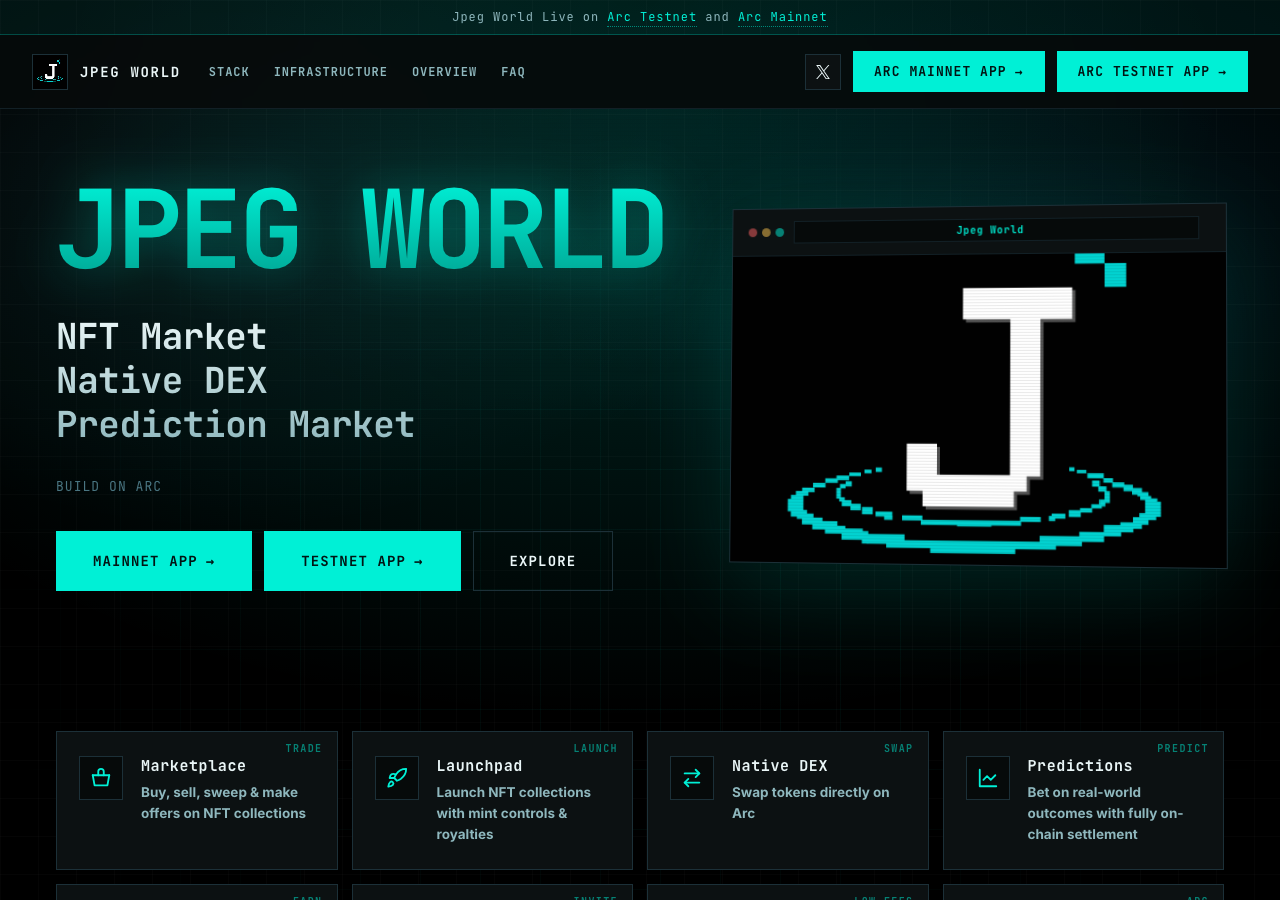
Jpeg World in the browser during the run

By the numbers

8 of 10
scenarios passed, 2 failed
50
browser actions
19
screenshots
67
model calls
4.9
minutes
10
scenarios
8
passed
2
failed
0
blocked
2
issues
medium2

Walkthrough

Every scenario DeepQA drove in the browser, in plan order, with the 18 screenshots it captured along the way. A passing scenario is evidence too.

  1. S1
    Verify landing page load and title

    2 steps, 1 screenshot

    pass
    S1-1.png
    S1 · Verify landing page load and title
    • Loaded https://jpegworld.io/ and verified general content rendering including hero headers, navigation, features, and footer.
    • Verified document title matches 'Jpeg World · NFT Market, DEX & Prediction Markets on Arc' and landing page loaded successfully.
    • The landing page https://jpegworld.io/ loaded cleanly with all expected sections, headers, and links.
    • The document title exactly matches 'Jpeg World · NFT Market, DEX & Prediction Markets on Arc'.
  2. S2
    Verify Mainnet App launch link

    3 steps, 2 screenshots

    pass
    S2-1.png
    S2 · Verify Mainnet App launch link
    S2-3.png
    S2 · Verify Mainnet App launch link
    • Landing page loaded displaying navigation links including 'Arc Mainnet App' pointing to https://app.jpegworld.io/.
    • Clicking 'Arc Mainnet App' navigated successfully to https://app.jpegworld.io/ without errors.
    • The 'Arc Mainnet App' link on the landing page successfully navigates to the mainnet DApp subdomain (https://app.jpegworld.io/).
    • The destination page loads properly with title 'JPEG WORLD · The consumer layer for ARC Network' and displays all DApp navigation items.
  3. S3
    Verify Testnet App launch link

    3 steps, 2 screenshots

    pass
    S3-1.png
    S3 · Verify Testnet App launch link
    S3-3.png
    S3 · Verify Testnet App launch link
    • Loaded jpegworld.io landing page with navigation links to Mainnet and Testnet apps.
    • Clicked the 'Arc Testnet App' link and successfully navigated to https://testnet.jpegworld.io/.
    • Navigating to https://jpegworld.io/ and clicking the 'Arc Testnet App' link navigates properly to https://testnet.jpegworld.io/ without errors.
  4. S4
    Test Stack anchor link navigation

    3 steps, 2 screenshots

    fail
    S4-1.png
    S4 · Test Stack anchor link navigation
    S4-3.png
    S4 · Test Stack anchor link navigation
    • Loaded https://jpegworld.io/ and observed the initial landing page with navigation links including 'Stack'.
    • Clicked the 'Stack' link in the top navigation; URL hash updated to #stack, but no Stack section exists on the page and the viewport did not scroll.
    • Loaded https://jpegworld.io/ and observed the landing page layout with navigation links including 'Stack' (#stack).
    • Clicked the 'Stack' navigation link, which updated the URL hash to '#stack' but failed to scroll the viewport or show a Stack section.
  5. S5
    Test Infrastructure anchor link navigation

    3 steps, 2 screenshots

    pass
    S5-1.png
    S5 · Test Infrastructure anchor link navigation
    S5-4.png
    S5 · Test Infrastructure anchor link navigation
    • Loaded https://jpegworld.io/ and captured initial page state before anchor navigation.
    • Clicked 'Infrastructure' anchor link in header navigation; URL updated to https://jpegworld.io/#infrastructure and viewport scrolled to the infrastructure section.
    • Successfully navigated to https://jpegworld.io/.
    • Clicked the 'Infrastructure' navigation link (#infrastructure).
    • The URL hash updated to #infrastructure and the page scrolled to the target section.
  6. S6
    Test Overview anchor link navigation

    3 steps, 2 screenshots

    pass
    S6-1.png
    S6 · Test Overview anchor link navigation
    S6-3.png
    S6 · Test Overview anchor link navigation
    • Loaded https://jpegworld.io/ and observed top navigation bar with anchor links.
    • Clicked Overview anchor link which successfully navigated to #overview in the URL and scrolled to the Overview section.
    • Navigated to https://jpegworld.io/ and located the Overview link in the top navigation bar.
    • Clicked the Overview anchor link, updating the URL hash to #overview and scrolling to the Overview section as expected.
  7. S7
    Test FAQ anchor link navigation

    3 steps, 2 screenshots

    fail
    S7-1.png
    S7 · Test FAQ anchor link navigation
    S7-3.png
    S7 · Test FAQ anchor link navigation
    • Loaded homepage and observed the FAQ navigation link in the header.
    • Clicked the FAQ anchor link; the URL changed to /#faq, but no FAQ section or element with id="faq" exists on the page, so no scroll or FAQ content was displayed.
    • Navigated to https://jpegworld.io/ and located the 'FAQ' link in the navigation menu.
    • Clicked the 'FAQ' link which set the URL hash to '#faq'.
    • Observed that no FAQ section or element with id 'faq' exists in the DOM, so the viewport did not scroll to show any FAQ content.
  8. S8
    Test Explore anchor button

    3 steps, 2 screenshots

    pass
    S8-1.png
    S8 · Test Explore anchor button
    S8-3.png
    S8 · Test Explore anchor button
    • Loaded the landing page at https://jpegworld.io/ showing the hero section with the Explore anchor button.
    • Clicked the Explore anchor button, updating the URL hash to #infrastructure and scrolling down to the infrastructure/features exploration section.
    • Navigated to https://jpegworld.io/ and confirmed the Explore button is present in the hero section.
    • Clicked the Explore anchor button and observed the URL change to https://jpegworld.io/#infrastructure and the viewport jump/scroll to the targeted exploration section.
  9. S9
    Verify 404 handling on unknown paths

    2 steps, 1 screenshot

    pass
    S9-2.png
    S9 · Verify 404 handling on unknown paths
    • Navigated to https://jpegworld.io/trade and observed a 404 Not Found error page with title '404 Not Found' and headings '404' and 'Not Found'.
    • Navigating to https://jpegworld.io/trade correctly displays a '404 Not Found' error page with the title '404 Not Found' and server error description.
  10. S10
    Verify Follow on X link

    3 steps, 2 screenshots

    pass
    S10-1.png
    S10 · Verify Follow on X link
    S10-3.png
    S10 · Verify Follow on X link
    • Observed 'Follow on X' links on the homepage with target URL https://x.com/jpeg_world_.
    • Verified the 'Follow on X' links in header, mobile navigation drawer, and footer point to the valid X profile URL https://x.com/jpeg_world_.

Issues

Findings that survived the Critic's audit. Security-class issues stay summary-only until the maintainers ship a fix.

mediumconfirmed ✓functionalF1 · S4

Navigation link 'Stack' (#stack) does not scroll viewport to any Stack section

The observations clearly show that the anchor link '#stack' does not match any element on the page, leaving it non-functional.

Expected

The page should contain a Stack section and scroll the viewport to display the Stack section upon clicking the 'Stack' navigation link.

Actual

The URL hash updates to #stack, but no element or section with id 'stack' exists on the page and the viewport does not scroll.

Repro · 3 steps
  1. Navigate to https://jpegworld.io/
  2. Click the 'Stack' anchor link in the header navigation
  3. Observe the viewport position and content
mediumconfirmed ✓functionalF2 · S7

Header FAQ anchor link points to a non-existent section

The observations clearly show that the anchor link '#faq' points to a section that does not exist in the DOM, failing to scroll the page.

Expected

The page should scroll down to display an FAQ section corresponding to the #faq anchor.

Actual

The URL updates to https://jpegworld.io/#faq but no scroll occurs and no FAQ section exists on the page.

Repro · 3 steps
  1. Navigate to https://jpegworld.io/
  2. Click the 'FAQ' anchor link in the header navigation
  3. Observe viewport position and page content

Wallet activity

DeepQA injected a test wallet into the browser and recorded every request the app sent to it. Testnet funds only.

address
0x28C278…7c39AF
chain
Arc Testnet
browsers opened
2
read requests forwarded
0
signing requests
0

Critic audit

An adversarial second pass over every finding before it reaches the report.

2
findings reviewed
0
re-verified live
0
withdrawn
  • F1confirmed ✓

    The observations clearly show that the anchor link '#stack' does not match any element on the page, leaving it non-functional.

  • F2confirmed ✓

    The observations clearly show that the anchor link '#faq' points to a section that does not exist in the DOM, failing to scroll the page.

  • The 404 console error observed in S9 is a deliberate outcome of testing the handling of unknown paths.

Report

QA report: external/jpegworld.io at hosted

The landing page renders and links correctly, but header navigation links for the Stack and FAQ sections point to missing anchor targets.

Testing covered 10 scenarios across the landing page, verifying initial page loads, external app launcher links, social links, 404 route handling, and in-page anchor navigation.

Two navigation issues were confirmed during testing. Both the 'Stack' link and the 'FAQ' link append their respective hash targets (#stack and #faq) to the URL, but the page does not scroll because the target elements do not exist in the document.

While general landing page features and other section links such as Infrastructure and Overview operate without issue, these missing anchors leave user navigation incomplete.

Run summary
MetricCount
Scenarios executed10
Passed8
Failed2
Blocked0
Findings raised2
Issues after the audit2
Withdrawn by the audit0
Critical / high / medium / low0 / 0 / 2 / 0

Target: https://jpegworld.io/ · Testing level: deep_feature · Stack: unknown

Issues
Medium severity
F1 · Navigation link 'Stack' (#stack) does not scroll viewport to any Stack section

Severity: medium · Type: functional · Verdict: confirmed · Scenario: S4

The observations clearly show that the anchor link '#stack' does not match any element on the page, leaving it non-functional.

Expected: The page should contain a Stack section and scroll the viewport to display the Stack section upon clicking the 'Stack' navigation link.

Actual: The URL hash updates to #stack, but no element or section with id 'stack' exists on the page and the viewport does not scroll.

Steps to reproduce:

  1. Navigate to https://jpegworld.io/
  2. Click the 'Stack' anchor link in the header navigation
  3. Observe the viewport position and content

Evidence: screenshots/S4-1.png, screenshots/S4-3.png

F2 · Header FAQ anchor link points to a non-existent section

Severity: medium · Type: functional · Verdict: confirmed · Scenario: S7

The observations clearly show that the anchor link '#faq' points to a section that does not exist in the DOM, failing to scroll the page.

Expected: The page should scroll down to display an FAQ section corresponding to the #faq anchor.

Actual: The URL updates to https://jpegworld.io/#faq but no scroll occurs and no FAQ section exists on the page.

Steps to reproduce:

  1. Navigate to https://jpegworld.io/
  2. Click the 'FAQ' anchor link in the header navigation
  3. Observe viewport position and page content

Evidence: screenshots/S7-1.png, screenshots/S7-3.png

Scenario results
ScenarioPriorityResultIssues
S1 Verify landing page load and titlehighpassnone
S2 Verify Mainnet App launch linkhighpassnone
S3 Verify Testnet App launch linkhighpassnone
S4 Test Stack anchor link navigationmediumfailF1
S5 Test Infrastructure anchor link navigationmediumpassnone
S6 Test Overview anchor link navigationmediumpassnone
S7 Test FAQ anchor link navigationmediumfailF2
S8 Test Explore anchor buttonmediumpassnone
S9 Verify 404 handling on unknown pathslowpassnone
S10 Verify Follow on X linklowpassnone
The audit

The Critic reviewed 2 findings and re-verified 0 of them live in the browser, replaying the reported steps on a fresh page.

  • The 404 console error observed in S9 is a deliberate outcome of testing the handling of unknown paths.
What to fix first
  1. Add the missing 'stack' element ID to the landing page or update the 'Stack' header link destination (F1).
  2. Add the missing 'faq' element ID or remove the 'FAQ' navigation link if the content is unavailable (F2).
Coverage and caveats

In scope: Landing page initial load; External DApp launch links; Internal anchor link navigation; 404 error page handling.

Not covered: Web3 wallet interactions (the intake mentioned wallet capabilities, but the landing page AppMap reveals no wallet connection flow on this origin); DEX, NFT marketplace, and other app functionality (hosted on separate subdomains according to the AppMap).

  • Testnet and Mainnet app links point to external subdomains, and the tester can verify navigation by observing the new URL.
  • The 404 console error on load is a minor static asset failure that does not block core page rendering.
By the numbers
MetricValue
Scenarios8 passed, 2 failed, 0 blocked of 10 (28 planned steps)
Browser actions50 (10 clicks, 0 inputs, 14 navigations, 26 snapshots)
Screenshots19 (1 explore, 18 scenario, 0 critic), 18 captioned
Coverage2 pages, 0 forms, 2 flows, 1 console errors
Audit2 findings, 0 re-verified live, 2 confirmed, 0 promoted, 0 withdrawn
Model calls67
Tokens256,294 input, 4,942 output, 7,327 thinking
Time5 min
Wallet0 transactions, 0 signatures, 0 refusals on chain 5042002
StageCallsInputOutputThinkingSeconds
explore730,3418351,08143
plan12,6651,5071,40523
test57218,3232,1773,845215
critique13,5521894817
report11,4132345158

Run log

stagecallstokenstime
Explore732.3k43s
Plan15.6k23s
Test57224.3k3m 35s
Critique14.2k7s
Report12.2k8s
Total67268.6k4m 56s
Intake
Explore
Plan
Test
Critique
Report
  • 15:38:07Zexploreexplore started
  • 15:43:03ZexploreExplored / (30 controls, 0 forms)
  • 15:43:03ZexploreExplored /trade (0 controls, 0 forms)
  • 15:43:03ZexploreMapped 2 pages, 0 forms, 2 flows in 7 turns.
  • 15:43:03Zexploreexplore completed in 43s.
  • 15:43:03Zplanplan started
  • 15:43:03ZplanPlanned 10 scenarios (3 high, 5 medium, 2 low).
  • 15:43:03Zplanplan completed in 23s.
  • 15:43:03Ztesttest started
  • 15:43:03ZtestS1 executed (pass)
  • 15:43:03ZtestS2 executed (pass)
  • 15:43:03ZtestS3 executed (pass)
  • 15:43:03ZtestS4 executed (fail), 1 finding
  • 15:43:03ZtestS5 executed (pass)
  • 15:43:03ZtestS6 executed (pass)
  • 15:43:03ZtestS7 executed (fail), 1 finding
  • 15:43:03ZtestS8 executed (pass)
  • 15:43:03ZtestS9 executed (pass)
  • 15:43:03ZtestS10 executed (pass)
  • 15:43:03ZtestExecuted 10 scenarios: 8 passed, 2 failed, 0 blocked, 2 findings.
  • 15:43:03Ztesttest completed in 215s.
  • 15:43:03Zcritiquecritique started
  • 15:43:03ZcritiqueReviewed 2 findings; 0 possible defects spotted in passed scenarios.
  • 15:43:03ZcritiqueAudit complete: 2 confirmed, 0 withdrawn, 0 promoted, 0 re-verified live.
  • 15:43:03Zcritiquecritique completed in 7s.
  • 15:43:03Zreportreport started
  • 15:43:03ZreportReported 2 issues (0 critical, 0 high, 2 medium, 0 low) from 2 findings.
  • 15:43:03Zreportreport completed in 8s.

Put an agent team on your next pull request.

Connect a repo, dispatch a Run, and read an audited, evidence-backed report the same day.