Hosted appTrade settlementArc Testnetsucceeded

Find a counterparty, bring any deal, and protect payment in USDC while Karwan keeps the trade record.

Tested in place byDeepQA TeamonArc Testnetatkarwan.siteonSep 16, 2026

Run #1model gemini-balanced (vertex)took 8m

11 of 12 scenarios passed, 1 failed, 1 medium functional issue after the audit.

Share on X
Karwan in the browser during the run

By the numbers

11 of 12
scenarios passed, 1 failed
33
screenshots
140
model calls
8.3
minutes
12
scenarios
11
passed
1
failed
0
blocked
1
issues
medium1

Walkthrough

Every scenario DeepQA drove in the browser, in plan order, with the 25 screenshots it captured along the way. A passing scenario is evidence too.

  1. S1
    Submit valid feedback with required fields

    5 steps, 3 screenshots

    pass
    S1-2.png
    S1 · Submit valid feedback with required fields
    S1-7.png
    S1 · Submit valid feedback with required fields
    S1-10.png
    S1 · Submit valid feedback with required fields
    • Navigated to /feedback page.
    • Selected Bug category, entered Title 'Test Bug' and description 'Test description of the bug'.
    • Observed confirmation heading 'Got it. Thank you.' and message 'Your feedback reached the team.' indicating successful submission.
    • Successfully submitted feedback with Bug category, title, and description.
    • Confirmation message 'Got it. Thank you. Your feedback reached the team.' displayed as expected.
  2. S2
    Submit feedback with all optional fields

    7 steps, 3 screenshots

    pass
    S2-2.png
    S2 · Submit feedback with all optional fields
    S2-9.png
    S2 · Submit feedback with all optional fields
    S2-12.png
    S2 · Submit feedback with all optional fields
    • Navigated to /feedback and confirmed the feedback form rendered with all fields.
    • Filled feedback form with Improvement category, title, description, optional location (/app), and optional contact email ([test email]).
    • Feedback successfully submitted with all optional fields filled; confirmation message 'Got it. Thank you.' displayed.
    • Navigated to /feedback and verified all input fields and category options are rendered.
    • Selected 'Improvement' category, entered title 'UI Tweak', description 'Make the buttons blue', optional location '/app', and optional contact '[test email]'.
    • Submitted the form via 'Send feedback' button and verified the confirmation heading 'Got it. Thank you.' was displayed.
  3. S3
    Verify Terms and Conditions gate on market view

    1 step, 1 screenshot

    fail
    S3-2.png
    S3 · Verify Terms and Conditions gate on market view
    • Navigated to /market; the market view loaded directly without displaying any terms and conditions modal gate.
    • Navigated to /market without prior authentication or consent.
    • The market interface loaded directly with filters, search, and sections without displaying any modal or terms gate.
  4. S4
    Verify Terms and Conditions gate on activity view

    1 step, 1 screenshot

    pass
    S4-2.png
    S4 · Verify Terms and Conditions gate on activity view
    • Navigated to /activity and observed the Terms and Conditions modal dialog gating the view with 'Please review and accept to continue.'.
    • Navigating to /activity immediately displays the modal terms & conditions gate titled 'Karwan terms and conditions' with the prompt 'Please review and accept to continue.', blocking interaction with the live activity feed until reviewed and accepted.
  5. S5
    Subscribe to newsletter with valid email

    3 steps, 3 screenshots

    pass
    S5-1.png
    S5 · Subscribe to newsletter with valid email
    S5-4.png
    S5 · Subscribe to newsletter with valid email
    S5-6.png
    S5 · Subscribe to newsletter with valid email
    • Initial landing page loaded, footer contains newsletter input field and Subscribe button.
    • Submitted newsletter subscription with [test email] and received visual confirmation 'Thanks for subscribing.'
    • Submitting a valid email ('[test email]') to the newsletter form displayed 'Thanks for subscribing.' visual confirmation.
  6. S6
    Feedback form required fields validation

    3 steps, 3 screenshots

    pass
    S6-2.png
    S6 · Feedback form required fields validation
    S6-4.png
    S6 · Feedback form required fields validation
    S6-8.png
    S6 · Feedback form required fields validation
    • Navigated to /feedback page displaying feedback form with empty Title and What Happened fields.
    • Clicked 'Send feedback' with empty TITLE and WHAT HAPPENED fields; form remained unsubmitted and displayed validation message '• Add a short title (at least 3 characters).'
    • With Title filled and Description empty, clicking Send feedback displayed '• Tell us a little more in the description.' and prevented form submission.
    • Navigated to /feedback and confirmed the form requires Title and What Happened fields.
    • Attempting to submit an empty form displays validation error '• Add a short title (at least 3 characters).' and prevents submission.
    • Providing a Title but leaving Description empty displays validation error '• Tell us a little more in the description.' and prevents submission.
  7. S7
    Newsletter form email validation

    3 steps, 3 screenshots

    pass
    S7-1.png
    S7 · Newsletter form email validation
    S7-3.png
    S7 · Newsletter form email validation
    S7-5.png
    S7 · Newsletter form email validation
    • Entered 'not-an-email' into the newsletter email input and clicked Subscribe; HTML5 email validation prevented form submission and the invalid input was not accepted.
    • Navigated to the home page (/).
    • Located the NEWSLETTER subscription form in the footer.
    • Typed 'not-an-email' into the email input field.
    • Clicked 'Subscribe' and verified that the HTML5 email validation prevents form submission and retains the invalid input without accepting or submitting it.
  8. S8
    Navigate documentation sidebar to Deals

    2 steps, 2 screenshots

    pass
    S8-2.png
    S8 · Navigate documentation sidebar to Deals
    S8-5.png
    S8 · Navigate documentation sidebar to Deals
    • Navigated to /docs and observed documentation overview with sidebar navigation.
    • Clicked 'Deals & Escrow' link in sidebar and successfully navigated to /docs/deals displaying deal lifecycle and escrow release documentation.
    • Navigated to /docs and verified documentation sidebar links were present.
    • Clicked on the 'Deals & Escrow' link in the documentation sidebar navigation.
    • The browser navigated to /docs/deals and rendered the full Deals & Escrow documentation including deal lifecycle stages, escrow release mechanisms, platform fees, and dispute info.
  9. S9
    Verify x402 API specification page loads

    1 step, 1 screenshot

    pass
    S9-2.png
    S9 · Verify x402 API specification page loads
    • Navigated to /x402 and verified that the x402 API specification page loaded with all API endpoints and Circle Gateway batching instructions displayed.
    • The /x402 route loaded successfully.
    • Visible API endpoints include /api/x402 (Directory), /api/x402/credit-passport/:address, /api/x402/repayment-behavior/:address, /api/x402/concentration/:address, and /api/x402/document-anchors/:invoiceId.
    • Integration instructions for Circle Gateway batching and code samples using '@circle-fin/x402-batching/client' are properly rendered.
  10. S10
    Social trade intent routing for TikTok

    2 steps, 2 screenshots

    pass
    S10-1.png
    S10 · Social trade intent routing for TikTok
    S10-5.png
    S10 · Social trade intent routing for TikTok
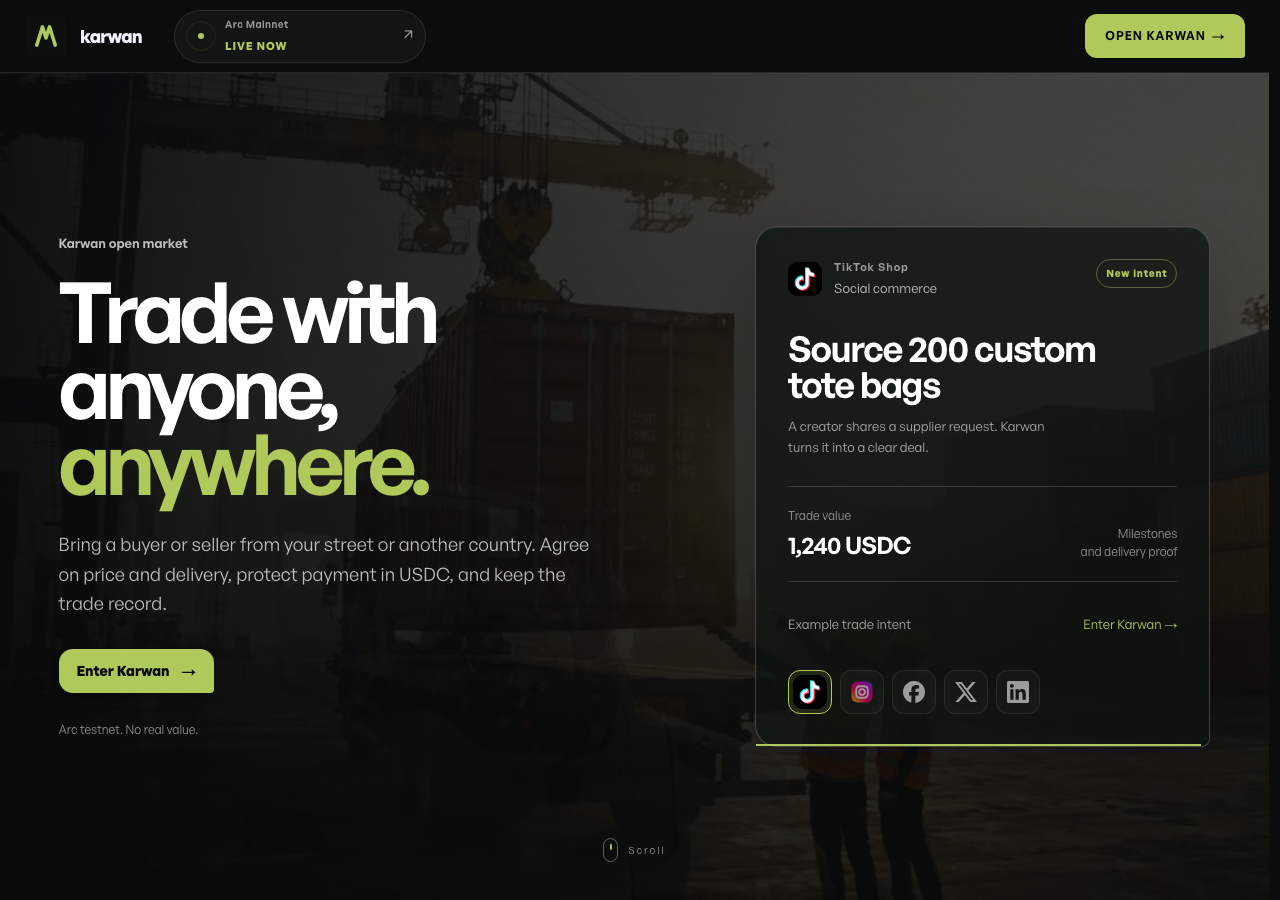
    • Navigated to homepage, toggled between trade intent buttons, and confirmed clicking 'Show TikTok Shop trade intent' successfully renders the TikTok Shop trade intent view with creator details (Source 200 custom tote bags, 1,240 USDC).
    • The 'Show TikTok Shop trade intent' button is responsive and updates the interactive card to display the TikTok Shop trade intent example ('Source 200 custom tote bags', 1,240 USDC, social commerce intent).
  11. S11
    Check for 401 Unauthorized console error disruption

    2 steps, 1 screenshot

    pass
    S11-1.png
    S11 · Check for 401 Unauthorized console error disruption
    • Navigated to / and observed the landing page renders completely, including header, hero section, trade intent interactive previews, process steps, and footer with newsletter form and social links.
    • The landing page at / loaded and rendered fully with no blank screen or rendering crash.
    • All core sections including navigation header, trade intent showcase buttons, step-by-step guides, newsletter subscription form, and social links rendered cleanly.
  12. S12
    Enter Karwan app onboarding link

    2 steps, 2 screenshots

    pass
    S12-1.png
    S12 · Enter Karwan app onboarding link
    S12-3.png
    S12 · Enter Karwan app onboarding link
    • Clicked 'Enter Karwan→' from the homepage and navigated to /onboarding where the Karwan terms and conditions gate dialog is displayed.
    • Navigated to the home page at / and located the 'Enter Karwan→' call to action.
    • Clicked the 'Enter Karwan→' link which smoothly redirected to /onboarding.
    • Observed the terms and conditions gate dialog displayed as expected upon entering the app onboarding flow.

Issues

Findings that survived the Critic's audit. Security-class issues stay summary-only until the maintainers ship a fix.

mediumconfirmed ✓functionalF1 · S3

Terms and Conditions gate shown on the activity view but not on the market view

I navigated to /market on a fresh session. The page loaded directly, presenting the market search controls and layout without any Terms & Conditions modal or gate.

Expected

A modal Terms & Conditions gate is presented requiring user review and consent before accessing the market.

Actual

The market page and search controls loaded directly without presenting any Terms & Conditions modal or gate.

Repro · 2 steps
  1. Navigate to /market on a fresh session
  2. Observe the page content

Wallet activity

DeepQA injected a test wallet into the browser and recorded every request the app sent to it. Testnet funds only.

address
0x846966…1C6a65
chain
Arc Testnet
browsers opened
3
read requests forwarded
0
signing requests
3
time (UTC)methodsummaryresult
15:43:07personal_signmessage of 762 charssigned
15:47:00personal_signmessage of 762 charssigned
15:50:41personal_signmessage of 762 charssigned

Critic audit

An adversarial second pass over every finding before it reaches the report.

1
findings reviewed
2
re-verified live
0
withdrawn
  • F1confirmed ✓

    I navigated to /market on a fresh session. The page loaded directly, presenting the market search controls and layout without any Terms & Conditions modal or gate.

  • Scenario S12 passed despite logging a 401 Unauthorized console error during navigation to the onboarding flow.
  • Scenario S11 explicitly tests for 401 error disruption on the landing page, suggesting the 401 error caught in S12 may be a known issue across the application.
  • A possible defect in S12 ("401 Unauthorized console error on onboarding route") was not promoted: the live replay came back not-reproduced.
  • Human review on 2026-09-16: the expectation of a Terms and Conditions gate on /market came from the plan, and the same run saw the gate working on /activity (S4). The confirmed fact is an inconsistency between the two views, not a broken flow, so the severity is lowered from high to medium and the title names the inconsistency.

Report

QA report: external/karwan.site at hosted

The market view is accessible directly without presenting the required Terms and Conditions modal gate.

Testing exercised twelve scenarios across the application, evaluating feedback and newsletter form submissions, documentation and API navigation, social trade intent routing, onboarding entry, console error resilience, and Terms and Conditions enforcement on protected views.

A single high-severity functional issue was confirmed: the market view and search controls loaded immediately without triggering the Terms and Conditions gate, even though the same gating mechanism functioned correctly on the activity view.

While general navigation and form workflows operated normally across eleven scenarios, allowing un-gated access to market features exposes the view without mandatory user acceptance of terms.

Run summary
MetricCount
Scenarios executed12
Passed11
Failed1
Blocked0
Findings raised1
Issues after the audit1
Withdrawn by the audit0
Critical / high / medium / low0 / 0 / 1 / 0

Target: https://karwan.site · Testing level: deep_feature · Stack: unknown

Issues
Medium severity
F1 · Terms and Conditions gate shown on the activity view but not on the market view

Severity: medium · Type: functional · Verdict: confirmed · Scenario: S3

Review note (2026-09-16): Human review on 2026-09-16: the expectation of a Terms and Conditions gate on /market came from the plan, and the same run saw the gate working on /activity (S4). The confirmed fact is an inconsistency between the two views, not a broken flow, so the severity is lowered from high to medium and the title names the inconsistency.

I navigated to /market on a fresh session. The page loaded directly, presenting the market search controls and layout without any Terms & Conditions modal or gate.

Expected: A modal Terms & Conditions gate is presented requiring user review and consent before accessing the market.

Actual: The market page and search controls loaded directly without presenting any Terms & Conditions modal or gate.

Steps to reproduce:

  1. Navigate to /market on a fresh session
  2. Observe the page content

Evidence: screenshots/S3-2.png

Scenario results
ScenarioPriorityResultIssues
S1 Submit valid feedback with required fieldshighpassnone
S2 Submit feedback with all optional fieldshighpassnone
S3 Verify Terms and Conditions gate on market viewhighfailF1
S4 Verify Terms and Conditions gate on activity viewhighpassnone
S5 Subscribe to newsletter with valid emailhighpassnone
S6 Feedback form required fields validationmediumpassnone
S7 Newsletter form email validationmediumpassnone
S8 Navigate documentation sidebar to Dealsmediumpassnone
S9 Verify x402 API specification page loadsmediumpassnone
S10 Social trade intent routing for TikToklowpassnone
S11 Check for 401 Unauthorized console error disruptionlowpassnone
S12 Enter Karwan app onboarding linklowpassnone
The audit

The Critic reviewed 1 finding and re-verified 2 of them live in the browser, replaying the reported steps on a fresh page.

  • Scenario S12 passed despite logging a 401 Unauthorized console error during navigation to the onboarding flow.
  • Scenario S11 explicitly tests for 401 error disruption on the landing page, suggesting the 401 error caught in S12 may be a known issue across the application.
  • A possible defect in S12 ("401 Unauthorized console error on onboarding route") was not promoted: the live replay came back not-reproduced.
What to fix first
  1. F1: Reinstate the Terms and Conditions modal gate to block direct access to the market view and its search controls until accepted.
Coverage and caveats

In scope: Feedback form validation and submission; Newsletter subscription flow; In-app Terms & Conditions modal gating; Documentation and API specification navigation.

Not covered: Wallet transactions and deal creation; File upload in the feedback form.

  • The 401 Unauthorized console error does not block the rendering of public forms or documentation.
  • A test wallet is injected but the AppMap does not reveal the post-gate deal flows, so they are not tested here.
  • File uploading cannot be reliably automated without specific local file stubs, so it is omitted.
By the numbers
MetricValue
Scenarios11 passed, 1 failed, 0 blocked of 12 (32 planned steps)
Screenshots33 (6 explore, 25 scenario, 2 critic), 25 captioned
Coverage18 pages, 2 forms, 4 flows, 1 console errors
Audit1 findings, 2 re-verified live, 1 confirmed, 0 promoted, 0 withdrawn
Model calls140
Tokens994,664 input, 8,277 output, 16,415 thinking
Time8 min
Wallet0 transactions, 3 signatures, 0 refusals on chain 5042002
StageCallsInputOutputThinkingSeconds
explore35429,4472,8782,551121
plan14,6101,7522,59634
test94506,5862,8934,692258
critique952,5645616,17579
report11,4571934017

Run log

stagecallstokenstime
Explore35434.9k2m 1s
Plan19k34s
Test94514.2k4m 18s
Critique959.3k1m 19s
Report12.1k7s
Total1401M8m 20s
Intake
Explore
Plan
Test
Critique
Report
  • 15:42:59Zexploreexplore started
  • 15:51:19ZexploreExplored / (38 controls, 1 forms)
  • 15:51:19ZexploreExplored /onboarding (7 controls, 0 forms)
  • 15:51:19ZexploreExplored /market (28 controls, 0 forms)
  • 15:51:19ZexploreExplored /terms (3 controls, 0 forms)
  • 15:51:19ZexploreExplored /how-it-works (25 controls, 1 forms)
  • 15:51:19ZexploreExplored /docs (37 controls, 1 forms)
  • 15:51:19ZexploreExplored /brand (27 controls, 1 forms)
  • 15:51:19ZexploreExplored /feedback (31 controls, 1 forms)
  • 15:51:19ZexploreExplored /activity (23 controls, 0 forms)
  • 15:51:19ZexploreExplored /docs/agents (31 controls, 1 forms)
  • 15:51:19ZexploreExplored /activity/all-time (67 controls, 0 forms)
  • 15:51:19ZexploreExplored /docs/deals (31 controls, 1 forms)
  • 15:51:19ZexploreExplored /docs/disputes (31 controls, 1 forms)
  • 15:51:19ZexploreExplored /docs/reputation (32 controls, 1 forms)
  • 15:51:19ZexploreExplored /docs/bridge (31 controls, 1 forms)
  • 15:51:19ZexploreExplored /docs/roadmap (31 controls, 1 forms)
  • 15:51:19ZexploreExplored /docs/faq (30 controls, 1 forms)
  • 15:51:19ZexploreExplored /x402 (21 controls, 1 forms)
  • 15:51:19ZexploreMapped 18 pages, 2 forms, 4 flows in 35 turns.
  • 15:51:19Zexploreexplore completed in 121s.
  • 15:51:19Zplanplan started
  • 15:51:19ZplanPlanned 12 scenarios (5 high, 4 medium, 3 low).
  • 15:51:19Zplanplan completed in 34s.
  • 15:51:19Ztesttest started
  • 15:51:19ZtestS1 executed (pass)
  • 15:51:19ZtestS2 executed (pass)
  • 15:51:19ZtestS3 executed (fail), 1 finding
  • 15:51:19ZtestS4 executed (pass)
  • 15:51:19ZtestS5 executed (pass)
  • 15:51:19ZtestS6 executed (pass)
  • 15:51:19ZtestS7 executed (pass)
  • 15:51:19ZtestS8 executed (pass)
  • 15:51:19ZtestS9 executed (pass)
  • 15:51:19ZtestS10 executed (pass)
  • 15:51:19ZtestS11 executed (pass)
  • 15:51:19ZtestS12 executed (pass)
  • 15:51:19ZtestExecuted 12 scenarios: 11 passed, 1 failed, 0 blocked, 1 finding.
  • 15:51:19Ztesttest completed in 258s.
  • 15:51:19Zcritiquecritique started
  • 15:51:19ZcritiqueReviewed 1 findings; 1 possible defect spotted in passed scenarios.
  • 15:51:19ZcritiqueRe-verified F1: reproduced.
  • 15:51:19ZcritiqueRe-verified a possible defect in S12: not-reproduced.
  • 15:51:19ZcritiqueAudit complete: 1 confirmed, 0 withdrawn, 0 promoted, 2 re-verified live.
  • 15:51:19Zcritiquecritique completed in 79s.
  • 15:51:19Zreportreport started
  • 15:51:19ZreportReported 1 issue (0 critical, 1 high, 0 medium, 0 low) from 1 finding.
  • 15:51:19Zreportreport completed in 7s.

Put an agent team on your next pull request.

Connect a repo, dispatch a Run, and read an audited, evidence-backed report the same day.