Hosted appCross-chain intentsArc Testnetsucceeded

Liqdx is an intelligent AI-driven cross-chain agent for Ethereum, Solana, Base, Arbitrum, and Avalanche.

Tested in place byDeepQA TeamonArc Testnetatliqdx.app/onSep 17, 2026

Run #1model gemini-balanced (vertex)took 4m

7 of 10 scenarios passed, 3 failed, 3 issues after the audit, 2 medium.

Share on X
Liqdx in the browser during the run

By the numbers

7 of 10
scenarios passed, 3 failed
61
browser actions
24
screenshots
79
model calls
4.3
minutes
10
scenarios
7
passed
3
failed
0
blocked
3
issues
medium2low1

Walkthrough

Every scenario DeepQA drove in the browser, in plan order, with the 22 screenshots it captured along the way. A passing scenario is evidence too.

  1. S1
    Verify landing page load and metadata

    2 steps, 1 screenshot

    pass
    S1-1.png
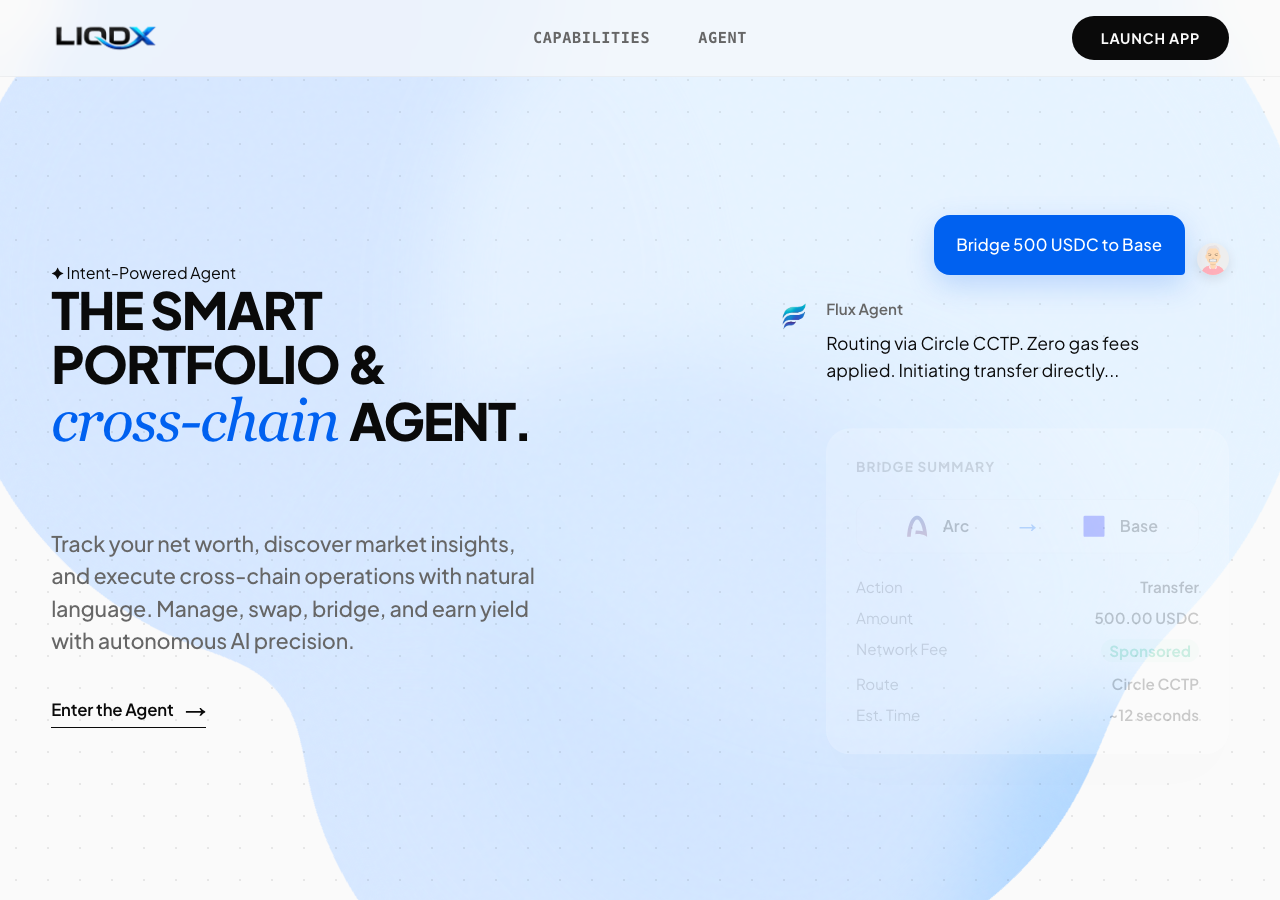
    S1 · Verify landing page load and metadata
    • The landing page at https://liqdx.app/ loaded successfully with all core sections and the document title is 'Liqdx | Intent-Powered Cross-Chain Wallet'.
    • Navigated to https://liqdx.app/ and verified that the page loads completely without errors.
    • Verified that the document title is exactly 'Liqdx | Intent-Powered Cross-Chain Wallet'.
    • Observed hero section, agent execution cards, feature highlights (01-04), and footer navigation render properly.
  2. S2
    Navigate to testnet app via Launch App button

    2 steps, 2 screenshots

    pass
    S2-1.png
    S2 · Navigate to testnet app via Launch App button
    S2-3.png
    S2 · Navigate to testnet app via Launch App button
    • Landed on Liqdx home page with 'Launch App' link visible in navigation.
    • Verified that the 'Launch App' button is an anchor pointing to https://testnet.liqdx.app.
    • The 'Launch App' button in the navigation correctly points to the testnet URL https://testnet.liqdx.app.
    • Clicking the link triggers navigation toward https://testnet.liqdx.app as specified in the target href.
  3. S3
    Navigate to testnet app via Enter the Agent button

    2 steps, 2 screenshots

    pass
    S3-1.png
    S3 · Navigate to testnet app via Enter the Agent button
    S3-3.png
    S3 · Navigate to testnet app via Enter the Agent button
    • Verified that 'Enter the Agent→' CTA button links directly to https://testnet.liqdx.app.
    • Navigated to https://liqdx.app/ and inspected the 'Enter the Agent→' CTA button.
    • The 'Enter the Agent→' CTA button is properly configured with target URL https://testnet.liqdx.app.
  4. S4
    In-page navigation to Capabilities section

    2 steps, 2 screenshots

    pass
    S4-1.png
    S4 · In-page navigation to Capabilities section
    S4-3.png
    S4 · In-page navigation to Capabilities section
    • Navigated to the Capabilities section via the in-page anchor link #capabilities without page reload or 404.
    • Clicking the 'Capabilities' link updated the URL hash to #capabilities and scrolled smoothly to the Capabilities/Features section without full page reload or 404.
  5. S5
    In-page navigation to Agent section

    2 steps, 2 screenshots

    pass
    S5-1.png
    S5 · In-page navigation to Agent section
    S5-3.png
    S5 · In-page navigation to Agent section
    • Loaded the Liqdx landing page with Agent navigation link visible in the header.
    • Clicked the Agent navigation link; URL updated to https://liqdx.app/#agent and the page scrolled to the Agent architecture section showing Flux Agent, Atlas Agent, Oracle Agent, and Agent Core.
    • The 'Agent' header navigation link correctly performs in-page navigation to the #agent section displaying the agent architecture (Flux Agent, Atlas Agent, Oracle Agent, Agent Core).
    • No page reload or 404 errors occurred.
  6. S6
    Return to top via Logo link

    3 steps, 3 screenshots

    pass
    S6-1.png
    S6 · Return to top via Logo link
    S6-3.png
    S6 · Return to top via Logo link
    S6-5.png
    S6 · Return to top via Logo link
    • Loaded landing page at https://liqdx.app/ with top navigation bar visible.
    • Clicked 'Agent' navigation link, scrolling down to #agent section.
    • Clicked the logo link (ref e14, url=#), which smoothly returned the URL and viewport to the top of the landing page.
    • Navigated to https://liqdx.app/ and observed top navbar and hero section.
    • Clicked 'Agent' navigation link which navigated to #agent anchor on the landing page.
    • Clicked the top logo link (#), returning to the top of the landing page as expected.
  7. S7
    Verify 404 page handling for unknown routes

    1 step, 1 screenshot

    pass
    S7-2.png
    S7 · Verify 404 page handling for unknown routes
    • Navigated to /app and observed a graceful standard 404 page with '404' and 'This page could not be found.'
    • Navigating to an unknown route (/app) correctly displays a standard 404 page with '404' and 'This page could not be found.' without crashing or showing a blank page.
  8. S8
    Verify social media footer links

    3 steps, 3 screenshots

    fail
    S8-1.png
    S8 · Verify social media footer links
    S8-3.png
    S8 · Verify social media footer links
    S8-5.png
    S8 · Verify social media footer links
    • Viewed landing page footer showing Community links: Twitter / X (https://x.com/liqdx), Discord (url=#), and Github (url=#).
    • Clicked Discord footer link; it stayed on the same page and changed URL to https://liqdx.app/# because href is '#'.
    • Clicked Github footer link; it stayed on the same page and did not navigate anywhere because href is '#'.
    • The Twitter / X link correctly points to https://x.com/liqdx.
    • The Discord and Github links under Community have href="#" instead of actual profile/invite URLs.
  9. S9
    Verify documentation and help links

    3 steps, 3 screenshots

    fail
    S9-1.png
    S9 · Verify documentation and help links
    S9-3.png
    S9 · Verify documentation and help links
    S9-5.png
    S9 · Verify documentation and help links
    • Loaded the homepage and found Documentation and Help Center links in the footer with href="#".
    • Clicked Documentation link, which navigated to "#" staying on the homepage.
    • Clicked Help Center link, which navigated to "#" staying on the homepage.
    • Inspected the footer navigation links under the Resources section.
    • Verified that clicking 'Documentation' updates the URL to 'https://liqdx.app/#' without loading documentation content or navigating to a docs page.
    • Verified that clicking 'Help Center' updates the URL to 'https://liqdx.app/#' without loading support content or navigating to a help page.
  10. S10
    Verify legal footer links

    3 steps, 3 screenshots

    fail
    S10-1.png
    S10 · Verify legal footer links
    S10-3.png
    S10 · Verify legal footer links
    S10-5.png
    S10 · Verify legal footer links
    • Loaded https://liqdx.app/ and inspected the footer where Legal links are located.
    • Clicked Terms of Service footer link; it stayed on the landing page at https://liqdx.app/# and did not navigate to a Terms of Service page.
    • Clicked Privacy Policy footer link; it stayed on https://liqdx.app/# and did not navigate to a Privacy Policy page.
    • Checked footer 'Terms of Service' link which points to '#' and does not display terms of service content.
    • Checked footer 'Privacy Policy' link which points to '#' and does not display privacy policy content.

Issues

Findings that survived the Critic's audit. Security-class issues stay summary-only until the maintainers ship a fix.

mediumconfirmed ✓functionalF2 · S9

Footer Documentation and Help Center links point to placeholder '#' hash anchors

The evidence supports the missing targets, though placeholder footer links typically warrant a low severity rather than medium.

Expected

Clicking Documentation and Help Center footer links should navigate users to active documentation and help center resources.

Actual

The Documentation and Help Center links have href="#" and do not navigate to any documentation or help resource.

Repro · 5 steps
  1. Navigate to https://liqdx.app/
  2. Scroll to the footer and click the 'Documentation' link
  3. Observe that the link targets '#' and remains on the homepage
  4. Click the 'Help Center' link
  5. Observe that the link targets '#' and remains on the homepage
mediumconfirmed ✓functionalF3 · S10

Legal footer links use placeholder '#' anchors instead of navigating to legal pages

The observations confirm the legal links are placeholders, but this should be flagged as a low severity issue rather than medium.

Expected

The 'Terms of Service' and 'Privacy Policy' links should navigate to their respective legal policy pages.

Actual

Both 'Terms of Service' and 'Privacy Policy' footer links have href='#' and do not navigate to any legal pages.

Repro · 4 steps
  1. Navigate to https://liqdx.app/
  2. Scroll down to the footer 'Legal' section
  3. Click the 'Terms of Service' link and observe no navigation occurs
  4. Click the 'Privacy Policy' link and observe no navigation occurs
lowconfirmed ✓functionalF1 · S8

Discord and Github footer links are placeholder hash anchors (#) and do not navigate

The observations confirm that the Discord and Github footer links use placeholder '#' hrefs.

Expected

The Discord and Github footer links should point and navigate to valid external profiles or invite URLs.

Actual

The Discord and Github footer links have href="#" and do not navigate to any external profile or invite page when clicked.

Repro · 4 steps
  1. Navigate to https://liqdx.app/
  2. Scroll down to the footer section.
  3. Click the Discord link under Community.
  4. Click the Github link under Community.

Wallet activity

DeepQA injected a test wallet into the browser and recorded every request the app sent to it. Testnet funds only.

address
0x28C278…7c39AF
chain
Arc Testnet
browsers opened
2
read requests forwarded
0
signing requests
2
time (UTC)methodsummaryresult
17:40:45personal_signmessage of 520 charssigned
17:42:01personal_signmessage of 520 charssigned

Critic audit

An adversarial second pass over every finding before it reaches the report.

3
findings reviewed
0
re-verified live
0
withdrawn
  • F1confirmed ✓

    The observations confirm that the Discord and Github footer links use placeholder '#' hrefs.

  • F2confirmed ✓

    The evidence supports the missing targets, though placeholder footer links typically warrant a low severity rather than medium.

  • F3confirmed ✓

    The observations confirm the legal links are placeholders, but this should be flagged as a low severity issue rather than medium.

  • Findings F2 and F3 have inflated severities; placeholder footer links on an early-stage or static landing page are generally low severity.

Report

QA report: external/liqdx.app at hosted

Core landing page navigation and launch actions are functional, but all footer documentation, legal, and community links point to placeholder hash anchors.

Testing exercised the landing page layout, metadata, in-page section navigation, application launch entry points, 404 route handling, and footer destinations across 10 scenarios. Primary user flows, including in-page scrolling and buttons directing users into the testnet application, passed successfully.

Failures were isolated to the footer, where links fail to navigate to real destinations. The Documentation and Help Center links (F2) and the Terms of Service and Privacy Policy links (F3) use placeholder hash anchors. Similarly, external community links for Discord and GitHub (F1) resolve to empty hash targets rather than external platforms.

While the primary landing experience and application launch pathways function as expected, users currently cannot access legal terms, documentation, or community channels. Testing was limited to landing page presentation and navigation and did not evaluate interactions inside the testnet application itself.

Run summary
MetricCount
Scenarios executed10
Passed7
Failed3
Blocked0
Findings raised3
Issues after the audit3
Withdrawn by the audit0
Critical / high / medium / low0 / 0 / 2 / 1

Target: https://liqdx.app/ · Testing level: deep_feature · Stack: unknown

Issues
Medium severity
F2 · Footer Documentation and Help Center links point to placeholder '#' hash anchors

Severity: medium · Type: functional · Verdict: confirmed · Scenario: S9

The evidence supports the missing targets, though placeholder footer links typically warrant a low severity rather than medium.

Expected: Clicking Documentation and Help Center footer links should navigate users to active documentation and help center resources.

Actual: The Documentation and Help Center links have href="#" and do not navigate to any documentation or help resource.

Steps to reproduce:

  1. Navigate to https://liqdx.app/
  2. Scroll to the footer and click the 'Documentation' link
  3. Observe that the link targets '#' and remains on the homepage
  4. Click the 'Help Center' link
  5. Observe that the link targets '#' and remains on the homepage

Evidence: screenshots/S9-1.png, screenshots/S9-3.png, screenshots/S9-5.png

F3 · Legal footer links use placeholder '#' anchors instead of navigating to legal pages

Severity: medium · Type: functional · Verdict: confirmed · Scenario: S10

The observations confirm the legal links are placeholders, but this should be flagged as a low severity issue rather than medium.

Expected: The 'Terms of Service' and 'Privacy Policy' links should navigate to their respective legal policy pages.

Actual: Both 'Terms of Service' and 'Privacy Policy' footer links have href='#' and do not navigate to any legal pages.

Steps to reproduce:

  1. Navigate to https://liqdx.app/
  2. Scroll down to the footer 'Legal' section
  3. Click the 'Terms of Service' link and observe no navigation occurs
  4. Click the 'Privacy Policy' link and observe no navigation occurs

Evidence: screenshots/S10-1.png, screenshots/S10-3.png, screenshots/S10-5.png

Low severity
F1 · Discord and Github footer links are placeholder hash anchors (#) and do not navigate

Severity: low · Type: functional · Verdict: confirmed · Scenario: S8

The observations confirm that the Discord and Github footer links use placeholder '#' hrefs.

Expected: The Discord and Github footer links should point and navigate to valid external profiles or invite URLs.

Actual: The Discord and Github footer links have href="#" and do not navigate to any external profile or invite page when clicked.

Steps to reproduce:

  1. Navigate to https://liqdx.app/
  2. Scroll down to the footer section.
  3. Click the Discord link under Community.
  4. Click the Github link under Community.

Evidence: screenshots/S8-1.png, screenshots/S8-3.png, screenshots/S8-5.png

Scenario results
ScenarioPriorityResultIssues
S1 Verify landing page load and metadatahighpassnone
S2 Navigate to testnet app via Launch App buttonhighpassnone
S3 Navigate to testnet app via Enter the Agent buttonhighpassnone
S4 In-page navigation to Capabilities sectionmediumpassnone
S5 In-page navigation to Agent sectionmediumpassnone
S6 Return to top via Logo linkmediumpassnone
S7 Verify 404 page handling for unknown routesmediumpassnone
S8 Verify social media footer linkslowfailF1
S9 Verify documentation and help linkslowfailF2
S10 Verify legal footer linkslowfailF3
The audit

The Critic reviewed 3 findings and re-verified 0 of them live in the browser, replaying the reported steps on a fresh page.

  • Findings F2 and F3 have inflated severities; placeholder footer links on an early-stage or static landing page are generally low severity.
What to fix first
  1. F2: Replace placeholder hash anchors on the Documentation and Help Center footer links with valid documentation URLs.
  2. F3: Update the Terms of Service and Privacy Policy footer links to point to published legal pages.
  3. F1: Configure the Discord and GitHub footer links with URLs to the live community and source repository pages.
Coverage and caveats

In scope: Landing page loading and metadata; In-page anchor navigation; Cross-origin links to the testnet application; Footer link integrity and placeholders; 404 route handling.

Not covered: Web application functionality (wallet connect, intents, cross-chain actions) because it is hosted on a separate subdomain (testnet.liqdx.app) outside the provided target URL..

  • The target origin is strictly the landing page; thus wallet features described in the intake cannot be tested here.
  • Footer links pointing to '#' as observed in the AppMap will be flagged as defects, under the assumption that a production-ready landing page should have resolved links.
By the numbers
MetricValue
Scenarios7 passed, 3 failed, 0 blocked of 10 (23 planned steps)
Browser actions61 (16 clicks, 0 inputs, 14 navigations, 31 snapshots)
Screenshots24 (2 explore, 22 scenario, 0 critic), 22 captioned
Coverage1 pages, 0 forms, 2 flows, 1 console errors
Audit3 findings, 0 re-verified live, 3 confirmed, 0 promoted, 0 withdrawn
Model calls79
Tokens313,567 input, 5,582 output, 8,835 thinking
Time4 min
Wallet0 transactions, 2 signatures, 0 refusals on chain 5042002
StageCallsInputOutputThinkingSeconds
explore1044,27989695436
plan12,7061,5052,49831
test66261,1782,6373,086169
critique13,8772381,66817
report11,5273066298

Run log

stagecallstokenstime
Explore1046.1k36s
Plan16.7k31s
Test66266.9k2m 49s
Critique15.8k17s
Report12.5k8s
Total79328k4m 21s
Intake
Explore
Plan
Test
Critique
Report
  • 17:40:35Zexploreexplore started
  • 17:44:56ZexploreExplored / (13 controls, 0 forms)
  • 17:44:56ZexploreExplored /app (0 controls, 0 forms)
  • 17:44:56ZexploreMapped 1 pages, 0 forms, 2 flows in 10 turns.
  • 17:44:56Zexploreexplore completed in 36s.
  • 17:44:56Zplanplan started
  • 17:44:56ZplanPlanned 10 scenarios (3 high, 4 medium, 3 low).
  • 17:44:56Zplanplan completed in 31s.
  • 17:44:56Ztesttest started
  • 17:44:56ZtestS1 executed (pass)
  • 17:44:56ZtestS2 executed (pass)
  • 17:44:56ZtestS3 executed (pass)
  • 17:44:56ZtestS4 executed (pass)
  • 17:44:56ZtestS5 executed (pass)
  • 17:44:56ZtestS6 executed (pass)
  • 17:44:56ZtestS7 executed (pass)
  • 17:44:56ZtestS8 executed (fail), 1 finding
  • 17:44:56ZtestS9 executed (fail), 1 finding
  • 17:44:56ZtestS10 executed (fail), 1 finding
  • 17:44:56ZtestExecuted 10 scenarios: 7 passed, 3 failed, 0 blocked, 3 findings.
  • 17:44:56Ztesttest completed in 169s.
  • 17:44:56Zcritiquecritique started
  • 17:44:56ZcritiqueReviewed 3 findings; 0 possible defects spotted in passed scenarios.
  • 17:44:56ZcritiqueAudit complete: 3 confirmed, 0 withdrawn, 0 promoted, 0 re-verified live.
  • 17:44:56Zcritiquecritique completed in 17s.
  • 17:44:56Zreportreport started
  • 17:44:56ZreportReported 3 issues (0 critical, 0 high, 2 medium, 1 low) from 3 findings.
  • 17:44:56Zreportreport completed in 8s.

Put an agent team on your next pull request.

Connect a repo, dispatch a Run, and read an audited, evidence-backed report the same day.