Hosted appDeFiArc Mainnet, read onlysucceeded

One router for concentrated, volatile and stable pools. Real yield paid out of protocol fees. Launches whose liquidity is locked at graduation and cannot be taken back.

Tested in place byDeepQA TeamonArc Mainnet, read onlyatlunya.ioonSep 17, 2026

Run #1model gemini-balanced (vertex)took 17m

5 of 12 scenarios passed, 6 failed, 1 blocked, 2 issues after the audit, 1 high.

Share on X
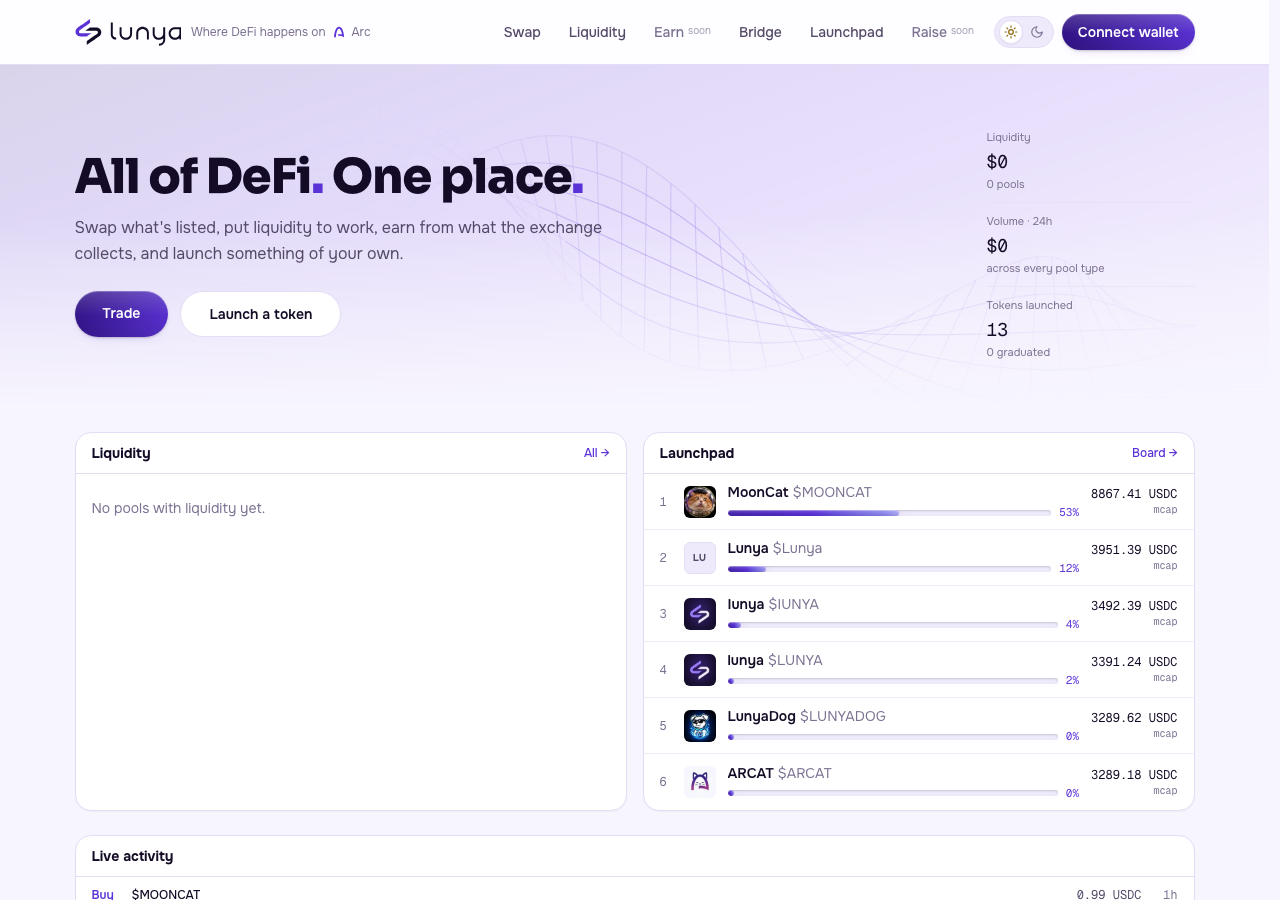
lunya in the browser during the run

By the numbers

5 of 12
scenarios passed, 6 failed, 1 blocked
197
browser actions
32
screenshots
205
model calls
17
minutes
12
scenarios
5
passed
6
failed
1
blocked
2
issues
high1low1

Walkthrough

Every scenario DeepQA drove in the browser, in plan order, with the 24 screenshots it captured along the way. A passing scenario is evidence too.

  1. S1
    Submit valid contact inquiry

    5 steps, 3 screenshots

    fail
    S1-4.png
    S1 · Submit valid contact inquiry
    S1-10.png
    S1 · Submit valid contact inquiry
    S1-12.png
    S1 · Submit valid contact inquiry
    • Navigated to the Contact page at /contact.
    • Filled in topic, email, and message fields, but the submit button remains disabled with label 'Checking…'.
    • Observed the contact form with topic dropdown, email input, optional Discord and Telegram inputs, and message input.
    • Populated valid topic, email (testuser@example.com), and message fields.
    • Observed that the submit button remained permanently disabled with text 'Checking…', preventing form submission.
  2. S2
    Swap form valid inputs trigger wallet connection

    4 steps, 2 screenshots

    fail
    S2-4.png
    S2 · Swap form valid inputs trigger wallet connection
    S2-10.png
    S2 · Swap form valid inputs trigger wallet connection
    • Navigated to the swap page where USDC and ARGUS are selected by default.
    • Entered 100 USDC into the Pay amount field and verified that a route and estimated receive amount were computed.
    • Navigated to /swap where USDC and ARGUS are selected by default.
    • Entered valid numeric amount 100 into Pay amount field; exchange rate and estimated receive amounts populated correctly.
    • Clicked the primary 'Connect wallet' button under the swap form.
    • No Connect Wallet modal or dialog appeared on screen, failing the required modal prompt check.
  3. S3
    Launch Token form required fields validation

    4 steps, 3 screenshots

    fail
    S3-5.png
    S3 · Launch Token form required fields validation
    S3-7.png
    S3 · Launch Token form required fields validation
    S3-10.png
    S3 · Launch Token form required fields validation
    • Navigated to /launch showing the launchpad board and Launch a token [redacted]
    • Opened 'Launch a token' form modal with empty Name, Symbol, Description, Image fields.
    • Attempting to submit the empty token [redacted] form by clicking Connect wallet opened the wallet connection modal instead of validating required fields.
    • Navigated to /launch and opened the 'Launch a token' form dialog.
    • Form inputs for Name, Symbol, Description, and Image were left completely blank.
    • Clicking the submission / action button 'Connect wallet' inside the form bypassed required field validation and immediately opened the 'Connect a wallet' dialog.
  4. S4
    Bridge form recipient address validation

    5 steps, 1 screenshot

    fail
    S4-4.png
    S4 · Bridge form recipient address validation
    • Navigated to https://lunya.io/bridge.
    • The bridge form allows selecting source chain (Ethereum), destination chain (Arc), and entering a transfer amount (e.g. 100).
    • There is no recipient address field provided or displayed in the bridge form.
    • Attempting to initiate the transfer displays a primary action button 'Connect wallet', which opens the wallet connection modal instead of validating or requiring a recipient address.
  5. S5
    Observe CORS error on brand assets fetch

    2 steps, 1 screenshot

    fail
    S5-4.png
    S5 · Observe CORS error on brand assets fetch
    • Navigated to https://lunya.io/brand and clicked the Brand kit link in the footer, which triggered a direct browser file download without any CORS policy console error.
    • Navigated to https://lunya.io/brand, which directly initiates a file download for the brand kit.
    • No CORS policy error was logged in the console during the brand assets download.
  6. S6
    Contact form required fields validation

    3 steps, 2 screenshots

    pass
    S6-5.png
    S6 · Contact form required fields validation
    S6-13.png
    S6 · Contact form required fields validation
    • Navigated to the Contact page at /contact and observed form fields: What is it about, Your email, Discord, Telegram, Message.
    • Left all fields in their initial/empty states; observed Topic defaults to 'support' (Something is not working), while Email and Message are required HTML5 inputs and the submit button is rendered disabled with label 'Checking…'.
    • Navigated to https://lunya.io/contact.
    • Form fields for Topic ('What is it about'), Email, Discord, Telegram, and Message are rendered.
    • Topic dropdown comes pre-selected with 'support' by default.
    • Email and Message input fields have the HTML5 required attribute enforced, preventing unvalidated empty form submission.
    • The submit button is disabled in a 'Checking…' state, preventing empty or unverified submissions from submitting without errors or reloading the page.
  7. S7
    Swap form empty input validation

    4 steps, 2 screenshots

    fail
    S7-5.png
    S7 · Swap form empty input validation
    S7-13.png
    S7 · Swap form empty input validation
    • Navigated to /swap page where Pay token (USDC) and Receive token (ARGUS) are selected by default and the Pay amount input is empty.
    • Navigated to /swap page where Pay token (USDC) and Receive token (ARGUS) were selected.
    • Pay amount field was initially empty, and remained empty when tested.
    • Observed the primary action button on the swap form remained active and labeled 'Connect wallet'.
    • Clicking the primary button with or without amount inputs opens the wallet connection modal instead of validating that an amount is required or disabling the button.
  8. S8
    New Pool creation triggers wallet connection

    4 steps, 2 screenshots

    blocked
    S8-6.png
    S8 · New Pool creation triggers wallet connection
    S8-9.png
    S8 · New Pool creation triggers wallet connection
    • Navigated to Liquidity page and observed the New pool button.
    • Navigated to /liquidity/new where page shows 'Nothing has been listed on this chain yet, and a pool needs two tokens' and no pool creation form/selectors are rendered.
    • Navigated from home to /liquidity and clicked 'New pool' to reach /liquidity/new.
    • On /liquidity/new, the application shows an empty state message 'Nothing has been listed on this chain yet, and a pool needs two tokens. — a token [redacted] graduates opens its own pool — or come back when somebody has.' with a link to /launch.
    • No Token A / Token B selector, Pool Type selector, Fee Tier selector, or primary action button exist on the page to trigger pool creation or wallet connection.
  9. S9
    Liquidity pool search filters empty state

    2 steps, 2 screenshots

    pass
    S9-4.png
    S9 · Liquidity pool search filters empty state
    S9-7.png
    S9 · Liquidity pool search filters empty state
    • Navigated to the Liquidity page where search bar and pool list are displayed.
    • Entered non-existent query 'XYZ999Unknown' into pool search input and observed empty state message 'No pools indexed yet.' without any errors.
    • Navigated to the Liquidity page at /liquidity.
    • Entered 'XYZ999Unknown' into the 'Search pair or address' input field.
    • The page displayed the empty state 'No pools indexed yet.' without errors.
  10. S10
    Bonding curve Buy/Sell mode toggle

    3 steps, 2 screenshots

    pass
    S10-5.png
    S10 · Bonding curve Buy/Sell mode toggle
    S10-7.png
    S10 · Bonding curve Buy/Sell mode toggle
    • Navigated to MoonCat token [redacted] and observed default trading mode is Buy with 'You pay USDC' and 'You receive (est.) MOONCAT'.
    • Clicked Sell toggle; the trade form updated to show 'You pay MOONCAT', 'You receive (est.) USDC', and 'Sell MOONCAT' button.
    • The token [redacted] at /t/0x20f18ffd70aed7cd13c99ea78e10c0b78b941885 loaded with Buy mode selected by default ('You pay USDC', 'You receive (est.) MOONCAT', and 'Buy MOONCAT' button).
    • Clicking the Sell tab updated the form controls to Sell mode ('You pay MOONCAT', 'You receive (est.) USDC', and 'Sell MOONCAT' button).
    • Clicking back to the Buy tab properly restored Buy mode and its preset amount buttons.
  11. S11
    Analytics dashboard tab navigation

    2 steps, 3 screenshots

    pass
    S11-5.png
    S11 · Analytics dashboard tab navigation
    S11-7.png
    S11 · Analytics dashboard tab navigation
    S11-9.png
    S11 · Analytics dashboard tab navigation
    • Navigated to the Analytics page showing the default DEX metrics (TVL, Volume 24h, Fees lifetime, Swaps, Liquidity by pool type).
    • Clicked the 'Launchpad' tab button; the analytics dashboard updated dynamically to display launchpad metrics including Total volume, Tokens launched, Graduated count, Trades, Daily volume, Daily token [redacted], and Top tokens by volume.
    • Toggled back to the 'DEX' tab; the dashboard updated smoothly back to DEX statistics without reloading the page.
    • The analytics dashboard successfully toggles between DEX metrics and Launchpad metrics without errors or full page reloads.
    • Switching to Launchpad displays Total volume, Tokens launched, Graduated count, Trades, Daily volume chart, Daily token [redacted], and Top tokens by volume.
  12. S12
    Disabled future features show tooltips

    2 steps, 1 screenshot

    pass
    S12-1.png
    S12 · Disabled future features show tooltips
    • Navigated to homepage and observed 'Earn' and 'Raise' navigation items displayed as non-link elements with 'soon' badges and 'is not open yet' tooltips.
    • The 'Earn' and 'Raise' items in the navigation header are rendered as non-navigating elements displaying a 'soon' badge and tooltip descriptions ('Earn is not open yet', 'Raise is not open yet').
    • No broken navigation or 404 errors occurred.

Issues

Findings that survived the Critic's audit. Security-class issues stay summary-only until the maintainers ship a fix.

highconfirmed ✓functionalF1 · S1

Contact form submit button is permanently disabled with 'Checking…' state

I navigated to the contact page, selected 'Feedback', and filled in a valid email address and message. The submit button remained disabled, displaying the 'Checking…' text indefinitely, preventing form submission. The page reported 4 console errors during the scenario.

Expected

The submit button should become enabled once required fields are completed, allowing the user to submit the inquiry.

Actual

The submit button is disabled and displays 'Checking…' indefinitely, preventing the inquiry from being submitted.

Repro · 5 steps
  1. Navigate to https://www.lunya.io/contact
  2. Select a topic from the 'What is it about' dropdown
  3. Enter a valid email address in the 'Your email' field
  4. Enter a message in the 'Message' field
  5. Attempt to click the submit button
lowpromoted ↑functionalF7 · S6

CORS policy error on background fetch

Surfaced by the audit of S6, which the Tester passed, and reproduced live: When clicking the 'Brand kit' link (ref=e32, url=/brand) in the footer on the main page, nothing happens because a background client-side navigation fetch is attempted and fails due to a CORS policy error on the external Vercel Blob redirect. The UI fails silently. The page reported 4 console errors during the scenario.

Expected

No CORS policy errors should be logged during background requests.

Actual

A CORS policy error is logged due to a blocked preflight request.

Repro · 2 steps
  1. Navigate to the application
  2. Observe the browser console
highwithdrawnfunctionalF2 · S2

Connect wallet action button on swap form fails to open wallet connection modal

The claim that the modal fails to open directly contradicts Scenario S7, which shows the exact same button successfully opening the modal, indicating a driver click failure rather than an application defect. The live replay was inconclusive: The replay ran out of tool calls before it reached the reported state. The page reported 4 console errors during the scenario.

Expected

A Web3 Connect Wallet modal dialog should open allowing the user to connect a wallet.

Actual

Clicking the 'Connect wallet' button does not open any modal or prompt.

Repro · 3 steps
  1. Navigate to https://lunya.io/swap
  2. Enter 100 into the Pay amount spinbutton
  3. Click the primary 'Connect wallet' button below the route summary
mediumwithdrawnfunctionalF3 · S3

Launch token form prompts for wallet connection without validating missing required fields

The action button is explicitly labeled 'Connect wallet', so opening the wallet connection modal is the correct behavior; form validation should not precede wallet connection. The page reported 2 console errors during the scenario.

Expected

The application should display field-level validation errors for missing required inputs (Name, Symbol, Image) before prompting for wallet interaction

Actual

The form triggers the 'Connect a wallet' modal immediately without validating required token configuration fields

Repro · 4 steps
  1. Navigate to https://www.lunya.io/launch
  2. Click the 'Launch a token' button to open the token creation form
  3. Leave all fields empty (Token Name, Symbol, Description, Image)
  4. Click the 'Connect wallet' button inside the form modal
mediumwithdrawnfunctionalF4 · S4

Bridge form prompts for wallet connection without validating or accepting a recipient address

The primary action button functions as a 'Connect wallet' prompt for unauthenticated users, meaning it correctly opens the wallet modal instead of validating form fields first. The page reported 4 console errors during the scenario.

Expected

The primary action button should be disabled or display a validation error prompting for a recipient address before initiating the bridge action.

Actual

The form lacks a recipient address field/validation and immediately prompts the user to connect a wallet.

Repro · 5 steps
  1. Navigate to https://lunya.io/bridge
  2. Select Source Chain (e.g., Ethereum), Destination Chain (e.g., Arc)
  3. Enter a valid transfer amount into the amount input field (e.g., 100)
  4. Observe the lack of recipient address validation and the primary action button labeled 'Connect wallet'
  5. Click 'Connect wallet'
lowwithdrawnfunctionalF5 · S5

No CORS error logged during brand kit assets download at /brand

The absence of a CORS error during a successful file download is expected behavior and does not constitute a defect. The page reported 4 console errors during the scenario.

Expected

A CORS policy error is logged in the console regarding the fetch of 'lunya-brand-kit.zip'.

Actual

Navigating to https://lunya.io/brand initiates a direct browser download of the brand kit assets without encountering or logging any CORS policy errors.

Repro · 3 steps
  1. Navigate to https://lunya.io
  2. Click the 'Brand kit' link (/brand) in the footer or navigate directly to https://lunya.io/brand
  3. Observe that the download starts directly without any CORS policy errors logged in the console
lowwithdrawnuxF6 · S7

Swap form primary button prompts for wallet connection instead of disabling or requiring an amount when Pay amount is empty

Because the user's wallet is not connected, the primary button correctly acts as a 'Connect wallet' prompt and opens the connection modal rather than enforcing input validation. The page reported 3 console errors during the scenario.

Expected

The primary action button should be disabled or display 'Enter an amount' (or similar validation message) when the input is empty.

Actual

The primary action button remains active, displays 'Connect wallet', and opens the wallet modal when clicked.

Repro · 4 steps
  1. 1. Navigate to https://www.lunya.io/swap
  2. 2. Ensure Pay token (USDC) and Receive token (ARGUS) are selected.
  3. 3. Leave the Pay amount field empty.
  4. 4. Observe the primary action button below the form.

Critic audit

An adversarial second pass over every finding before it reaches the report.

6
findings reviewed
4
re-verified live
5
withdrawn
  • F1confirmed ✓

    I navigated to the contact page, selected 'Feedback', and filled in a valid email address and message. The submit button remained disabled, displaying the 'Checking…' text indefinitely, preventing form submission.

  • F2withdrawn

    The claim that the modal fails to open directly contradicts Scenario S7, which shows the exact same button successfully opening the modal, indicating a driver click failure rather than an application defect. The live replay was inconclusive: The replay ran out of tool calls before it reached the reported state.

  • F3withdrawn

    The action button is explicitly labeled 'Connect wallet', so opening the wallet connection modal is the correct behavior; form validation should not precede wallet connection.

  • F4withdrawn

    The primary action button functions as a 'Connect wallet' prompt for unauthenticated users, meaning it correctly opens the wallet modal instead of validating form fields first.

  • F5withdrawn

    The absence of a CORS error during a successful file download is expected behavior and does not constitute a defect.

  • F6withdrawn

    Because the user's wallet is not connected, the primary button correctly acts as a 'Connect wallet' prompt and opens the connection modal rather than enforcing input validation.

  • F7promoted ↑

    Surfaced by the audit of S6, which the Tester passed, and reproduced live: When clicking the 'Brand kit' link (ref=e32, url=/brand) in the footer on the main page, nothing happens because a background client-side navigation fetch is attempted and fails due to a CORS policy error on the external Vercel Blob redirect. The UI fails silently.

  • Scenarios S2 and S7 contradict each other on whether the 'Connect wallet' button successfully opens a modal.
  • The Tester repeatedly raised defects (F3, F4, F6) for a 'Connect wallet' button failing to validate form inputs, misunderstanding that wallet connection precedes form submission.
  • Finding F5 incorrectly flags the absence of a CORS error during a successful file download as a defect.
  • A possible defect in S6 ("Malformed console error logging NaN") was not promoted: the live replay came back inconclusive.

Report

QA report: external/lunya.io at hosted

The contact form cannot be submitted due to a submit button stuck in a permanent disabled state.

Testing exercised 12 scenarios covering contact inquiries, token launching, swap and bridge interfaces, liquidity pool management, bonding curve controls, and analytics tab navigation. Five scenarios passed, six failed initial verification, and one was blocked.

The primary functional failure is the contact inquiry form, where the submit button remains indefinitely disabled displaying 'Checking…', preventing users from submitting messages. A secondary low-severity issue causes a background fetch request to fail due to a CORS policy preflight error. Five other candidate findings concerning wallet modal interactions and asset downloads were withdrawn during the audit.

New pool creation flows could not be tested because the interface lacked listed tokens on the tested chain. Resolving the contact form submission block is necessary before user outreach and support channels can function reliably.

Run summary
MetricCount
Scenarios executed12
Passed5
Failed6
Blocked1
Findings raised6
Issues after the audit2
Withdrawn by the audit5
Critical / high / medium / low0 / 1 / 0 / 1

Target: https://lunya.io · Testing level: deep_feature · Stack: unknown

Issues
High severity
F1 · Contact form submit button is permanently disabled with 'Checking…' state

Severity: high · Type: functional · Verdict: confirmed · Scenario: S1

I navigated to the contact page, selected 'Feedback', and filled in a valid email address and message. The submit button remained disabled, displaying the 'Checking…' text indefinitely, preventing form submission. The page reported 4 console errors during the scenario.

Expected: The submit button should become enabled once required fields are completed, allowing the user to submit the inquiry.

Actual: The submit button is disabled and displays 'Checking…' indefinitely, preventing the inquiry from being submitted.

Steps to reproduce:

  1. Navigate to https://www.lunya.io/contact
  2. Select a topic from the 'What is it about' dropdown
  3. Enter a valid email address in the 'Your email' field
  4. Enter a message in the 'Message' field
  5. Attempt to click the submit button

Evidence: screenshots/S1-4.png, screenshots/S1-10.png, screenshots/S1-12.png

Low severity
F7 · CORS policy error on background fetch

Severity: low · Type: functional · Verdict: promoted · Scenario: S6

Surfaced by the audit of S6, which the Tester passed, and reproduced live: When clicking the 'Brand kit' link (ref=e32, url=/brand) in the footer on the main page, nothing happens because a background client-side navigation fetch is attempted and fails due to a CORS policy error on the external Vercel Blob redirect. The UI fails silently. The page reported 4 console errors during the scenario.

Expected: No CORS policy errors should be logged during background requests.

Actual: A CORS policy error is logged due to a blocked preflight request.

Steps to reproduce:

  1. Navigate to the application
  2. Observe the browser console

Evidence: screenshots/critic-M1-1.png

Withdrawn findings

The Critic re-examined these claims and found the evidence did not support them. They are kept here rather than deleted.

  • Connect wallet action button on swap form fails to open wallet connection modal (S2, high): The claim that the modal fails to open directly contradicts Scenario S7, which shows the exact same button successfully opening the modal, indicating a driver click failure rather than an application defect. The live replay was inconclusive: The replay ran out of tool calls before it reached the reported state. The page reported 4 console errors during the scenario.
  • Launch token form prompts for wallet connection without validating missing required fields (S3, medium): The action button is explicitly labeled 'Connect wallet', so opening the wallet connection modal is the correct behavior; form validation should not precede wallet connection. The page reported 2 console errors during the scenario.
  • Bridge form prompts for wallet connection without validating or accepting a recipient address (S4, medium): The primary action button functions as a 'Connect wallet' prompt for unauthenticated users, meaning it correctly opens the wallet modal instead of validating form fields first. The page reported 4 console errors during the scenario.
  • No CORS error logged during brand kit assets download at /brand (S5, low): The absence of a CORS error during a successful file download is expected behavior and does not constitute a defect. The page reported 4 console errors during the scenario.
  • Swap form primary button prompts for wallet connection instead of disabling or requiring an amount when Pay amount is empty (S7, low): Because the user's wallet is not connected, the primary button correctly acts as a 'Connect wallet' prompt and opens the connection modal rather than enforcing input validation. The page reported 3 console errors during the scenario.
Scenario results
ScenarioPriorityResultIssues
S1 Submit valid contact inquiryhighfailF1
S2 Swap form valid inputs trigger wallet connectionhighfailnone
S3 Launch Token form required fields validationhighfailnone
S4 Bridge form recipient address validationhighfailnone
S5 Observe CORS error on brand assets fetchhighfailnone
S6 Contact form required fields validationmediumpassF7
S7 Swap form empty input validationmediumfailnone
S8 New Pool creation triggers wallet connectionmediumblocked (Cannot create a new pool because /liquidity/new displays 'Nothing has been listed on this chain yet, and a pool needs two tokens' with no token [redacted], pool type, fee tier controls, or pool creation form rendered.)none
S9 Liquidity pool search filters empty statemediumpassnone
S10 Bonding curve Buy/Sell mode togglemediumpassnone
S11 Analytics dashboard tab navigationlowpassnone
S12 Disabled future features show tooltipslowpassnone
The audit

The Critic reviewed 6 findings and re-verified 4 of them live in the browser, replaying the reported steps on a fresh page.

  • Scenarios S2 and S7 contradict each other on whether the 'Connect wallet' button successfully opens a modal.
  • The Tester repeatedly raised defects (F3, F4, F6) for a 'Connect wallet' button failing to validate form inputs, misunderstanding that wallet connection precedes form submission.
  • Finding F5 incorrectly flags the absence of a CORS error during a successful file download as a defect.
  • A possible defect in S6 ("Malformed console error logging NaN") was not promoted: the live replay came back inconclusive.
What to fix first
  1. Resolve the state validation logic preventing the contact form submit button from leaving the 'Checking…' state (F1).
  2. Update the server CORS preflight headers to allow background fetch requests on form pages (F7).
Coverage and caveats

In scope: Contact form submission and validation; Web3 form input validation (Swap, Launch Token, Bridge) up to wallet connection; Data visualization tabs (Analytics) and list filtering (Liquidity); Page load integrity and CORS error observation.

Not covered: On-chain transaction execution (Swap, Bridge, Liquidity, Bonding Curve) because the Tester lacks a Web3 wallet..

  • The automated Tester operates a standard browser without Web3 wallet extensions.
  • End-to-end execution of Web3 flows cannot be completed; testing for these flows terminates at the 'Connect Wallet' modal.
  • The Contact form relies on a standard Web2 backend and can be tested completely.
  • The /brand URL is expected to trigger a CORS error based on the AppMap console logs when accessed via client-side routing.
  • S8 could not be executed: Cannot create a new pool because /liquidity/new displays 'Nothing has been listed on this chain yet, and a pool needs two tokens' with no token [redacted], pool type, fee tier controls, or pool creation form rendered..
By the numbers
MetricValue
Scenarios5 passed, 6 failed, 1 blocked of 12 (40 planned steps)
Browser actions197 (41 clicks, 16 inputs, 39 navigations, 101 snapshots)
Screenshots32 (4 explore, 24 scenario, 4 critic), 24 captioned
Coverage11 pages, 6 forms, 6 flows, 13 console errors
Audit6 findings, 4 re-verified live, 1 confirmed, 1 promoted, 5 withdrawn
Model calls205
Tokens1,478,984 input, 11,963 output, 22,041 thinking
Time17 min
StageCallsInputOutputThinkingSeconds
explore22168,8462,7891,398100
plan15,9022,0522,68934
test1541,161,3805,6068,345539
critique27140,7551,2628,950337
report12,1012546598

Run log

stagecallstokenstime
Explore22173k1m 40s
Plan110.6k34s
Test1541.2M8m 59s
Critique27151k5m 37s
Report13k8s
Total2051.5M16m 58s
Intake
Explore
Plan
Test
Critique
Report
  • 17:10:48Zexploreexplore started
  • 17:27:46ZexploreExplored / (37 controls, 0 forms)
  • 17:27:46ZexploreExplored /swap (30 controls, 0 forms)
  • 17:27:46ZexploreExplored /liquidity (26 controls, 0 forms)
  • 17:27:46ZexploreExplored /liquidity/new (21 controls, 0 forms)
  • 17:27:46ZexploreExplored /bridge (25 controls, 0 forms)
  • 17:27:46ZexploreExplored /bridge/unified (21 controls, 0 forms)
  • 17:27:46ZexploreExplored /launch (47 controls, 0 forms)
  • 17:27:46ZexploreExplored /t/0x20f18ffd70aed7cd13c99ea78e10c0b78b941885 (71 controls, 0 forms)
  • 17:27:46ZexploreExplored /analytics (21 controls, 0 forms)
  • 17:27:46ZexploreExplored /points (19 controls, 0 forms)
  • 17:27:46ZexploreExplored /contact (25 controls, 1 forms)
  • 17:27:46ZexploreMapped 11 pages, 6 forms, 6 flows in 22 turns.
  • 17:27:46Zexploreexplore completed in 100s.
  • 17:27:46Zplanplan started
  • 17:27:46ZplanPlanned 12 scenarios (5 high, 5 medium, 2 low).
  • 17:27:46Zplanplan completed in 34s.
  • 17:27:46Ztesttest started
  • 17:27:46ZtestS1 executed (fail), 1 finding
  • 17:27:46ZtestS2 executed (fail), 1 finding
  • 17:27:46ZtestS3 executed (fail), 1 finding
  • 17:27:46ZtestS4 executed (fail), 1 finding
  • 17:27:46ZtestS5 executed (fail), 1 finding
  • 17:27:46ZtestS6 executed (pass)
  • 17:27:46ZtestS7 executed (fail), 1 finding
  • 17:27:46ZtestS8 executed (blocked)
  • 17:27:46ZtestS9 executed (pass)
  • 17:27:46ZtestS10 executed (pass)
  • 17:27:46ZtestS11 executed (pass)
  • 17:27:46ZtestS12 executed (pass)
  • 17:27:46ZtestExecuted 12 scenarios: 5 passed, 6 failed, 1 blocked, 6 findings.
  • 17:27:46Ztesttest completed in 539s.
  • 17:27:46Zcritiquecritique started
  • 17:27:46ZcritiqueReviewed 6 findings; 2 possible defects spotted in passed scenarios.
  • 17:27:46ZcritiqueRe-verified F1: reproduced.
  • 17:27:46ZcritiqueRe-verified F2: inconclusive.
  • 17:27:46ZcritiqueRe-verified a possible defect in S6: reproduced.
  • 17:27:46ZcritiqueRe-verified a possible defect in S6: inconclusive.
  • 17:27:46ZcritiqueAudit complete: 1 confirmed, 5 withdrawn, 1 promoted, 4 re-verified live.
  • 17:27:46Zcritiquecritique completed in 337s.
  • 17:27:46Zreportreport started
  • 17:27:46ZreportReported 2 issues (0 critical, 1 high, 0 medium, 1 low) from 6 findings.
  • 17:27:46Zreportreport completed in 8s.

Put an agent team on your next pull request.

Connect a repo, dispatch a Run, and read an audited, evidence-backed report the same day.