Hosted appGUI agent screen parserHosted, in placesucceeded

Microsoft's public Hugging Face Space of OmniParser V2, an open-source screen parsing tool for vision based GUI agents. Tested in place.

Tested in place byDeepQA Teamatmicrosoft-omniparser-v2.hf.spaceonSep 20, 2026

Run #1model gemini-balanced (vertex)took 5m

7 of 9 scenarios passed, 1 failed, 1 blocked, 1 high functional issue after the audit.

Share on X
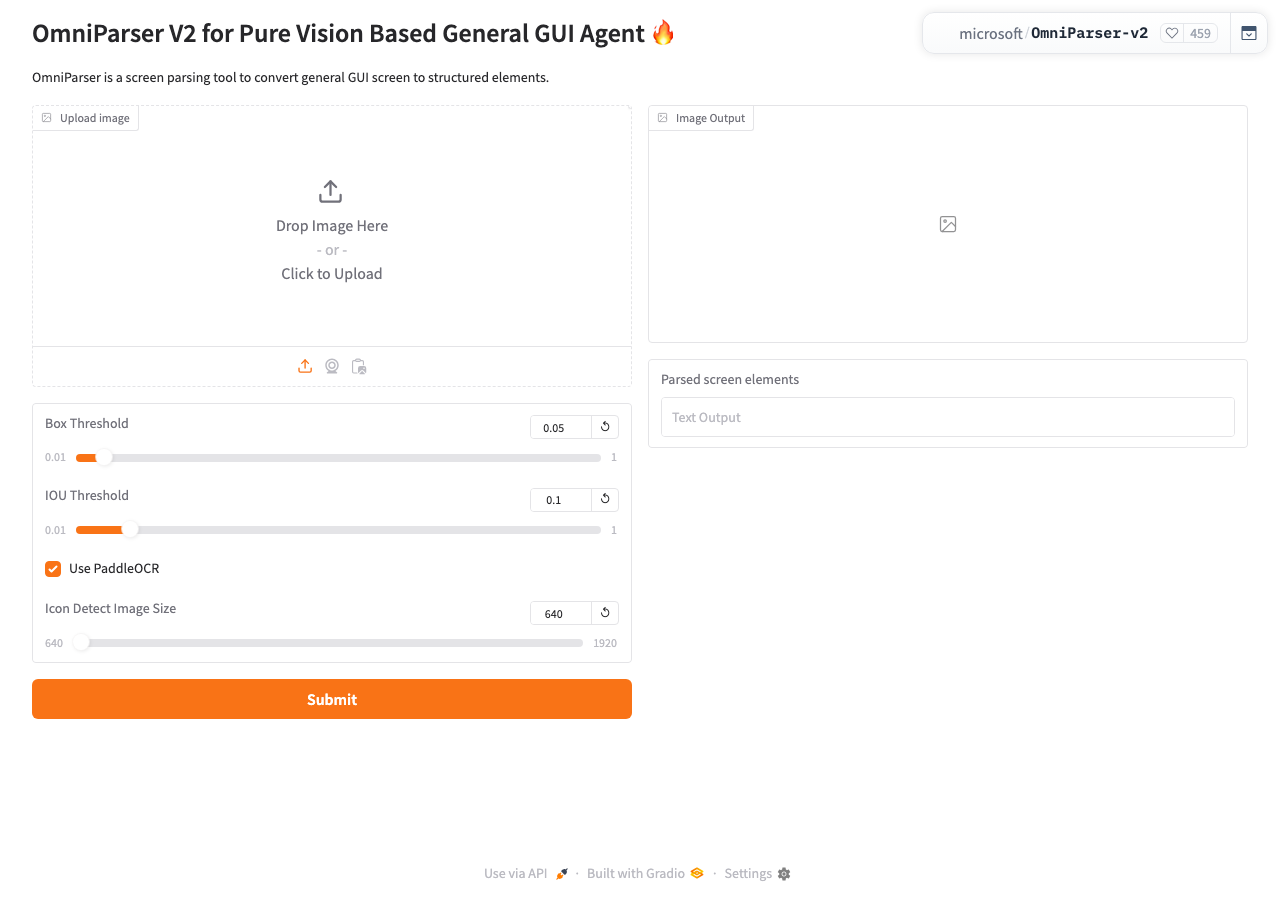
OmniParser V2 demo in the browser during the run

By the numbers

7 of 9
scenarios passed, 1 failed, 1 blocked
99
browser actions
25
screenshots
97
model calls
5.1
minutes
9
scenarios
7
passed
1
failed
1
blocked
1
issues
high1

Walkthrough

Every scenario DeepQA drove in the browser, in plan order, with the 20 screenshots it captured along the way. A passing scenario is evidence too.

  1. S1
    Application load and UI integrity

    4 steps, 1 screenshot

    pass
    S1-2.png
    S1 · Application load and UI integrity
    • Loaded the application home page and verified presence of 'Upload file' button, 'Submit' button, and 'Parsed screen elements' textbox along with parameter controls.
    • The OmniParser V2 Gradio application loads successfully at https://microsoft-omniparser-v2.hf.space/.
    • The 'Upload file' button is rendered and present in the UI.
    • The 'Submit' button is rendered and present in the UI.
    • The 'Parsed screen elements' output textbox is rendered and present in the UI.
    • Box Threshold, IOU Threshold, PaddleOCR checkbox, and Icon Detect Image Size controls are fully visible and properly initialized.
  2. S2
    Primary inference flow with image upload

    4 steps, 2 screenshots

    blocked
    S2-1.png
    S2 · Primary inference flow with image upload
    S2-8.png
    S2 · Primary inference flow with image upload
    • Loaded the Gradio interface with image upload controls (Upload file, Drop image, Capture from camera, Paste from clipboard) and inference parameters.
    • OmniParser V2 Gradio application loaded successfully with all expected configuration controls and action buttons.
    • No preloaded example images exist on the page to trigger inference without uploading a file.
  3. S3
    Submit inference form without an image

    4 steps, 2 screenshots

    fail
    S3-1.png
    S3 · Submit inference form without an image
    S3-4.png
    S3 · Submit inference form without an image
    • Loaded OmniParser V2 Gradio application with no image uploaded.
    • Clicked Submit with no image uploaded and observed no validation message, error toast, or warning to the user.
    • The OmniParser V2 Gradio UI renders with default parameter values and an empty image upload field.
    • Clicking 'Submit' without providing an image produces no visual feedback, toast, or validation error message indicating an image is required.
  4. S4
    Box Threshold parameter adjustment and reset

    4 steps, 3 screenshots

    pass
    S4-1.png
    S4 · Box Threshold parameter adjustment and reset
    S4-4.png
    S4 · Box Threshold parameter adjustment and reset
    S4-6.png
    S4 · Box Threshold parameter adjustment and reset
    • Loaded OmniParser V2 app with Box Threshold default value 0.05.
    • Entered 0.1 into the Box Threshold input field, updating both the number input and slider to 0.1.
    • Clicked the Box Threshold reset button, and the input and slider successfully reverted to their default value of 0.05.
    • The Box Threshold input initially held the default value 0.05.
    • Changing the Box Threshold input value to 0.1 updated the input and slider controls accordingly.
    • Clicking the 'Reset to default value' button for Box Threshold reverted the input and slider back to 0.05.
  5. S5
    IOU Threshold parameter adjustment and reset

    4 steps, 3 screenshots

    pass
    S5-1.png
    S5 · IOU Threshold parameter adjustment and reset
    S5-4.png
    S5 · IOU Threshold parameter adjustment and reset
    S5-6.png
    S5 · IOU Threshold parameter adjustment and reset
    • Initial page loaded with default IOU Threshold value of 0.1.
    • Entered 0.9 into the IOU Threshold input field and slider updated to 0.9.
    • Clicked the IOU Threshold reset button and observed the value revert to the default 0.1.
    • The IOU Threshold number input and slider correctly updated when modified to 0.9.
    • Clicking the 'Reset to default value' button for IOU Threshold restored both the number input and slider back to the default value of 0.1.
  6. S6
    Icon Detect Image Size adjustment and reset

    4 steps, 3 screenshots

    pass
    S6-1.png
    S6 · Icon Detect Image Size adjustment and reset
    S6-4.png
    S6 · Icon Detect Image Size adjustment and reset
    S6-6.png
    S6 · Icon Detect Image Size adjustment and reset
    • Loaded the OmniParser V2 page where Icon Detect Image Size is set to default value 640.
    • Entered 1024 into the Icon Detect Image Size input field.
    • Clicked the Reset to default value button for Icon Detect Image Size and observed the input revert to 640.
    • Navigated to https://microsoft-omniparser-v2.hf.space/ and observed default value 640 for Icon Detect Image Size.
    • Entered custom value 1024 into the Icon Detect Image Size input field.
    • Clicked the 'Reset to default value' button next to Icon Detect Image Size.
    • Verified that the Icon Detect Image Size input and slider both reverted to the default value 640.
  7. S7
    Invalid input validation for Box Threshold

    4 steps, 2 screenshots

    pass
    S7-1.png
    S7 · Invalid input validation for Box Threshold
    S7-5.png
    S7 · Invalid input validation for Box Threshold
    • Navigated to OmniParser home page with Box Threshold default value 0.05.
    • Attempted to enter non-numeric input into Box Threshold spinbutton; the field enforced numeric input and retained 0.05.
    • The Box Threshold parameter uses a number input (spinbutton) configured to reject non-numeric characters, correctly preserving the numeric value (0.05).
  8. S8
    View API documentation modal

    3 steps, 2 screenshots

    pass
    S8-1.png
    S8 · View API documentation modal
    S8-4.png
    S8 · View API documentation modal
    • Navigated to https://microsoft-omniparser-v2.hf.space/ and verified the main UI.
    • Clicked 'Use via API' in footer, which updated the URL to ?view=api and rendered the API documentation overlay modal.
    • The Gradio 'Use via API' button in the footer responds to clicks by appending ?view=api to the URL and displaying the API documentation overlay modal.
  9. S9
    Open Gradio UI Settings

    3 steps, 2 screenshots

    pass
    S9-1.png
    S9 · Open Gradio UI Settings
    S9-3.png
    S9 · Open Gradio UI Settings
    • Clicked the Settings button in the footer and observed the Gradio Settings modal overlay opening with configuration options including Language and Progressive Web App settings.
    • The Gradio settings modal opens properly upon clicking the Settings button in the footer, displaying settings options and updating the URL to ?view=settings.

Issues

Findings that survived the Critic's audit. Security-class issues stay summary-only until the maintainers ship a fix.

highpromoted ↑functionalF2 · S8

Environment: API documentation endpoint returns a Python traceback instead of JSON

Surfaced by the audit of S8, which the Tester passed, and reproduced live: Clicked 'Use via API' in the footer. The URL updated to ?view=api and an empty generic overlay appeared on the page, but the API documentation failed to render. This behavior is consistent with the reported parsing error blocking the modal from displaying its contents. The page reported 3 console errors during the scenario.

Expected

The API documentation modal fetches and parses the API schema successfully.

Actual

The server returns a raw Python traceback, causing a JSON parsing error in the console.

Repro · 2 steps
  1. Navigate to the application
  2. Click 'Use via API' in the footer to open the API documentation modal
mediumwithdrawnfunctionalF1 · S3

Inference form fails silently with no validation feedback when submitted without an image

The console errors reveal the backend is returning 500 and 404 errors, causing the 'No API found' failure when submitting. This is a broken environment, not a missing validation feature. The page reported 3 console errors during the scenario.

Expected

The application should prevent submission and clearly indicate to the user that an image is required.

Actual

No validation message, error toast, or warning is displayed to the user when clicking Submit without an image; the application fails silently.

Repro · 4 steps
  1. Navigate to https://microsoft-omniparser-v2.hf.space/
  2. Ensure no image is uploaded
  3. Click the 'Submit' button
  4. Observe the UI for validation feedback

Critic audit

An adversarial second pass over every finding before it reaches the report.

1
findings reviewed
2
re-verified live
1
withdrawn
  • F1withdrawn

    The console errors reveal the backend is returning 500 and 404 errors, causing the 'No API found' failure when submitting. This is a broken environment, not a missing validation feature.

  • F2promoted ↑

    Surfaced by the audit of S8, which the Tester passed, and reproduced live: Clicked 'Use via API' in the footer. The URL updated to ?view=api and an empty generic overlay appeared on the page, but the API documentation failed to render. This behavior is consistent with the reported parsing error blocking the modal from displaying its contents.

  • The target environment appears heavily degraded or offline, with 500 Internal Server Errors, 404s, and backend tracebacks affecting almost every scenario.
  • F1 was called an environment limitation, and nothing S3 recorded names an environment cause, so it was audited as an ordinary finding.
  • A possible defect in S1 was called an environment limitation, and nothing that scenario recorded names an environment cause, so it was audited as a candidate.
  • A possible defect in S8 was called an environment limitation, and nothing that scenario recorded names an environment cause, so it was audited as a candidate.
  • A possible defect in S1 ("Environment: Server responds with 500 Internal Server Error on load") was not promoted: the live replay came back not-reproduced.

Report

QA report: external/microsoft-omniparser-v2.hf.space at hosted

The API documentation endpoint fails with a backend Python traceback instead of returning valid JSON.

Testing evaluated application startup, UI parameter adjustments and resets, input validations, settings modal interactions, empty form submissions, and API documentation viewing across nine scenarios. While parameter controls and general UI navigation functioned as expected, accessing the API documentation triggered a server failure where the endpoint returned a raw Python traceback instead of valid JSON.

Full end-to-end inference testing could not be completed because the automated test environment could not interact with the file picker to upload an image. During the audit, one finding concerning empty form validation feedback was withdrawn, leaving one confirmed high-severity issue.

Run summary
MetricCount
Scenarios executed9
Passed7
Failed1
Blocked1
Findings raised1
Issues after the audit1
Withdrawn by the audit1
Critical / high / medium / low0 / 1 / 0 / 0

Target: https://microsoft-omniparser-v2.hf.space · Testing level: deep_feature · Stack: unknown

Issues
High severity
F2 · Environment: API documentation endpoint returns a Python traceback instead of JSON

Severity: high · Type: functional · Verdict: promoted · Scenario: S8

Surfaced by the audit of S8, which the Tester passed, and reproduced live: Clicked 'Use via API' in the footer. The URL updated to ?view=api and an empty generic overlay appeared on the page, but the API documentation failed to render. This behavior is consistent with the reported parsing error blocking the modal from displaying its contents. The page reported 3 console errors during the scenario.

Expected: The API documentation modal fetches and parses the API schema successfully.

Actual: The server returns a raw Python traceback, causing a JSON parsing error in the console.

Steps to reproduce:

  1. Navigate to the application
  2. Click 'Use via API' in the footer to open the API documentation modal

Evidence: screenshots/critic-M2-1.png

Withdrawn findings

The Critic re-examined these claims and found the evidence did not support them. They are kept here rather than deleted.

  • Inference form fails silently with no validation feedback when submitted without an image (S3, medium): The console errors reveal the backend is returning 500 and 404 errors, causing the 'No API found' failure when submitting. This is a broken environment, not a missing validation feature. The page reported 3 console errors during the scenario.
Scenario results
ScenarioPriorityResultIssues
S1 Application load and UI integrityhighpassnone
S2 Primary inference flow with image uploadhighblocked (Cannot upload a test image because the browser driver toolset lacks file system attachment or drag-and-drop capabilities to interact with the OS file picker.)none
S3 Submit inference form without an imagehighfailnone
S4 Box Threshold parameter adjustment and resetmediumpassnone
S5 IOU Threshold parameter adjustment and resetmediumpassnone
S6 Icon Detect Image Size adjustment and resetmediumpassnone
S7 Invalid input validation for Box Thresholdlowpassnone
S8 View API documentation modallowpassF2
S9 Open Gradio UI Settingslowpassnone
The audit

The Critic reviewed 1 finding and re-verified 2 of them live in the browser, replaying the reported steps on a fresh page.

  • The target environment appears heavily degraded or offline, with 500 Internal Server Errors, 404s, and backend tracebacks affecting almost every scenario.
  • F1 was called an environment limitation, and nothing S3 recorded names an environment cause, so it was audited as an ordinary finding.
  • A possible defect in S1 was called an environment limitation, and nothing that scenario recorded names an environment cause, so it was audited as a candidate.
  • A possible defect in S8 was called an environment limitation, and nothing that scenario recorded names an environment cause, so it was audited as a candidate.
  • A possible defect in S1 ("Environment: Server responds with 500 Internal Server Error on load") was not promoted: the live replay came back not-reproduced.
What to fix first
  1. Fix the backend handler for the API documentation endpoint so that it returns valid JSON rather than a raw Python traceback (F2).
Coverage and caveats

In scope: Application load and UI element rendering; Image input mechanisms (upload, empty state); Parameter adjustment and reset functionality; Form submission and error handling; Footer modals (API and Settings).

Not covered: Camera capture features (requires browser permissions and hardware access); Clipboard paste functionality (browser security restrictions on automated clipboard reading/writing); Toggle Use PaddleOCR setting (creating an account or an order on a hosted target is out of scope).

  • The tester has a valid test image to upload.
  • The 500/API errors noted in the AppMap may cause the primary submission flow to fail; the plan expects the application to either handle this gracefully in the UI or successfully parse the image.
  • S2 could not be executed: Cannot upload a test image because the browser driver toolset lacks file system attachment or drag-and-drop capabilities to interact with the OS file picker..
By the numbers
MetricValue
Scenarios7 passed, 1 failed, 1 blocked of 9 (34 planned steps)
Browser actions99 (21 clicks, 7 inputs, 14 navigations, 57 snapshots)
Screenshots25 (3 explore, 20 scenario, 2 critic), 20 captioned
Coverage1 pages, 1 forms, 3 flows, 4 console errors
Audit1 findings, 2 re-verified live, 0 confirmed, 1 promoted, 1 withdrawn
Model calls97
Tokens447,111 input, 6,265 output, 9,714 thinking
Time5 min
StageCallsInputOutputThinkingSeconds
explore1783,3321,36486462
plan13,6181,7421,49124
test70334,1022,2773,803166
critique824,4066912,96545
report11,6531915918

Run log

stagecallstokenstime
Explore1785.6k1m 2s
Plan16.9k24s
Test70340.2k2m 46s
Critique828.1k45s
Report12.4k8s
Total97463.1k5m 5s
Intake
Explore
Plan
Test
Critique
Report
  • 02:34:27Zexploreexplore started
  • 02:39:32ZexploreExplored / (22 controls, 0 forms)
  • 02:39:32ZexploreMapped 1 pages, 1 forms, 3 flows in 17 turns.
  • 02:39:32Zexploreexplore completed in 62s.
  • 02:39:32Zplanplan started
  • 02:39:32ZplanDropped 1 scenario that would have created an account or an order on this hosted target.
  • 02:39:32ZplanPlanned 9 scenarios (3 high, 3 medium, 3 low).
  • 02:39:32Zplanplan completed in 24s.
  • 02:39:32Ztesttest started
  • 02:39:32ZtestS1 executed (pass)
  • 02:39:32ZtestS2 executed (blocked)
  • 02:39:32ZtestS3 executed (fail), 1 finding
  • 02:39:32ZtestS4 executed (pass)
  • 02:39:32ZtestS5 executed (pass)
  • 02:39:32ZtestS6 executed (pass)
  • 02:39:32ZtestS7 executed (pass)
  • 02:39:32ZtestS8 executed (pass)
  • 02:39:32ZtestS9 executed (pass)
  • 02:39:32ZtestExecuted 9 scenarios: 7 passed, 1 failed, 1 blocked, 1 finding.
  • 02:39:32Ztesttest completed in 166s.
  • 02:39:32Zcritiquecritique started
  • 02:39:32ZcritiqueReviewed 1 findings; 2 possible defects spotted in passed scenarios.
  • 02:39:32Zcritique3 failures were called environment limitations with no environment cause in the run's record, so they are audited as findings instead.
  • 02:39:32ZcritiqueRe-verified a possible defect in S1: not-reproduced.
  • 02:39:32ZcritiqueRe-verified a possible defect in S8: reproduced.
  • 02:39:32ZcritiqueAudit complete: 0 confirmed, 1 withdrawn, 1 promoted, 2 re-verified live.
  • 02:39:32Zcritiquecritique completed in 45s.
  • 02:39:32Zreportreport started
  • 02:39:32ZreportReported 1 issue (0 critical, 1 high, 0 medium, 0 low) from 1 finding.
  • 02:39:32Zreportreport completed in 8s.

Put an agent team on your next pull request.

Connect a repo, dispatch a Run, and read an audited, evidence-backed report the same day.