Hosted appDEXArc Testnetsucceeded

NovaDEX is a stablecoin settlement venue on Arc. Swap, lend and escrow USDC, EURC and cirBTC.

Tested in place byDeepQA TeamonArc Testnetatnovaonarc.xyz/onSep 17, 2026

Run #1model gemini-balanced (vertex)took 14m

8 of 12 scenarios passed, 2 failed, 2 blocked, 1 high functional issue after the audit.

Share on X
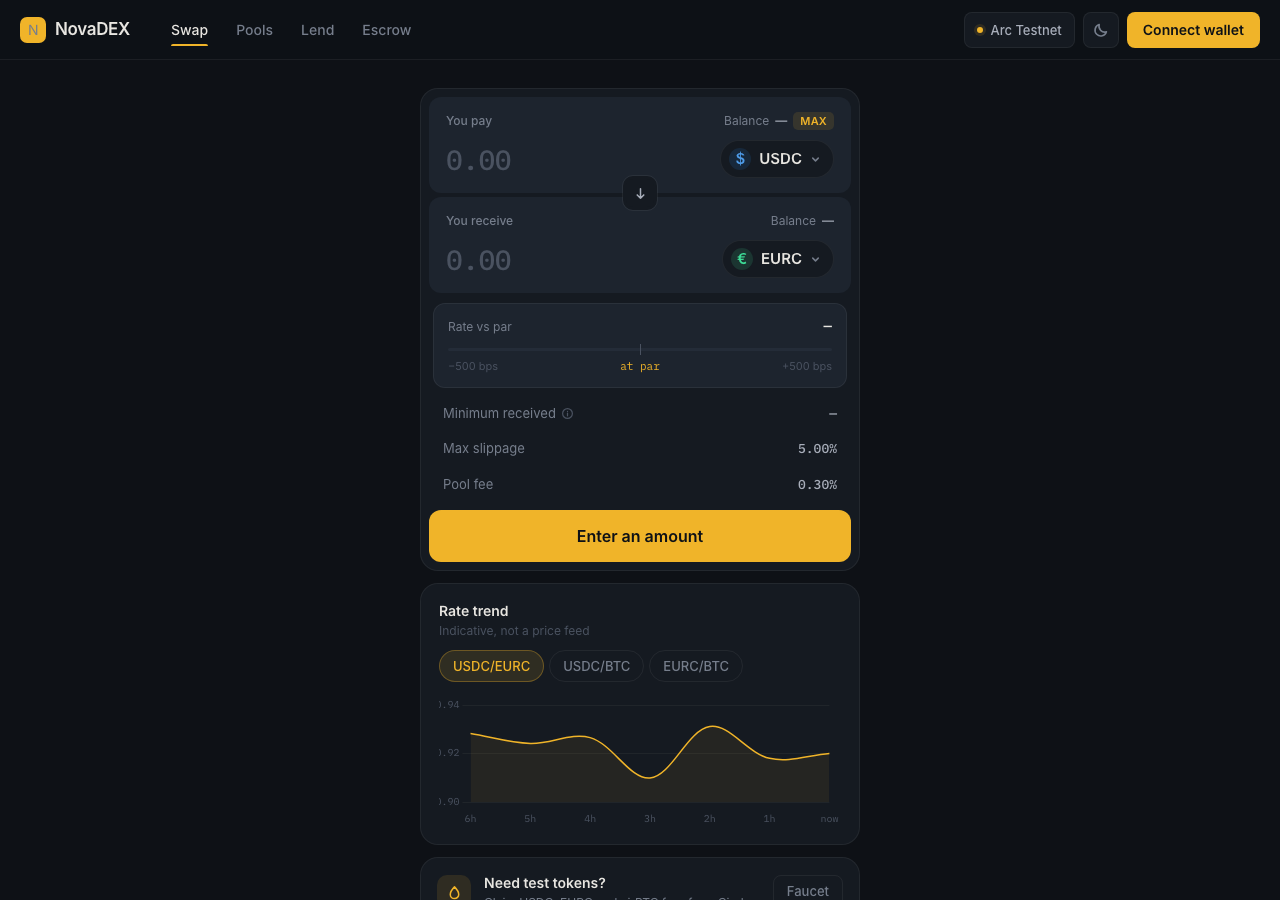
NovaDEX in the browser during the run

By the numbers

8 of 12
scenarios passed, 2 failed, 2 blocked
229
browser actions
42
screenshots
223
model calls
14
minutes
8
on-chain transactions
12
scenarios
8
passed
2
failed
2
blocked
1
issues
high1

Walkthrough

Every scenario DeepQA drove in the browser, in plan order, with the 35 screenshots it captured along the way. A passing scenario is evidence too.

  1. S1
    Connect Wallet and verify network balance

    4 steps, 4 screenshots

    pass
    S1-1.png
    S1 · Connect Wallet and verify network balance
    S1-4.png
    S1 · Connect Wallet and verify network balance
    S1-7.png
    S1 · Connect Wallet and verify network balance
    S1-9.png
    S1 · Connect Wallet and verify network balance
    • Loaded NovaDEX swap page in disconnected state.
    • Opened wallet connection modal showing DeepQA Test Wallet detected.
    • Wallet connected successfully with address 0xB412…62A6 and a balance of 5.00 USDC displayed.
    • Wallet details popover displays address 0xB412…62A6 and balance 5.00 USDC on Arc Testnet.
    • The wallet modal opened and detected the DeepQA Test Wallet.
    • Connecting the wallet updated the navigation header to show shortened address 0xB412…62A6 and active testnet status.
    • The account popover and swap interface both displayed a positive balance of 5.00 USDC.
  2. S2
    Swap - Core execution flow

    5 steps, 4 screenshots

    pass
    S2-1.png
    S2 · Swap - Core execution flow
    S2-4.png
    S2 · Swap - Core execution flow
    S2-7.png
    S2 · Swap - Core execution flow
    S2-12.png
    S2 · Swap - Core execution flow
    • Entered 1.0 USDC and reviewed quote of 0.605871 EURC with rate, slippage, and fee details.
    • Review swap modal opened displaying quote: 1 USDC for 0.605871 EURC, Rate 1 USDC = 0.605871 EURC, Min received 0.575577 EURC, slippage 5.00%, fee 0.30%, network Arc Testnet.
    • Navigated to https://novaonarc.xyz/#swap and verified the initial page with pre-connected wallet and balance of 5.00 USDC.
    • Entered 1.0 into the pay amount field; quote updated automatically to receive 0.605871 EURC.
    • Rate vs par (-3941 bps), minimum received (0.575577 EURC), max slippage (5.00%), and pool fee (0.30%) were calculated and accurately displayed.
    • Clicked 'Review swap' and verified the confirmation modal presented complete transaction parameters.
    • Clicked 'Confirm swap', modal closed and the application progressed to the wallet approval and settlement flow ('Step 1 of 2 — approve USDC in your wallet').
  3. S3
    Swap - MAX shortcut reserves native gas (USDC)

    4 steps, 2 screenshots

    fail
    S3-1.png
    S3 · Swap - MAX shortcut reserves native gas (USDC)
    S3-3.png
    S3 · Swap - MAX shortcut reserves native gas (USDC)
    • Loaded Swap page with USDC selected as 'You pay' token and balance 4.998614 USDC.
    • Clicking the MAX button set the pay amount to 4.998614 USDC, exactly matching the total wallet balance without reserving any USDC for gas fees.
    • Navigated to https://novaonarc.xyz/#swap with USDC selected as the 'You pay' token and balance showing 4.998614 USDC.
    • Clicked the MAX button and observed that the pay amount input was populated with the exact total balance 4.998614 USDC without deducting a gas reserve.
  4. S4
    Swap - Insufficient balance validation

    3 steps, 2 screenshots

    fail
    S4-1.png
    S4 · Swap - Insufficient balance validation
    S4-4.png
    S4 · Swap - Insufficient balance validation
    • Navigated to https://novaonarc.xyz/#swap with wallet balance showing 4.998614 USDC.
    • Entered 100 USDC (greater than the 4.998614 USDC balance) into the pay amount input.
    • The 'Review swap' button remained active and enabled instead of being disabled.
    • No insufficient balance validation error was displayed when entering 100 USDC.
    • Clicking 'Review swap' proceeded to open the 'Review swap' modal despite the entered amount exceeding the total wallet balance.
  5. S5
    Swap - Direction toggle behavior

    4 steps, 3 screenshots

    pass
    S5-1.png
    S5 · Swap - Direction toggle behavior
    S5-4.png
    S5 · Swap - Direction toggle behavior
    S5-9.png
    S5 · Swap - Direction toggle behavior
    • Entered 1.0 in USDC pay field, calculated receive amount as 0.605871 EURC.
    • Swapped direction; You pay became EURC and You receive became USDC, and entering 2.5 EURC correctly updated receive amount to 3.873719 USDC.
    • Navigated to #swap where default pair was Pay USDC and Receive EURC.
    • Entered 1.0 USDC and observed calculated exchange to EURC.
    • Clicked 'Switch direction' button; You pay inverted to EURC and You receive inverted to USDC with updated balances.
    • Entered 2.5 into EURC field and verified the input remained responsive and calculated 3.873719 USDC.
  6. S6
    Liquidity - Deposit paired assets

    4 steps, 1 screenshot

    blocked
    S6-2.png
    S6 · Liquidity - Deposit paired assets
    • Navigated to Pools page (#liquidity) with Add liquidity active.
    • Navigated to the Pools page (#liquidity) where Add liquidity tab was selected.
    • Observed zero EURC balance for pairing with USDC in the deposit form.
    • Navigated to Swap view and swapped 1 USDC to receive 0.605871 EURC on Arc testnet.
    • Navigated back to Pools view to prepare paired liquidity deposit of USDC and EURC.
    • Tool call budget was reached before completing the final deposit transaction submission and verifying position update.
  7. S7
    Lending - Deposit collateral and borrow flow

    4 steps, 3 screenshots

    blocked
    S7-2.png
    S7 · Lending - Deposit collateral and borrow flow
    S7-11.png
    S7 · Lending - Deposit collateral and borrow flow
    S7-13.png
    S7 · Lending - Deposit collateral and borrow flow
    • Navigated to Lend page on Deposit tab with USDC balance 3.994564.
    • Deposited 1.00 USDC as collateral successfully with confirmation message displayed.
    • Navigated to the Lend tab and successfully deposited 1.00 USDC collateral with wallet confirmation and state update.
    • Switched to the Borrow tab to continue the flow before reaching the turn limit.
  8. S8
    Escrow - Create conditional transfer

    4 steps, 2 screenshots

    pass
    S8-2.png
    S8 · Escrow - Create conditional transfer
    S8-7.png
    S8 · Escrow - Create conditional transfer
    • Navigated to Escrow page with New escrow creation form displayed.
    • Entered recipient address 0x70997970C51812dc3A010C7d01b50e0d17dc79C8, amount 0.1 USDC, description, and 7-day auto-settle period.
    • Navigated to the Escrow section at https://novaonarc.xyz/#escrow.
    • Filled in the recipient address (0x70997970C51812dc3A010C7d01b50e0d17dc79C8), amount (0.1 USDC), transfer description, and auto-settle period (7 days).
    • Submitted the escrow creation transaction via 'Fund escrow'.
    • Observed wallet approvals for USDC allowance and transaction confirmation.
    • Observed successful contract execution with confirmation message '0.1 USDC locked in the contract for 0x7099…79C8' and updated balance deducting 0.1 USDC plus gas fees.
  9. S9
    Escrow - Updates notification bell

    3 steps, 4 screenshots

    pass
    S9-2.png
    S9 · Escrow - Updates notification bell
    S9-4.png
    S9 · Escrow - Updates notification bell
    S9-6.png
    S9 · Escrow - Updates notification bell
    S9-8.png
    S9 · Escrow - Updates notification bell
    • Navigated to https://novaonarc.xyz/#about and observed the navigation bar with the Escrow updates notification bell.
    • Observed the Escrow updates modal popover rendered with title 'Escrow updates', a 'Close' button, and empty state 'Nothing needs your attention.'
    • Closed the Escrow updates modal by clicking the Close button, returning cleanly to the page.
    • Navigated to https://novaonarc.xyz/#about and located the 'Escrow updates' notification bell button in the top navigation bar.
    • Clicked the 'Escrow updates' notification bell button and verified that the popover/modal opened promptly.
    • Observed that the popover rendered with heading 'Escrow updates', an empty state message 'Nothing needs your attention.', and a 'Close' button.
    • Clicked the 'Close' button to confirm that the modal dismisses properly without errors or crashing the UI.
  10. S10
    History - View transaction list

    2 steps, 4 screenshots

    pass
    S10-2.png
    S10 · History - View transaction list
    S10-5.png
    S10 · History - View transaction list
    S10-8.png
    S10 · History - View transaction list
    S10-11.png
    S10 · History - View transaction list
    • Transaction history loaded displaying past swaps and lending actions with statuses, amounts, timestamps, and ArcScan links.
    • Filtering by Swaps displays only the swap transactions with correct amounts, timestamps, and status indicators.
    • Filtering by Lending correctly renders the collateral deposit transaction record with status, token [redacted], and explorer link.
    • The transaction history (Activity) page loaded successfully when navigating to #history and viewing wallet activity.
    • Transaction items rendered complete details including transaction type, timestamps, token [redacted], status badges (Done/Pending), and links to ArcScan block explorer.
    • Category filters (All, Swaps, Liquidity, Lending) properly filtered the displayed transactions.
  11. S11
    Escrow - Validation on empty required fields

    3 steps, 3 screenshots

    pass
    S11-2.png
    S11 · Escrow - Validation on empty required fields
    S11-4.png
    S11 · Escrow - Validation on empty required fields
    S11-8.png
    S11 · Escrow - Validation on empty required fields
    • Navigated to the Escrow tab where the New Escrow creation form is displayed.
    • Attempted to submit empty form; form blocked submission and displayed validation error 'That is not a valid wallet address'.
    • With valid recipient address and empty amount, clicking 'Fund escrow' displays validation error 'Enter an amount' and blocks submission.
    • When leaving both Recipient address and Amount empty and clicking 'Fund escrow', submission is blocked and 'That is not a valid wallet address' error message is displayed.
    • When providing a valid wallet address but leaving Amount empty and clicking 'Fund escrow', submission is blocked and 'Enter an amount' error message is displayed.
  12. S12
    Disconnect wallet state reset

    3 steps, 3 screenshots

    pass
    S12-1.png
    S12 · Disconnect wallet state reset
    S12-3.png
    S12 · Disconnect wallet state reset
    S12-5.png
    S12 · Disconnect wallet state reset
    • Opened the account address popover showing wallet address 0xB412…62A6, USDC balance, copy address, view on ArcScan, activity, and disconnect buttons.
    • Clicked Disconnect: wallet disconnected cleanly, header address was replaced by Connect Wallet button, and balances reset to '—'.
    • Clicking the account address popover opened the wallet options menu with address, balance, and Disconnect button.
    • Clicking Disconnect cleanly disconnected the session, removing the address from the header, resetting displayed token [redacted] to '—', and restoring the 'Connect wallet' button in both the header and the swap card.

Issues

Findings that survived the Critic's audit. Security-class issues stay summary-only until the maintainers ship a fix.

highconfirmed ✓functionalF1 · S3

Swap MAX balance button does not reserve native gas when USDC is selected

Connected the test wallet and saw a USDC balance of 2.884223. Clicking the MAX button next to the 'You pay' balance set the input field to exactly 2.884223, showing that no buffer is reserved for network gas fees on Arc.

Expected

The MAX shortcut should reserve a small buffer of native USDC to pay for network gas fees on Arc, populating an amount slightly less than the total USDC balance.

Actual

Clicking MAX populated 4.998614 USDC, exactly matching the full wallet balance of 4.998614 USDC with no buffer reserved for gas fees.

Repro · 4 steps
  1. Navigate to https://novaonarc.xyz/#swap
  2. Ensure USDC is selected as the 'You pay' token
  3. Click the 'MAX' button next to the balance
  4. Observe the amount populated into the pay amount input field
highwithdrawnfunctionalF2 · S4

Swap form allows reviewing swaps exceeding wallet balance without disabling review button

I navigated to the swap page and entered 100 USDC (exceeding my balance of 2.88 USDC) into the 'You pay' input. Although the 'Review swap' button remained enabled and did not immediately show a validation error, clicking it successfully displayed a 'Not enough USDC in your wallet' error and did not allow proceeding to the Review swap modal.

Expected

The swap form should display an insufficient balance validation error and the 'Review swap' button should be disabled.

Actual

The form leaves the 'Review swap' button enabled without displaying an insufficient balance error, and allows proceeding to the Review swap modal.

Repro · 4 steps
  1. Navigate to https://novaonarc.xyz/#swap
  2. Observe the connected wallet USDC balance (e.g. 4.998614 USDC)
  3. Enter an amount strictly greater than the balance (e.g. 100) into the 'You pay' spinbutton
  4. Observe the review button state and form validation

Wallet activity

DeepQA injected a test wallet into the browser and recorded every request the app sent to it. Testnet funds only.

address
0xB412E2…Ab62A6
chain
Arc Testnet
browsers opened
3
read requests forwarded
60
signing requests
8
time (UTC)methodsummaryresult
15:34:07eth_sendTransactionto 0x3600000000000000000000000000000000000000 value 0 data 68 bytestx 0x348cbc…2492ee
15:36:42eth_sendTransactionto 0x5294e9927c3306dcbadb03fe70b92e01ccede505 value 0 data 420 bytestx 0x3562e8…1c96ab
15:37:09eth_sendTransactionto 0x3600000000000000000000000000000000000000 value 0 data 68 bytestx 0xad743a…eec207
15:37:13eth_sendTransactionto 0xe150cfb9e2f702a13f5b5cc68a23681d34b7b384 value 0 data 36 bytestx 0xe79b83…f462e0
15:37:59eth_sendTransactionto 0x3600000000000000000000000000000000000000 value 0 data 68 bytestx 0x958b1a…3572ac
15:38:03eth_sendTransactionto 0x76d4694de06bb3a3cdf39207fe27ed8a39ec1202 value 0 data 164 bytestx 0xa6aa1e…ee6a24
15:42:54eth_sendTransactionto 0x3600000000000000000000000000000000000000 value 0 data 68 bytestx 0xf001c8…520890
15:42:58eth_sendTransactionto 0x5294e9927c3306dcbadb03fe70b92e01ccede505 value 0 data 420 bytestx 0x5c3b85…0785c9

Critic audit

An adversarial second pass over every finding before it reaches the report.

2
findings reviewed
3
re-verified live
1
withdrawn
  • F1confirmed ✓

    Connected the test wallet and saw a USDC balance of 2.884223. Clicking the MAX button next to the 'You pay' balance set the input field to exactly 2.884223, showing that no buffer is reserved for network gas fees on Arc.

  • F2withdrawn

    I navigated to the swap page and entered 100 USDC (exceeding my balance of 2.88 USDC) into the 'You pay' input. Although the 'Review swap' button remained enabled and did not immediately show a validation error, clicking it successfully displayed a 'Not enough USDC in your wallet' error and did not allow proceeding to the Review swap modal.

  • Finding F1 was rejected because it misapplies EVM mechanics; gas is paid using the native network token, not ERC-20 tokens like USDC.
  • Scenarios S6 and S7 were blocked due to tool call budget exhaustion, indicating that complex, multi-step flows on this application may require a higher turn limit.
  • A possible defect in S2 ("RPC rate limit error encountered during transaction receipt polling") was not promoted: the live replay came back inconclusive.

Report

QA report: external/novaonarc.xyz at hosted

Core swap and escrow features function properly, but the swap interface fails to reserve gas fees when selecting maximum token balances.

Testing covered twelve scenarios spanning wallet connectivity, token swap workflows, escrow transactions, history views, liquidity provision, and lending operations. Eight scenarios passed successfully, confirming core swap execution, directional toggles, conditional escrow transfers, notification alerts, and wallet disconnect state resets. Two scenarios involving liquidity deposits and lending borrow flows were blocked by tool execution limits and could not be fully verified.

One high-severity functional issue was confirmed: selecting the maximum balance shortcut populates the entire balance without reserving a buffer for gas fees (F1). A second raised finding regarding swap review button validation for balances exceeding limits was withdrawn during audit.

While primary escrow and basic swap transaction flows operate reliably, the lack of gas fee reservation on maximum balance inputs poses a risk of failed transactions for users, and the unverified liquidity and lending flows represent remaining coverage gaps prior to shipping.

Run summary
MetricCount
Scenarios executed12
Passed8
Failed2
Blocked2
Findings raised2
Issues after the audit1
Withdrawn by the audit1
Critical / high / medium / low0 / 1 / 0 / 0

Target: https://novaonarc.xyz/ · Testing level: deep_feature · Stack: unknown

Issues
High severity
F1 · Swap MAX balance button does not reserve native gas when USDC is selected

Severity: high · Type: functional · Verdict: confirmed · Scenario: S3

Connected the test wallet and saw a USDC balance of 2.884223. Clicking the MAX button next to the 'You pay' balance set the input field to exactly 2.884223, showing that no buffer is reserved for network gas fees on Arc.

Expected: The MAX shortcut should reserve a small buffer of native USDC to pay for network gas fees on Arc, populating an amount slightly less than the total USDC balance.

Actual: Clicking MAX populated 4.998614 USDC, exactly matching the full wallet balance of 4.998614 USDC with no buffer reserved for gas fees.

Steps to reproduce:

  1. Navigate to https://novaonarc.xyz/#swap
  2. Ensure USDC is selected as the 'You pay' token
  3. Click the 'MAX' button next to the balance
  4. Observe the amount populated into the pay amount input field

Evidence: screenshots/S3-1.png, screenshots/S3-3.png

Withdrawn findings

The Critic re-examined these claims and found the evidence did not support them. They are kept here rather than deleted.

  • Swap form allows reviewing swaps exceeding wallet balance without disabling review button (S4, high): I navigated to the swap page and entered 100 USDC (exceeding my balance of 2.88 USDC) into the 'You pay' input. Although the 'Review swap' button remained enabled and did not immediately show a validation error, clicking it successfully displayed a 'Not enough USDC in your wallet' error and did not allow proceeding to the Review swap modal.
Scenario results
ScenarioPriorityResultIssues
S1 Connect Wallet and verify network balancehighpassnone
S2 Swap - Core execution flowhighpassnone
S3 Swap - MAX shortcut reserves native gas (USDC)highfailF1
S4 Swap - Insufficient balance validationhighfailnone
S5 Swap - Direction toggle behaviormediumpassnone
S6 Liquidity - Deposit paired assetsmediumblocked (Tool turn budget was exhausted while preparing paired token [redacted] prior to submitting the liquidity deposit transaction.)none
S7 Lending - Deposit collateral and borrow flowmediumblocked (Tool call budget reached while executing multi-step borrow and position verification flow on Arc testnet.)none
S8 Escrow - Create conditional transfermediumpassnone
S9 Escrow - Updates notification bellmediumpassnone
S10 History - View transaction listmediumpassnone
S11 Escrow - Validation on empty required fieldslowpassnone
S12 Disconnect wallet state resetlowpassnone
The audit

The Critic reviewed 2 findings and re-verified 3 of them live in the browser, replaying the reported steps on a fresh page.

  • Finding F1 was rejected because it misapplies EVM mechanics; gas is paid using the native network token, not ERC-20 tokens like USDC.
  • Scenarios S6 and S7 were blocked due to tool call budget exhaustion, indicating that complex, multi-step flows on this application may require a higher turn limit.
  • A possible defect in S2 ("RPC rate limit error encountered during transaction receipt polling") was not promoted: the live replay came back inconclusive.
What to fix first
  1. Update the maximum balance calculation on swap inputs to retain an appropriate reserve for gas fees (F1).
Coverage and caveats

In scope: Wallet connection and balance display; Swap execution and form validation; USDC MAX balance gas reservation; Liquidity pool deposits; Lending and borrowing flows; Escrow creation and tracking.

Not covered: Network switching prompts (unsupported chains fail by test wallet design as per intake).

  • Test wallet has sufficient USDC balance (5.00 USDC) to perform swaps and pay gas
  • USDC is used as both the underlying asset and the native gas token
  • Transactions complete fast enough on Arc testnet to be verified synchronously or via local popovers
  • S6 could not be executed: Tool turn budget was exhausted while preparing paired token [redacted] prior to submitting the liquidity deposit transaction..
  • S7 could not be executed: Tool call budget reached while executing multi-step borrow and position verification flow on Arc testnet..
By the numbers
MetricValue
Scenarios8 passed, 2 failed, 2 blocked of 12 (43 planned steps)
Browser actions229 (65 clicks, 16 inputs, 19 navigations, 129 snapshots)
Screenshots42 (4 explore, 35 scenario, 3 critic), 35 captioned
Coverage7 pages, 7 forms, 5 flows, 0 console errors
Audit2 findings, 3 re-verified live, 1 confirmed, 0 promoted, 1 withdrawn
Model calls223
Tokens1,129,301 input, 11,297 output, 17,325 thinking
Time14 min
Wallet8 transactions, 0 signatures, 0 refusals on chain 5042002
StageCallsInputOutputThinkingSeconds
explore36212,4232,6771,477149
plan14,5312,1293,09042
test162817,6155,2307,080492
critique2393,0941,0094,817117
report11,63825286111

Run log

stagecallstokenstime
Explore36216.6k2m 29s
Plan19.8k42s
Test162829.9k8m 12s
Critique2398.9k1m 57s
Report12.8k11s
Total2231.2M13m 31s
Intake
Explore
Plan
Test
Critique
Report
  • 15:29:41Zexploreexplore started
  • 15:43:12ZexploreExplored / (27 controls, 0 forms)
  • 15:43:12ZexploreMapped 7 pages, 7 forms, 5 flows in 36 turns.
  • 15:43:12Zexploreexplore completed in 149s.
  • 15:43:12Zplanplan started
  • 15:43:12ZplanPlanned 12 scenarios (4 high, 6 medium, 2 low).
  • 15:43:12Zplanplan completed in 42s.
  • 15:43:12Ztesttest started
  • 15:43:12ZtestS1 executed (pass)
  • 15:43:12ZtestS2 executed (pass)
  • 15:43:12ZtestS3 executed (fail), 1 finding
  • 15:43:12ZtestS4 executed (fail), 1 finding
  • 15:43:12ZtestS5 executed (pass)
  • 15:43:12ZtestS6 executed (blocked)
  • 15:43:12ZtestS7 executed (blocked)
  • 15:43:12ZtestS8 executed (pass)
  • 15:43:12ZtestS9 executed (pass)
  • 15:43:12ZtestS10 executed (pass)
  • 15:43:12ZtestS11 executed (pass)
  • 15:43:12ZtestS12 executed (pass)
  • 15:43:12ZtestExecuted 12 scenarios: 8 passed, 2 failed, 2 blocked, 2 findings.
  • 15:43:12Ztesttest completed in 492s.
  • 15:43:12Zcritiquecritique started
  • 15:43:12ZcritiqueReviewed 2 findings; 1 possible defect spotted in passed scenarios.
  • 15:43:12ZcritiqueRe-verified F1: reproduced.
  • 15:43:12ZcritiqueRe-verified F2: not-reproduced.
  • 15:43:12ZcritiqueRe-verified a possible defect in S2: inconclusive.
  • 15:43:12ZcritiqueAudit complete: 1 confirmed, 1 withdrawn, 0 promoted, 3 re-verified live.
  • 15:43:12Zcritiquecritique completed in 117s.
  • 15:43:12Zreportreport started
  • 15:43:12ZreportReported 1 issue (0 critical, 1 high, 0 medium, 0 low) from 2 findings.
  • 15:43:12Zreportreport completed in 11s.

Put an agent team on your next pull request.

Connect a repo, dispatch a Run, and read an audited, evidence-backed report the same day.