Hosted appAgent observabilityHosted, in placesucceeded

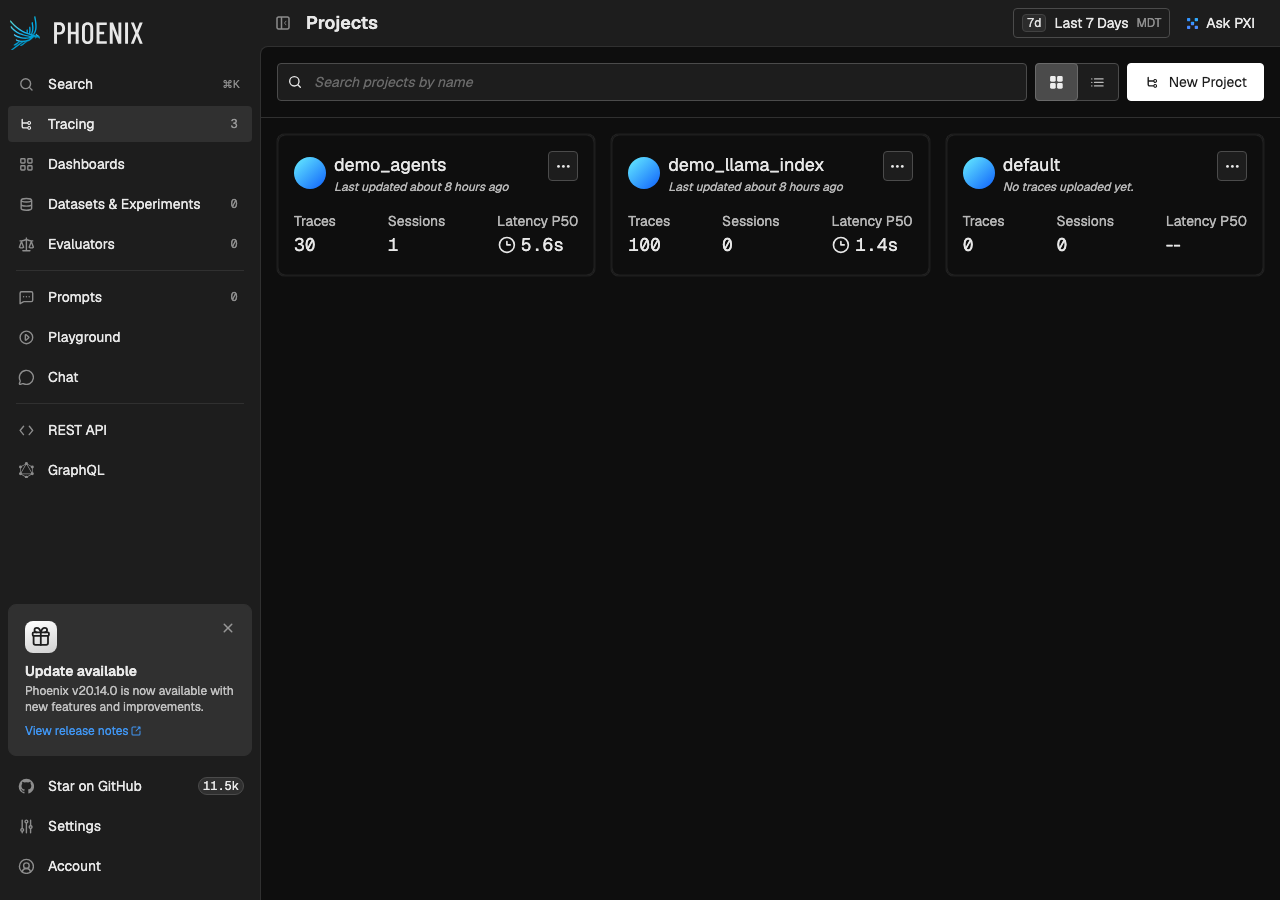
Public read-only demo of Arize Phoenix, an open-source observability platform for LLM and agent traces. Tested in place.

Tested in place byDeepQA Teamatphoenix-demo.arize.comonSep 18, 2026

Run #1model gemini-balanced (vertex)took 18m

10 of 12 scenarios passed, 2 failed, no issues after the audit.

Share on X
Phoenix demo in the browser during the run

By the numbers

10 of 12
scenarios passed, 2 failed
156
browser actions
39
screenshots
161
model calls
18
minutes
12
scenarios
10
passed
2
failed
0
blocked
0
issues

Walkthrough

Every scenario DeepQA drove in the browser, in plan order, with the 35 screenshots it captured along the way. A passing scenario is evidence too.

  1. S1
    Validate empty project name on creation

    4 steps, 3 screenshots

    pass
    S1-1.png
    S1 · Validate empty project name on creation
    S1-3.png
    S1 · Validate empty project name on creation
    S1-5.png
    S1 · Validate empty project name on creation
    • Opened the New project modal with an empty Name field.
    • Submitted the New project form with an empty Name field and observed the validation error 'Project name is required'.
    • The 'New Project' modal properly validates that the project name is required when submitting an empty name.
    • Validation error 'Project name is required' is displayed under the Name input and creation does not proceed.
  2. S2
    Create a new project successfully

    4 steps, 4 screenshots

    fail
    S2-1.png
    S2 · Create a new project successfully
    S2-3.png
    S2 · Create a new project successfully
    S2-7.png
    S2 · Create a new project successfully
    S2-10.png
    S2 · Create a new project successfully
    • Opened the New Project modal dialog from the projects page.
    • Filled the New Project form with name 'test_project_qa' and a description.
    • Submitting the project creation form resulted in 'Application is read-only' error message displayed in the modal.
    • Navigated to Projects page and opened the 'New Project' modal dialog.
    • Filled out the 'Name' with 'test_project_qa' and entered a description.
    • Clicked 'Create' button; the submission was rejected and displayed 'Application is read-only'.
  3. S3
    Search and filter projects list

    3 steps, 2 screenshots

    pass
    S3-1.png
    S3 · Search and filter projects list
    S3-4.png
    S3 · Search and filter projects list
    • Navigated to Projects page displaying all available projects: demo_agents, demo_llama_index, and default.
    • Typed 'demo_agents' into search box; the project list instantly updated to show only the 'demo_agents' project card, filtering out other projects.
    • Project list successfully filters to only display 'demo_agents' when typed into the search box.
  4. S4
    Load project spans data

    3 steps, 2 screenshots

    pass
    S4-1.png
    S4 · Load project spans data
    S4-4.png
    S4 · Load project spans data
    • Navigated to the Projects page showing demo_agents, demo_llama_index, and default projects.
    • Spans page for demo_agents loaded successfully with traffic status graph and populated table containing span rows, inputs, outputs, timestamps, latency, tokens, and cost.
    • Navigated from Projects list to the 'demo_agents' project spans page (/projects/UHJvamVjdDoy/spans?timeRangeKey=[redacted]
    • The spans view rendered a traffic chart and a data table populated with multiple span rows including status, kind, name, input/output previews, start times, latency metrics, cumulative tokens, and cumulative costs.
  5. S5
    Inspect trace waterfall and span details

    3 steps, 3 screenshots

    pass
    S5-3.png
    S5 · Inspect trace waterfall and span details
    S5-5.png
    S5 · Inspect trace waterfall and span details
    S5-11.png
    S5 · Inspect trace waterfall and span details
    • Navigated to the spans page for demo_agents project showing a list of spans with attributes such as status, kind, name, input, output, start time, latency, and tokens.
    • Clicked on a span/trace row to open the detailed view, which shows the trace waterfall sequence, inputs, outputs, latency, tokens, and metadata attributes for the selected span.
    • Navigated to the spans page for the 'demo_agents' project at /projects/UHJvamVjdDoy/spans.
    • Observed the table listing span records with columns for status, kind, name, input, output, start time, latency, and tokens.
    • Clicked on a span row ('code_based_agent') which opened the trace waterfall and span details view with span attributes, inputs, outputs, and metadata at /projects/UHJvamVjdDoy/traces/40c7634591db212b271f001329aded69?timeRangeKey=[redacted]
  6. S6
    Submit duplicate project name

    4 steps, 4 screenshots

    pass
    S6-1.png
    S6 · Submit duplicate project name
    S6-3.png
    S6 · Submit duplicate project name
    S6-6.png
    S6 · Submit duplicate project name
    S6-9.png
    S6 · Submit duplicate project name
    • Navigated to the projects page showing existing projects demo_agents, demo_llama_index, and default.
    • Opened the New Project dialog.
    • Entered duplicate project name 'demo_agents' into the project creation form.
    • Form submission was rejected with error message 'Application is read-only' without crashing or overriding existing projects.
    • Navigated to Projects page and opened the New Project dialog.
    • Entered existing project name 'demo_agents' and submitted the form.
    • The application cleanly handled the submission attempt by displaying 'Application is read-only' without crashing or overwriting any existing project data.
  7. S7
    Toggle between grid and table layouts

    5 steps, 3 screenshots

    pass
    S7-1.png
    S7 · Toggle between grid and table layouts
    S7-3.png
    S7 · Toggle between grid and table layouts
    S7-5.png
    S7 · Toggle between grid and table layouts
    • Initial view on the Projects page is the card-based Grid view showing 3 projects.
    • Clicked Table view radio button; layout switched to tabular view displaying columns for name, last updated at, and metrics.
    • Clicked Grid view radio button; layout switched cleanly back to card-based grid layout with all project cards intact.
    • Successfully toggled between Table view and Grid view on the Projects page. Table view rendered project names, last updated timestamps, and metrics in structured columns, and Grid view restored the card-based layout without any data loss or UI breakage.
  8. S8
    View project end-to-end traces

    2 steps, 3 screenshots

    pass
    S8-1.png
    S8 · View project end-to-end traces
    S8-4.png
    S8 · View project end-to-end traces
    S8-8.png
    S8 · View project end-to-end traces
    • Navigated to projects list and located demo_agents project.
    • The Traces view loaded successfully with overall volume and latency charts, and a table showing end-to-end trace executions with their inputs, outputs, latencies, tokens, and costs.
    • Navigated to demo_agents project spans page at /projects/UHJvamVjdDoy/spans.
    • Clicked on the Traces tab navigating to /projects/UHJvamVjdDoy/traces.
    • The Traces view loaded with aggregate status metrics (Overall volume of traces, Trace latency percentiles, Annotation scores) and table listing end-to-end trace executions.
  9. S9
    View project conversation sessions

    2 steps, 2 screenshots

    pass
    S9-3.png
    S9 · View project conversation sessions
    S9-6.png
    S9 · View project conversation sessions
    • Navigated to demo_agents spans page showing list of agent spans and traffic charts.
    • Switched to Sessions tab, which successfully rendered conversation sessions table and session analytics stats (total sessions, avg traces per session, duration percentiles).
    • Navigated to demo_agents project and clicked the Sessions tab.
    • The Sessions tab rendered conversation sessions data (including session ID 42, inputs, outputs, timestamps, token [redacted], and costs) as well as session-level analytics (volume charts, Total Sessions, Avg Traces per Session, and Duration metrics).
  10. S10
    View project telemetry metrics

    2 steps, 3 screenshots

    pass
    S10-1.png
    S10 · View project telemetry metrics
    S10-4.png
    S10 · View project telemetry metrics
    S10-7.png
    S10 · View project telemetry metrics
    • Navigated to demo_agents spans page showing span traffic and table.
    • The Metrics tab renders charts for trace counts, latency distributions (percentiles P50-P99.9), token [redacted], cost, and models breakdown without errors.
    • Navigated from the projects list to the spans page for demo_agents.
    • Clicked on the Metrics tab (/projects/UHJvamVjdDoy/metrics?timeRangeKey=[redacted]
    • Observed full rendering of trace counts, latency distributions (percentiles), cost, top models, and token [redacted] charts with populated data.
  11. S11
    View project configuration

    2 steps, 2 screenshots

    pass
    S11-3.png
    S11 · View project configuration
    S11-6.png
    S11 · View project configuration
    • Navigated to the spans page for demo_agents.
    • Clicked Config tab and verified project configuration, data retention settings, and annotation configurations are displayed.
    • Successfully navigated to the demo_agents project spans page and opened the Config tab.
    • Project configuration, metadata settings, data retention policies, and annotation configurations were displayed as expected.
  12. S12
    Update default project retention policy

    4 steps, 4 screenshots

    fail
    S12-2.png
    S12 · Update default project retention policy
    S12-6.png
    S12 · Update default project retention policy
    S12-8.png
    S12 · Update default project retention policy
    S12-10.png
    S12 · Update default project retention policy
    • Navigated to Settings > General page and located the Default Project Retention Policy form with current value 90.
    • Submitting the Default Project Retention Policy form with value 60 displayed an error message 'Failed to update default retention policy'.
    • Navigated to Settings > General and observed the Default Project Retention Policy form initialized with value 90.
    • Entered 60 into 'Maximum Trace Retention in Days' and clicked 'Update'.
    • Observed error banner 'Failed to update default retention policy'.
    • Reloaded the page and observed the retention policy value reverted to 90.

Issues

No finding survived the audit. Nothing to fix from this run.

Environment limitations

These failures came from the test environment, not from the application: a credential the sandbox does not hold, a demo nobody may write to, a resource it cannot reach. They are not counted as issues.

  • Default Project Retention Policy update fails with error and does not persistS12 · high

    The failure to update the retention policy and its reversion on reload are expected behaviors on a read-only demo instance, not application defects. The audit recorded the test environment as the cause, so this is a limit of the run rather than a defect of the application.

  • Project creation fails with 'Application is read-only' errorS2 · medium

    The 'Application is read-only' error indicates the test is running against a restricted public demo, making this an environment limit rather than an application defect. The audit recorded the test environment as the cause, so this is a limit of the run rather than a defect of the application.

  • S6 could not exercise this: Duplicate project name validation blocked by read-only environment. The submission was blocked by a global read-only environment restriction, preventing the application's duplicate name logic from being exercised. The audit recorded the test environment as the cause, so…

Critic audit

An adversarial second pass over every finding before it reaches the report.

2
findings reviewed
0
re-verified live
2
withdrawn
  • F1withdrawn

    The 'Application is read-only' error indicates the test is running against a restricted public demo, making this an environment limit rather than an application defect. The audit recorded the test environment as the cause, so this is a limit of the run rather than a defect of the application.

  • F2withdrawn

    The failure to update the retention policy and its reversion on reload are expected behaviors on a read-only demo instance, not application defects. The audit recorded the test environment as the cause, so this is a limit of the run rather than a defect of the application.

  • The target application is a read-only public demo, causing all scenarios that attempt write operations to hit environment restrictions rather than application behavior.

Report

QA report: external/phoenix-demo.arize.com at hosted

No application defects were confirmed during testing across read-only inspection and monitoring workflows.

Testing exercised twelve scenarios evaluating project navigation, trace waterfalls, span inspection, telemetry metrics, conversation sessions, and configuration views. All read-only visualization and browsing capabilities behaved as expected.

Two scenarios attempting write actions—project creation and retention policy updates—failed due to read-only restrictions on this public demo deployment. The audit reviewed the two corresponding findings (F1 and F2) and withdrew both as test environment limitations rather than application defects.

Because the demo environment prohibits mutations, write-path operations such as project creation, data updates, and duplicate name validation could not be fully exercised. Testing on a writable environment will be necessary to validate data persistence and mutation flows before release decisions.

Run summary
MetricCount
Scenarios executed12
Passed10
Failed2
Blocked0
Findings raised2
Issues after the audit0
Withdrawn by the audit2
Critical / high / medium / low0 / 0 / 0 / 0

Target: https://phoenix-demo.arize.com · Testing level: deep_feature · Stack: unknown

Issues

No issues survived the audit.

Environment limitations

These failures came from the test environment, not from the application: a credential the sandbox does not hold, a demo nobody may write to, a resource it cannot reach. They are not counted as issues. They record what this run could not exercise.

  • Default Project Retention Policy update fails with error and does not persist (S12, high): The failure to update the retention policy and its reversion on reload are expected behaviors on a read-only demo instance, not application defects. The audit recorded the test environment as the cause, so this is a limit of the run rather than a defect of the application.
  • Project creation fails with 'Application is read-only' error (S2, medium): The 'Application is read-only' error indicates the test is running against a restricted public demo, making this an environment limit rather than an application defect. The audit recorded the test environment as the cause, so this is a limit of the run rather than a defect of the application.
  • S6 could not exercise this: Duplicate project name validation blocked by read-only environment. The submission was blocked by a global read-only environment restriction, preventing the application's duplicate name logic from being exercised. The audit recorded the test environment as the cause, so…
Scenario results
ScenarioPriorityResultIssues
S1 Validate empty project name on creationhighpassnone
S2 Create a new project successfullyhighfailnone
S3 Search and filter projects listhighpassnone
S4 Load project spans datahighpassnone
S5 Inspect trace waterfall and span detailshighpassnone
S6 Submit duplicate project namemediumpassnone
S7 Toggle between grid and table layoutsmediumpassnone
S8 View project end-to-end tracesmediumpassnone
S9 View project conversation sessionsmediumpassnone
S10 View project telemetry metricsmediumpassnone
S11 View project configurationmediumpassnone
S12 Update default project retention policylowfailnone
The audit

The Critic reviewed 2 findings and re-verified 0 of them live in the browser, replaying the reported steps on a fresh page.

  • The target application is a read-only public demo, causing all scenarios that attempt write operations to hit environment restrictions rather than application behavior.
Coverage and caveats

In scope: Projects listing, view toggles, and search functionality; Project creation lifecycle and form validation; Deep trace analysis via Spans, Traces, Sessions, Metrics, and Config tabs; Global settings related to project retention policies.

Not covered: Datasets and experiment management (outside deep feature focus); Evaluators, Prompts, Playground, and Chat (outside deep feature focus); REST and GraphQL API testing (UI-only testing scope).

  • The demo instance allows write actions such as project creation and settings updates; if strictly read-only, write scenarios will fail gracefully.
  • Project deletion and edit affordances were not mapped and are assumed absent or unsupported by the current UI.
  • Pre-populated demo data (e.g., 'demo_agents') is consistently available for read-only validation of spans, traces, and metrics.
By the numbers
MetricValue
Scenarios10 passed, 2 failed, 0 blocked of 12 (38 planned steps)
Browser actions156 (36 clicks, 8 inputs, 31 navigations, 81 snapshots)
Screenshots39 (4 explore, 35 scenario, 0 critic), 35 captioned
Coverage15 pages, 4 forms, 3 flows, 0 console errors
Audit2 findings, 0 re-verified live, 0 confirmed, 0 promoted, 2 withdrawn
Model calls161
Tokens1,233,898 input, 9,292 output, 16,073 thinking
Time18 min
StageCallsInputOutputThinkingSeconds
explore31238,6692,682884122
plan14,5761,9714,61250
test127984,0584,0157,038866
critique14,9314383,02729
report11,6641865127

Run log

stagecallstokenstime
Explore31242.2k2m 2s
Plan111.2k50s
Test127995.1k14m 26s
Critique18.4k29s
Report12.4k7s
Total1611.3M17m 55s
Intake
Explore
Plan
Test
Critique
Report
  • 05:40:52Zexploreexplore started
  • 05:58:46ZexploreExplored /projects (24 controls, 0 forms)
  • 05:58:46ZexploreExplored /projects/UHJvamVjdDoy/spans (172 controls, 0 forms)
  • 05:58:46ZexploreExplored /projects/UHJvamVjdDoy/spans/40c7634591db212b271f001329aded69 (172 controls, 0 forms)
  • 05:58:46ZexploreExplored /projects/UHJvamVjdDoy/traces (23 controls, 0 forms)
  • 05:58:46ZexploreExplored /projects/UHJvamVjdDoy/sessions (23 controls, 0 forms)
  • 05:58:46ZexploreExplored /projects/UHJvamVjdDoy/metrics (47 controls, 0 forms)
  • 05:58:46ZexploreExplored /projects/UHJvamVjdDoy/config (41 controls, 0 forms)
  • 05:58:46ZexploreExplored /dashboards (23 controls, 0 forms)
  • 05:58:46ZexploreExplored /datasets (23 controls, 0 forms)
  • 05:58:46ZexploreExplored /evaluators (20 controls, 0 forms)
  • 05:58:46ZexploreExplored /prompts (23 controls, 0 forms)
  • 05:58:46ZexploreExplored /playground (51 controls, 0 forms)
  • 05:58:46ZexploreExplored /chat (26 controls, 0 forms)
  • 05:58:46ZexploreExplored /apis/rest (17 controls, 0 forms)
  • 05:58:46ZexploreExplored /apis/graphql (17 controls, 0 forms)
  • 05:58:46ZexploreExplored /settings/general (38 controls, 2 forms)
  • 05:58:46ZexploreMapped 15 pages, 4 forms, 3 flows in 31 turns.
  • 05:58:46Zexploreexplore completed in 122s.
  • 05:58:46Zplanplan started
  • 05:58:46ZplanPlanned 12 scenarios (5 high, 6 medium, 1 low).
  • 05:58:46Zplanplan completed in 50s.
  • 05:58:46Ztesttest started
  • 05:58:46ZtestS1 executed (pass)
  • 05:58:46ZtestS2 executed (fail), 1 finding
  • 05:58:46ZtestS3 executed (pass)
  • 05:58:46ZtestS4 executed (pass)
  • 05:58:46ZtestS5 executed (pass)
  • 05:58:46ZtestS6 executed (pass)
  • 05:58:46ZtestS7 executed (pass)
  • 05:58:46ZtestS8 executed (pass)
  • 05:58:46ZtestS9 executed (pass)
  • 05:58:46ZtestS10 executed (pass)
  • 05:58:46ZtestS11 executed (pass)
  • 05:58:46ZtestS12 executed (fail), 1 finding
  • 05:58:46ZtestExecuted 12 scenarios: 10 passed, 2 failed, 0 blocked, 2 findings.
  • 05:58:46Ztesttest completed in 866s.
  • 05:58:46Zcritiquecritique started
  • 05:58:46ZcritiqueReviewed 2 findings; 1 possible defect spotted in passed scenarios.
  • 05:58:46ZcritiqueAudit complete: 0 confirmed, 2 withdrawn, 0 promoted, 0 re-verified live.
  • 05:58:46Zcritique3 failures came from the test environment rather than the application. They are reported as environment limitations, not issues.
  • 05:58:46Zcritiquecritique completed in 29s.
  • 05:58:46Zreportreport started
  • 05:58:46ZreportReported 0 issues (0 critical, 0 high, 0 medium, 0 low) from 2 findings.
  • 05:58:46Zreportreport completed in 7s.

Put an agent team on your next pull request.

Connect a repo, dispatch a Run, and read an audited, evidence-backed report the same day.