
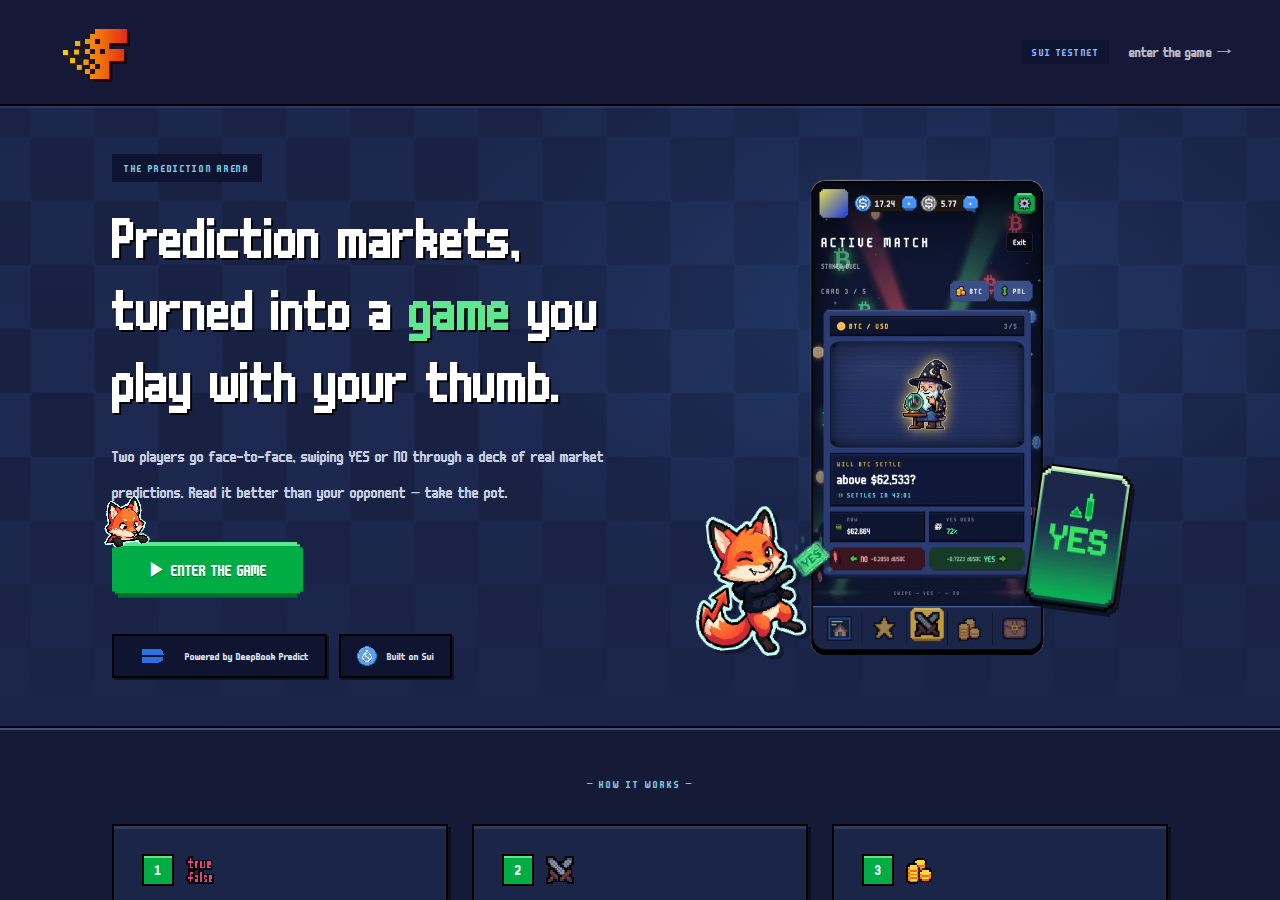
Hosted appDeepBook prediction gameSui Testnet ↗succeeded

DeepBook Predict PvP game where two players swipe through a deck of market predictions head to head. Tested in place on Sui Testnet.

Tested in place byDeepQA TeamonSui Testnetatplay.flicky.site/onSep 27, 2026

Run #1model gemini-balanced (vertex)took 6m

4 of 11 scenarios passed, 7 blocked, no issues after the audit.

Share on X
Flicky in the browser during the run

By the numbers

4 of 11
scenarios passed, 7 blocked
113
browser actions
30
screenshots
121
model calls
5.9
minutes
11
scenarios
4
passed
0
failed
7
blocked
0
issues

Walkthrough

Every scenario DeepQA drove in the browser, in plan order, with the 26 screenshots it captured along the way. A passing scenario is evidence too.

  1. S1
    Navigate from landing page to game arena

    2 steps, 2 screenshots

    pass
    S1-1.png
    S1, Navigate from landing page to game arena
    S1-4.png
    S1, Navigate from landing page to game arena
    • Landing page loaded showing 'Sui testnet' badge and 'enter the game →' link.
    • Navigated to https://play.flicky.site/game/home where the game shell loaded with the 'sign in to play' button visible.
    • The landing page correctly showed 'Sui testnet' network badge.
    • Clicking 'enter the game →' successfully navigated to https://play.flicky.site/game/home, loading the game shell with the 'sign in to play' button and bottom navigation links.
  2. S2
    Public leaderboard data renders

    2 steps, 3 screenshots

    pass
    S2-2.png
    S2, Public leaderboard data renders
    S2-4.png
    S2, Public leaderboard data renders
    S2-7.png
    S2, Public leaderboard data renders
    • Confirmed network is Sui testnet from the application header badge on the home page.
    • Navigated to /game/pvp which displays the unauthenticated PvP duel prompt prompting users to sign in.
    • Opened the sign-in modal on /game/pvp offering Google zkLogin via Enoki and Slush wallet extension.
    • Navigated to /game/rank and observed the public leaderboard populated with player standings, wallet addresses, tiers, scores, and win-loss records without requiring sign-in.
    • The leaderboard table on /game/rank renders public player data without requiring authentication, including ranks 1 through 6, truncated Sui wallet addresses, tier badges, scores, and win-loss-tie statistics.
  3. S3
    Unauthenticated navigation across game views

    4 steps, 4 screenshots

    pass
    S3-2.png
    S3, Unauthenticated navigation across game views
    S3-4.png
    S3, Unauthenticated navigation across game views
    S3-6.png
    S3, Unauthenticated navigation across game views
    S3-8.png
    S3, Unauthenticated navigation across game views
    • Navigated to /game/home in unauthenticated state, displaying sign-in prompt and bottom navigation links.
    • Clicked rank navigation link, URL changed to /game/rank without crashing and bottom navigation remained responsive.
    • Clicked shop navigation link, navigated to /game/shop displaying leaderboard and season prizes without crashing.
    • Clicked chat/inventory navigation link, navigated to /game/inventory showing the swap interface without crashing.
    • The navigation bar successfully routes unauthenticated users between /game/home, /game/rank, /game/shop, and /game/inventory without crashes or inescapable blocking modals.
  4. S4
    Sign-in modal dismissal

    3 steps, 3 screenshots

    pass
    S4-2.png
    S4, Sign-in modal dismissal
    S4-4.png
    S4, Sign-in modal dismissal
    S4-6.png
    S4, Sign-in modal dismissal
    • Navigated to /game/home and observed the 'sign in to play' prompt and bottom navigation links.
    • Clicked 'sign in to play' and observed the 'sign in to flicky' modal overlay with options for Google zkLogin and Slush.
    • Clicked the close button on the sign-in modal; the modal closed cleanly and restored the underlying home view.
    • The sign-in modal opened upon clicking 'sign in to play' and was dismissed immediately upon clicking the close button, returning the user to the unblocked home view.
  5. S5
    Valid numeric input in swap amount

    2 steps, 2 screenshots

    blocked
    S5-2.png
    S5, Valid numeric input in swap amount
    S5-6.png
    S5, Valid numeric input in swap amount
    • Navigated to /game/inventory which displayed a sign-in wall 'ready to duel? sign in to swipe, stake, and take the pot.'. Opening the sign-in modal showed 'continue with google' (zklogin via enoki) and 'continue with slush' (a sui wallet extension), neither of which connects the DeepQA test wallet without third-party authentication or a specific extension.
    • Confirmed network showed 'Sui testnet' in the top banner.
    • Navigated to https://play.flicky.site/game/inventory where a sign-in prompt is required before the swap amount input can be accessed.
    • The sign-in modal offers only 'continue with google' (zklogin via enoki) and 'continue with slush' (a named sui wallet extension); the injected DeepQA test wallet is not supported.
  6. S6
    Validation of non-numeric characters in swap amount

    2 steps, 1 screenshot

    blocked
    S6-3.png
    S6, Validation of non-numeric characters in swap amount
    • Navigated to /game/inventory where an unauthenticated sign-in wall requires signing in with Google (zkLogin) or Slush wallet extension to access inventory and swap functionality.
    • Confirmed the application header indicates network 'Sui testnet'.
    • Navigated to /game/inventory which presents a sign-in wall: 'ready to duel? sign in to swipe, stake, and take the pot.'
    • Opening the sign in dialog presents two options: 'continue with google' (zklogin via enoki) and 'continue with slush' ('slush is a sui wallet extension'). Neither DeepQA test wallet nor a generic injected Sui wallet option is offered, and third-party identity providers (Google) cannot be used on hosted targets.
    • The swap amount input field is locked behind the authentication wall and cannot be reached without an account.
  7. S7
    Toggle swap direction

    2 steps, 3 screenshots

    blocked
    S7-2.png
    S7, Toggle swap direction
    S7-4.png
    S7, Toggle swap direction
    S7-7.png
    S7, Toggle swap direction
    • Navigated to /game/inventory; sign in prompt is displayed.
    • Sign-in modal on /game/inventory only offers 'continue with google' (zklogin via enoki) and 'continue with slush' (a named Sui wallet extension), neither of which connects the DeepQA test wallet.
    • The network shown on the application header is 'Sui testnet'.
    • Accessing /game/inventory presents a sign-in wall requiring authentication via 'continue with google' (zklogin via enoki) or 'continue with slush'.
    • Third-party OAuth via Google is out of scope for a hosted run and the wallet picker only offers the named Slush extension rather than standard/DeepQA injected test wallet.
  8. S8
    Valid custom slippage input

    2 steps, 2 screenshots

    blocked
    S8-2.png
    S8, Valid custom slippage input
    S8-4.png
    S8, Valid custom slippage input
    • Navigated to /game/inventory and observed a sign-in wall asking user to 'sign in to swipe, stake, and take the pot.'
    • The sign in modal offers only 'continue with google' (zklogin via enoki) and 'continue with slush' (slush wallet extension), neither of which allows connecting the DeepQA test wallet or proceeding without an account.
    • The application shows Sui testnet on the landing page.
    • Navigating to /game/inventory displays a sign-in wall: 'ready to duel? sign in to swipe, stake, and take the pot.' with a 'sign in to play' button.
    • The sign-in dialog provides 'continue with google' (zklogin via enoki) and 'continue with slush' (Sui wallet extension), offering no general DeepQA test wallet connection and requiring third-party authentication.
  9. S9
    Validation of out-of-bounds slippage

    2 steps, 2 screenshots

    blocked
    S9-2.png
    S9, Validation of out-of-bounds slippage
    S9-6.png
    S9, Validation of out-of-bounds slippage
    • Navigated to /game/inventory where a sign-in prompt is shown; opened sign-in modal which offers only 'continue with google' (zklogin via enoki) and 'continue with slush' (Sui wallet extension), neither of which connects the injected DeepQA test wallet.
    • The application requires authentication before accessing the inventory page (/game/inventory).
    • The sign-in dialog provides only two options: 'continue with google' (zklogin via enoki) and 'continue with slush' (a named Sui wallet extension).
    • The DeepQA Test Wallet is not supported or offered in the wallet picker, blocking access to the inventory and slippage configuration.
  10. S10
    Validation of negative slippage

    2 steps, 2 screenshots

    blocked
    S10-2.png
    S10, Validation of negative slippage
    S10-4.png
    S10, Validation of negative slippage
    • Navigated to /game/inventory where a sign-in wall prompt 'ready to duel? sign in to swipe, stake, and take the pot.' is displayed.
    • Sign-in dialog offers 'continue with google' (zklogin via enoki) and 'continue with slush' (a named sui wallet extension); the DeepQA test wallet is not offered and Google OAuth is out of scope.
    • The application displayed 'Sui testnet' in the banner on the landing page.
    • Navigating to /game/inventory displays a sign-in wall stating 'ready to duel? sign in to swipe, stake, and take the pot.' with a 'sign in to play' button.
    • Clicking 'sign in to play' opens a modal offering 'continue with google' (zklogin via enoki) and 'continue with slush' ('slush is a sui wallet extension'). Neither allows logging in without creating/using a third-party Google account or a specific named wallet extension (Slush).
  11. S11
    Refresh swap rates

    2 steps, 2 screenshots

    blocked
    S11-2.png
    S11, Refresh swap rates
    S11-4.png
    S11, Refresh swap rates
    • Navigated to /game/inventory which required signing in to view inventory and swap rates.
    • The sign in dialog lists only 'continue with google' (zklogin via enoki) and 'continue with slush' (a sui wallet extension).
    • The home page displayed network as 'Sui testnet'.
    • Navigating to /game/inventory prompts the user with 'ready to duel? sign in to swipe, stake, and take the pot.' and a 'sign in to play' button.
    • The sign-in modal offers 'continue with google' (zklogin via enoki) and 'continue with slush' ('slush is a sui wallet extension'), with no option for the injected DeepQA Test Wallet.

Issues

No finding survived the audit. Nothing to fix from this run.

Wallet activity

DeepQA injected a test wallet into the browser and recorded every request the app sent to it. Testnet funds only.

App network: Sui testnet

address
0xca0e75…2521a7 ↗
chain
Sui Testnet
browsers opened
2
connects
0
signing requests
0

The app connected the test wallet 0 times and asked for no signature.

Critic audit

An adversarial second pass over every finding before it reaches the report.

0
findings reviewed
0
live replays
0
withdrawn
    • The majority of the test plan was blocked because the application's wallet picker only supports specific providers (Google zkLogin and Slush), preventing the injected test wallet from connecting.

    Report

    QA report: external/play.flicky.site at hosted

    No defects were observed across accessible public views, but the majority of interactive scenarios could not be tested due to wallet connection constraints.

    Testing covered unauthenticated public functionality, including navigating from the landing page to the game arena, rendering public leaderboard data, browsing across views, and dismissing the sign-in modal. All four of these baseline scenarios passed successfully without errors.

    Seven scenarios focusing on token swap and transaction configuration—including swap amount validation, directional toggling, slippage parameter settings, and rate refreshes—were blocked. The application's wallet interface only supports specific providers such as Google zkLogin and Slush, which prevented the automated test wallet from connecting and left authenticated game actions unexercised.

    Run summary
    MetricCount
    Scenarios executed11
    Passed4
    Failed0
    Blocked7
    Findings raised0
    Issues after the audit0
    Withdrawn by the audit0
    Critical / high / medium / low0 / 0 / 0 / 0

    Target: https://play.flicky.site/ · Testing level: deep_feature · Stack: unknown

    Issues

    No issues survived the audit.

    Scenario results
    ScenarioPriorityResultIssues
    S1 Navigate from landing page to game arenahighpassnone
    S2 Public leaderboard data rendershighpassnone
    S3 Unauthenticated navigation across game viewshighpassnone
    S4 Sign-in modal dismissalhighpassnone
    S5 Valid numeric input in swap amountmediumblocked (the app's wallet picker does not offer the DeepQA test wallet)none
    S6 Validation of non-numeric characters in swap amountmediumblocked (the app's wallet picker does not offer the DeepQA test wallet)none
    S7 Toggle swap directionmediumblocked (the app's wallet picker does not offer the DeepQA test wallet)none
    S8 Valid custom slippage inputmediumblocked (needs an account, out of scope for a hosted run)none
    S9 Validation of out-of-bounds slippagemediumblocked (the app's wallet picker does not offer the DeepQA test wallet)none
    S10 Validation of negative slippagelowblocked (needs an account, out of scope for a hosted run)none
    S11 Refresh swap rateslowblocked (the app's wallet picker does not offer the DeepQA test wallet)none
    The audit

    The Critic reviewed 0 findings and ran 0 live replays in the browser, each on a fresh page.

    • The majority of the test plan was blocked because the application's wallet picker only supports specific providers (Google zkLogin and Slush), preventing the injected test wallet from connecting.
    Coverage and caveats

    In scope: Unauthenticated landing page and game entry navigation; Routing to rank, PvP, shop, and inventory views; Public leaderboard data rendering; Sign-in modal dismissal; Testnet token swap input validation (amounts and slippage).

    Not covered: Core gameplay mechanics (swiping, staking, dueling) - needs an account, out of scope for a hosted run; Execution of testnet swap - requires wallet connection, out of scope; In-game shop purchases - requires an account, out of scope.

    • Unauthenticated users can navigate between shell tabs (rank, pvp, shop, inventory) without being trapped in a sign-in redirect loop.
    • The 'switch direction' button in the swap interface produces a visually observable change in token labels.
    • The slippage input has standard front-end validation bounds (e.g., rejecting >100% or negative numbers) that can be triggered.
    • S5 could not be executed: the app's wallet picker does not offer the DeepQA test wallet.
    • S6 could not be executed: the app's wallet picker does not offer the DeepQA test wallet.
    • S7 could not be executed: the app's wallet picker does not offer the DeepQA test wallet.
    • S8 could not be executed: needs an account, out of scope for a hosted run.
    • S9 could not be executed: the app's wallet picker does not offer the DeepQA test wallet.
    • S10 could not be executed: needs an account, out of scope for a hosted run.
    • S11 could not be executed: the app's wallet picker does not offer the DeepQA test wallet.
    By the numbers
    MetricValue
    Scenarios4 passed, 0 failed, 7 blocked of 11 (25 planned steps)
    Browser actions113 (29 clicks, 0 inputs, 23 navigations, 61 snapshots)
    Screenshots30 (4 explore, 26 scenario, 0 critic), 26 captioned
    Coverage6 pages, 1 forms, 3 flows, 0 console errors
    Audit0 findings, 0 re-verified live, 0 confirmed, 0 promoted, 0 withdrawn
    Model calls121
    Tokens602,835 input, 7,150 output, 15,200 thinking
    Time6 min
    Wallet0 transactions, 0 signatures, 0 refusals on chain sui:testnet
    StageCallsInputOutputThinkingSeconds
    explore1561,9281,6351,72741
    plan13,9211,7032,74630
    test103529,9753,5779,958271
    critique15,517653365
    report11,4941704335

    Run log

    stagecallstokenstime
    Explore1565.3k41s
    Plan18.4k30s
    Test103543.5k4m 31s
    Critique15.9k5s
    Report12.1k5s
    Total121625.2k5m 52s
    ○Intake
    ✓Explore
    ✓Plan
    ✓Test
    ✓Critique
    ✓Report
    • 05:15:40Zexploreexplore started
    • 05:21:32ZexploreExplored / (6 controls, 0 forms)
    • 05:21:32ZexploreExplored /game/home (6 controls, 0 forms)
    • 05:21:32ZexploreExplored /game/rank (6 controls, 0 forms)
    • 05:21:32ZexploreExplored /game/pvp (6 controls, 0 forms)
    • 05:21:32ZexploreExplored /game/shop (6 controls, 0 forms)
    • 05:21:32ZexploreExplored /game/inventory (13 controls, 0 forms)
    • 05:21:32ZexploreMapped 6 pages, 1 forms, 3 flows in 15 turns.
    • 05:21:32Zexploreexplore completed in 41s.
    • 05:21:32Zplanplan started
    • 05:21:32ZplanPlanned 11 scenarios (4 high, 5 medium, 2 low).
    • 05:21:32Zplanplan completed in 30s.
    • 05:21:32Ztesttest started
    • 05:21:32ZtestS1 executed (pass)
    • 05:21:32ZtestS2 executed (pass)
    • 05:21:32ZtestS3 executed (pass)
    • 05:21:32ZtestS4 executed (pass)
    • 05:21:32ZtestS5 executed (blocked)
    • 05:21:32ZtestS6 executed (blocked)
    • 05:21:32ZtestS7 executed (blocked)
    • 05:21:32ZtestS8 executed (blocked)
    • 05:21:32ZtestS9 executed (blocked)
    • 05:21:32ZtestS10 executed (blocked)
    • 05:21:32ZtestS11 executed (blocked)
    • 05:21:32ZtestExecuted 11 scenarios: 4 passed, 0 failed, 7 blocked, 0 findings.
    • 05:21:32Ztesttest completed in 271s.
    • 05:21:32Zcritiquecritique started
    • 05:21:32ZcritiqueReviewed 0 findings; 0 possible defects spotted in passed scenarios.
    • 05:21:32ZcritiqueAudit complete: 0 confirmed, 0 withdrawn, 0 promoted, 0 re-verified live.
    • 05:21:32Zcritiquecritique completed in 5s.
    • 05:21:32Zreportreport started
    • 05:21:32ZreportReported 0 issues (0 critical, 0 high, 0 medium, 0 low) from 0 findings.
    • 05:21:32Zreportreport completed in 5s.

    Put an agent team on your next pull request.

    Connect a repo, dispatch a Run, and read an audited, evidence-backed report the same day.