Explore/Sui Campaign/Polymedia Profile
Hosted appOn-chain identitySui Testnet ↗succeeded

On-chain profile system that attaches a name and picture to a Sui address, with over 130,000 profiles created to date. Tested in place on Sui Testnet.

Tested in place byDeepQA TeamonSui Testnetatprofile.polymedia.app/?network=testnetonSep 27, 2026

Run #1model gemini-balanced (vertex)took 7m

7 of 9 scenarios passed, 2 failed, no issues after the audit.

Share on X
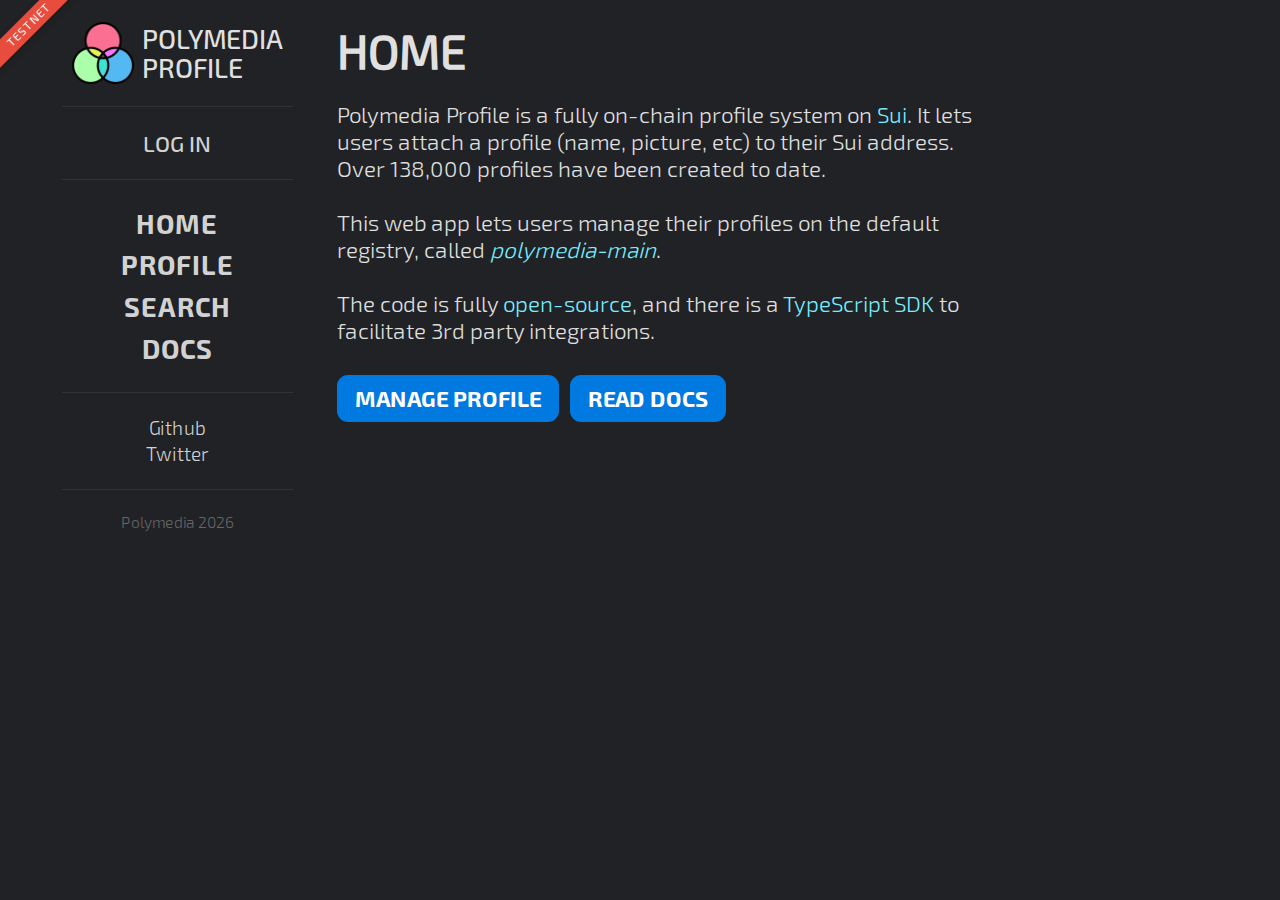
Polymedia Profile in the browser during the run

By the numbers

7 of 9
scenarios passed, 2 failed
138
browser actions
28
screenshots
142
model calls
7.4
minutes
9
scenarios
7
passed
2
failed
0
blocked
0
issues

Walkthrough

Every scenario DeepQA drove in the browser, in plan order, with the 24 screenshots it captured along the way. A passing scenario is evidence too.

  1. S1
    Search Profile with valid Sui address

    3 steps, 2 screenshots

    fail
    S1-3.png
    S1, Search Profile with valid Sui address
    S1-12.png
    S1, Search Profile with valid Sui address
    • Navigated to the Search page which shows the address input form.
    • Entered a valid 66-character Sui address and submitted the search form; the application displayed 'TypeError: Failed to fetch'.
    • Confirmed the dApp network badge is TESTNET.
    • Navigated to /search and input a valid 66-character Sui address.
    • Upon pressing Enter, the search form transitioned to 'Loading...' and then displayed 'TypeError: Failed to fetch'.
  2. S2
    Search Profile with invalid address format

    3 steps, 3 screenshots

    pass
    S2-1.png
    S2, Search Profile with invalid address format
    S2-4.png
    S2, Search Profile with invalid address format
    S2-8.png
    S2, Search Profile with invalid address format
    • Loaded home page showing TESTNET network. Navigating to /search.
    • Navigated to /search page displaying address input textbox.
    • Confirmed the application displayed 'TESTNET' in the header banner.
    • Navigated to /search and located the profile search address input textarea/textbox.
    • Entered 'invalid_sui_address' into the address input field.
    • Observed the input parser validated the text and correctly identified '0 address es', preventing any invalid network requests or unhandled exceptions.
    • Pressing Enter did not trigger any malformed fetch or error; invalid input was cleanly ignored/filtered.
  3. S3
    Connect Wallet on Manage Page

    3 steps, 3 screenshots

    pass
    S3-2.png
    S3, Connect Wallet on Manage Page
    S3-4.png
    S3, Connect Wallet on Manage Page
    S3-13.png
    S3, Connect Wallet on Manage Page
    • Navigated to /manage showing TESTNET network and LOG IN button.
    • Clicked LOG IN, opening the Connect a Wallet modal displaying DeepQA Test Wallet.
    • Navigated to https://profile.polymedia.app/manage with network TESTNET active.
    • Clicked LOG IN button in the navigation header, which displayed the Connect a Wallet dialog with DeepQA Test Wallet listed.
    • Selected DeepQA Test Wallet; the modal dismissed and the logged-out state ('You must log in to use this feature') updated to the connected wallet state.
  4. S4
    Search Profile with multiple valid addresses

    3 steps, 3 screenshots

    fail
    S4-2.png
    S4, Search Profile with multiple valid addresses
    S4-7.png
    S4, Search Profile with multiple valid addresses
    S4-14.png
    S4, Search Profile with multiple valid addresses
    • Navigated to /search page showing TESTNET and an address input field.
    • Navigated to https://profile.polymedia.app/search while on TESTNET network.
    • Entered two valid 66-character hex Sui addresses separated by a space into the search input.
    • The UI parsed the input and displayed the address count indicator as '2 address es'.
    • Upon pressing Enter to submit the search, the search initiated a loading state and then failed with 'TypeError: Failed to fetch'.
  5. S5
    Search Profile with empty input

    3 steps, 2 screenshots

    pass
    S5-2.png
    S5, Search Profile with empty input
    S5-5.png
    S5, Search Profile with empty input
    • Navigated to /search with network set to TESTNET.
    • Focused the search textbox while empty and pressed Enter; the application ignored the submission without triggering errors or broken loading states.
    • Focused the address input and pressed Enter with an empty value.
    • The application gracefully ignored the empty submission without making an invalid request or entering an error/infinite loading state.
  6. S6
    Search Profile with whitespace only

    3 steps, 2 screenshots

    pass
    S6-3.png
    S6, Search Profile with whitespace only
    S6-7.png
    S6, Search Profile with whitespace only
    • Navigated to search page on TESTNET network with address search input displayed.
    • Entered multiple spaces into the search address input and pressed Enter; the application parsed 0 addresses and did not trigger any failed search request.
    • The search page correctly identified whitespace-only input as 0 addresses and did not attempt an invalid network query.
  7. S7
    Navigation across primary tabs

    5 steps, 4 screenshots

    pass
    S7-1.png
    S7, Navigation across primary tabs
    S7-6.png
    S7, Navigation across primary tabs
    S7-9.png
    S7, Navigation across primary tabs
    S7-12.png
    S7, Navigation across primary tabs
    • Loaded the home page showing the TESTNET network badge and primary navigation links.
    • Navigated to the PROFILE page at /manage displaying the PROFILE heading and loading state.
    • Navigated to the SEARCH page at /search displaying the address search form.
    • The application displays TESTNET in the network badge.
    • Navigating to PROFILE (/manage) updated the URL to /manage and rendered the PROFILE section.
    • Navigating to SEARCH (/search) updated the URL to /search and rendered the address search interface.
    • Navigating to DOCS (/docs) updated the URL to /docs and rendered the full documentation content.
  8. S8
    Home page call-to-action links

    6 steps, 4 screenshots

    pass
    S8-1.png
    S8, Home page call-to-action links
    S8-5.png
    S8, Home page call-to-action links
    S8-8.png
    S8, Home page call-to-action links
    S8-11.png
    S8, Home page call-to-action links
    • Observed home page displaying TESTNET network with MANAGE PROFILE and READ DOCS CTA buttons.
    • Navigated to /manage after clicking MANAGE PROFILE button link, loading the PROFILE page.
    • Navigated back to the HOME page at https://profile.polymedia.app/.
    • Navigated to /docs after clicking READ DOCS button link, successfully loading the DOCS page.
    • Confirmed the network displayed is TESTNET.
    • Clicking the 'MANAGE PROFILE' CTA button navigated to https://profile.polymedia.app/manage and displayed the Profile management view.
    • Navigating back to the Home page and clicking the 'READ DOCS' CTA button navigated to https://profile.polymedia.app/docs and displayed the documentation.
  9. S9
    Network badge verification

    2 steps, 1 screenshot

    pass
    S9-2.png
    S9, Network badge verification
    • Observed the TESTNET badge prominently displayed at the top left of the header on the homepage.
    • The network badge displaying 'TESTNET' is clearly visible at the top of the application header.

Issues

Findings that survived the Critic's audit. Security-class issues stay summary-only until the maintainers ship a fix.

highwithdrawnfunctionalF2 in S4

Search query fails with unhandled 'TypeError: Failed to fetch' error

The same defect on the same control is already reported as F1. One defect is counted once, however many scenarios met it. The page reported 2 console errors during the scenario.

Expected

The application should fetch and display profile results or an empty result status for the queried addresses.

Actual

The application fails to complete the search and displays 'TypeError: Failed to fetch'.

3 repro steps
  1. Navigate to https://profile.polymedia.app/search
  2. Enter two valid 66-character Sui addresses separated by a space (e.g. '0x0000000000000000000000000000000000000000000000000000000000000001 0x0000000000000000000000000000000000000000000000000000000000000002')
  3. Press Enter to perform the search

Environment limitations

These failures came from the test environment, not from the application: a credential the sandbox does not hold, a demo nobody may write to, a resource it cannot reach. They are not counted as issues.

  • Search address query fails with unhandled TypeError Failed to fetchS1, high

    The search fails because requests to the third-party Sui testnet fullnode are blocked by CORS, which is an environment limitation rather than an application defect. The audit recorded the test environment as the cause, so this is a limit of the run rather than a defect of the application. The page reported 2 console errors during the scenario.

  • S7 could not exercise this: CORS policy blocks fetch to Sui testnet fullnode on page load. Requests to the fullnode fail due to a CORS policy block, rendering network-dependent features unusable. The audit recorded the test environment as the cause, so it is not counted as an issue.

Wallet activity

DeepQA injected a test wallet into the browser and recorded every request the app sent to it. Testnet funds only.

App network: TESTNET

address
0xfe186a…f00bbd ↗
chain
Sui Testnet
browsers opened
2
connects
13
signing requests
0

The app connected the test wallet 13 times and asked for no signature.

Critic audit

An adversarial second pass over every finding before it reaches the report.

2
findings reviewed
0
live replays
2
withdrawn
  • F1withdrawn

    The search fails because requests to the third-party Sui testnet fullnode are blocked by CORS, which is an environment limitation rather than an application defect. The audit recorded the test environment as the cause, so this is a limit of the run rather than a defect of the application.

  • F2withdrawn

    The same defect on the same control is already reported as F1. One defect is counted once, however many scenarios met it.

  • The test run was broadly limited by a third-party CORS policy issue with the public Sui testnet fullnode, restricting true functional test coverage.
  • Finding F2 was recorded in S4's record but was not presented in the findings list for review.
  • F2 reports the same defect on the same control as F1, so it is recorded as a duplicate.

Report

QA report: external/profile.polymedia.app at hosted

No application defects were confirmed during testing, though test environment network restrictions prevented full verification of profile queries.

Testing covered the primary navigation tabs, home page call-to-action links, network badge displays, wallet connection triggers, and profile search input handling with valid, invalid, empty, and whitespace formats across nine scenarios.

Input validation and static interface navigation performed as expected across seven passing scenarios. Two scenarios failed when attempting to query live Sui profile data, but both associated findings were withdrawn by the audit after identifying that sandbox CORS policy restrictions to the public Sui testnet fullnode blocked backend communication.

Because the external RPC fullnode could not be reached from the test environment, end-to-end profile retrieval on the Sui testnet remains unverified, though no actionable defects in the application codebase were identified.

Run summary
MetricCount
Scenarios executed9
Passed7
Failed2
Blocked0
Findings raised2
Issues after the audit0
Withdrawn by the audit2
Critical / high / medium / low0 / 0 / 0 / 0

Target: https://profile.polymedia.app/?network=testnet · Testing level: deep_feature · Stack: unknown

Issues

No issues survived the audit.

Environment limitations

These failures came from the test environment, not from the application: a credential the sandbox does not hold, a demo nobody may write to, a resource it cannot reach. They are not counted as issues. They record what this run could not exercise.

  • Search address query fails with unhandled TypeError Failed to fetch (S1, high): The search fails because requests to the third-party Sui testnet fullnode are blocked by CORS, which is an environment limitation rather than an application defect. The audit recorded the test environment as the cause, so this is a limit of the run rather than a defect of the application. The page reported 2 console errors during the scenario.
  • S7 could not exercise this: CORS policy blocks fetch to Sui testnet fullnode on page load. Requests to the fullnode fail due to a CORS policy block, rendering network-dependent features unusable. The audit recorded the test environment as the cause, so it is not counted as an issue.
Withdrawn findings

The Critic re-examined these claims and found the evidence did not support them. They are kept here rather than deleted.

  • Search query fails with unhandled 'TypeError: Failed to fetch' error (S4, high): The same defect on the same control is already reported as F1. One defect is counted once, however many scenarios met it. The page reported 2 console errors during the scenario.
Scenario results
ScenarioPriorityResultIssues
S1 Search Profile with valid Sui addresshighfailnone
S2 Search Profile with invalid address formathighpassnone
S3 Connect Wallet on Manage Pagehighpassnone
S4 Search Profile with multiple valid addressesmediumfailnone
S5 Search Profile with empty inputmediumpassnone
S6 Search Profile with whitespace onlymediumpassnone
S7 Navigation across primary tabsmediumpassnone
S8 Home page call-to-action linkslowpassnone
S9 Network badge verificationlowpassnone
The audit

The Critic reviewed 2 findings and ran 0 live replays in the browser, each on a fresh page.

  • The test run was broadly limited by a third-party CORS policy issue with the public Sui testnet fullnode, restricting true functional test coverage.
  • Finding F2 was recorded in S4's record but was not presented in the findings list for review.
  • F2 reports the same defect on the same control as F1, so it is recorded as a duplicate.
Coverage and caveats

In scope: Search functionality and input validation; Wallet connection workflow via the Manage page; Primary navigation and call-to-action links; Network indication badge.

Not covered: Profile creation or on-chain mutations (needs an account, out of scope for a hosted run).

  • A dummy 66-character hex string is used to represent a valid Sui address during search testing.
  • RPC errors such as CORS or rate limits are treated as environmental; the UI is expected to handle them gracefully rather than crashing.
By the numbers
MetricValue
Scenarios7 passed, 2 failed, 0 blocked of 9 (31 planned steps)
Browser actions138 (17 clicks, 18 inputs, 18 navigations, 85 snapshots)
Screenshots28 (4 explore, 24 scenario, 0 critic), 24 captioned
Coverage4 pages, 1 forms, 2 flows, 2 console errors
Audit2 findings, 0 re-verified live, 0 confirmed, 0 promoted, 2 withdrawn
Model calls142
Tokens750,586 input, 7,289 output, 15,681 thinking
Time7 min
Wallet0 transactions, 0 signatures, 0 refusals on chain sui:testnet
StageCallsInputOutputThinkingSeconds
explore22106,4451,4002,12857
plan13,4881,5273,71434
test117633,4853,7666,044317
critique15,5754033,39028
report11,5931934057

Run log

stagecallstokenstime
Explore22110k57s
Plan18.7k34s
Test117643.3k5m 17s
Critique19.4k28s
Report12.2k7s
Total142773.6k7m 23s
○Intake
✓Explore
✓Plan
✓Test
✓Critique
✓Report
  • 04:58:39Zexploreexplore started
  • 05:06:02ZexploreExplored / (14 controls, 0 forms)
  • 05:06:02ZexploreExplored /manage (14 controls, 0 forms)
  • 05:06:02ZexploreExplored /search (9 controls, 0 forms)
  • 05:06:02ZexploreExplored /docs (9 controls, 1 forms)
  • 05:06:02ZexploreMapped 4 pages, 1 forms, 2 flows in 22 turns.
  • 05:06:02Zexploreexplore completed in 57s.
  • 05:06:02Zplanplan started
  • 05:06:02ZplanPlanned 9 scenarios (3 high, 4 medium, 2 low).
  • 05:06:02Zplanplan completed in 34s.
  • 05:06:02Ztesttest started
  • 05:06:02ZtestS1 executed (fail), 1 finding
  • 05:06:02ZtestS2 executed (pass)
  • 05:06:02ZtestS3 executed (pass)
  • 05:06:02ZtestS4 executed (fail), 1 finding
  • 05:06:02ZtestS5 executed (pass)
  • 05:06:02ZtestS6 executed (pass)
  • 05:06:02ZtestS7 executed (pass)
  • 05:06:02ZtestS8 executed (pass)
  • 05:06:02ZtestS9 executed (pass)
  • 05:06:02ZtestExecuted 9 scenarios: 7 passed, 2 failed, 0 blocked, 2 findings.
  • 05:06:02Ztesttest completed in 317s.
  • 05:06:02Zcritiquecritique started
  • 05:06:02ZcritiqueReviewed 1 findings; 1 possible defect spotted in passed scenarios.
  • 05:06:02Zcritique1 finding repeated a defect already reported, and is recorded as duplicates rather than counted again.
  • 05:06:02ZcritiqueAudit complete: 0 confirmed, 2 withdrawn, 0 promoted, 0 re-verified live.
  • 05:06:02Zcritique2 failures came from the test environment rather than the application. They are reported as environment limitations, not issues.
  • 05:06:02Zcritiquecritique completed in 28s.
  • 05:06:02Zreportreport started
  • 05:06:02ZreportReported 0 issues (0 critical, 0 high, 0 medium, 0 low) from 2 findings.
  • 05:06:02Zreportreport completed in 7s.

Put an agent team on your next pull request.

Connect a repo, dispatch a Run, and read an audited, evidence-backed report the same day.