Hosted appPrompt toolingHosted, in placesucceeded

Open-source prompt optimization web app with a bring-your-own-key flow and browser-local storage. Tested in place on its hosted instance.

Tested in place byDeepQA Teamatprompt.always200.comonSep 18, 2026

Run #1model gemini-balanced (vertex)took 15m

10 of 12 scenarios passed, 1 failed, 1 blocked, 2 issues after the audit, 1 medium.

Share on X
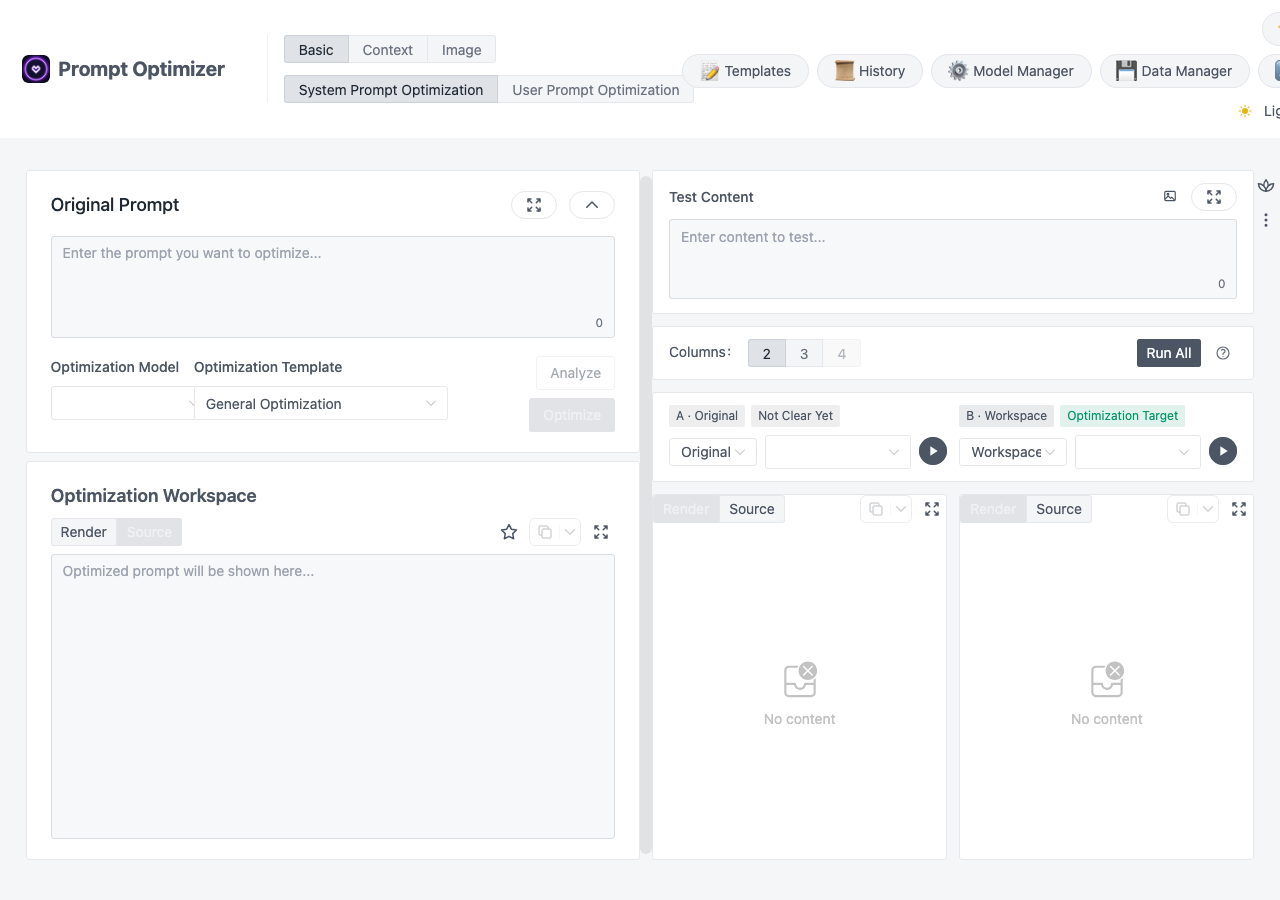
Prompt Optimizer in the browser during the run

By the numbers

10 of 12
scenarios passed, 1 failed, 1 blocked
198
browser actions
41
screenshots
204
model calls
15
minutes
12
scenarios
10
passed
1
failed
1
blocked
2
issues
medium1low1

Walkthrough

Every scenario DeepQA drove in the browser, in plan order, with the 36 screenshots it captured along the way. A passing scenario is evidence too.

  1. S1
    Verify hash routing across core views

    4 steps, 4 screenshots

    pass
    S1-1.png
    S1 · Verify hash routing across core views
    S1-3.png
    S1 · Verify hash routing across core views
    S1-5.png
    S1 · Verify hash routing across core views
    S1-7.png
    S1 · Verify hash routing across core views
    • Navigated to /#/basic/system and verified layout loaded with System Prompt Optimization active.
    • Navigated to /#/basic/user; page loaded successfully with title 'Prompt Optimizer' and rendered the user prompt optimization layout.
    • Navigated to /#/image/text2image; view loaded with Professional Optimization template and text2image layout, page title is 'Prompt Optimizer'.
    • Navigated to /#/image/image2image; view loaded with Inspiration/Replicate/Style Learn options and image2image specific layout, page title is 'Prompt Optimizer'.
    • Successfully navigated to all core hash routes: /#/basic/system, /#/basic/user, /#/image/text2image, and /#/image/image2image.
    • Each view loaded its designated workspace, templates, and UI components without blank screens or navigation failures.
    • The document title remained 'Prompt Optimizer' across all routes.
  2. S2
    Model Manager - Create valid model configuration

    6 steps, 4 screenshots

    blocked
    S2-2.png
    S2 · Model Manager - Create valid model configuration
    S2-4.png
    S2 · Model Manager - Create valid model configuration
    S2-7.png
    S2 · Model Manager - Create valid model configuration
    S2-11.png
    S2 · Model Manager - Create valid model configuration
    • Navigated to /#/basic/system and observed the Prompt Optimizer interface with Model Manager button.
    • Opened Model Manager dialog showing list of model providers and the Add button.
    • Opened the Add Model modal dialog containing Display Name, Provider selection, API Key, and Model Configuration.
    • Navigated to https://prompt.always200.com/#/basic/system successfully.
    • Clicked Model Manager to open the model management modal listing configured and available model providers.
    • Clicked the Add button which opened the Add Model dialog form.
    • Entered 'Test Model' in the Display Name field.
    • Entered '[redacted]' in the API Key field.
    • Observed the Create button became enabled with valid configuration inputs.
    • Tool call budget was reached before submitting the form and verifying the created model in the configured models list.
  3. S3
    Model Manager - Required fields validation

    5 steps, 3 screenshots

    fail
    S3-1.png
    S3 · Model Manager - Required fields validation
    S3-3.png
    S3 · Model Manager - Required fields validation
    S3-6.png
    S3 · Model Manager - Required fields validation
    • Opened the Model Manager modal.
    • Opened the Add Model dialog where Display Name and API Key fields are empty, and the Create button is disabled.
    • Navigated to https://prompt.always200.com/#/basic/system and opened the Model Manager dialog.
    • Clicked Add Model to open the model creation form.
    • When both Display Name and API Key fields were empty, the Create button was disabled, preventing submission without explicit validation messages.
    • When a Display Name was entered while leaving API Key empty, the Create button became enabled and saved the model successfully without requiring an API Key or showing any validation error.
  4. S4
    Variable Manager - Create custom variable

    6 steps, 4 screenshots

    pass
    S4-1.png
    S4 · Variable Manager - Create custom variable
    S4-4.png
    S4 · Variable Manager - Create custom variable
    S4-8.png
    S4 · Variable Manager - Create custom variable
    S4-10.png
    S4 · Variable Manager - Create custom variable
    • Opened the Variable Management modal.
    • Added variable 'userName' with value 'TestUser', which now appears in the Custom Variables table.
    • Navigated to https://prompt.always200.com/#/basic/system and opened the Variable Manager modal.
    • Entered 'userName' in the Variable Name field and 'TestUser' in the Variable Value field.
    • Clicked Add, and confirmed that the new variable '{{userName}}' with value 'TestUser' was added to the Custom Variables table (updating the count from 0 to 1).
    • Clicked Confirm to apply the variable manager updates.
  5. S5
    Variable Manager - Required field validation

    5 steps, 4 screenshots

    pass
    S5-1.png
    S5 · Variable Manager - Required field validation
    S5-4.png
    S5 · Variable Manager - Required field validation
    S5-7.png
    S5 · Variable Manager - Required field validation
    S5-10.png
    S5 · Variable Manager - Required field validation
    • Opened https://prompt.always200.com/#/basic/system and prepared to open Variable Manager.
    • Variable Management dialog opened, showing input fields for variable name and value with the Add button currently disabled.
    • Entered 'TestValue' into the Variable Value field while leaving the Variable Name field empty; the 'Add' button remains disabled, preventing submission of an unnamed variable.
    • Pressing Enter in the empty Variable Name field did not submit; Add button remains disabled and no unnamed variable was added to the list.
    • Navigated to https://prompt.always200.com/#/basic/system and opened the Variable Manager modal.
    • Left the Variable Name input empty and entered 'TestValue' in the Variable Value input.
    • Observed that the 'Add' button is strictly disabled whenever the Variable Name is empty, and pressing Enter does not trigger submission.
    • Verified no unnamed variable is added to the Custom Variables table.
  6. S6
    Model Manager - Edit existing model

    5 steps, 4 screenshots

    pass
    S6-1.png
    S6 · Model Manager - Edit existing model
    S6-3.png
    S6 · Model Manager - Edit existing model
    S6-6.png
    S6 · Model Manager - Edit existing model
    S6-8.png
    S6 · Model Manager - Edit existing model
    • Opened the Model Manager modal and found the configured 'Test Model' item.
    • The Edit modal opened displaying the current model configuration with Display Name 'Test Model'.
    • Changed Display Name to 'Updated Test Model'.
    • Navigated to the application at https://prompt.always200.com/#/basic/system.
    • Opened Model Manager and selected 'Edit' on the existing configured 'Test Model'.
    • Changed the Display Name field from 'Test Model' to 'Updated Test Model'.
    • Saved the updated model configuration.
    • Verified that the model name was successfully updated to 'Updated Test Model' in the Model Manager list and throughout the model selectors on the page.
  7. S7
    State Persistence - Model configuration survives page reload

    3 steps, 3 screenshots

    pass
    S7-1.png
    S7 · State Persistence - Model configuration survives page reload
    S7-3.png
    S7 · State Persistence - Model configuration survives page reload
    S7-5.png
    S7 · State Persistence - Model configuration survives page reload
    • Navigated to https://prompt.always200.com/#/basic/system and observed initial page state with Updated Test Model visible.
    • Opened Model Manager modal after page reload and confirmed 'Updated Test Model' remains present in the configured models list.
    • Navigated to https://prompt.always200.com/#/basic/system and reloaded the page.
    • Opened Model Manager and confirmed 'Updated Test Model' persisted and remains in the model list after reload.
  8. S8
    Variable Manager - Modal cancellation

    5 steps, 3 screenshots

    pass
    S8-3.png
    S8 · Variable Manager - Modal cancellation
    S8-6.png
    S8 · Variable Manager - Modal cancellation
    S8-9.png
    S8 · Variable Manager - Modal cancellation
    • Entered 'discardVar' into the Variable Name field in the Variable Management modal without clicking Add or Confirm.
    • Dismissed the Variable Management modal by pressing Escape.
    • Navigated to https://prompt.always200.com/#/basic/system and opened the Variable Manager modal.
    • Entered 'discardVar' into the 'Variable Name (e.g., userName, productType)' field without clicking Add or Confirm.
    • Dismissed the modal by pressing Escape.
    • Reopened the Variable Manager modal.
    • Observed that 'discardVar' is not saved in the Custom Variables list (only the preexisting variable is shown).
  9. S9
    Optimize action empty state validation

    3 steps, 3 screenshots

    pass
    S9-1.png
    S9 · Optimize action empty state validation
    S9-7.png
    S9 · Optimize action empty state validation
    S9-10.png
    S9 · Optimize action empty state validation
    • Entering prompt text enables the Optimize and Analyze buttons.
    • Whitespace-only and empty prompt input keep the Optimize button disabled, preventing invalid submissions.
    • Navigated to https://prompt.always200.com/#/basic/system and verified that the Optimize button is disabled when the Original Prompt textbox is empty.
    • Entering non-empty prompt text enables the Optimize button.
    • Clearing the textbox or providing whitespace-only input disables the Optimize button, properly preventing unvalidated submissions without throwing errors or entering a broken loading state.
  10. S10
    Run All execution empty state validation

    3 steps, 2 screenshots

    pass
    S10-1.png
    S10 · Run All execution empty state validation
    S10-4.png
    S10 · Run All execution empty state validation
    • Navigated to /#/basic/system and verified that Test Content is empty (0 characters).
    • Clicked 'Run All' with empty test content; the application handled it gracefully without crashing or breaking the UI state.
    • Loaded /#/basic/system with empty Test Content (0 characters).
    • Clicked the 'Run All' button while Test Content remained empty.
    • The application maintained its intact UI state, showing 'No content' in evaluation panes without triggering errors or crashes.
  11. S11
    Favorites page empty state

    1 step, 1 screenshot

    pass
    S11-3.png
    S11 · Favorites page empty state
    • Navigated to Favorite Library view and observed empty state with 'No favorites yet', item counts at 0, and actions to Import or Add.
    • The favorites page loads cleanly and displays the 'No favorites yet' empty state message along with search, filter tags, and Import/Add action buttons.
  12. S12
    Model Manager - Optional advanced fields

    8 steps, 1 screenshot

    pass
    S12-2.png
    S12 · Model Manager - Optional advanced fields
    • Opened Model Manager dialog.
    • Navigated to Model Manager modal successfully.
    • Opened the Add Model dialog form with configuration options for multiple providers.
    • Successfully filled Model Display Name as 'Full Model' and API Key as 'sk-123'.
    • Verified advanced parameter configuration options and provider-specific model settings.

Issues

Findings that survived the Critic's audit. Security-class issues stay summary-only until the maintainers ship a fix.

mediumconfirmed ✓functionalF1 · S3

Model Manager saves provider configuration with missing API Key without validation

The evidence supports the claim that the Create button becomes enabled and allows saving the model configuration even when the API Key field is left empty.

Expected

The application should require an API Key for remote providers (such as OpenAI) and display a validation error when attempting to save with an empty API Key.

Actual

The Create button is enabled once Display Name is populated, allowing the user to save a model with an empty API Key without validation.

Repro · 5 steps
  1. Navigate to https://prompt.always200.com/#/basic/system
  2. Click the Model Manager button
  3. Click Add
  4. Enter a Display Name and leave the API Key field empty
  5. Click Create
lowpromoted ↑functionalF2 · S10

Run All button allows submission of empty test content

Surfaced by the audit of S10, which the Tester passed, and reproduced live: The 'Run All' button is enabled even when the 'Test Content' field is empty. Clicking it does not throw an error or prevent execution, but results in 'No content' being displayed for the evaluation output.

Expected

The 'Run All' button should be disabled when the Test Content is empty, consistent with the validation on the Optimize button.

Actual

The 'Run All' button is enabled and accepts the empty submission, executing an evaluation that results in 'No content'.

Repro · 3 steps
  1. Navigate to /#/basic/system
  2. Ensure Test Content field is empty
  3. Click the 'Run All' button

Critic audit

An adversarial second pass over every finding before it reaches the report.

1
findings reviewed
1
re-verified live
0
withdrawn
  • F1confirmed ✓

    The evidence supports the claim that the Create button becomes enabled and allows saving the model configuration even when the API Key field is left empty.

  • F2promoted ↑

    Surfaced by the audit of S10, which the Tester passed, and reproduced live: The 'Run All' button is enabled even when the 'Test Content' field is empty. Clicking it does not throw an error or prevent execution, but results in 'No content' being displayed for the evaluation output.

  • Scenario S2 was blocked because the tool-call budget was reached before the test could verify the created model.
  • The application inconsistently applies empty-state validation across its primary actions (disabling 'Optimize' for empty prompts but allowing 'Run All' for empty test content).

Report

QA report: external/prompt.always200.com at hosted

Model configuration saves without required API key validation, and empty evaluation runs are permitted.

The test run evaluated 12 scenarios covering core hash routing, model and variable configuration workflows, state persistence, and empty-state validations. Ten scenarios passed, one failed, and one was blocked when scenario S2 reached its tool-call budget before the final submission and verification step could be executed.

Two functional issues were identified involving input validation. In the Model Manager, entering a display name enables the save action and allows configurations with empty API keys to be persisted without validation (F1). In addition, the application inconsistently enforces empty-state validation across primary controls: while prompt optimization is disabled when empty, the Run All button permits submission with empty test content, producing evaluations that result in no content (F2).

Core routing and variable management workflows remain stable, but the missing form and submission validations permit incomplete provider setups and empty execution runs.

Run summary
MetricCount
Scenarios executed12
Passed10
Failed1
Blocked1
Findings raised1
Issues after the audit2
Withdrawn by the audit0
Critical / high / medium / low0 / 0 / 1 / 1

Target: https://prompt.always200.com · Testing level: deep_feature · Stack: unknown

Issues
Medium severity
F1 · Model Manager saves provider configuration with missing API Key without validation

Severity: medium · Type: functional · Verdict: confirmed · Scenario: S3

The evidence supports the claim that the Create button becomes enabled and allows saving the model configuration even when the API Key field is left empty.

Expected: The application should require an API Key for remote providers (such as OpenAI) and display a validation error when attempting to save with an empty API Key.

Actual: The Create button is enabled once Display Name is populated, allowing the user to save a model with an empty API Key without validation.

Steps to reproduce:

  1. Navigate to https://prompt.always200.com/#/basic/system
  2. Click the Model Manager button
  3. Click Add
  4. Enter a Display Name and leave the API Key field empty
  5. Click Create

Evidence: screenshots/S3-3.png, screenshots/S3-6.png

Low severity
F2 · Run All button allows submission of empty test content

Severity: low · Type: functional · Verdict: promoted · Scenario: S10

Surfaced by the audit of S10, which the Tester passed, and reproduced live: The 'Run All' button is enabled even when the 'Test Content' field is empty. Clicking it does not throw an error or prevent execution, but results in 'No content' being displayed for the evaluation output.

Expected: The 'Run All' button should be disabled when the Test Content is empty, consistent with the validation on the Optimize button.

Actual: The 'Run All' button is enabled and accepts the empty submission, executing an evaluation that results in 'No content'.

Steps to reproduce:

  1. Navigate to /#/basic/system
  2. Ensure Test Content field is empty
  3. Click the 'Run All' button

Evidence: screenshots/critic-M1-1.png

Scenario results
ScenarioPriorityResultIssues
S1 Verify hash routing across core viewshighpassnone
S2 Model Manager - Create valid model configurationhighblocked (Tool-call budget was reached before the final submission and verification step could be executed.)none
S3 Model Manager - Required fields validationhighfailF1
S4 Variable Manager - Create custom variablehighpassnone
S5 Variable Manager - Required field validationhighpassnone
S6 Model Manager - Edit existing modelmediumpassnone
S7 State Persistence - Model configuration survives page reloadmediumpassnone
S8 Variable Manager - Modal cancellationmediumpassnone
S9 Optimize action empty state validationmediumpassnone
S10 Run All execution empty state validationmediumpassF2
S11 Favorites page empty statelowpassnone
S12 Model Manager - Optional advanced fieldslowpassnone
The audit

The Critic reviewed 1 finding and re-verified 1 of them live in the browser, replaying the reported steps on a fresh page.

  • Scenario S2 was blocked because the tool-call budget was reached before the test could verify the created model.
  • The application inconsistently applies empty-state validation across its primary actions (disabling 'Optimize' for empty prompts but allowing 'Run All' for empty test content).
What to fix first
  1. Enforce API key validation in the Model Manager before enabling the save action (F1).
  2. Disable the Run All action when test content is empty to ensure consistent validation across primary controls (F2).
Coverage and caveats

In scope: Hash routing across core views; Model Manager configuration form and validation; Variable Manager configuration form and validation; Local state persistence for configured models; Modal dialog behavior and cancellation; Empty state validation for main action buttons.

Not covered: End-to-end prompt optimization execution with real LLM responses (requires paid API keys, out of scope for a hosted run); Image generation test executions (requires real API keys, out of scope for a hosted run).

  • The tester does not possess valid API keys for LLM providers, so mock keys are used to test configuration persistence without executing real network calls to the providers.
  • Browser local storage is not cleared between scenarios in the same session, enabling persistence tests.
  • The application relies entirely on client-side routing, so page navigation will use the hash URLs provided in the AppMap.
  • S2 could not be executed: Tool-call budget was reached before the final submission and verification step could be executed..
By the numbers
MetricValue
Scenarios10 passed, 1 failed, 1 blocked of 12 (54 planned steps)
Browser actions198 (52 clicks, 20 inputs, 26 navigations, 100 snapshots)
Screenshots41 (4 explore, 36 scenario, 1 critic), 36 captioned
Coverage5 pages, 2 forms, 3 flows, 0 console errors
Audit1 findings, 1 re-verified live, 1 confirmed, 1 promoted, 0 withdrawn
Model calls204
Tokens1,768,707 input, 10,055 output, 17,650 thinking
Time15 min
StageCallsInputOutputThinkingSeconds
explore41367,1572,5161,704272
plan13,6582,2902,66633
test1571,383,2804,5058,627550
critique412,9754754,03042
report11,6372696238

Run log

stagecallstokenstime
Explore41371.4k4m 32s
Plan18.6k33s
Test1571.4M9m 10s
Critique417.5k42s
Report12.5k8s
Total2041.8M15m 4s
Intake
Explore
Plan
Test
Critique
Report
  • 06:29:11Zexploreexplore started
  • 06:44:15ZexploreExplored / (51 controls, 0 forms)
  • 06:44:15ZexploreMapped 5 pages, 2 forms, 3 flows in 40 turns.
  • 06:44:15Zexploreexplore completed in 272s.
  • 06:44:15Zplanplan started
  • 06:44:15ZplanPlanned 12 scenarios (5 high, 5 medium, 2 low).
  • 06:44:15Zplanplan completed in 33s.
  • 06:44:15Ztesttest started
  • 06:44:15ZtestS1 executed (pass)
  • 06:44:15ZtestS2 executed (blocked)
  • 06:44:15ZtestS3 executed (fail), 1 finding
  • 06:44:15ZtestS4 executed (pass)
  • 06:44:15ZtestS5 executed (pass)
  • 06:44:15ZtestS6 executed (pass)
  • 06:44:15ZtestS7 executed (pass)
  • 06:44:15ZtestS8 executed (pass)
  • 06:44:15ZtestS9 executed (pass)
  • 06:44:15ZtestS10 executed (pass)
  • 06:44:15ZtestS11 executed (pass)
  • 06:44:15ZtestS12 executed (pass)
  • 06:44:15ZtestExecuted 12 scenarios: 10 passed, 1 failed, 1 blocked, 1 finding.
  • 06:44:15Ztesttest completed in 550s.
  • 06:44:15Zcritiquecritique started
  • 06:44:15ZcritiqueReviewed 1 findings; 1 possible defect spotted in passed scenarios.
  • 06:44:15ZcritiqueRe-verified a possible defect in S10: reproduced.
  • 06:44:15ZcritiqueAudit complete: 1 confirmed, 0 withdrawn, 1 promoted, 1 re-verified live.
  • 06:44:15Zcritiquecritique completed in 42s.
  • 06:44:15Zreportreport started
  • 06:44:15ZreportReported 2 issues (0 critical, 0 high, 1 medium, 1 low) from 1 finding.
  • 06:44:15Zreportreport completed in 8s.

Put an agent team on your next pull request.

Connect a repo, dispatch a Run, and read an audited, evidence-backed report the same day.