Hosted appLLM chat playgroundHosted, in placesucceeded

Official Hugging Face Space of Qwen3 by the Qwen team: chat with a thinking mode toggle, thinking budget and conversation history. Tested in place.

Tested in place byDeepQA Teamatqwen-qwen3-demo.hf.spaceonSep 20, 2026

Run #1model gemini-balanced (vertex)took 9m

All 12 scenarios passed, no issues after the audit.

Share on X
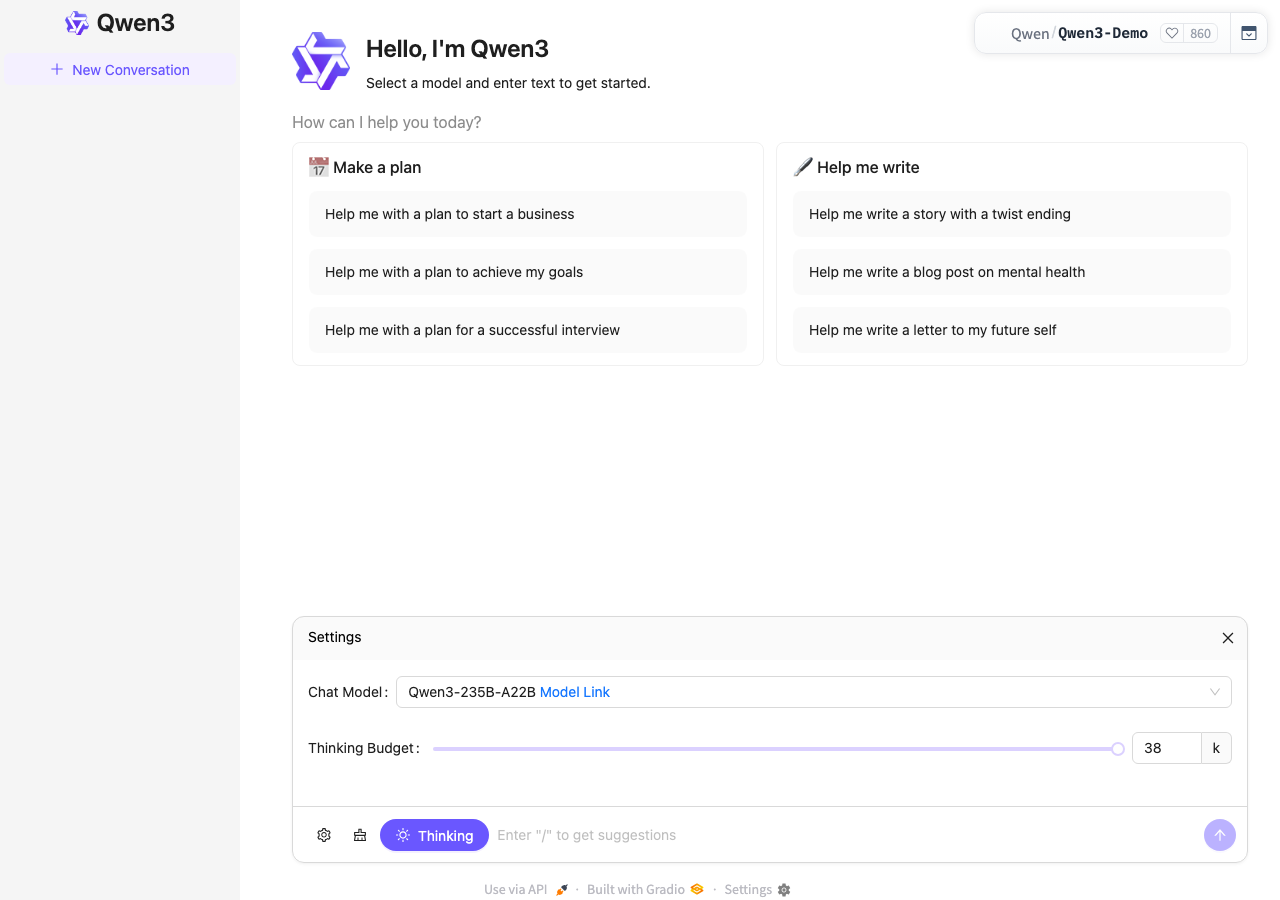
Qwen3 demo in the browser during the run

By the numbers

12 of 12
scenarios passed
160
browser actions
37
screenshots
151
model calls
9.4
minutes
12
scenarios
12
passed
0
failed
0
blocked
0
issues

Walkthrough

Every scenario DeepQA drove in the browser, in plan order, with the 32 screenshots it captured along the way. A passing scenario is evidence too.

  1. S1
    Send a standard chat message

    4 steps, 4 screenshots

    pass
    S1-1.png
    S1 · Send a standard chat message
    S1-4.png
    S1 · Send a standard chat message
    S1-6.png
    S1 · Send a standard chat message
    S1-8.png
    S1 · Send a standard chat message
    • Loaded the Qwen3 demo homepage with chat input and model settings visible.
    • Entered prompt 'Hello, can you help me?' into the chat input textbox.
    • Clicked submit button, conversation started and model began streaming its thought process and response.
    • AI response generated successfully with thinking duration (5.35s), total duration (6.27s), and action buttons (Copy, etc.).
    • Navigated to the Qwen3 demo application at https://qwen-qwen3-demo.hf.space/.
    • Entered 'Hello, can you help me?' into the chat input textbox and submitted.
    • Observed live thinking process and streaming generation.
    • Verified AI response completed displaying the answer, thinking duration badge 'End of Thought (5.35s)', total duration '6.27s', and action buttons including 'Copy'.
  2. S2
    Start a new conversation and verify history

    4 steps, 3 screenshots

    pass
    S2-1.png
    S2 · Start a new conversation and verify history
    S2-5.png
    S2 · Start a new conversation and verify history
    S2-7.png
    S2 · Start a new conversation and verify history
    • Sent 'Test message' and received response 'Hello! It looks like you're testing the system. How can I assist you today?' from Qwen3.
    • Clicked 'New Conversation' button; the main view reset to the welcome screen and 'Test message' was retained in the history list.
    • Loaded the demo application with an empty initial state and default welcome screen.
    • Submitted 'Test message' to the model and received a full completion response with thinking time.
    • Clicked 'New Conversation' which reset the chat pane to the welcome screen and preserved 'Test message' in the history list in the sidebar.
  3. S3
    Adjust Thinking Budget using slider

    3 steps, 2 screenshots

    pass
    S3-1.png
    S3 · Adjust Thinking Budget using slider
    S3-13.png
    S3 · Adjust Thinking Budget using slider
    • Navigated to Qwen3 demo page where the settings panel is visible showing Thinking Budget slider and spinbutton currently set to 38k.
    • Navigated to https://qwen-qwen3-demo.hf.space/ and located the Settings panel containing the Thinking Budget slider and spinbutton.
    • The default Thinking Budget for model Qwen3-235B-A22B was 38k.
    • Adjusting the value in the spinbutton updated the slider position and tooltip to 20k.
    • Navigating and adjusting the slider using keyboard controls (ArrowLeft/ArrowRight) smoothly updated the slider position and immediately synced the Thinking Budget spinbutton value to 19k and 20k.
  4. S4
    Empty message validation

    3 steps, 4 screenshots

    pass
    S4-1.png
    S4 · Empty message validation
    S4-3.png
    S4 · Empty message validation
    S4-7.png
    S4 · Empty message validation
    S4-12.png
    S4 · Empty message validation
    • Loaded the Qwen3 demo page with empty chat input.
    • Clicked the Submit button with an empty chat input; the application did not trigger a submission, show loading state, or add an empty chat bubble.
    • Verified that pressing Enter or clicking Submit with an empty input does not trigger any submission or add an empty message bubble.
    • Navigated to https://qwen-qwen3-demo.hf.space/ and ensured the chat input textbox was empty.
    • Clicked the submit button with an empty input and verified that no submission was made, no loading state was triggered, and no empty message bubble was added to the chat.
    • Tested pressing the Enter key on the empty chat input and verified that no submission occurred.
  5. S5
    Adjust Thinking Budget using spinbutton

    3 steps, 2 screenshots

    pass
    S5-1.png
    S5 · Adjust Thinking Budget using spinbutton
    S5-5.png
    S5 · Adjust Thinking Budget using spinbutton
    • Initial page loaded with Settings drawer open showing Thinking Budget slider and spinbutton with value 38.
    • Typed 16 into Thinking Budget spinbutton and confirmed the value was updated to 16.
    • Navigated to the application and verified the Settings drawer contains the Thinking Budget controls.
    • Entered 16 into the Thinking Budget spinbutton, successfully updating the input value to 16.
  6. S6
    Slash command suggestions trigger

    3 steps, 2 screenshots

    pass
    S6-1.png
    S6 · Slash command suggestions trigger
    S6-6.png
    S6 · Slash command suggestions trigger
    • Focused the chat input textbox and entered '/', which successfully triggered suggestion popup menus for 'Make a plan', 'Help me write', 'Start a business', 'Achieve my goals', and 'Successful interview'.
    • Loaded the Qwen3 demo application at https://qwen-qwen3-demo.hf.space/.
    • Focused the chat input textbox with placeholder 'Enter "/" to get suggestions'.
    • Typed '/' into the chat textbox and observed suggestion menus pop up with prompt options ('Make a plan', 'Help me write', 'Start a business', etc.).
    • Confirmed that the slash command suggestion menu works as expected.
  7. S7
    Toggle Thinking mode

    2 steps, 3 screenshots

    pass
    S7-1.png
    S7 · Toggle Thinking mode
    S7-4.png
    S7 · Toggle Thinking mode
    S7-6.png
    S7 · Toggle Thinking mode
    • Navigated to https://qwen-qwen3-demo.hf.space/ and found the 'Thinking' mode button in the prompt toolbar.
    • Clicked the 'Thinking' mode toggle button in the prompt toolbar, triggering state update in the UI.
    • Navigated to the Qwen3 Gradio interface at https://qwen-qwen3-demo.hf.space/.
    • Located the Thinking mode toggle button in the prompt toolbar alongside the input textbox.
    • Clicked the Thinking mode toggle button, successfully toggling its active state in the interface.
  8. S8
    View API documentation modal

    2 steps, 2 screenshots

    pass
    S8-1.png
    S8 · View API documentation modal
    S8-4.png
    S8 · View API documentation modal
    • Clicked 'Use via API' button; the URL updated to '?view=api' and the API documentation modal opened with endpoint details and code snippets.
    • Navigated to the home page and clicked the 'Use via API' button in the footer.
    • The URL parameter '?view=api' was appended properly without reloading the page.
    • The API documentation overlay opened displaying 18 API endpoints, client installation instructions, and code snippets in multiple programming languages.
  9. S9
    Submit extremely long message

    3 steps, 3 screenshots

    pass
    S9-1.png
    S9 · Submit extremely long message
    S9-4.png
    S9 · Submit extremely long message
    S9-6.png
    S9 · Submit extremely long message
    • Submitted 5000 character input; application accepted it and started streaming the response cleanly without UI overflow or crash.
    • Navigated to https://qwen-qwen3-demo.hf.space/ and entered a 5000-character test message into the chat input textbox.
    • Clicked the Submit button; the application successfully processed the 5000-character message and began generating a response with thinking stream without any crash or visual distortion.
  10. S10
    Close API documentation modal

    3 steps, 2 screenshots

    pass
    S10-2.png
    S10 · Close API documentation modal
    S10-4.png
    S10 · Close API documentation modal
    • Navigated to https://qwen-qwen3-demo.hf.space/?view=api and verified the API documentation modal overlay is displayed.
    • Clicked the close button on the API documentation modal; the overlay was dismissed and the core chat interface is visible and intact.
    • The API documentation modal rendered properly when visiting https://qwen-qwen3-demo.hf.space/?view=api.
    • Clicking the modal close button successfully dismissed the modal overlay and returned to the core chat interface without errors or blank pages.
  11. S11
    View Gradio settings modal

    2 steps, 2 screenshots

    pass
    S11-1.png
    S11 · View Gradio settings modal
    S11-3.png
    S11 · View Gradio settings modal
    • Loaded the home page and located the Settings button in the footer.
    • Clicked the Settings footer button; the URL updated to '?view=settings' and the Gradio settings modal opened displaying Language and Progressive Web App sections.
    • Navigated to https://qwen-qwen3-demo.hf.space/ and clicked the Settings button in the footer.
    • The page URL updated to https://qwen-qwen3-demo.hf.space/?view=settings and the general Gradio settings modal opened displaying Language and Progressive Web App settings.
  12. S12
    Out of bounds Thinking Budget input

    3 steps, 3 screenshots

    pass
    S12-1.png
    S12 · Out of bounds Thinking Budget input
    S12-4.png
    S12 · Out of bounds Thinking Budget input
    S12-7.png
    S12 · Out of bounds Thinking Budget input
    • Initial page view loaded with Thinking Budget spinbutton visible with value 38.
    • Entering a negative value (-10 or -50) into the Thinking Budget spinbutton was rejected and clamped to the minimum allowed value of 1.
    • The Thinking Budget spinbutton clamps negative input values (e.g. -10 and -50) to the minimum allowed bound of 1 upon pressing Enter or clicking away.

Issues

No finding survived the audit. Nothing to fix from this run.

Critic audit

An adversarial second pass over every finding before it reaches the report.

0
findings reviewed
2
re-verified live
0
withdrawn
    • A 404 console error appears across all scenarios, suggesting a missing static asset or unreachable telemetry endpoint in the hosted environment.
    • Scenario S4 logs a connection error despite the application correctly withholding the empty message submission, pointing to a background environment or WebSocket instability.
    • A possible defect in S1 was called an environment limitation, and nothing that scenario recorded names an environment cause, so it was audited as a candidate.
    • A possible defect in S4 was called an environment limitation, and nothing that scenario recorded names an environment cause, so it was audited as a candidate.
    • A possible defect in S1 ("Missing resource triggers 404 on page load") was not promoted: the live replay came back not-reproduced.
    • A possible defect in S4 ("Connection error logged during empty message validation") was not promoted: the live replay came back inconclusive.

    Report

    QA report: external/qwen-qwen3-demo.hf.space at hosted

    All twelve automated scenarios passed with no confirmed defects identified during the run.

    Testing covered core chat interactions, history resets, thinking mode toggling, budget configuration via slider and numeric inputs, slash command triggers, boundary and empty message handling, and modal dialog interactions for API documentation and settings.

    Across all twelve deep feature scenarios, the application responded as expected with zero confirmed defects. Two potential anomalies evaluated during the audit—involving background network logs—were not promoted to issues after live re-verification.

    From the perspective of the tested user workflows and controls, the application demonstrated stable functionality across all evaluated scenarios.

    Run summary
    MetricCount
    Scenarios executed12
    Passed12
    Failed0
    Blocked0
    Findings raised0
    Issues after the audit0
    Withdrawn by the audit0
    Critical / high / medium / low0 / 0 / 0 / 0

    Target: https://qwen-qwen3-demo.hf.space · Testing level: deep_feature · Stack: unknown

    Issues

    No issues survived the audit.

    Scenario results
    ScenarioPriorityResultIssues
    S1 Send a standard chat messagehighpassnone
    S2 Start a new conversation and verify historyhighpassnone
    S3 Adjust Thinking Budget using sliderhighpassnone
    S4 Empty message validationmediumpassnone
    S5 Adjust Thinking Budget using spinbuttonmediumpassnone
    S6 Slash command suggestions triggermediumpassnone
    S7 Toggle Thinking modemediumpassnone
    S8 View API documentation modalmediumpassnone
    S9 Submit extremely long messagemediumpassnone
    S10 Close API documentation modallowpassnone
    S11 View Gradio settings modallowpassnone
    S12 Out of bounds Thinking Budget inputlowpassnone
    The audit

    The Critic reviewed 0 findings and re-verified 2 of them live in the browser, replaying the reported steps on a fresh page.

    • A 404 console error appears across all scenarios, suggesting a missing static asset or unreachable telemetry endpoint in the hosted environment.
    • Scenario S4 logs a connection error despite the application correctly withholding the empty message submission, pointing to a background environment or WebSocket instability.
    • A possible defect in S1 was called an environment limitation, and nothing that scenario recorded names an environment cause, so it was audited as a candidate.
    • A possible defect in S4 was called an environment limitation, and nothing that scenario recorded names an environment cause, so it was audited as a candidate.
    • A possible defect in S1 ("Missing resource triggers 404 on page load") was not promoted: the live replay came back not-reproduced.
    • A possible defect in S4 ("Connection error logged during empty message validation") was not promoted: the live replay came back inconclusive.
    Coverage and caveats

    In scope: Core chat functionality and message submission; Conversation history and clearing; Model configuration parameters (Thinking Budget, Thinking Mode); API and Settings modal views triggered by query parameters or footer links; Form input validation (empty and long messages).

    Not covered: Account creation or authentication flows, as the application requires no auth; Backend model accuracy or latency profiling, as testing focuses on UI and functional integration.

    • The underlying Qwen3 model is online and responsive.
    • Conversation history is managed via local state or browser storage, persisting across a single session without requiring server-side auth.
    • The 404 console error noted in the AppMap does not block core UI rendering or interaction.
    By the numbers
    MetricValue
    Scenarios12 passed, 0 failed, 0 blocked of 12 (35 planned steps)
    Browser actions160 (28 clicks, 29 inputs, 18 navigations, 85 snapshots)
    Screenshots37 (4 explore, 32 scenario, 1 critic), 32 captioned
    Coverage3 pages, 2 forms, 5 flows, 1 console errors
    Audit0 findings, 2 re-verified live, 0 confirmed, 0 promoted, 0 withdrawn
    Model calls151
    Tokens786,086 input, 8,631 output, 12,363 thinking
    Time9 min
    StageCallsInputOutputThinkingSeconds
    explore20117,3711,5101,16782
    plan13,5832,0011,70027
    test118626,5814,3276,145379
    critique1137,0186403,05971
    report11,5331532926

    Run log

    stagecallstokenstime
    Explore20120k1m 22s
    Plan17.3k27s
    Test118637.1k6m 19s
    Critique1140.7k1m 11s
    Report12k6s
    Total151807.1k9m 25s
    Intake
    Explore
    Plan
    Test
    Critique
    Report
    • 02:56:34Zexploreexplore started
    • 03:05:59ZexploreExplored / (16 controls, 1 forms)
    • 03:05:59ZexploreMapped 3 pages, 2 forms, 5 flows in 20 turns.
    • 03:05:59Zexploreexplore completed in 82s.
    • 03:05:59Zplanplan started
    • 03:05:59ZplanPlanned 12 scenarios (3 high, 6 medium, 3 low).
    • 03:05:59Zplanplan completed in 27s.
    • 03:05:59Ztesttest started
    • 03:05:59ZtestS1 executed (pass)
    • 03:05:59ZtestS2 executed (pass)
    • 03:05:59ZtestS3 executed (pass)
    • 03:05:59ZtestS4 executed (pass)
    • 03:05:59ZtestS5 executed (pass)
    • 03:05:59ZtestS6 executed (pass)
    • 03:05:59ZtestS7 executed (pass)
    • 03:05:59ZtestS8 executed (pass)
    • 03:05:59ZtestS9 executed (pass)
    • 03:05:59ZtestS10 executed (pass)
    • 03:05:59ZtestS11 executed (pass)
    • 03:05:59ZtestS12 executed (pass)
    • 03:05:59ZtestExecuted 12 scenarios: 12 passed, 0 failed, 0 blocked, 0 findings.
    • 03:05:59Ztesttest completed in 379s.
    • 03:05:59Zcritiquecritique started
    • 03:05:59ZcritiqueReviewed 0 findings; 2 possible defects spotted in passed scenarios.
    • 03:05:59Zcritique2 failures were called environment limitations with no environment cause in the run's record, so they are audited as findings instead.
    • 03:05:59ZcritiqueRe-verified a possible defect in S4: inconclusive.
    • 03:05:59ZcritiqueRe-verified a possible defect in S1: not-reproduced.
    • 03:05:59ZcritiqueAudit complete: 0 confirmed, 0 withdrawn, 0 promoted, 2 re-verified live.
    • 03:05:59Zcritiquecritique completed in 71s.
    • 03:05:59Zreportreport started
    • 03:05:59ZreportReported 0 issues (0 critical, 0 high, 0 medium, 0 low) from 0 findings.
    • 03:05:59Zreportreport completed in 6s.

    Put an agent team on your next pull request.

    Connect a repo, dispatch a Run, and read an audited, evidence-backed report the same day.