Hosted appNFT launchpadArc Testnetsucceeded

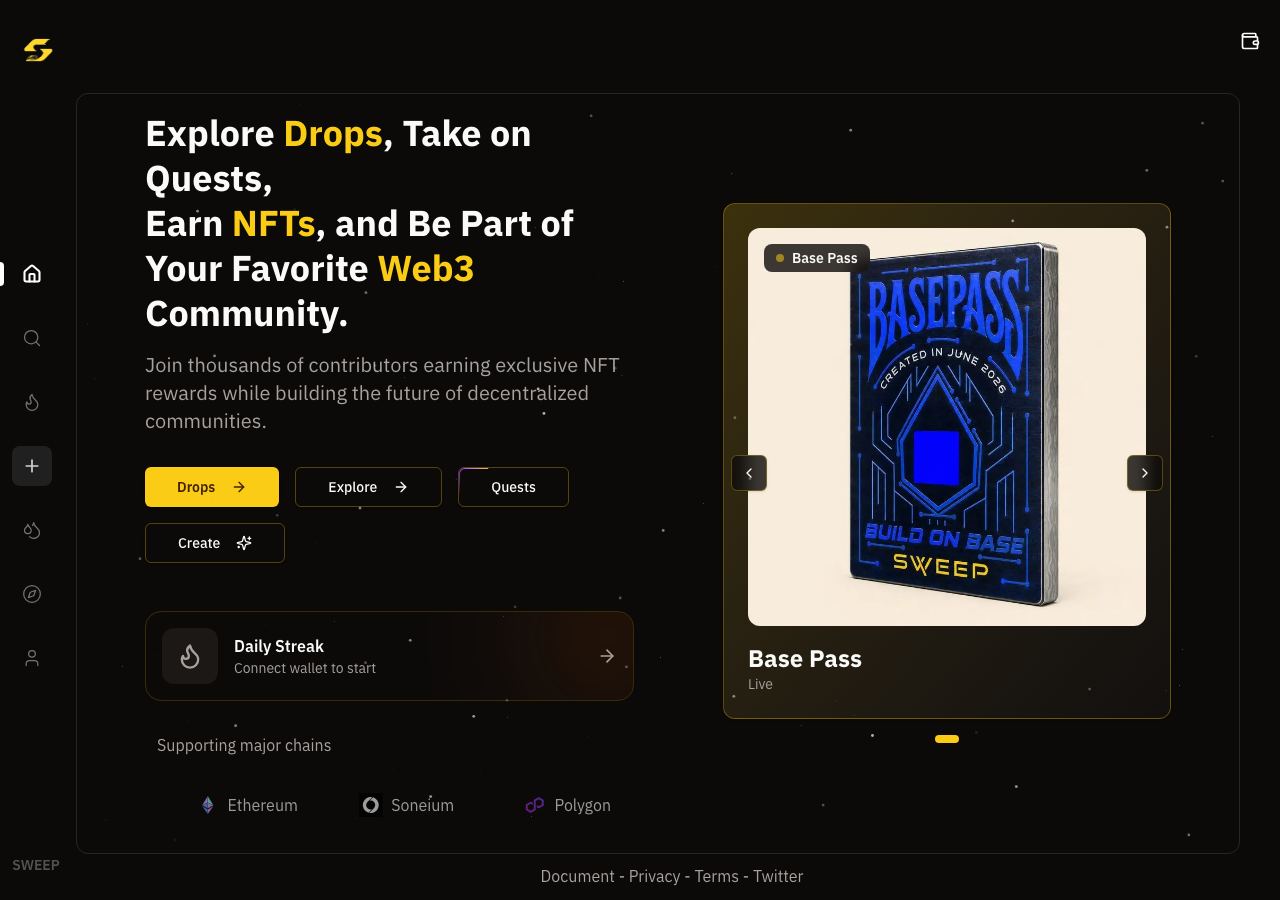
Explore Drops, Take on Quests, Earn NFTs, and Be Part of Your Favorite Web3 Community.

Tested in place byDeepQA TeamonArc Testnetatsweep.hausonSep 17, 2026

Run #1model gemini-balanced (vertex)took 23m

6 of 12 scenarios passed, 2 failed, 4 blocked, 1 medium functional issue after the audit.

Share on X
SweepHaus in the browser during the run

By the numbers

6 of 12
scenarios passed, 2 failed, 4 blocked
253
browser actions
33
screenshots
215
model calls
23
minutes
12
scenarios
6
passed
2
failed
4
blocked
1
issues
medium1

Walkthrough

Every scenario DeepQA drove in the browser, in plan order, with the 28 screenshots it captured along the way. A passing scenario is evidence too.

  1. S1
    Connect Test Wallet

    3 steps, 4 screenshots

    pass
    S1-1.png
    S1 · Connect Test Wallet
    S1-4.png
    S1 · Connect Test Wallet
    S1-7.png
    S1 · Connect Test Wallet
    S1-10.png
    S1 · Connect Test Wallet
    • Navigated to https://sweep.haus/ and clicked the Connect button in the header.
    • Selected DeepQA Test Wallet from the wallet modal, successfully connecting the test wallet.
    • Header updated to display the connected wallet address (0x6496...55E7) and its USDC balance (5 USDC).
    • Successfully connected DeepQA Test Wallet via the Connect button modal on the homepage.
    • The application header updated immediately to display the truncated wallet address (0x6496...55E7) along with the current balance of 5 USDC.
    • Clicking the connected wallet button opens the 'Manage Wallet' modal confirming address 0x6496...55E7 and 5 USDC on Arc Testnet.
  2. S2
    Create Collection Form Validation

    3 steps, 2 screenshots

    pass
    S2-2.png
    S2 · Create Collection Form Validation
    S2-9.png
    S2 · Create Collection Form Validation
    • Navigated to /create page and observed the Deploy button is disabled by default when required fields (Collection Title, Description, Image) are empty.
    • Verified that leaving required fields empty keeps the Deploy button disabled and prevents invalid form submission.
    • Navigated to /create page where Collection Title, Description, and Collection Image are marked as required fields (*).
    • Observed that the Deploy button is in a disabled state when required fields are empty, blocking invalid submission and preventing smart contract deployment without required inputs.
    • Observed that the Symbol field is optional and auto-generates from the Collection Title if left empty.
  3. S3
    Create Collection Quest Validation

    5 steps, 3 screenshots

    pass
    S3-2.png
    S3 · Create Collection Quest Validation
    S3-4.png
    S3 · Create Collection Quest Validation
    S3-13.png
    S3 · Create Collection Quest Validation
    • Navigated to /create page and viewed the Deploy NFT Collection form.
    • Clicked Add Quest which added a new quest row with empty title and URL inputs.
    • Navigated to https://sweep.haus/create.
    • Entered 'Test Collection' in Collection Title and 'TEST' in Symbol.
    • Observed validation on collection title indicating 'The name "Test Collection" is already taken. Please choose a unique name.'
    • The Deploy button remained disabled, preventing submission with incomplete/empty quest and collection inputs.
  4. S4
    Deploy Collection on Arc Testnet

    4 steps, 1 screenshot

    blocked
    S4-2.png
    S4 · Deploy Collection on Arc Testnet
    • Navigated to https://sweep.haus/create.
    • Observed the NFT collection creation form with inputs for Title, Symbol, Description, Image/Video, Network combobox, Mint Price, Total Supply, Max Mint, and Deploy button.
    • Clicked the network selection combobox which opened a dialog modal with Mainnet/Testnet toggles and a 'Search blockchain...' input.
    • The blockchain options list inside the dialog did not populate or render options accessible to automation within the allotted tool turns.
  5. S5
    Dashboard Collection Persistence

    2 steps, 1 screenshot

    fail
    S5-4.png
    S5 · Dashboard Collection Persistence
    • Navigated to /dashboard and observed 'No Collections Found' displayed for the connected wallet, with 'Test Launch' collection missing.
    • Navigated to https://sweep.haus/dashboard where wallet 0x6496...55E75 is connected.
    • The 'My Collections' section failed to show the previously deployed 'Test Launch' collection, displaying 'No Collections Found' instead.
  6. S6
    Create Collection on Unsupported Network

    4 steps, 1 screenshot

    blocked
    S6-2.png
    S6 · Create Collection on Unsupported Network
    • Navigated to https://sweep.haus/create and verified the form fields for deploying an NFT collection.
    • Entered 'Invalid Chain Drop' for Collection Title and 'INV' for Symbol.
    • Selected Polygon (a non-Arc network) from the network combobox, which updated the network switch warning to 'Your wallet is on Arc . We'll switch to Polygon when you deploy.'
    • Deploy button remains disabled until a collection image/media file is uploaded via the file input element, which cannot be populated in this test automation environment without file upload capabilities.
  7. S7
    Daily Streak Check-in on Arc

    3 steps, 3 screenshots

    blocked
    S7-2.png
    S7 · Daily Streak Check-in on Arc
    S7-5.png
    S7 · Daily Streak Check-in on Arc
    S7-11.png
    S7 · Daily Streak Check-in on Arc
    • Navigated to the Daily Streak page with chain selector showing BaseETH.
    • Navigated to https://sweep.haus/streak where the Daily Streak check-in feature is located.
    • Opened the Daily Check-in chain selector dropdown/modal to select the Arc network.
    • Observed that the chain selector only offers BaseETH, RobinhoodETH, SomniaSomi, SoneiumETH, InkETH, OptimismETH, UnichainETH (Coming Soon), and ArbitrumETH (Coming Soon); Arc network is not present.
  8. S8
    Daily Streak on Unsupported Network

    3 steps, 4 screenshots

    pass
    S8-2.png
    S8 · Daily Streak on Unsupported Network
    S8-5.png
    S8 · Daily Streak on Unsupported Network
    S8-8.png
    S8 · Daily Streak on Unsupported Network
    S8-11.png
    S8 · Daily Streak on Unsupported Network
    • Navigated to the Daily Streak page with wallet connected.
    • Selected RobinhoodETH network from the Daily Check-in Chain selector.
    • Navigated to https://sweep.haus/streak with a connected mock wallet.
    • Opened the chain selector modal and selected the RobinhoodETH network.
    • Clicked the '🔥 Mint Today's Streak NFT' action button.
    • Observed the application catch the network switch failure and display a user error notification toast reading 'Minting Failed Please try again.'.
  9. S9
    Explore Dynamic Search Filtering

    2 steps, 2 screenshots

    pass
    S9-2.png
    S9 · Explore Dynamic Search Filtering
    S9-5.png
    S9 · Explore Dynamic Search Filtering
    • Navigated to /explore where full list of collections is displayed including Omega Dragon DAO #440.
    • Typed 'Omega' into the search input and the collections table dynamically filtered to display matching collections including 'Omega Dragon DAO #440'.
    • Dynamic search filtering on /explore correctly filters collections by name when user types 'Omega', showing Omega Dragon DAO #440 and other matching collections.
  10. S10
    Drops Status Filtering

    2 steps, 4 screenshots

    fail
    S10-2.png
    S10 · Drops Status Filtering
    S10-4.png
    S10 · Drops Status Filtering
    S10-7.png
    S10 · Drops Status Filtering
    S10-10.png
    S10 · Drops Status Filtering
    • Navigated to /drop and observed the drops table with status filter buttons ALL, Active, and Ended.
    • Clicked the Active filter button and verified the drops list displayed active drops.
    • Clicked the Ended filter button and observed the exact same list of drops displayed without filtering out active drops.
    • Navigated to https://sweep.haus/drop where the status filter options ALL, Active, and Ended are displayed.
    • Clicking the 'Active' filter displayed 16 active drops in the table.
    • Clicking the 'Ended' filter retained the exact same 16 active drops instead of filtering by ended drops.
    • Clicking the 'ALL' filter resulted in 'No Results Found. Try adjusting your search or filters.' instead of displaying all available drops.
  11. S11
    View Quest Campaign Details

    2 steps, 2 screenshots

    pass
    S11-3.png
    S11 · View Quest Campaign Details
    S11-6.png
    S11 · View Quest Campaign Details
    • Navigated to /quests/explore showing quest campaigns list including Ink Pass.
    • Navigated to /quests/Ink-Pass which displayed the Ink Pass quest campaign details, prize pool ($500.00), timer, winner list link, description, and 'Mint Ink Pass' task action link.
    • Navigated to /quests/explore and observed the quest campaigns list including the 'Ink Pass' quest campaign card.
    • Navigated to /quests/Ink-Pass and confirmed it loaded the specific quest campaign metadata, title 'Ink Pass', description ('Mint Ink Pass the first NFT on Ink Network created by Sweep. Mint now & enter the $500 Prize Pool!'), prize pool of $500.00, winner list link, and 'Mint Ink Pass' task requirement button linking to /quests/mint/Ink-Pass.
  12. S12
    Mint Button Task Verification

    2 steps, 1 screenshot

    blocked
    S12-2.png
    S12 · Mint Button Task Verification
    • Navigated to edition page for Omega Dragon DAO #440 showing Mint Tasks including Follow Sweep, and a Mint 1 Edition button.
    • Navigated to https://sweep.haus/0xc90C2176B82ABE59DF06323188F51B37c655eBEd where Omega Dragon DAO #440 edition details and 'Mint Tasks' ('Follow Sweep') were displayed.
    • Click attempts on page buttons ('Mint 1 Edition', '+') timed out due to notification overlays / actionability blocks on the page.

Issues

Findings that survived the Critic's audit. Security-class issues stay summary-only until the maintainers ship a fix.

mediumconfirmed ✓functionalF3 · S10

Selecting 'Ended' status filter does not filter out active drops on Drops page

The observation confirms that the 'Ended' filter fails to remove active drops, displaying the exact same list instead. The page reported 2 console errors during the scenario.

Expected

Selecting 'Ended' filters the list to show only drops whose mint periods have concluded or an appropriate empty state if none have ended.

Actual

Selecting 'Ended' displays the exact same active drops as the 'Active' filter without performing any filtering.

Repro · 2 steps
  1. Navigate to https://sweep.haus/drop
  2. Click the 'Ended' filter button
highwithdrawnfunctionalF1 · S5

Deployed collection 'Test Launch' is missing from the creator dashboard

The 'Test Launch' collection was never deployed because the prerequisite scenario (S4) was blocked on network selection, so it is expected that it does not appear in the dashboard. The live replay was inconclusive: The replay ran out of tool calls before it reached the reported state.

Expected

The 'Test Launch' collection deployed by the connected wallet should be visible in the dashboard collections list.

Actual

The page displays 'No Collections Found' with 'You haven't deployed any NFT collections yet. Start by creating your first collection.' and no collections are listed.

Repro · 2 steps
  1. Navigate to https://sweep.haus/dashboard with the connected creator wallet.
  2. Observe the list of deployed collections under 'My Collections'.
highwithdrawnfunctionalF2 · S10

Selecting 'ALL' status filter on Drops page displays 'No Results Found'

I navigated to /drop, clicked the 'Active' filter, and then clicked 'ALL'. The table correctly displayed multiple NFT collections (e.g. 'Mercenary Frogs', 'Robinhood Chain', 'Base Pass') rather than showing an empty 'No Results Found' state. The defect is not reproduced. The page reported 2 console errors during the scenario.

Expected

Selecting 'ALL' displays all NFT drops across all statuses.

Actual

Selecting 'ALL' shows 'No Results Found. Try adjusting your search or filters.' with an empty table state.

Repro · 3 steps
  1. Navigate to https://sweep.haus/drop
  2. Click the 'Active' filter button
  3. Click the 'ALL' filter button

Wallet activity

DeepQA injected a test wallet into the browser and recorded every request the app sent to it. Testnet funds only.

address
0x649657…9255E7
chain
Arc Testnet
browsers opened
3
read requests forwarded
0
signing requests
0

Critic audit

An adversarial second pass over every finding before it reaches the report.

3
findings reviewed
4
re-verified live
2
withdrawn
  • F1withdrawn

    The 'Test Launch' collection was never deployed because the prerequisite scenario (S4) was blocked on network selection, so it is expected that it does not appear in the dashboard. The live replay was inconclusive: The replay ran out of tool calls before it reached the reported state.

  • F2withdrawn

    I navigated to /drop, clicked the 'Active' filter, and then clicked 'ALL'. The table correctly displayed multiple NFT collections (e.g. 'Mercenary Frogs', 'Robinhood Chain', 'Base Pass') rather than showing an empty 'No Results Found' state. The defect is not reproduced.

  • F3confirmed ✓

    The observation confirms that the 'Ended' filter fails to remove active drops, displaying the exact same list instead.

  • F1 was withdrawn because it asserts the absence of data that a previously blocked scenario (S4) failed to create.
  • Multiple passed scenarios (S2, S3, S8) log uncaught chain-switching errors in the console, which should be properly caught or suppressed by the application.
  • S12 was blocked by an active notification overlay, indicating that toast or modal dismissals are missing from the test setup.
  • A possible defect in S8 ("404 Not Found error during Daily Streak minting attempt") was not promoted: the live replay came back inconclusive.
  • A possible defect in S2 ("Unhandled promise rejection/console error when chain switching fails") was not promoted: the live replay came back inconclusive.

Report

QA report: external/sweep.haus at hosted

The Drops page fails to filter out active drops when selecting the 'Ended' status filter.

Testing exercised wallet connection, collection creation form validation, quest details, search filtering, daily streak flows, and drops status filtering across twelve scenarios. Six scenarios passed, two failed, and four were blocked before completion due to inaccessible network selectors, required file upload requirements, missing network options on the streak page, and UI overlays intercepting button clicks.

A single medium-severity functional issue was confirmed: applying the 'Ended' filter on the Drops page displays the exact same active drops as the 'Active' filter without filtering them out. Two other reported issues—involving missing collections on the creator dashboard and 'ALL' filter empty states—were withdrawn by the audit.

While basic form validation, search, and navigation operate as expected, several key end-to-end workflows including NFT collection deployment, daily streak check-in, and edition minting could not be fully validated due to blocking interface constraints.

Run summary
MetricCount
Scenarios executed12
Passed6
Failed2
Blocked4
Findings raised3
Issues after the audit1
Withdrawn by the audit2
Critical / high / medium / low0 / 0 / 1 / 0

Target: https://sweep.haus · Testing level: deep_feature · Stack: unknown

Issues
Medium severity
F3 · Selecting 'Ended' status filter does not filter out active drops on Drops page

Severity: medium · Type: functional · Verdict: confirmed · Scenario: S10

The observation confirms that the 'Ended' filter fails to remove active drops, displaying the exact same list instead. The page reported 2 console errors during the scenario.

Expected: Selecting 'Ended' filters the list to show only drops whose mint periods have concluded or an appropriate empty state if none have ended.

Actual: Selecting 'Ended' displays the exact same active drops as the 'Active' filter without performing any filtering.

Steps to reproduce:

  1. Navigate to https://sweep.haus/drop
  2. Click the 'Ended' filter button

Evidence: screenshots/S10-10.png

Withdrawn findings

The Critic re-examined these claims and found the evidence did not support them. They are kept here rather than deleted.

  • Deployed collection 'Test Launch' is missing from the creator dashboard (S5, high): The 'Test Launch' collection was never deployed because the prerequisite scenario (S4) was blocked on network selection, so it is expected that it does not appear in the dashboard. The live replay was inconclusive: The replay ran out of tool calls before it reached the reported state.
  • Selecting 'ALL' status filter on Drops page displays 'No Results Found' (S10, high): I navigated to /drop, clicked the 'Active' filter, and then clicked 'ALL'. The table correctly displayed multiple NFT collections (e.g. 'Mercenary Frogs', 'Robinhood Chain', 'Base Pass') rather than showing an empty 'No Results Found' state. The defect is not reproduced. The page reported 2 console errors during the scenario.
Scenario results
ScenarioPriorityResultIssues
S1 Connect Test Wallethighpassnone
S2 Create Collection Form Validationhighpassnone
S3 Create Collection Quest Validationhighpassnone
S4 Deploy Collection on Arc Testnethighblocked (Network selection modal in the collection creation form did not display accessible blockchain options within the turn budget, preventing selection of Arc Testnet.)none
S5 Dashboard Collection Persistencehighfailnone
S6 Create Collection on Unsupported Networkmediumblocked (The Deploy button remains strictly disabled until required file upload inputs (image/video/cover banner) are populated, preventing triggering the deploy action without file upload support.)none
S7 Daily Streak Check-in on Arcmediumblocked (The Arc network is not available as an option in the Daily Check-in Chain selector on /streak.)none
S8 Daily Streak on Unsupported Networkmediumpassnone
S9 Explore Dynamic Search Filteringmediumpassnone
S10 Drops Status FilteringmediumfailF3
S11 View Quest Campaign Detailslowpassnone
S12 Mint Button Task Verificationlowblocked (Unable to interactively click or trigger the 'Mint 1 Edition' button due to active notification overlays intercepting click events.)none
The audit

The Critic reviewed 3 findings and re-verified 4 of them live in the browser, replaying the reported steps on a fresh page.

  • F1 was withdrawn because it asserts the absence of data that a previously blocked scenario (S4) failed to create.
  • Multiple passed scenarios (S2, S3, S8) log uncaught chain-switching errors in the console, which should be properly caught or suppressed by the application.
  • S12 was blocked by an active notification overlay, indicating that toast or modal dismissals are missing from the test setup.
  • A possible defect in S8 ("404 Not Found error during Daily Streak minting attempt") was not promoted: the live replay came back inconclusive.
  • A possible defect in S2 ("Unhandled promise rejection/console error when chain switching fails") was not promoted: the live replay came back inconclusive.
What to fix first
  1. Fix the status filter on the Drops page so that selecting 'Ended' properly excludes active drops (F3).
Coverage and caveats

In scope: Wallet connection and native gas token balance rendering; Collection creation form validation, quest attachment, and deployment on Arc network; Handling of wallet network switch rejections on non-Arc chains; Daily check-in streak functionality; Dynamic search on the Explore page; Dashboard collection persistence and visibility.

Not covered: Completion of third-party off-chain social tasks (e.g., following on X) as the tester lacks social accounts; Successful contract deployment on non-Arc networks as the test wallet strictly rejects them.

  • The injected test wallet automatically approves transaction signing prompts when requested by the application
  • The application provides observable UI feedback (toast, inline message, or redirect) upon successful transaction mining
  • Navigating directly to a drop contract address URL is supported for testing task verification
  • S4 could not be executed: Network selection modal in the collection creation form did not display accessible blockchain options within the turn budget, preventing selection of Arc Testnet..
  • S6 could not be executed: The Deploy button remains strictly disabled until required file upload inputs (image/video/cover banner) are populated, preventing triggering the deploy action without file upload support..
  • S7 could not be executed: The Arc network is not available as an option in the Daily Check-in Chain selector on /streak..
  • S12 could not be executed: Unable to interactively click or trigger the 'Mint 1 Edition' button due to active notification overlays intercepting click events..
By the numbers
MetricValue
Scenarios6 passed, 2 failed, 4 blocked of 12 (35 planned steps)
Browser actions253 (61 clicks, 24 inputs, 39 navigations, 129 snapshots)
Screenshots33 (4 explore, 28 scenario, 1 critic), 28 captioned
Coverage10 pages, 3 forms, 5 flows, 4 console errors
Audit3 findings, 4 re-verified live, 1 confirmed, 0 promoted, 2 withdrawn
Model calls215
Tokens1,334,438 input, 10,526 output, 21,587 thinking
Time23 min
Wallet0 transactions, 0 signatures, 0 refusals on chain 5042002
StageCallsInputOutputThinkingSeconds
explore27185,2992,3141,166137
plan14,2912,0064,18450
test156996,1764,65910,823971
critique30146,8351,2884,847219
report11,83725956710

Run log

stagecallstokenstime
Explore27188.8k2m 17s
Plan110.5k50s
Test1561M16m 11s
Critique30153k3m 39s
Report12.7k10s
Total2151.4M23m 6s
Intake
Explore
Plan
Test
Critique
Report
  • 15:16:22Zexploreexplore started
  • 15:39:28ZexploreExplored / (58 controls, 0 forms)
  • 15:39:28ZexploreExplored /explore (37 controls, 0 forms)
  • 15:39:28ZexploreExplored /0xc90C2176B82ABE59DF06323188F51B37c655eBEd (17 controls, 0 forms)
  • 15:39:28ZexploreExplored /streak (12 controls, 0 forms)
  • 15:39:28ZexploreExplored /create (27 controls, 0 forms)
  • 15:39:28ZexploreExplored /drop (37 controls, 0 forms)
  • 15:39:28ZexploreExplored /quests/explore (28 controls, 0 forms)
  • 15:39:28ZexploreExplored /quests/Ink-Pass (12 controls, 0 forms)
  • 15:39:28ZexploreExplored /quests/mint/Ink-Pass (18 controls, 0 forms)
  • 15:39:28ZexploreExplored /dashboard (12 controls, 0 forms)
  • 15:39:28ZexploreMapped 10 pages, 3 forms, 5 flows in 27 turns.
  • 15:39:28Zexploreexplore completed in 137s.
  • 15:39:28Zplanplan started
  • 15:39:28ZplanPlanned 12 scenarios (5 high, 5 medium, 2 low).
  • 15:39:28Zplanplan completed in 50s.
  • 15:39:28Ztesttest started
  • 15:39:28ZtestS1 executed (pass)
  • 15:39:28ZtestS2 executed (pass)
  • 15:39:28ZtestS3 executed (pass)
  • 15:39:28ZtestS4 executed (blocked)
  • 15:39:28ZtestS5 executed (fail), 1 finding
  • 15:39:28ZtestS6 executed (blocked)
  • 15:39:28ZtestS7 executed (blocked)
  • 15:39:28ZtestS8 executed (pass)
  • 15:39:28ZtestS9 executed (pass)
  • 15:39:28ZtestS10 executed (fail), 2 findings
  • 15:39:28ZtestS11 executed (pass)
  • 15:39:28ZtestS12 executed (blocked)
  • 15:39:28ZtestExecuted 12 scenarios: 6 passed, 2 failed, 4 blocked, 3 findings.
  • 15:39:28Ztesttest completed in 971s.
  • 15:39:28Zcritiquecritique started
  • 15:39:28ZcritiqueReviewed 3 findings; 2 possible defects spotted in passed scenarios.
  • 15:39:28ZcritiqueRe-verified F1: inconclusive.
  • 15:39:28ZcritiqueRe-verified F2: not-reproduced.
  • 15:39:28ZcritiqueRe-verified a possible defect in S8: inconclusive.
  • 15:39:28ZcritiqueRe-verified a possible defect in S2: inconclusive.
  • 15:39:28ZcritiqueAudit complete: 1 confirmed, 2 withdrawn, 0 promoted, 4 re-verified live.
  • 15:39:28Zcritiquecritique completed in 219s.
  • 15:39:28Zreportreport started
  • 15:39:28ZreportReported 1 issue (0 critical, 0 high, 1 medium, 0 low) from 3 findings.
  • 15:39:28Zreportreport completed in 10s.

Put an agent team on your next pull request.

Connect a repo, dispatch a Run, and read an audited, evidence-backed report the same day.