Hosted appExplorerSui Testnet ↗succeeded

A second Sui block explorer with a dedicated testnet subdomain, covering transactions, checkpoints and validator delegations. Tested in place on Sui Testnet.

Tested in place byDeepQA TeamonSui Testnetattestnet.suivision.xyz/onSep 26, 2026

Run #1model gemini-balanced (vertex)took 14m

10 of 12 scenarios passed, 2 failed, 1 high functional issue after the audit.

Share on X
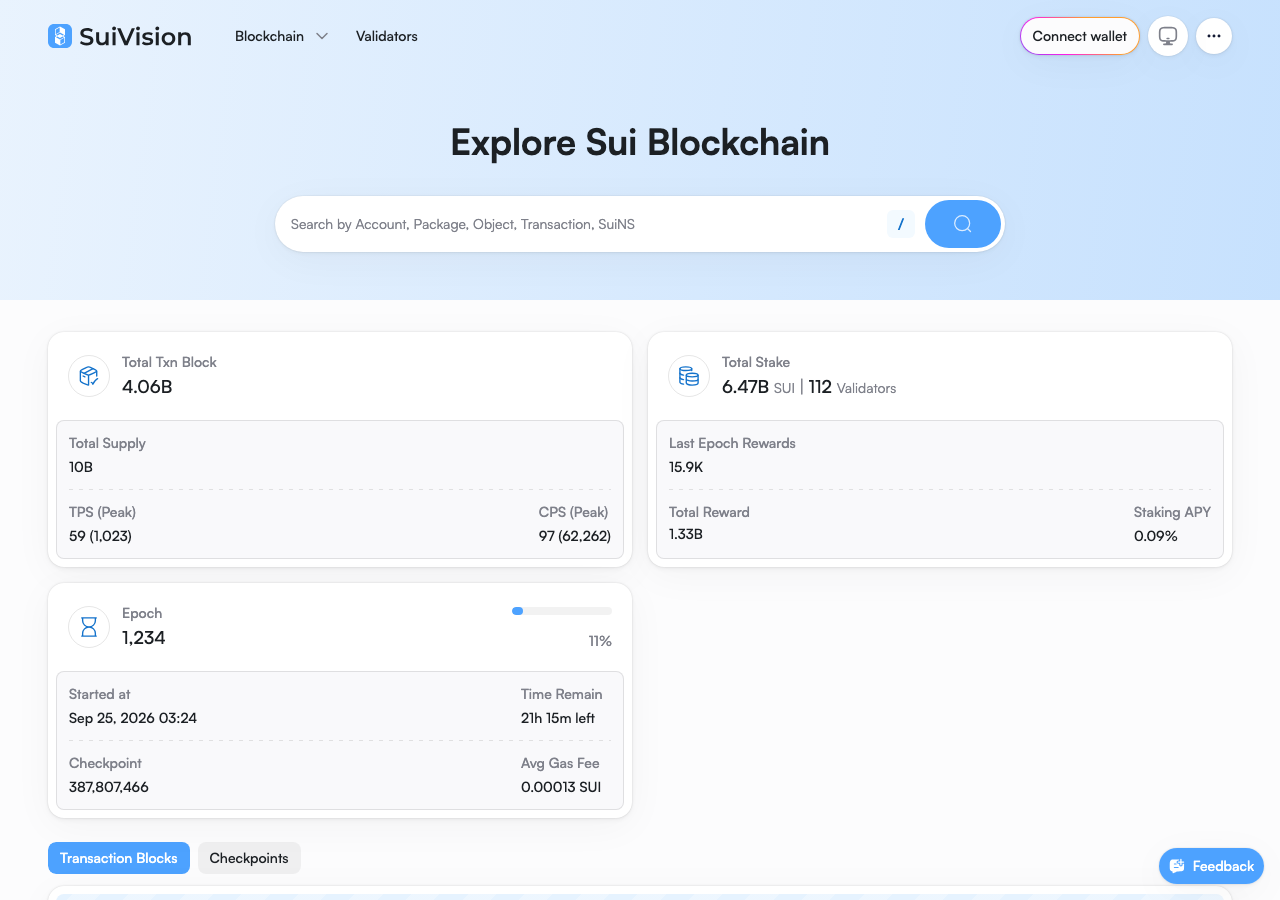
SuiVision in the browser during the run

By the numbers

10 of 12
scenarios passed, 2 failed
221
browser actions
31
screenshots
177
model calls
14
minutes
12
scenarios
10
passed
2
failed
0
blocked
1
issues
high1

Walkthrough

Every scenario DeepQA drove in the browser, in plan order, with the 25 screenshots it captured along the way. A passing scenario is evidence too.

  1. S1
    Connect test wallet

    3 steps, 3 screenshots

    fail
    S1-1.png
    S1, Connect test wallet
    S1-4.png
    S1, Connect test wallet
    S1-11.png
    S1, Connect test wallet
    • Opened the 'Connect Your Wallet' modal by clicking 'Connect wallet', but selecting providers from the list fails silently without connecting to the injected Sui wallet or updating the wallet button.
    • Loaded the testnet.suivision.xyz homepage and observed the 'Connect wallet' button in the header.
    • Clicked 'Connect wallet' which opened the 'Connect Your Wallet' modal listing available providers.
    • Attempted to connect using multiple wallet options (Slush, Suiet, Phantom, Backpack, Nightly, Martian Wallet); none initiated connection with the injected testnet wallet or updated the header state.
  2. S2
    Search by transaction digest

    2 steps, 2 screenshots

    pass
    S2-1.png
    S2, Search by transaction digest
    S2-10.png
    S2, Search by transaction digest
    • Searched for transaction digest 56R2BQt4YMQWJyuZzu8sjc8xcEUsLBYN7YhaycGzKEEZ and navigated directly to the Sui Transaction Block - Overview page displaying full metrics and transaction details.
    • Entering a valid Sui transaction digest into the homepage search input and executing the search successfully navigates to the Sui Transaction Block - Overview page.
    • The transaction block page displays checkpoint, sender, recipient, gas fees, inputs, MoveCalls, and tabbed details without error.
  3. S3
    View realtime transactions details

    2 steps, 2 screenshots

    pass
    S3-2.png
    S3, View realtime transactions details
    S3-4.png
    S3, View realtime transactions details
    • Navigated to the realtime transactions page displaying latest transaction blocks.
    • Loaded Sui Transaction Block Overview page showing Status (success), Sender, Gas fee metrics, and Transactions & Inputs payload data.
    • Navigated to the Transactions page and viewed the realtime transaction blocks table.
    • Successfully opened the transaction block details page for digest 4oCF8E53Q31gTR5BZEC4pWrfEg7khoHZabpjqb7ADp8s.
    • Verified the Transaction Block Overview page loaded properly with title 'Sui Transaction Block - Overview | SuiVision' displaying status, sender, gas fee metrics, and payload/MoveCall input data.
  4. S4
    Inspect checkpoint details

    2 steps, 3 screenshots

    pass
    S4-1.png
    S4, Inspect checkpoint details
    S4-8.png
    S4, Inspect checkpoint details
    S4-11.png
    S4, Inspect checkpoint details
    • Loaded home page of SuiVision testnet explorer.
    • Navigated to /checkpoints showing the list of recent checkpoints with sequence numbers, digests, time, and txn counts.
    • Loaded Checkpoint 387809028 page showing Sequence No (387,809,028), Epoch (1,234), Checkpoint Timestamp (Sep 26, 2026 00:14:47 +UTC), Txns Found (11), Signature (iOXQIm...KFAK), Gas fees, and included transaction blocks table.
    • Navigated to the Checkpoints list page (/checkpoints) where checkpoints are listed with sequence number, digest, timestamp, and transaction count.
    • Clicked on checkpoint sequence number 387809028 to view its details.
    • Verified that the Checkpoint detail page (/checkpoint/387809028) displays the Checkpoint Sequence No (387,809,028), Epoch (1,234), Checkpoint Timestamp (Sep 26, 2026 00:14:47 +UTC), Txns Found count (11), Validator Signature (iOXQIm...KFAK), Gas & Storage Fee details, and the list of included Checkpoint Transaction Blocks.
  5. S5
    View validator details

    2 steps, 3 screenshots

    pass
    S5-1.png
    S5, View validator details
    S5-4.png
    S5, View validator details
    S5-6.png
    S5, View validator details
    • Navigated to the validators list page displaying total stake, reward charts, and validator table.
    • Validator detail view loaded showing validator metrics including Staking APY (0.09%), Commission (10%), Total SUI Stake, Delegators, charts, and transaction blocks list.
    • Navigated to /validators where a list of active network validators is displayed alongside summary metrics.
    • Selected the 'BlockVision' validator to open its detail page.
    • Verified that the 'Validator Transaction Blocks | SuiVision' page loaded successfully with Staking APY, Commission, Total SUI Stake, Delegators count, and historical transaction blocks.
  6. S6
    Switch to All Delegations tab

    2 steps, 2 screenshots

    pass
    S6-3.png
    S6, Switch to All Delegations tab
    S6-6.png
    S6, Switch to All Delegations tab
    • Navigated to the Validators page showing the All Validators table.
    • Clicked the 'All Delegations' tab, updating the URL to ?tab=All+Delegations and displaying the RealTime Delegation Activity table with delegation records.
    • Navigated from home to the Validators page by clicking the header link.
    • Switched to the 'All Delegations' tab, which updated the view to show the 'RealTime Delegation Activity' table populated with delegation records.
  7. S7
    Switch to Top Delegators tab

    2 steps, 2 screenshots

    pass
    S7-3.png
    S7, Switch to Top Delegators tab
    S7-6.png
    S7, Switch to Top Delegators tab
    • Navigated to the Validators page showing the default All Validators tab.
    • Switched to the Top Delegators tab on the Validators page, and the table loaded top delegator accounts along with their stake amounts and validators.
    • Navigated to the Validators page at /validators.
    • Clicked the Top Delegators tab, updating the URL to /validators?tab=Top+Delegators.
    • The table successfully updated to display top delegator addresses, maximum validator, stake percentages, and corresponding staked amounts.
  8. S8
    Search by checkpoint sequence

    2 steps, 2 screenshots

    fail
    S8-3.png
    S8, Search by checkpoint sequence
    S8-12.png
    S8, Search by checkpoint sequence
    • Entered checkpoint sequence number 387809815 into the search box.
    • Navigated to the home page and switched to the Checkpoints tab to obtain valid recent checkpoint sequence numbers.
    • Entered valid checkpoint sequence number '387809815' into the main search box and pressed Enter.
    • The search interface responded with 'No data found' and failed to route to the Checkpoint detail view.
    • Re-tested with another valid active checkpoint sequence number '387809973', which also displayed 'No data found' and failed to route.
    • Direct navigation to '/checkpoint/387809973' successfully loads the Checkpoint detail view, confirming the sequence number exists and is valid on chain.
  9. S9
    Cross-navigate transaction to checkpoint

    3 steps, 2 screenshots

    pass
    S9-2.png
    S9, Cross-navigate transaction to checkpoint
    S9-5.png
    S9, Cross-navigate transaction to checkpoint
    • Navigated to home page and observed latest transaction blocks.
    • Navigated to Transactions page showing list of transaction blocks.
    • Navigated to Transaction Block page and observed Checkpoint sequence link 387,810,260.
    • Clicked Checkpoint sequence number 387,810,260 and successfully navigated to the corresponding Checkpoint page at /checkpoint/387810260.
    • Successfully navigated from transaction overview to the corresponding checkpoint page via the checkpoint sequence number link.
  10. S10
    Cross-navigate checkpoint to transaction

    3 steps

    pass
    • Navigated to /checkpoints page showing the list of recent checkpoints.
    • Clicked checkpoint sequence number and opened the Checkpoint details page for checkpoint 387810626.
    • Successfully opened the transaction block overview page (Sui Transaction Block - Overview) showing transaction details and reference back to checkpoint 387,810,626.
    • Navigated to /checkpoints and verified the list of recent checkpoints.
    • Clicked on checkpoint sequence number 387,810,626 to view the checkpoint detail page, which contains the list of checkpoint transaction blocks.
    • Navigated to transaction digest 6oGZ8wRvmWp7fj1QRi6Gz7cLtZqshYEG9Uih8iiaXdUd from the checkpoint's transaction blocks table.
    • Verified that the 'Sui Transaction Block - Overview' page loaded properly with full transaction details and backlink to checkpoint 387,810,626.
  11. S11
    Open Feedback dialog

    2 steps, 2 screenshots

    pass
    S11-1.png
    S11, Open Feedback dialog
    S11-4.png
    S11, Open Feedback dialog
    • Clicked the Feedback button on the homepage and observed the 'Help Us Improve' feedback modal open with feedback categories, input fields, and submission options.
    • Navigated to the SuiVision homepage.
    • Clicked the 'Feedback' button at the bottom of the page.
    • Observed the 'Help Us Improve' feedback modal open, containing category selector buttons, text areas for feedback and contact details, a 'Send Feedback' button, and a Discord chat support link.
  12. S12
    Load static policy pages

    2 steps, 2 screenshots

    pass
    S12-3.png
    S12, Load static policy pages
    S12-5.png
    S12, Load static policy pages
    • Navigated to /terms and observed the Terms of Service content loading successfully with all sections and headings.
    • Navigated to /privacy and observed the Privacy Policy content loading successfully with full text and headings without errors.
    • Loaded /terms successfully; displayed full Terms of Service document with sections, table of contents, and legal text without errors.
    • Loaded /privacy successfully; displayed full Privacy Policy document with sections, table of contents, and legal text without errors.

Issues

Findings that survived the Critic's audit. Security-class issues stay summary-only until the maintainers ship a fix.

highconfirmedfunctionalF2 in S8

Search function does not support or route by checkpoint sequence number

The observations confirm that the search interface fails to parse and route valid checkpoint sequence numbers, despite those checkpoints existing and loading properly via direct navigation. The live replay was inconclusive: The replay ran out of tool calls before it reached the reported state.

Expected

The application should recognize the checkpoint sequence number and navigate directly to the Checkpoint detail view (/checkpoint/387809973).

Actual

The application displays 'No data found' under the search input and does not route to the checkpoint detail view.

3 repro steps
  1. Navigate to https://testnet.suivision.xyz/
  2. Enter a valid checkpoint sequence number (e.g. 387809973) into the search box
  3. Press Enter

Environment limitations

These failures came from the test environment, not from the application: a credential the sandbox does not hold, a demo nobody may write to, a resource it cannot reach. They are not counted as issues.

  • Wallet connection modal offers only named third-party providers, none of which is our injected test walletS1, high

    I navigated to the site, clicked 'Connect wallet', and the modal successfully opened. I then clicked on wallet providers ('Phantom' and 'Slush') in the list, but they failed silently. The modal remained open and the header button still read 'Connect wallet'. A hand check of the modal (screenshots/S1-4.png) confirms it renders a fixed list of 9 named provider buttons (Phantom, Slush, OKX, Backpack, Desig, Nightly, Bitget, Martian, Suiet), with no generic slot for a Wallet Standard wallet outside that list. The run's own wallet-log.json shows 0 read requests and no signing, our injected wallet was never contacted. This is an environment or engine limitation, the sandbox does not hold any of the 9 named extensions, not a defect in the application's own connect flow.

Wallet activity

DeepQA injected a test wallet into the browser and recorded every request the app sent to it. Testnet funds only.

address
0x7b375c…c34f03 ↗
chain
Sui Testnet
browsers opened
3
connects
0
signing requests
0

The app connected the test wallet 0 times and asked for no signature.

Critic audit

An adversarial second pass over every finding before it reaches the report.

2
findings reviewed
2
live replays
1
withdrawn
  • F1withdrawn

    The wallet connect modal renders a fixed list of 9 named provider buttons with no generic Wallet Standard slot, and the run's wallet-log shows 0 reads and no signing, so our injected test wallet was never in the running here. This is an environment limitation, the sandbox holds none of the 9 named extensions, not a defect in the application's connect flow.

  • F2confirmed

    The observations confirm that the search interface fails to parse and route valid checkpoint sequence numbers, despite those checkpoints existing and loading properly via direct navigation. The live replay was inconclusive: The replay ran out of tool calls before it reached the reported state.

  • F1 is an environment limitation because the tester interacted with wallet options for extensions that the sandbox does not hold, instead of the generic injected test wallet.
  • The search interface defect found in S8 highlights a functional gap between direct URL routing and the search parser.
  • Hand correction, 2026-09-26: F1 was re-classified as an environment limitation and withdrawn after a hand check of the connect modal confirmed it lists only 9 fixed named wallet providers with no generic slot, and the run's wallet-log shows zero contact with our injected wallet.

Report

QA report: external/testnet.suivision.xyz at hosted

Search queries cannot resolve checkpoint sequence numbers.

Testing exercised twelve scenarios across core explorer workflows on SuiVision Testnet, including transaction and checkpoint inspection, validator delegations, feedback dialogs, and static policy pages. Ten of the twelve scenarios passed without issue, confirming that general navigation and direct lookup flows work as expected.

One high-severity functional issue was confirmed: the main search interface fails to parse or route searches executed by checkpoint sequence numbers, showing a 'No data found' message instead of directing users to the checkpoint view.

A second finding, that the wallet connection modal "fails silently" when clicking a provider, was withdrawn after a hand check. The modal lists a fixed set of 9 named third-party wallet providers (Phantom, Slush, OKX, Backpack, Desig, Nightly, Bitget, Martian, Suiet) and offers no generic slot for a Wallet Standard wallet outside that list, so our injected test wallet was never going to be reachable through this UI. The run's own wallet log confirms zero contact with the injected wallet.

While general network telemetry and direct deep links function properly, the lack of sequence-based search indexing impairs an essential navigation path. Wallet-gated flows could not be exercised in this sandbox and remain untested rather than confirmed broken.

Run summary
MetricCount
Scenarios executed12
Passed10
Failed2
Blocked0
Findings raised2
Issues after the audit1
Withdrawn by the audit1
Critical / high / medium / low0 / 1 / 0 / 0

Target: https://testnet.suivision.xyz/ · Testing level: deep_feature · Stack: unknown

Issues
High severity
F2 · Search function does not support or route by checkpoint sequence number

Severity: high · Type: functional · Verdict: confirmed · Scenario: S8

The observations confirm that the search interface fails to parse and route valid checkpoint sequence numbers, despite those checkpoints existing and loading properly via direct navigation. The live replay was inconclusive: The replay ran out of tool calls before it reached the reported state.

Expected: The application should recognize the checkpoint sequence number and navigate directly to the Checkpoint detail view (/checkpoint/387809973).

Actual: The application displays 'No data found' under the search input and does not route to the checkpoint detail view.

Steps to reproduce:

  1. Navigate to https://testnet.suivision.xyz/
  2. Enter a valid checkpoint sequence number (e.g. 387809973) into the search box
  3. Press Enter

Evidence: screenshots/S8-3.png, screenshots/S8-12.png

Environment limitations

These failures came from the test environment, not from the application: a credential the sandbox does not hold, a demo nobody may write to, a resource it cannot reach. They are not counted as issues. They record what this run could not exercise.

  • Wallet connection modal offers only named third-party providers, none of which is our injected test wallet (S1, high): I navigated to the site, clicked 'Connect wallet', and the modal successfully opened. I then clicked on wallet providers ('Phantom' and 'Slush') in the list, but they failed silently. The modal remained open and the header button still read 'Connect wallet'. A hand check of the modal (screenshots/S1-4.png) confirms it renders a fixed list of 9 named provider buttons (Phantom, Slush, OKX, Backpack, Desig, Nightly, Bitget, Martian, Suiet), with no generic slot for a Wallet Standard wallet outside that list. The run's own wallet-log.json shows 0 read requests and no signing, our injected wallet was never contacted. This is an environment or engine limitation, the sandbox does not hold any of the 9 named extensions, not a defect in the application's own connect flow.
Scenario results
ScenarioPriorityResultIssues
S1 Connect test wallethighfailnone
S2 Search by transaction digesthighpassnone
S3 View realtime transactions detailshighpassnone
S4 Inspect checkpoint detailshighpassnone
S5 View validator detailshighpassnone
S6 Switch to All Delegations tabmediumpassnone
S7 Switch to Top Delegators tabmediumpassnone
S8 Search by checkpoint sequencemediumfailF2
S9 Cross-navigate transaction to checkpointmediumpassnone
S10 Cross-navigate checkpoint to transactionmediumpassnone
S11 Open Feedback dialoglowpassnone
S12 Load static policy pageslowpassnone
The audit

The Critic reviewed 2 findings and ran 2 live replays in the browser, each on a fresh page.

  • F1 is an environment limitation because the tester interacted with wallet options for extensions that the sandbox does not hold, instead of the generic injected test wallet.
  • The search interface defect found in S8 highlights a functional gap between direct URL routing and the search parser.
  • Hand correction, 2026-09-26: F1 was re-classified as an environment limitation and withdrawn after a hand check of the connect modal confirmed it lists only 9 fixed named wallet providers with no generic slot, and the run's wallet-log shows zero contact with our injected wallet.
What to fix first
  1. Add sequence number parser support to the global search bar so checkpoint lookups route directly to checkpoint detail views (F2).
Coverage and caveats

In scope: Testnet blockchain data exploration; Transaction and Checkpoint details; Validator listing and tabs; Cross-navigation between related blockchain entities; Search functionality; Wallet connection via injected provider.

Not covered: Direct URL navigation to deep links for accounts and objects (to avoid Cloudflare bot verification blocks); Submitting transactions (application is read-mostly and target is unauthenticated apart from wallet connection).

  • Testnet is actively producing blocks and checkpoints, so realtime lists will populate with data.
  • SPA routing (clicking links, using the search box) bypasses the Cloudflare bot protection observed on direct deep links.
  • The injected test wallet is available in the browser context as described in the intake.
By the numbers
MetricValue
Scenarios10 passed, 2 failed, 0 blocked of 12 (27 planned steps)
Browser actions221 (47 clicks, 15 inputs, 39 navigations, 120 snapshots)
Screenshots31 (4 explore, 25 scenario, 2 critic), 25 captioned
Coverage9 pages, 0 forms, 5 flows, 2 console errors
Audit2 findings, 2 re-verified live, 1 confirmed, 0 promoted, 1 withdrawn
Model calls177
Tokens2,433,159 input, 9,455 output, 18,729 thinking
Time14 min
Wallet0 transactions, 0 signatures, 0 refusals on chain sui:testnet
StageCallsInputOutputThinkingSeconds
explore26396,4662,2501,266115
plan14,1241,8403,38735
test1341,863,7124,5039,427639
critique15167,2406044,16970
report11,6172584805

Run log

stagecallstokenstime
Explore26400k1m 55s
Plan19.4k35s
Test1341.9M10m 39s
Critique15172k1m 10s
Report12.4k5s
Total1772.5M14m 25s
○Intake
✓Explore
✓Plan
✓Test
✓Critique
✓Report
  • 00:09:15Zexploreexplore started
  • 00:23:40ZexploreExplored / (45 controls, 0 forms)
  • 00:23:40ZexploreExplored /transactions (68 controls, 0 forms)
  • 00:23:40ZexploreExplored /checkpoints (54 controls, 0 forms)
  • 00:23:40ZexploreExplored /validators (47 controls, 0 forms)
  • 00:23:40ZexploreExplored /validator/0x884515e99dab69c4c28662149db81ca563ed4c36e0c8ce44a58e40e25a0a64a1 (49 controls, 0 forms)
  • 00:23:40ZexploreExplored /txblock/56R2BQt4YMQWJyuZzu8sjc8xcEUsLBYN7YhaycGzKEEZ (33 controls, 0 forms)
  • 00:23:40ZexploreExplored /checkpoint/360485055 (39 controls, 0 forms)
  • 00:23:40ZexploreExplored /account/0x884515e99dab69c4c28662149db81ca563ed4c36e0c8ce44a58e40e25a0a64a1 (2 controls, 0 forms)
  • 00:23:40ZexploreExplored /terms (27 controls, 0 forms)
  • 00:23:40ZexploreExplored /privacy (26 controls, 0 forms)
  • 00:23:40ZexploreMapped 9 pages, 0 forms, 5 flows in 26 turns.
  • 00:23:40Zexploreexplore completed in 115s.
  • 00:23:40Zplanplan started
  • 00:23:40ZplanPlanned 12 scenarios (5 high, 5 medium, 2 low).
  • 00:23:40Zplanplan completed in 35s.
  • 00:23:40Ztesttest started
  • 00:23:40ZtestS1 executed (fail), 1 finding
  • 00:23:40ZtestS2 executed (pass)
  • 00:23:40ZtestS3 executed (pass)
  • 00:23:40ZtestS4 executed (pass)
  • 00:23:40ZtestS5 executed (pass)
  • 00:23:40ZtestS6 executed (pass)
  • 00:23:40ZtestS7 executed (pass)
  • 00:23:40ZtestS8 executed (fail), 1 finding
  • 00:23:40ZtestS9 executed (pass)
  • 00:23:40ZtestS10 executed (pass)
  • 00:23:40ZtestS11 executed (pass)
  • 00:23:40ZtestS12 executed (pass)
  • 00:23:40ZtestExecuted 12 scenarios: 10 passed, 2 failed, 0 blocked, 2 findings.
  • 00:23:40Ztesttest completed in 639s.
  • 00:23:40Zcritiquecritique started
  • 00:23:40ZcritiqueReviewed 2 findings; 0 possible defects spotted in passed scenarios.
  • 00:23:40Zcritique1 failure was called an environment limitation with no environment cause in the run's record, so it is audited as a finding instead.
  • 00:23:40ZcritiqueRe-verified F1: reproduced.
  • 00:23:40ZcritiqueRe-verified F2: inconclusive.
  • 00:23:40ZcritiqueAudit complete: 2 confirmed, 0 withdrawn, 0 promoted, 2 re-verified live.
  • 00:23:40Zcritiquecritique completed in 70s.
  • 00:23:40Zreportreport started
  • 00:23:40ZreportReported 2 issues (0 critical, 2 high, 0 medium, 0 low) from 2 findings.
  • 00:23:40Zreportreport completed in 5s.

Put an agent team on your next pull request.

Connect a repo, dispatch a Run, and read an audited, evidence-backed report the same day.