Hosted appTokenizer playgroundHosted, in placesucceeded

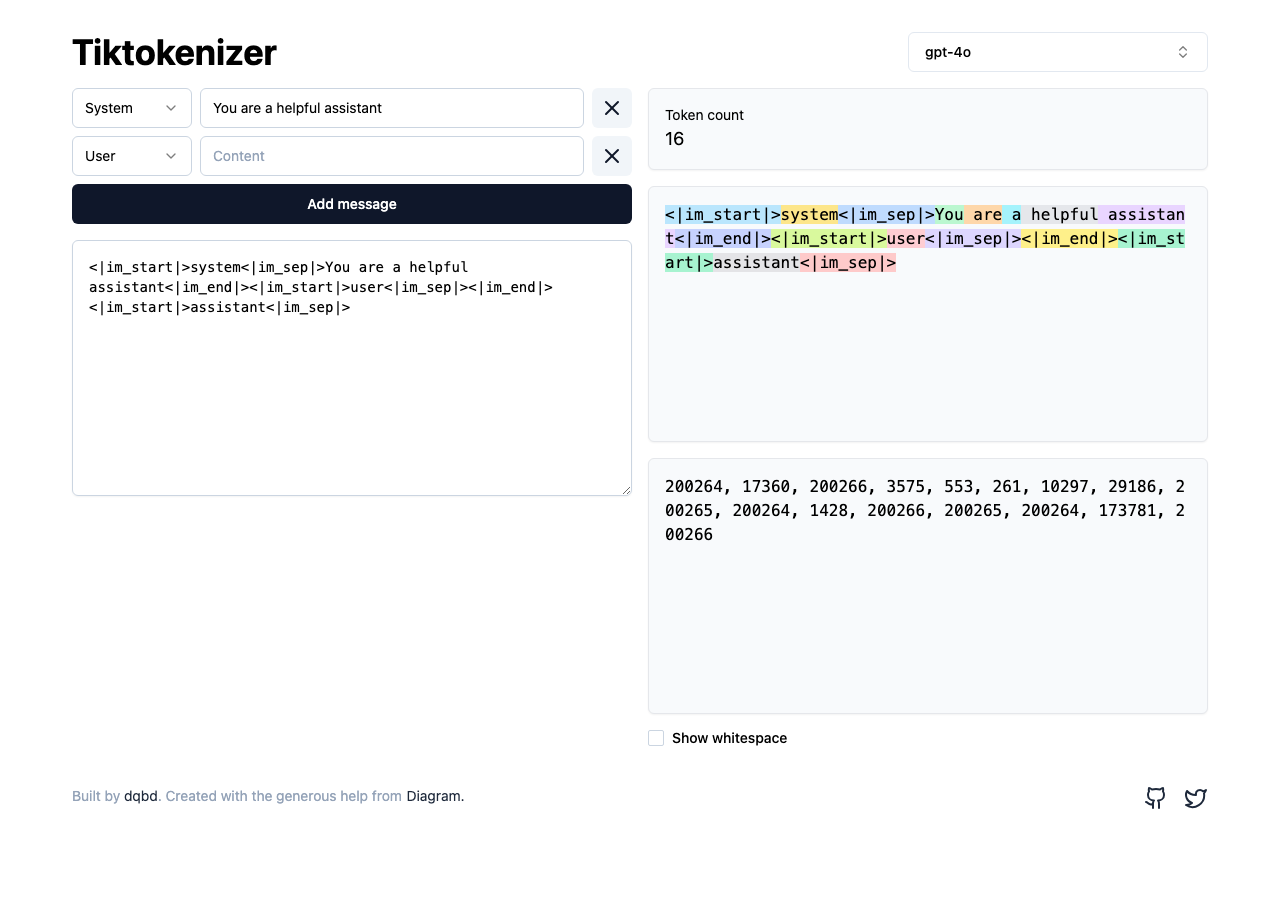
Open-source playground that shows how chat messages and raw text are tokenized for different LLMs. Tested in place on its hosted instance.

Tested in place byDeepQA Teamattiktokenizer.vercel.apponSep 20, 2026

Run #1model gemini-balanced (vertex)took 7m

All 12 scenarios passed, no issues after the audit.

Share on X
Tiktokenizer in the browser during the run

By the numbers

12 of 12
scenarios passed
148
browser actions
36
screenshots
156
model calls
7.0
minutes
12
scenarios
12
passed
0
failed
0
blocked
0
issues

Walkthrough

Every scenario DeepQA drove in the browser, in plan order, with the 34 screenshots it captured along the way. A passing scenario is evidence too.

  1. S1
    Token count updates dynamically in chat mode

    3 steps, 2 screenshots

    pass
    S1-1.png
    S1 · Token count updates dynamically in chat mode
    S1-4.png
    S1 · Token count updates dynamically in chat mode
    • Initial page loaded with default system message and empty user message, token [redacted] is 16.
    • Entered 'Testing the chat tokenization' in the user message textarea, token [redacted] updated to 21 and token [redacted] ('Testing', 'the', 'chat', 'token', 'ization') appeared.
    • The initial chat view rendered a default system prompt with a token [redacted] of 16.
    • Typing 'Testing the chat tokenization' into the content textarea dynamically increased the token [redacted] from 16 to 21.
    • The colored token [redacted] accurately reflected the entered text split into sub-tokens ('Testing', 'the', 'chat', 'token', 'ization') along with their corresponding IDs.
  2. S2
    Token count updates dynamically in raw encoder mode

    3 steps, 2 screenshots

    pass
    S2-2.png
    S2 · Token count updates dynamically in raw encoder mode
    S2-5.png
    S2 · Token count updates dynamically in raw encoder mode
    • Navigated to Tiktokenizer with cl100k_base model loaded in raw encoder mode with initial token [redacted] 0.
    • Typed 'Testing the raw encoder tokenization' and observed token [redacted] updated to 6 with colored token [redacted] and token IDs rendered properly.
    • The raw encoder mode accurately parsed the input text into 6 tokens and rendered both text chips and token IDs dynamically.
  3. S3
    Add a new message to the chat

    3 steps, 3 screenshots

    pass
    S3-1.png
    S3 · Add a new message to the chat
    S3-3.png
    S3 · Add a new message to the chat
    S3-6.png
    S3 · Add a new message to the chat
    • Loaded Tiktokenizer home page with initial token [redacted] of 16.
    • Clicked 'Add message' and observed a new message field added to the chat.
    • Typed 'A new user message' into the added message textarea; token [redacted] increased from 16 to 24 and tokens were updated.
    • Navigated to Tiktokenizer home page with initial token [redacted] of 16.
    • Clicked 'Add message' button, successfully creating a new message block.
    • Entered 'A new user message' into the new Content textarea, which updated the token [redacted] from 16 to 24 and displayed the individual tokens for the new message.
  4. S4
    Delete a message from the chat

    4 steps, 3 screenshots

    pass
    S4-1.png
    S4 · Delete a message from the chat
    S4-5.png
    S4 · Delete a message from the chat
    S4-8.png
    S4 · Delete a message from the chat
    • Initial state has two message blocks and a total token [redacted] of 16.
    • Added message and text, increasing token [redacted] from 16 to 22.
    • After deleting the second message, the message block was removed and token [redacted] decreased back from 22 to 16.
    • Navigated to https://tiktokenizer.vercel.app/ with default 2 messages and token [redacted] 16.
    • Added a third message and populated the second message with text 'Hello world', which increased token [redacted] to 22.
    • Clicked the delete message button on the second message block; the message field disappeared and token [redacted] decreased back to 16.
  5. S5
    Switch between chat and raw encoder interfaces

    3 steps, 2 screenshots

    pass
    S5-1.png
    S5 · Switch between chat and raw encoder interfaces
    S5-10.png
    S5 · Switch between chat and raw encoder interfaces
    • Selected cl100k_base encoder: multi-turn chat interface disappeared and was replaced by the single raw encoder input textarea.
    • Navigated to https://tiktokenizer.vercel.app/ which initially loaded in chat mode with multi-turn message textareas and role selectors.
    • Opened the Model/Encoder combobox dialog, searched for and selected 'cl100k_base'.
    • Observed that the multi-turn chat interface disappeared and was replaced by the single raw encoder input textarea.
    • Verified entering text into the raw encoder textarea tokenizes properly (token [redacted] updated to 7 for 'Hello world from cl100k_base').
  6. S6
    Change message role in chat mode

    3 steps, 3 screenshots

    pass
    S6-1.png
    S6 · Change message role in chat mode
    S6-4.png
    S6 · Change message role in chat mode
    S6-11.png
    S6 · Change message role in chat mode
    • Loaded Tiktokenizer initial chat mode showing messages with role selectors.
    • Changed the role selector of the second message to 'system', and observed the serialized tokens update from 'user' (token ID 1428) to 'system' (token ID 17360).
    • Navigated to https://tiktokenizer.vercel.app/ in chat mode.
    • Opened the role combobox for the second chat message and selected 'System'.
    • Observed the serialized prompt and tokenized representation update immediately, showing the 'system' token (token ID 17360) in place of 'user' (token ID 1428).
  7. S7
    Search for a model in the dialog

    4 steps, 3 screenshots

    pass
    S7-1.png
    S7 · Search for a model in the dialog
    S7-3.png
    S7 · Search for a model in the dialog
    S7-6.png
    S7 · Search for a model in the dialog
    • Loaded the Tiktokenizer home page.
    • Opened the model / encoder selector dialog showing the search input and available models.
    • Typed 'gpt2' into the search input and observed that the model list filtered to only display the matching 'gpt2' option.
    • The model/encoder combobox dialog opened properly on click and the search input filtered the options list to display matching model 'gpt2' when 'gpt2' was typed.
  8. S8
    Toggle whitespace visualization in chat mode

    4 steps, 4 screenshots

    pass
    S8-1.png
    S8 · Toggle whitespace visualization in chat mode
    S8-4.png
    S8 · Toggle whitespace visualization in chat mode
    S8-6.png
    S8 · Toggle whitespace visualization in chat mode
    S8-9.png
    S8 · Toggle whitespace visualization in chat mode
    • Entered 'Hello World' into the message content textarea and observed tokens generated for Hello and World.
    • Toggling the 'Show whitespace' checkbox converts spaces in token [redacted] into visual dot indicators (⋅).
    • Confirmed that tokens for 'Hello World' visually represented consecutive whitespace tokens as '⋅⋅⋅' and '⋅World' instead of standard spaces.
  9. S9
    Toggle whitespace visualization in raw encoder mode

    4 steps, 3 screenshots

    pass
    S9-2.png
    S9 · Toggle whitespace visualization in raw encoder mode
    S9-5.png
    S9 · Toggle whitespace visualization in raw encoder mode
    S9-7.png
    S9 · Toggle whitespace visualization in raw encoder mode
    • Navigated to tiktokenizer with cl100k_base model selected.
    • Entered 'Space test ' into the raw encoder input and observed 3 tokens with default whitespace display.
    • Clicked the 'Show whitespace' checkbox, and spaces in token [redacted] were visually rendered as middle dots ('⋅test', '⋅⋅⋅⋅').
    • The raw encoder tokenizes 'Space test ' into 3 tokens (10115, 1296, 257).
    • Toggling 'Show whitespace' dynamically updates the token [redacted] to render space characters visually as '⋅', clearly differentiating whitespace in '⋅test' and '⋅⋅⋅⋅'.
  10. S10
    Load model selection directly from URL parameter

    2 steps, 3 screenshots

    pass
    S10-2.png
    S10 · Load model selection directly from URL parameter
    S10-5.png
    S10 · Load model selection directly from URL parameter
    S10-9.png
    S10 · Load model selection directly from URL parameter
    • Navigated to https://tiktokenizer.vercel.app/?model=gpt2 and confirmed the gpt2 model/tokenizer loaded successfully with gpt2 tokenization (15496, 995 for 'Hello world').
    • Navigating to https://tiktokenizer.vercel.app/?model=gpt2 successfully initialized the model directly to gpt2.
    • Entering 'Hello world' verified that the gpt2 encoder was active, outputting token [redacted] 2 with gpt2 token IDs [15496, 995].
  11. S11
    Handle empty message content gracefully

    3 steps, 3 screenshots

    pass
    S11-1.png
    S11 · Handle empty message content gracefully
    S11-4.png
    S11 · Handle empty message content gracefully
    S11-7.png
    S11 · Handle empty message content gracefully
    • Initial page loaded with default system message 'You are a helpful assistant' and token [redacted] 16.
    • Cleared the system message content; the token [redacted] updated cleanly from 16 to baseline structural token [redacted] 11.
    • Entered new text into the user message textarea and verified token [redacted] updated to 13 as expected.
    • Empty message content is handled gracefully by recalculating structural baseline tokens (token [redacted] 11) without error or NaN.
    • The visualizer remains fully interactive and responsive to subsequent text inputs.
  12. S12
    Handle empty raw encoder input gracefully

    3 steps, 3 screenshots

    pass
    S12-2.png
    S12 · Handle empty raw encoder input gracefully
    S12-5.png
    S12 · Handle empty raw encoder input gracefully
    S12-8.png
    S12 · Handle empty raw encoder input gracefully
    • Navigated to https://tiktokenizer.vercel.app/?model=cl100k_base where the raw encoder loaded with an empty textbox and token [redacted] 0.
    • Typed 'Hello world this is a test' into the Raw encoder input, resulting in Token [redacted] 6 and 6 token [redacted]
    • Cleared all text in the Raw encoder textarea; the token [redacted] immediately updated to 0 and all token [redacted] disappeared.
    • Navigated to https://tiktokenizer.vercel.app/?model=cl100k_base with raw encoder mode.
    • Entered text into the textarea and verified token [redacted] and token [redacted] appeared.
    • Cleared all text from the raw encoder textarea and observed token [redacted] display exactly 0 with no token [redacted] rendered.

Issues

No finding survived the audit. Nothing to fix from this run.

Critic audit

An adversarial second pass over every finding before it reaches the report.

0
findings reviewed
0
re-verified live
0
withdrawn
    • The execution was clean and verified the application's core tokenization features accurately, with token [redacted] and IDs matching the expected values for the respective cl100k_base and gpt2 models.

    Report

    QA report: external/tiktokenizer.vercel.app at hosted

    All core tokenization workflows, interface modes, and input interactions passed testing with no defects identified.

    Testing covered 12 scenarios evaluating key functionality across both chat and raw encoder modes. The run exercised dynamic token count updates, message addition and removal, role modifications, whitespace visualization controls, model search dialogs, URL parameter model loading, and empty input handling.

    All 12 scenarios passed without any issues raised. The application reliably parsed inputs, rendered token metrics across models, and handled interface transitions and edge cases without failure.

    Run summary
    MetricCount
    Scenarios executed12
    Passed12
    Failed0
    Blocked0
    Findings raised0
    Issues after the audit0
    Withdrawn by the audit0
    Critical / high / medium / low0 / 0 / 0 / 0

    Target: https://tiktokenizer.vercel.app · Testing level: deep_feature · Stack: unknown

    Issues

    No issues survived the audit.

    Scenario results
    ScenarioPriorityResultIssues
    S1 Token count updates dynamically in chat modehighpassnone
    S2 Token count updates dynamically in raw encoder modehighpassnone
    S3 Add a new message to the chathighpassnone
    S4 Delete a message from the chathighpassnone
    S5 Switch between chat and raw encoder interfaceshighpassnone
    S6 Change message role in chat modemediumpassnone
    S7 Search for a model in the dialogmediumpassnone
    S8 Toggle whitespace visualization in chat modemediumpassnone
    S9 Toggle whitespace visualization in raw encoder modemediumpassnone
    S10 Load model selection directly from URL parametermediumpassnone
    S11 Handle empty message content gracefullylowpassnone
    S12 Handle empty raw encoder input gracefullylowpassnone
    The audit

    The Critic reviewed 0 findings and re-verified 0 of them live in the browser, replaying the reported steps on a fresh page.

    • The execution was clean and verified the application's core tokenization features accurately, with token [redacted] and IDs matching the expected values for the respective cl100k_base and gpt2 models.
    Coverage and caveats

    In scope: Chat model tokenization and real-time calculation; Raw base encoder tokenization; Dynamic UI switching between multi-turn chat and single textarea modes; Message lifecycle: adding, editing, and deleting chat messages; Whitespace visualization toggle; URL query parameter synchronization for model selection; Model search dialog functionality.

    Not covered: Accuracy validation of the token count against actual OpenAI/HuggingFace libraries, as the tester only observes UI updates; Performance testing for extremely large multi-megabyte payloads, which falls outside deep feature functional testing.

    • The application runs entirely client-side as described in the AppMap notes.
    • The 404 console error logged during exploration does not block the core tokenization flows.
    • The model 'cl100k_base' is present and serves as the standard raw encoder test target.
    By the numbers
    MetricValue
    Scenarios12 passed, 0 failed, 0 blocked of 12 (39 planned steps)
    Browser actions148 (20 clicks, 30 inputs, 20 navigations, 78 snapshots)
    Screenshots36 (2 explore, 34 scenario, 0 critic), 33 captioned
    Coverage2 pages, 1 forms, 2 flows, 1 console errors
    Audit0 findings, 0 re-verified live, 0 confirmed, 0 promoted, 0 withdrawn
    Model calls156
    Tokens775,656 input, 8,135 output, 15,896 thinking
    Time7 min
    StageCallsInputOutputThinkingSeconds
    explore26148,3422,1871,42169
    plan13,1132,0883,01636
    test127618,0013,6547,352282
    critique14,797713,74029
    report11,4031353675

    Run log

    stagecallstokenstime
    Explore26151.9k1m 9s
    Plan18.2k36s
    Test127629k4m 42s
    Critique18.6k29s
    Report11.9k5s
    Total156799.7k7m 1s
    Intake
    Explore
    Plan
    Test
    Critique
    Report
    • 01:28:17Zexploreexplore started
    • 01:35:19ZexploreExplored / (14 controls, 0 forms)
    • 01:35:19ZexploreMapped 2 pages, 1 forms, 2 flows in 26 turns.
    • 01:35:19Zexploreexplore completed in 69s.
    • 01:35:19Zplanplan started
    • 01:35:19ZplanPlanned 12 scenarios (5 high, 5 medium, 2 low).
    • 01:35:19Zplanplan completed in 36s.
    • 01:35:19Ztesttest started
    • 01:35:19ZtestS1 executed (pass)
    • 01:35:19ZtestS2 executed (pass)
    • 01:35:19ZtestS3 executed (pass)
    • 01:35:19ZtestS4 executed (pass)
    • 01:35:19ZtestS5 executed (pass)
    • 01:35:19ZtestS6 executed (pass)
    • 01:35:19ZtestS7 executed (pass)
    • 01:35:19ZtestS8 executed (pass)
    • 01:35:19ZtestS9 executed (pass)
    • 01:35:19ZtestS10 executed (pass)
    • 01:35:19ZtestS11 executed (pass)
    • 01:35:19ZtestS12 executed (pass)
    • 01:35:19ZtestExecuted 12 scenarios: 12 passed, 0 failed, 0 blocked, 0 findings.
    • 01:35:19Ztesttest completed in 282s.
    • 01:35:19Zcritiquecritique started
    • 01:35:19ZcritiqueReviewed 0 findings; 0 possible defects spotted in passed scenarios.
    • 01:35:19ZcritiqueAudit complete: 0 confirmed, 0 withdrawn, 0 promoted, 0 re-verified live.
    • 01:35:19Zcritiquecritique completed in 29s.
    • 01:35:19Zreportreport started
    • 01:35:19ZreportReported 0 issues (0 critical, 0 high, 0 medium, 0 low) from 0 findings.
    • 01:35:19Zreportreport completed in 5s.

    Put an agent team on your next pull request.

    Connect a repo, dispatch a Run, and read an audited, evidence-backed report the same day.