Hosted appCompliance gatingArc Testnetsucceeded

TrustGate scores wallets and tokens on-chain using behavioral signals (bot detection, deployment history, transaction patterns) and gates access to payments and services. Built on Arc.

Tested in place byDeepQA TeamonArc Testnetattrustgated.xyzonSep 17, 2026

Run #1model gemini-balanced (vertex)took 14m

9 of 12 scenarios passed, 2 failed, 1 blocked, 3 issues after the audit, 1 high.

Share on X
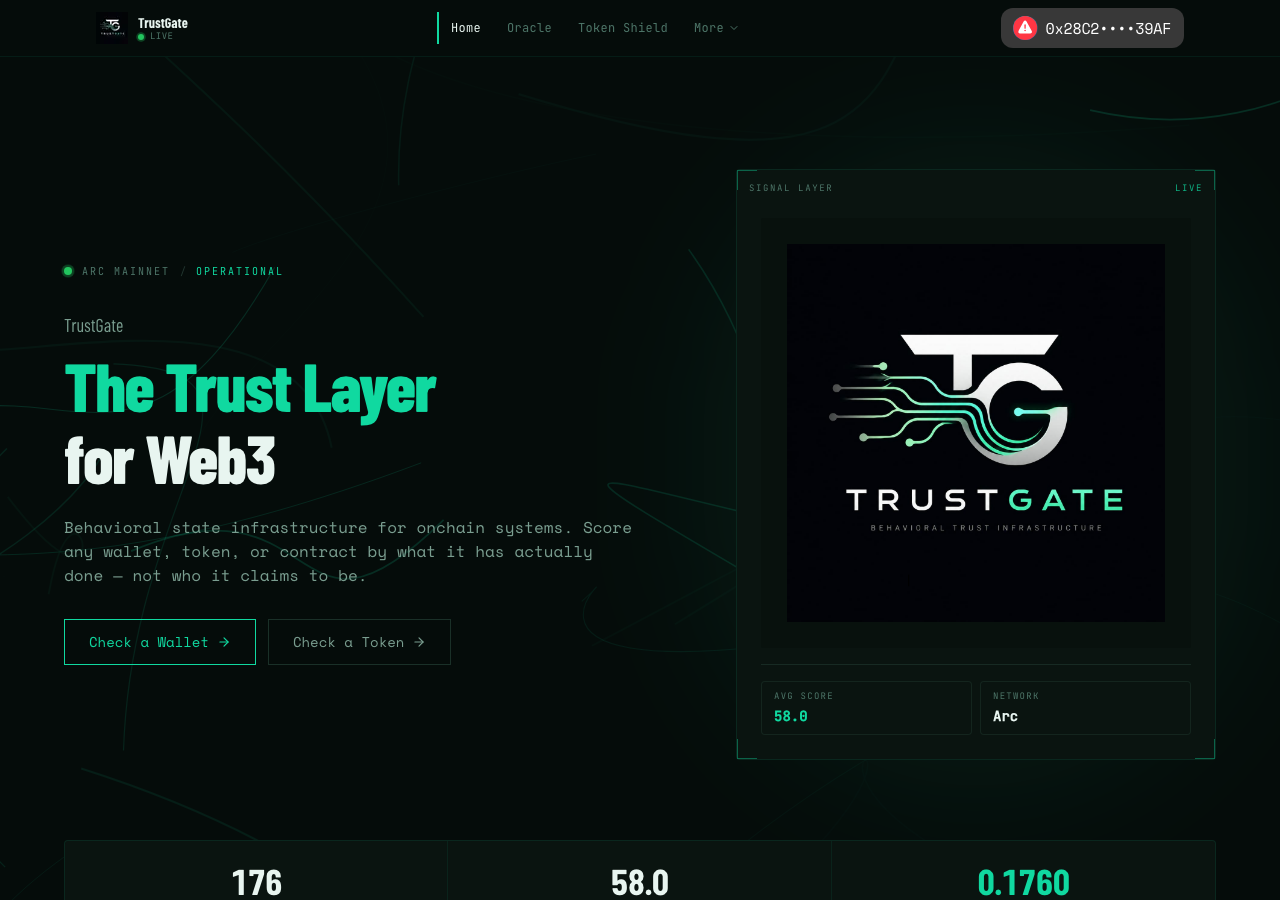
TrustGate in the browser during the run

By the numbers

9 of 12
scenarios passed, 2 failed, 1 blocked
251
browser actions
36
screenshots
233
model calls
14
minutes
12
scenarios
9
passed
2
failed
1
blocked
3
issues
high1medium1low1

Walkthrough

Every scenario DeepQA drove in the browser, in plan order, with the 30 screenshots it captured along the way. A passing scenario is evidence too.

  1. S1
    Verify navigation fails gracefully for broken dropdown links

    3 steps, 3 screenshots

    pass
    S1-1.png
    S1 · Verify navigation fails gracefully for broken dropdown links
    S1-3.png
    S1 · Verify navigation fails gracefully for broken dropdown links
    S1-8.png
    S1 · Verify navigation fails gracefully for broken dropdown links
    • Navigating to /widget returns a 404 Not Found error page with heading '404' and 'This page could not be found.' gracefully without crashing.
    • Navigated to /widget and verified that the application displays a 404 Not Found page ('404: This page could not be found.') rather than hanging, crashing, or rendering a blank page.
  2. S2
    Validate empty address on Oracle Wallet Query

    3 steps, 2 screenshots

    pass
    S2-4.png
    S2 · Validate empty address on Oracle Wallet Query
    S2-9.png
    S2 · Validate empty address on Oracle Wallet Query
    • Navigated to Oracle page at /oracle where the playground input is empty and the Query Trust Score button is disabled.
    • The 'Query Trust Score' button is disabled when the address field is empty, rejecting/preventing empty form submission without querying the contract.
    • Navigated to the Oracle page at /oracle.
    • Confirmed that the wallet address input field is initially empty and the 'Query Trust Score (0.001 USDC)' button is disabled.
    • Attempted submission with empty/whitespace input; the submission button remains disabled and prevents querying the contract without an address.
  3. S3
    Attempt Oracle Query with valid address expecting chain mismatch

    3 steps, 3 screenshots

    pass
    S3-5.png
    S3 · Attempt Oracle Query with valid address expecting chain mismatch
    S3-8.png
    S3 · Attempt Oracle Query with valid address expecting chain mismatch
    S3-11.png
    S3 · Attempt Oracle Query with valid address expecting chain mismatch
    • Navigated to the Oracle page at /oracle.
    • Oracle query triggered chain mismatch error displaying 'The current chain of the wallet (id: 5042002) does not match the target chain for the transaction (id: 5042 – undefined)'.
    • Navigated to /oracle and entered valid Arc wallet address 0x872fe9703ffe018991d4c6a41ffba740e5c9c791.
    • Clicked 'Query Trust Score (0.001 USDC)' button which initiated quote request.
    • UI surfaced explicit chain mismatch error: 'The current chain of the wallet (id: 5042002) does not match the target chain for the transaction (id: 5042 – undefined). Current Chain ID: 5042002 Expected Chain ID: 5042 – undefined Request Argument'.
  4. S4
    Audit a preset token via Token Shield

    3 steps, 2 screenshots

    fail
    S4-5.png
    S4 · Audit a preset token via Token Shield
    S4-11.png
    S4 · Audit a preset token via Token Shield
    • Navigated to Token [redacted] at /token-shield.
    • Entered USDC token [redacted] 0x3600000000000000000000000000000000000000 into Token [redacted] input.
    • Navigated to Token [redacted] at /token-shield and loaded the preset USDC contract address 0x3600000000000000000000000000000000000000.
    • Clicked 'Check Token (0.001 USDC)' button to audit the preset token.
    • Instead of rendering the token [redacted] score, deployer credibility, and behavioral flags directly for preset tokens, the Token [redacted] prompted 'Requesting payment quote...' requiring onchain payment.
  5. S5
    Validate invalid contract address on Token Shield

    3 steps, 2 screenshots

    pass
    S5-4.png
    S5 · Validate invalid contract address on Token Shield
    S5-14.png
    S5 · Validate invalid contract address on Token Shield
    • Navigated to the Token [redacted] page at /token-shield.
    • Entered an invalid string 'invalid-token-address' into the 'Token [redacted] address 0x...' input field.
    • Observed that the form validates the input format and disables the 'Check Token (0.001 USDC)' button for invalid or non-hex/invalid-length addresses, preventing invalid contract address submissions from hanging or crashing the application.
    • Entered a valid formatted 40-character hex address ('0x0000000000000000000000000000000000000000'), which correctly enabled the submit button.
  6. S6
    Validate empty amount on Dashboard Deposit

    4 steps, 2 screenshots

    pass
    S6-4.png
    S6 · Validate empty amount on Dashboard Deposit
    S6-9.png
    S6 · Validate empty amount on Dashboard Deposit
    • Navigated to /dashboard and viewed the Depositor tab with Deposit USDC form.
    • When the Amount USDC input is empty or 0, the Deposit button is disabled and prevents submission, triggering no transaction.
    • The Deposit USDC form requires an amount; when left empty or 0, the Deposit button remains disabled and cannot be submitted, preventing empty or 0 USDC deposit transactions.
  7. S7
    Attempt Dashboard Deposit expecting chain mismatch

    4 steps, 3 screenshots

    pass
    S7-4.png
    S7 · Attempt Dashboard Deposit expecting chain mismatch
    S7-8.png
    S7 · Attempt Dashboard Deposit expecting chain mismatch
    S7-13.png
    S7 · Attempt Dashboard Deposit expecting chain mismatch
    • Navigated to /dashboard where the connected wallet 0x28C2••••39AF is displayed with Depositor, Agents, and Claims tabs.
    • Entered 10 in the Deposit USDC amount field, enabling the Deposit button.
    • Navigated to the Dashboard page at /dashboard.
    • The Depositor tab was active by default showing Wallet USDC and Deposited in TrustGate balances.
    • Entered a valid numeric amount (10) into the Deposit USDC input field.
    • Clicked the Deposit button; the button entered the 'Approving...' state during the transaction attempt.
    • The transaction was rejected/handled promptly without stalling indefinitely, resetting the button state back to 'Deposit'.
  8. S8
    Validate invalid Agent Address on Set Allowance

    4 steps, 3 screenshots

    fail
    S8-4.png
    S8 · Validate invalid Agent Address on Set Allowance
    S8-9.png
    S8 · Validate invalid Agent Address on Set Allowance
    S8-11.png
    S8 · Validate invalid Agent Address on Set Allowance
    • Navigated to the Dashboard view with Depositor tab active.
    • Entered invalid agent address 'not-an-address' and valid allowance '10', enabling the Set Allowance button without validation error.
    • Navigated to the Dashboard page at /dashboard where Depositor view is displayed by default.
    • Entered invalid agent address 'not-an-address' into the Agent Address input field.
    • Entered numeric value '10' into the Allowance (USDC) input field.
    • The Set Allowance button was enabled despite the invalid/malformed agent address string.
    • Submitting the Set Agent Allowance form with an invalid address did not trigger client-side address format validation or flag the address as invalid.
  9. S9
    Validate empty amount on Dashboard Withdraw

    4 steps, 2 screenshots

    pass
    S9-3.png
    S9 · Validate empty amount on Dashboard Withdraw
    S9-10.png
    S9 · Validate empty amount on Dashboard Withdraw
    • Navigated to Dashboard page at /dashboard showing Depositor tab with Deposit, Withdraw, and Set Agent Allowance forms.
    • Verified that the Withdraw button is disabled when the Amount USDC field is empty or cleared, preventing withdrawal transactions with an empty amount.
    • Navigated to Dashboard (/dashboard) and inspected the Withdraw USDC section.
    • When the Amount USDC input is empty, the Withdraw submit button remains disabled and pressing Enter does not trigger any transaction.
    • Entering an amount enables the button, and clearing it immediately disables the button again, preventing empty withdrawal submissions.
  10. S10
    Run Trust Gating check and issue attestation

    4 steps, 2 screenshots

    blocked
    S10-9.png
    S10 · Run Trust Gating check and issue attestation
    S10-11.png
    S10 · Run Trust Gating check and issue attestation
    • Navigated through the application; checked dashboard and available routes.
    • Explored dashboard tabs and verified routes; direct navigation across origins/routes is blocked by browser origin restrictions and gating route is not present in navigation.
    • Navigated to home, oracle, and dashboard pages successfully.
    • Attempted to navigate to /gating via navigate API but was blocked by origin restriction.
    • Looked for Trust Gating check / attestation links in the UI header, footer, and dashboard, but no direct /gating navigation link was accessible.
  11. S11
    Validate missing rule selection on Gating check

    4 steps, 3 screenshots

    pass
    S11-3.png
    S11 · Validate missing rule selection on Gating check
    S11-5.png
    S11 · Validate missing rule selection on Gating check
    S11-13.png
    S11 · Validate missing rule selection on Gating check
    • Navigated to /gating and observed the Protocol Gating pilot check form.
    • Navigated to /gating to access the Protocol Gating check form.
    • Entered a valid wallet address 0x872fE970364dD23cE6466A8A484b397Ac311C791 into the 0x wallet address field.
    • Left the ladder rule buttons (Example lending ladder, Example governance ladder) unselected.
    • Clicked 'Run gating check + issue attestation'.
    • The application handled the request gracefully without crashing or throwing unhandled exceptions, displaying guidance 'Example ladder presets are demo-only. On mainnet supply your own ladder.bands.'.
  12. S12
    Control autonomous nanopayment simulation

    4 steps, 3 screenshots

    pass
    S12-3.png
    S12 · Control autonomous nanopayment simulation
    S12-6.png
    S12 · Control autonomous nanopayment simulation
    S12-8.png
    S12 · Control autonomous nanopayment simulation
    • Navigated to /demo page showing initial Nanopayment Stream simulation in IDLE state with 0 transactions.
    • Started simulation: stream status changed to LIVE, dynamic payment transactions stream in, cumulative volume and margin metrics update continuously.
    • Clicked Pause button; simulation halted cleanly with metrics frozen at 93 transactions, $232.43 saved, and 2,952 USDC volume.
    • Navigated to the /demo page where the Nanopayment Stream simulation was initially IDLE.
    • Clicked Start: Stream status transitioned to LIVE, live agent transactions streamed into the feed, throughput reported 4.5 tps avg, and cumulative metrics (total transactions, volume, savings, margin) updated dynamically.
    • Clicked Pause: Stream status transitioned to IDLE, button changed back to Start, and transaction count / volume metrics halted immediately without further increments.

Issues

Findings that survived the Critic's audit. Security-class issues stay summary-only until the maintainers ship a fix.

highconfirmed ✓functionalF1 · S4

Token Shield requires 0.001 USDC payment quote and does not return risk metrics for preset tokens

Navigated to `/token-shield?address=0x3600000000000000000000000000000000000000` and clicked the 'Check Token (0.001 USDC)' button. The button changed to a disabled state reading 'Requesting payment quote...' and no analysis results were displayed, confirming the reported behavior. The page reported 5 console errors during the scenario.

Expected

The token risk score, deployer credibility, and behavioral flags should be rendered on the page for preset tokens.

Actual

The button transitions to 'Requesting payment quote...' and halts waiting for payment flow without displaying the token analysis results.

Repro · 2 steps
  1. Navigate to /token-shield with preset token address (e.g. /token-shield?address=0x3600000000000000000000000000000000000000).
  2. Click the 'Check Token (0.001 USDC)' button.
mediumconfirmed ✓functionalF2 · S8

Set Agent Allowance form lacks client-side validation for malformed agent addresses

The observations clearly establish that the Set Allowance button remains enabled and fails to trigger any client-side format validation when a malformed address string is entered. The page reported 2 console errors during the scenario.

Expected

The form should validate that the Agent Address is a valid Ethereum/Arc address (0x prefixed 40-character hex string), disable the submit button or display an inline validation error, and prevent submission.

Actual

The Set Allowance button is enabled with malformed address input, and no validation error or address format check is displayed to prevent submission.

Repro · 4 steps
  1. Navigate to /dashboard
  2. Under 'Set Agent Allowance', enter an invalid address string (e.g., 'not-an-address' or '0x1234') into the 'Agent Address' field
  3. Enter a valid numeric allowance (e.g., '10') into the 'Allowance (USDC)' field
  4. Click the 'Set Allowance' button
lowpromoted ↑functionalF3 · S11

Form submitted without rule selection results in 400 Bad Request

Surfaced by the audit of S11, which the Tester passed, and reproduced live: When clicking 'Run gating check + issue attestation' without a ladder selected on /gating, the button changes to a disabled 'Working…' state, indicating a network request is being sent. The request then fails and an error message regarding missing ladder bands is displayed, confirming that client-side validation is missing and the invalid request is indeed submitted to the backend. The page reported 3 console errors during the scenario.

Expected

The application should perform client-side validation to ensure a rule is selected and prevent network submission if missing.

Actual

The client attempts to submit the invalid request to the backend, resulting in a 400 Bad Request error.

Repro · 4 steps
  1. Navigate to /gating.
  2. Enter a valid wallet address.
  3. Leave the ladder rule buttons unselected.
  4. Click 'Run gating check + issue attestation'.

Wallet activity

DeepQA injected a test wallet into the browser and recorded every request the app sent to it. Testnet funds only.

address
0x28C278…7c39AF
chain
Arc Testnet
browsers opened
3
read requests forwarded
0
signing requests
2
time (UTC)methodsummaryresult
18:19:20eth_sendTransactionto 0x3600000000000000000000000000000000000000 value 0 data 68 bytesrefused: Request exceeds defined limit. URL: https://rpc.testnet.arc.io Request body: {"method":"eth_getTransactionCount","params":["0x28C27802ee41F809242E7225878C4cBdb17c39AF","pending"]} Request Arguments: chain: Arc Testnet (id: 5042002) from: 0x28C27802ee41F809242E7225878C4cBdb17c39AF to: 0x3600000000000000000000000000000000000000 data: 0x095ea7b3000000000000000000000000d7f66981364be30d42d7ca5373d690fea10456280000000000000000000000000000000000000000000000000000000000989680 Details: rate limit exceeded Version: viem@2.56.5
18:19:26eth_sendTransactionto 0x3600000000000000000000000000000000000000 value 0 data 68 bytesrefused: Request exceeds defined limit. URL: https://rpc.testnet.arc.io Request body: {"method":"eth_getTransactionCount","params":["0x28C27802ee41F809242E7225878C4cBdb17c39AF","pending"]} Request Arguments: chain: Arc Testnet (id: 5042002) from: 0x28C27802ee41F809242E7225878C4cBdb17c39AF to: 0x3600000000000000000000000000000000000000 data: 0x095ea7b3000000000000000000000000d7f66981364be30d42d7ca5373d690fea10456280000000000000000000000000000000000000000000000000000000000989680 Details: rate limit exceeded Version: viem@2.56.5

Critic audit

An adversarial second pass over every finding before it reaches the report.

2
findings reviewed
3
re-verified live
0
withdrawn
  • F1confirmed ✓

    Navigated to `/token-shield?address=0x3600000000000000000000000000000000000000` and clicked the 'Check Token (0.001 USDC)' button. The button changed to a disabled state reading 'Requesting payment quote...' and no analysis results were displayed, confirming the reported behavior.

  • F2confirmed ✓

    The observations clearly establish that the Set Allowance button remains enabled and fails to trigger any client-side format validation when a malformed address string is entered.

  • F3promoted ↑

    Surfaced by the audit of S11, which the Tester passed, and reproduced live: When clicking 'Run gating check + issue attestation' without a ladder selected on /gating, the button changes to a disabled 'Working…' state, indicating a network request is being sent. The request then fails and an error message regarding missing ladder bands is displayed, confirming that client-side validation is missing and the invalid request is indeed submitted to the backend.

  • A persistent CORS error attempting to reach eth.merkle.io appears across all scenarios, indicating a systemic configuration issue that the tester completely ignored.
  • Scenario S10 was blocked due to an origin mismatch between the test harness and the browser session (trustgated.xyz vs www.trustgated.xyz), suggesting a flaw in the test environment setup.
  • A possible defect in S1 ("Global CORS error blocks fetch requests to eth.merkle.io") was not promoted: the live replay came back inconclusive.

Report

QA report: external/trustgated.xyz at hosted

Token Shield analysis fails to return risk metrics due to an unresolved payment quote prompt, alongside missing client-side validation across several forms.

Testing covered 12 deep-feature scenarios across the Oracle Wallet Query, Token Shield analysis, Dashboard deposit and withdrawal flows, agent allowance settings, trust gating checks, and nanopayment simulation. Nine scenarios passed, two failed due to functional defects, and one scenario was blocked because an origin mismatch between domains prevented navigation to the gating interface.

The most severe breakdown occurs in Token Shield, where attempting to audit preset tokens halts in a payment quote request state instead of rendering risk metrics. In addition, client-side validation gaps allow malformed or incomplete data to be submitted: the Set Agent Allowance form permits invalid address strings without validation, and gating forms without selected rules submit directly to the server and trigger 400 Bad Request responses.

These issues prevent users from evaluating preset tokens and expose backend services to invalid inputs that should be handled gracefully at the interface level.

Run summary
MetricCount
Scenarios executed12
Passed9
Failed2
Blocked1
Findings raised2
Issues after the audit3
Withdrawn by the audit0
Critical / high / medium / low0 / 1 / 1 / 1

Target: https://trustgated.xyz · Testing level: deep_feature · Stack: unknown

Issues
High severity
F1 · Token Shield requires 0.001 USDC payment quote and does not return risk metrics for preset tokens

Severity: high · Type: functional · Verdict: confirmed · Scenario: S4

Navigated to /token-shield?address=0x3600000000000000000000000000000000000000 and clicked the 'Check Token (0.001 USDC)' button. The button changed to a disabled state reading 'Requesting payment quote...' and no analysis results were displayed, confirming the reported behavior. The page reported 5 console errors during the scenario.

Expected: The token risk score, deployer credibility, and behavioral flags should be rendered on the page for preset tokens.

Actual: The button transitions to 'Requesting payment quote...' and halts waiting for payment flow without displaying the token analysis results.

Steps to reproduce:

  1. Navigate to /token-shield with preset token address (e.g. /token-shield?address=0x3600000000000000000000000000000000000000).
  2. Click the 'Check Token (0.001 USDC)' button.

Evidence: screenshots/S4-5.png, screenshots/S4-11.png

Medium severity
F2 · Set Agent Allowance form lacks client-side validation for malformed agent addresses

Severity: medium · Type: functional · Verdict: confirmed · Scenario: S8

The observations clearly establish that the Set Allowance button remains enabled and fails to trigger any client-side format validation when a malformed address string is entered. The page reported 2 console errors during the scenario.

Expected: The form should validate that the Agent Address is a valid Ethereum/Arc address (0x prefixed 40-character hex string), disable the submit button or display an inline validation error, and prevent submission.

Actual: The Set Allowance button is enabled with malformed address input, and no validation error or address format check is displayed to prevent submission.

Steps to reproduce:

  1. Navigate to /dashboard
  2. Under 'Set Agent Allowance', enter an invalid address string (e.g., 'not-an-address' or '0x1234') into the 'Agent Address' field
  3. Enter a valid numeric allowance (e.g., '10') into the 'Allowance (USDC)' field
  4. Click the 'Set Allowance' button

Evidence: screenshots/S8-4.png, screenshots/S8-9.png, screenshots/S8-11.png

Low severity
F3 · Form submitted without rule selection results in 400 Bad Request

Severity: low · Type: functional · Verdict: promoted · Scenario: S11

Surfaced by the audit of S11, which the Tester passed, and reproduced live: When clicking 'Run gating check + issue attestation' without a ladder selected on /gating, the button changes to a disabled 'Working…' state, indicating a network request is being sent. The request then fails and an error message regarding missing ladder bands is displayed, confirming that client-side validation is missing and the invalid request is indeed submitted to the backend. The page reported 3 console errors during the scenario.

Expected: The application should perform client-side validation to ensure a rule is selected and prevent network submission if missing.

Actual: The client attempts to submit the invalid request to the backend, resulting in a 400 Bad Request error.

Steps to reproduce:

  1. Navigate to /gating.
  2. Enter a valid wallet address.
  3. Leave the ladder rule buttons unselected.
  4. Click 'Run gating check + issue attestation'.

Evidence: screenshots/critic-M2-1.png

Scenario results
ScenarioPriorityResultIssues
S1 Verify navigation fails gracefully for broken dropdown linkshighpassnone
S2 Validate empty address on Oracle Wallet Queryhighpassnone
S3 Attempt Oracle Query with valid address expecting chain mismatchhighpassnone
S4 Audit a preset token via Token ShieldhighfailF1
S5 Validate invalid contract address on Token Shieldhighpassnone
S6 Validate empty amount on Dashboard Depositmediumpassnone
S7 Attempt Dashboard Deposit expecting chain mismatchmediumpassnone
S8 Validate invalid Agent Address on Set AllowancemediumfailF2
S9 Validate empty amount on Dashboard Withdrawmediumpassnone
S10 Run Trust Gating check and issue attestationmediumblocked (Cannot navigate to /gating due to origin mismatch configuration between base target and browser session (https://trustgated.xyz vs https://www.trustgated.xyz) and absence of a /gating link in UI.)none
S11 Validate missing rule selection on Gating checkmediumpassF3
S12 Control autonomous nanopayment simulationlowpassnone
The audit

The Critic reviewed 2 findings and re-verified 3 of them live in the browser, replaying the reported steps on a fresh page.

  • A persistent CORS error attempting to reach eth.merkle.io appears across all scenarios, indicating a systemic configuration issue that the tester completely ignored.
  • Scenario S10 was blocked due to an origin mismatch between the test harness and the browser session (trustgated.xyz vs www.trustgated.xyz), suggesting a flaw in the test environment setup.
  • A possible defect in S1 ("Global CORS error blocks fetch requests to eth.merkle.io") was not promoted: the live replay came back inconclusive.
What to fix first
  1. F1: Restore the Token Shield audit flow to ensure preset tokens return risk metrics without stalling on payment quotes.
  2. F2: Add client-side address validation to the Set Agent Allowance form to prevent submission of malformed inputs.
  3. F3: Require rule selection before allowing gating check submissions to prevent 400 Bad Request errors.
Coverage and caveats

In scope: Oracle query form validation and failure handling; Token Shield analysis execution and validation; Dashboard fund management and allowance workflows; Gating rule evaluation and attestation generation; Link integrity across primary navigation.

Not covered: Discovery page ordering features; Staking intelligence and leaderboards; Protocol Guard interface; External links to Explorer, Docs, Sui site, X, Discord, and Swaparc.

  • The wallet auto-connects to Arc testnet (5042002) as defined in the intake.
  • Onchain transactions (Oracle query, Dashboard deposits/allowances) will fail due to the known chain ID mismatch between the testnet wallet and the mainnet target, and this failure is the expected observable state.
  • Simulation behavior on the Demo page does not require a wallet transaction.
  • S10 could not be executed: Cannot navigate to /gating due to origin mismatch configuration between base target and browser session (https://trustgated.xyz vs https://www.trustgated.xyz) and absence of a /gating link in UI..
By the numbers
MetricValue
Scenarios9 passed, 2 failed, 1 blocked of 12 (43 planned steps)
Browser actions251 (53 clicks, 27 inputs, 41 navigations, 130 snapshots)
Screenshots36 (4 explore, 30 scenario, 2 critic), 29 captioned
Coverage11 pages, 6 forms, 5 flows, 7 console errors
Audit2 findings, 3 re-verified live, 2 confirmed, 1 promoted, 0 withdrawn
Model calls233
Tokens1,822,193 input, 12,124 output, 23,335 thinking
Time14 min
Wallet0 transactions, 0 signatures, 2 refusals on chain 5042002
StageCallsInputOutputThinkingSeconds
explore40370,9593,1343,347158
plan14,9922,0393,80845
test1691,308,9405,2388,784512
critique22135,5521,4046,891121
report11,7503095057

Run log

stagecallstokenstime
Explore40377.4k2m 38s
Plan110.8k45s
Test1691.3M8m 32s
Critique22143.8k2m 1s
Report12.6k7s
Total2331.9M14m 3s
Intake
Explore
Plan
Test
Critique
Report
  • 18:11:29Zexploreexplore started
  • 18:25:32ZexploreExplored / (24 controls, 0 forms)
  • 18:25:32ZexploreExplored /demo (17 controls, 0 forms)
  • 18:25:32ZexploreExplored /oracle (20 controls, 0 forms)
  • 18:25:32ZexploreExplored /token-shield (17 controls, 0 forms)
  • 18:25:32ZexploreExplored /swaparc (21 controls, 0 forms)
  • 18:25:32ZexploreExplored /dashboard (26 controls, 0 forms)
  • 18:25:32ZexploreExplored /discovery (20 controls, 0 forms)
  • 18:25:32ZexploreExplored /staking (29 controls, 0 forms)
  • 18:25:32ZexploreExplored /protocol-guard (34 controls, 0 forms)
  • 18:25:32ZexploreExplored /gating (23 controls, 0 forms)
  • 18:25:32ZexploreExplored /agents (15 controls, 0 forms)
  • 18:25:32ZexploreExplored /roadmap (18 controls, 0 forms)
  • 18:25:32ZexploreExplored /widget (15 controls, 0 forms)
  • 18:25:32ZexploreMapped 11 pages, 6 forms, 5 flows in 40 turns.
  • 18:25:32Zexploreexplore completed in 158s.
  • 18:25:32Zplanplan started
  • 18:25:32ZplanPlanned 12 scenarios (5 high, 6 medium, 1 low).
  • 18:25:32Zplanplan completed in 45s.
  • 18:25:32Ztesttest started
  • 18:25:32ZtestS1 executed (pass)
  • 18:25:32ZtestS2 executed (pass)
  • 18:25:32ZtestS3 executed (pass)
  • 18:25:32ZtestS4 executed (fail), 1 finding
  • 18:25:32ZtestS5 executed (pass)
  • 18:25:32ZtestS6 executed (pass)
  • 18:25:32ZtestS7 executed (pass)
  • 18:25:32ZtestS8 executed (fail), 1 finding
  • 18:25:32ZtestS9 executed (pass)
  • 18:25:32ZtestS10 executed (blocked)
  • 18:25:32ZtestS11 executed (pass)
  • 18:25:32ZtestS12 executed (pass)
  • 18:25:32ZtestExecuted 12 scenarios: 9 passed, 2 failed, 1 blocked, 2 findings.
  • 18:25:32Ztesttest completed in 512s.
  • 18:25:32Zcritiquecritique started
  • 18:25:32ZcritiqueReviewed 2 findings; 2 possible defects spotted in passed scenarios.
  • 18:25:32ZcritiqueRe-verified F1: reproduced.
  • 18:25:32ZcritiqueRe-verified a possible defect in S1: inconclusive.
  • 18:25:32ZcritiqueRe-verified a possible defect in S11: reproduced.
  • 18:25:32ZcritiqueAudit complete: 2 confirmed, 0 withdrawn, 1 promoted, 3 re-verified live.
  • 18:25:32Zcritiquecritique completed in 121s.
  • 18:25:32Zreportreport started
  • 18:25:32ZreportReported 3 issues (0 critical, 1 high, 1 medium, 1 low) from 2 findings.
  • 18:25:32Zreportreport completed in 7s.

Put an agent team on your next pull request.

Connect a repo, dispatch a Run, and read an audited, evidence-backed report the same day.