Explore/Sui Campaign/Suiet Wallet Kit example
Hosted appWallet adapter reference appSui Testnet ↗succeeded

Reference example app for the Suiet Wallet Kit, a Wallet Standard based wallet adapter for Sui. Connecting needs the real Suiet browser extension. Tested in place on Sui Testnet.

Tested in place byDeepQA TeamonSui Testnetatwallet-adapter-example.suiet.app/onSep 26, 2026

Run #1model gemini-balanced (vertex)took 4m

3 of 5 scenarios passed, 2 failed, no issues after the audit.

Share on X
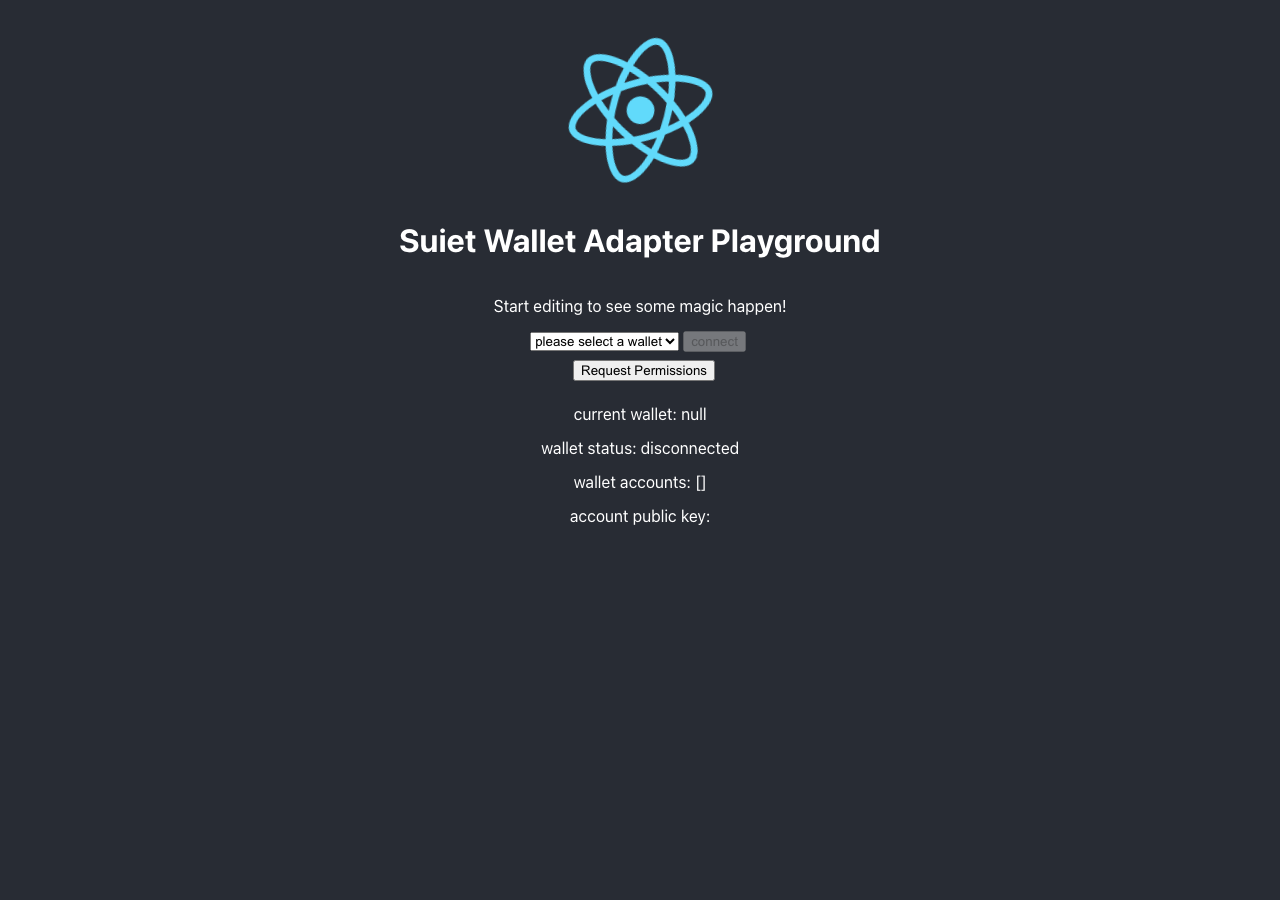
Suiet Wallet Kit example in the browser during the run

By the numbers

3 of 5
scenarios passed, 2 failed
97
browser actions
17
screenshots
79
model calls
4.2
minutes
5
scenarios
3
passed
2
failed
0
blocked
0
issues

Walkthrough

Every scenario DeepQA drove in the browser, in plan order, with the 12 screenshots it captured along the way. A passing scenario is evidence too.

  1. S1
    Connect wallet and observe status update

    4 steps, 3 screenshots

    fail
    S1-1.png
    S1, Connect wallet and observe status update
    S1-5.png
    S1, Connect wallet and observe status update
    S1-9.png
    S1, Connect wallet and observe status update
    • Loaded Suiet Wallet Adapter Playground page showing disconnected state and wallet dropdown.
    • Selected Suiet from the wallet dropdown, enabling the connect button.
    • Clicked the connect button with Suiet selected, but the wallet status remained disconnected and no account was populated.
    • Loaded the playground page and verified initial state showed 'current wallet: null' and 'wallet status: disconnected'.
    • Selected 'Suiet' from the dropdown, which set current wallet to Suiet and enabled the connect button.
    • Clicked 'connect', but wallet status remained disconnected and accounts array remained empty.
  2. S2
    Verify wallet state fields populate on connection

    5 steps, 2 screenshots

    fail
    S2-2.png
    S2, Verify wallet state fields populate on connection
    S2-9.png
    S2, Verify wallet state fields populate on connection
    • Loaded playground showing disconnected wallet status, empty accounts list, and blank account public key.
    • Clicked connect button, but wallet status remained disconnected, wallet accounts remained empty array [], and account public key remained blank.
    • The playground UI loads with wallet status 'disconnected', wallet accounts '[]', and blank account public key.
    • Clicking 'connect' or 'Request Permissions' does not connect the wallet or populate the account fields.
  3. S3
    Request wallet permissions

    4 steps, 2 screenshots

    pass
    S3-1.png
    S3, Request wallet permissions
    S3-5.png
    S3, Request wallet permissions
    • Navigated to playground, clicked connect and Request Permissions; the application handled the interaction gracefully without crashing or throwing an unhandled React error.
    • The application loaded the Suiet Wallet Adapter Playground successfully.
    • Clicked 'connect' and 'Request Permissions' buttons; the page handled the actions without any React error overlay or application crash.
  4. S4
    Page reload persistence of wallet state

    4 steps, 3 screenshots

    pass
    S4-1.png
    S4, Page reload persistence of wallet state
    S4-5.png
    S4, Page reload persistence of wallet state
    S4-7.png
    S4, Page reload persistence of wallet state
    • Loaded initial page with wallet status disconnected and connect button available.
    • Attempted connection with Suiet wallet adapter and captured state before reloading the page.
    • Page reloaded successfully without errors, displaying all controls and wallet status disconnected cleanly.
    • The application loaded without errors upon initial visit and after page reload.
    • The wallet status field displayed 'disconnected' gracefully after reloading, with no page crash or residual state corruption.
  5. S5
    Missing wallet extension error handling

    4 steps, 2 screenshots

    pass
    S5-2.png
    S5, Missing wallet extension error handling
    S5-6.png
    S5, Missing wallet extension error handling
    • Loaded the Suiet Wallet Adapter Playground with 'Suiet' selected in the dropdown and status disconnected.
    • Clicked 'Request Permissions' with uninstalled wallet 'Suiet' selected; the app remained interactive without crashing or producing a white screen.
    • The application remained responsive and the UI remained intact with no white-screen crash when requesting permissions for an uninstalled wallet.

Issues

No finding survived the audit. Nothing to fix from this run.

Environment limitations

These failures came from the test environment, not from the application: a credential the sandbox does not hold, a demo nobody may write to, a resource it cannot reach. They are not counted as issues.

  • Wallet status remains disconnected after clicking connect, sandbox has no Suiet browser extensionS1, high

    I selected 'Suiet' from the dropdown and clicked the 'connect' button. The 'current wallet' changed to 'Suiet', but the 'wallet status' remained 'disconnected', and 'wallet accounts' remained empty. The page's own console error names the cause directly: "[SUIET_WALLET]: You need to install Suiet Extension from Chrome Store firstly!". This example app is wired to the real Suiet browser extension global, not to generic Wallet Standard discovery, so our Node-signed injected wallet (no browser extension) was never going to connect here. wallet-log.json for this run shows 0 reads and no signing. This is a sandbox environment limitation, not an app defect.

  • Wallet connection fails to update status and populate account fields on connect, sandbox has no Suiet browser extensionS2, high

    I clicked the 'connect' button twice and the wallet status remained 'disconnected', wallet accounts remained empty '[]', and the account public key remained blank. Same root cause as F1: the page's console error names the missing Suiet browser extension directly, this example app does not use generic Wallet Standard discovery. This is a sandbox environment limitation, not an app defect.

  • Application requires specific Chrome extension not available in test sandboxS3, high

    Surfaced by the audit of S3, which the Tester passed, and reproduced live: I verified on https://wallet-adapter-example.suiet.app/ that clicking the 'connect' or 'Request Permissions' buttons while the Suiet wallet is selected does not initiate a connection. The wallet status remains 'disconnected' and no UI changes occur, confirming the application requires the real Suiet browser extension rather than accepting a generic Wallet Standard wallet. The page reported 2 console errors during the scenario. This is the same environment limitation as F1 and F2, not an independent defect.

Wallet activity

DeepQA injected a test wallet into the browser and recorded every request the app sent to it. Testnet funds only.

address
0xfe186a…f00bbd ↗
chain
Sui Testnet
browsers opened
3
connects
0
signing requests
0

The app connected the test wallet 0 times and asked for no signature.

Critic audit

An adversarial second pass over every finding before it reaches the report.

2
findings reviewed
3
live replays
3
withdrawn

The Critic also replays passed scenarios it doubts, so live replays can outnumber the findings reviewed.

  • F1withdrawn

    The page's own console error names the cause directly: "[SUIET_WALLET]: You need to install Suiet Extension from Chrome Store firstly!". This example app is wired to the real Suiet browser extension global, not to generic Wallet Standard discovery, so our injected wallet was never going to connect regardless of chain or wallet naming. wallet-log.json shows 0 reads and no signing. Environment limitation, not an app defect.

  • F2withdrawn

    Same root cause as F1: the missing Suiet browser extension, named directly in the page's own console error. Environment limitation, not an app defect.

  • F3withdrawn

    Surfaced by the audit of S3, which the Tester passed, and reproduced live: I verified on https://wallet-adapter-example.suiet.app/ that clicking the 'connect' or 'Request Permissions' buttons while the Suiet wallet is selected does not initiate a connection. The wallet status remains 'disconnected' and no UI changes occur, confirming the application requires the real Suiet browser extension rather than accepting a generic Wallet Standard wallet. Same environment limitation as F1 and F2, not an independent defect.

  • F1 and F2 are duplicate findings of a connection failure entirely due to the sandbox not having the specific Suiet browser extension installed.
  • Scenarios S3 and S5 masked the same underlying environment limitation by passing the app for simply not crashing when the wallet extension was absent.
  • Hand correction, 2026-09-26: F1, F2 and F3 were all re-classified as one environment limitation and withdrawn. The page's own console error names the missing Suiet browser extension directly ("[SUIET_WALLET]: You need to install Suiet Extension from Chrome Store firstly!"), this reference app requires that real extension rather than using generic Wallet Standard discovery, so the injected test wallet was never going to connect here regardless of naming or chain.

Report

QA report: external/wallet-adapter-example.suiet.app at hosted

No confirmed application defects. Wallet connection could not be exercised in this sandbox.

Testing exercised the core wallet connection workflows, status persistence, permission handling, and extension error flows across five scenarios. Three scenarios passed and two failed.

Connection attempts consistently failed to update the wallet status from disconnected or populate account public keys and wallet details. The page's own console error names the exact cause: "[SUIET_WALLET]: You need to install Suiet Extension from Chrome Store firstly!" This reference app is wired to the real Suiet browser extension global rather than to generic Wallet Standard discovery, so our Node-signed injected test wallet, which holds no browser extension, was never going to connect here regardless of chain or wallet naming. All three related findings were withdrawn as one environment limitation after this hand review.

Basic error handling and static fallback behavior functioned correctly without crashing when the wallet extension was absent. This app's wallet-dependent flows remain untested rather than confirmed broken, since they require an extension this sandbox does not and should not install.

Run summary
MetricCount
Scenarios executed5
Passed3
Failed2
Blocked0
Findings raised2
Issues after the audit0
Withdrawn by the audit3
Critical / high / medium / low0 / 0 / 0 / 0

Target: https://wallet-adapter-example.suiet.app/ · Testing level: deep_feature · Stack: unknown

Issues

No issues survived the audit.

Environment limitations

These failures came from the test environment, not from the application: a credential the sandbox does not hold, a demo nobody may write to, a resource it cannot reach. They are not counted as issues. They record what this run could not exercise.

  • Wallet status remains disconnected after clicking connect, sandbox has no Suiet browser extension (S1, high): I selected 'Suiet' from the dropdown and clicked the 'connect' button. The 'current wallet' changed to 'Suiet', but the 'wallet status' remained 'disconnected', and 'wallet accounts' remained empty. The page's own console error names the cause directly: "[SUIET_WALLET]: You need to install Suiet Extension from Chrome Store firstly!". This example app is wired to the real Suiet browser extension global, not to generic Wallet Standard discovery, so our Node-signed injected wallet (no browser extension) was never going to connect here. wallet-log.json for this run shows 0 reads and no signing. This is a sandbox environment limitation, not an app defect.
  • Wallet connection fails to update status and populate account fields on connect, sandbox has no Suiet browser extension (S2, high): I clicked the 'connect' button twice and the wallet status remained 'disconnected', wallet accounts remained empty '[]', and the account public key remained blank. Same root cause as F1: the page's console error names the missing Suiet browser extension directly, this example app does not use generic Wallet Standard discovery. This is a sandbox environment limitation, not an app defect.
  • Application requires specific Chrome extension not available in test sandbox (S3, high): Surfaced by the audit of S3, which the Tester passed, and reproduced live: I verified on https://wallet-adapter-example.suiet.app/ that clicking the 'connect' or 'Request Permissions' buttons while the Suiet wallet is selected does not initiate a connection. The wallet status remains 'disconnected' and no UI changes occur, confirming the application requires the real Suiet browser extension rather than accepting a generic Wallet Standard wallet. The page reported 2 console errors during the scenario. This is the same environment limitation as F1 and F2, not an independent defect.
Scenario results
ScenarioPriorityResultIssues
S1 Connect wallet and observe status updatehighfailnone
S2 Verify wallet state fields populate on connectionhighfailnone
S3 Request wallet permissionsmediumpassnone
S4 Page reload persistence of wallet statemediumpassnone
S5 Missing wallet extension error handlinglowpassnone
The audit

The Critic reviewed 2 findings and ran 3 live replays in the browser, each on a fresh page.

  • F1 and F2 are duplicate findings of a connection failure entirely due to the sandbox not having the specific Suiet browser extension installed.
  • Scenarios S3 and S5 masked the same underlying environment limitation by passing the app for simply not crashing when the wallet extension was absent.
  • Hand correction, 2026-09-26: F1, F2 and F3 were all re-classified as one environment limitation and withdrawn. The page's own console error names the missing Suiet browser extension directly ("[SUIET_WALLET]: You need to install Suiet Extension from Chrome Store firstly!"), this reference app requires that real extension rather than using generic Wallet Standard discovery, so the injected test wallet was never going to connect here regardless of naming or chain.
What to fix first

No confirmed issue to fix. Every finding from this run traces to one environment limitation, the sandbox does not hold the real Suiet browser extension this specific example app requires, not to a defect in the application.

Coverage and caveats

In scope: Wallet connection flow using the provided test wallet; Rendering of wallet state fields upon connection; Wallet permission requests via the UI; Application resilience to uninstalled wallet selections.

Not covered: Transactions or message signing (not mapped in the available UI); Creating new wallet accounts (external to the application); Testing specific third-party wallet extensions besides the injected test wallet.

  • The injected test wallet automatically approves connection and permission requests when prompted by the application.
  • The test wallet is available as an option in the wallet selection dropdown or acts as the default when 'connect' is clicked.
  • There is no explicit disconnect button mapped; state reset relies on page reload or test isolation.
By the numbers
MetricValue
Scenarios3 passed, 2 failed, 0 blocked of 5 (21 planned steps)
Browser actions97 (20 clicks, 6 inputs, 12 navigations, 59 snapshots)
Screenshots17 (2 explore, 12 scenario, 3 critic), 12 captioned
Coverage1 pages, 0 forms, 1 flows, 2 console errors
Audit2 findings, 3 re-verified live, 0 confirmed, 0 promoted, 3 withdrawn
Model calls79
Tokens272,736 input, 4,119 output, 9,739 thinking
Time4 min
Wallet0 transactions, 0 signatures, 0 refusals on chain sui:testnet
StageCallsInputOutputThinkingSeconds
explore1129,38151160132
plan12,7981,0041,88022
test51210,2441,5703,324131
critique1528,7708183,42862
report11,5432165066

Run log

stagecallstokenstime
Explore1130.5k32s
Plan15.7k22s
Test51215.1k2m 11s
Critique1533k1m 2s
Report12.3k6s
Total79286.6k4m 13s
○Intake
✓Explore
✓Plan
✓Test
✓Critique
✓Report
  • 00:52:05Zexploreexplore started
  • 00:56:18ZexploreExplored / (3 controls, 0 forms)
  • 00:56:18ZexploreExplored /demo (3 controls, 0 forms)
  • 00:56:18ZexploreMapped 1 pages, 0 forms, 1 flows in 11 turns.
  • 00:56:18Zexploreexplore completed in 32s.
  • 00:56:18Zplanplan started
  • 00:56:18ZplanPlanned 5 scenarios (2 high, 2 medium, 1 low).
  • 00:56:18Zplanplan completed in 22s.
  • 00:56:18Ztesttest started
  • 00:56:18ZtestS1 executed (fail), 1 finding
  • 00:56:18ZtestS2 executed (fail), 1 finding
  • 00:56:18ZtestS3 executed (pass)
  • 00:56:18ZtestS4 executed (pass)
  • 00:56:18ZtestS5 executed (pass)
  • 00:56:18ZtestExecuted 5 scenarios: 3 passed, 2 failed, 0 blocked, 2 findings.
  • 00:56:18Ztesttest completed in 131s.
  • 00:56:18Zcritiquecritique started
  • 00:56:18ZcritiqueReviewed 2 findings; 1 possible defect spotted in passed scenarios.
  • 00:56:18Zcritique3 failures were called environment limitations with no environment cause in the run's record, so they are audited as findings instead.
  • 00:56:18ZcritiqueRe-verified F1: reproduced.
  • 00:56:18ZcritiqueRe-verified F2: reproduced.
  • 00:56:18ZcritiqueRe-verified a possible defect in S3: reproduced.
  • 00:56:18ZcritiqueAudit complete: 2 confirmed, 0 withdrawn, 1 promoted, 3 re-verified live.
  • 00:56:18Zcritiquecritique completed in 62s.
  • 00:56:18Zreportreport started
  • 00:56:18ZreportReported 3 issues (0 critical, 3 high, 0 medium, 0 low) from 2 findings.
  • 00:56:18Zreportreport completed in 6s.

Put an agent team on your next pull request.

Connect a repo, dispatch a Run, and read an audited, evidence-backed report the same day.