Hosted appStorage explorerSui Testnet ↗succeeded

Explorer for Walrus decentralized storage on Sui, covering blobs, quilts, operators and accounts, with a dedicated testnet view. Tested in place on Sui Testnet.

Tested in place byDeepQA TeamonSui Testnetatwalruscan.com/testnet/homeonSep 26, 2026

Run #1model gemini-balanced (vertex)took 9m

11 of 12 scenarios passed, 1 failed, no issues after the audit.

Share on X
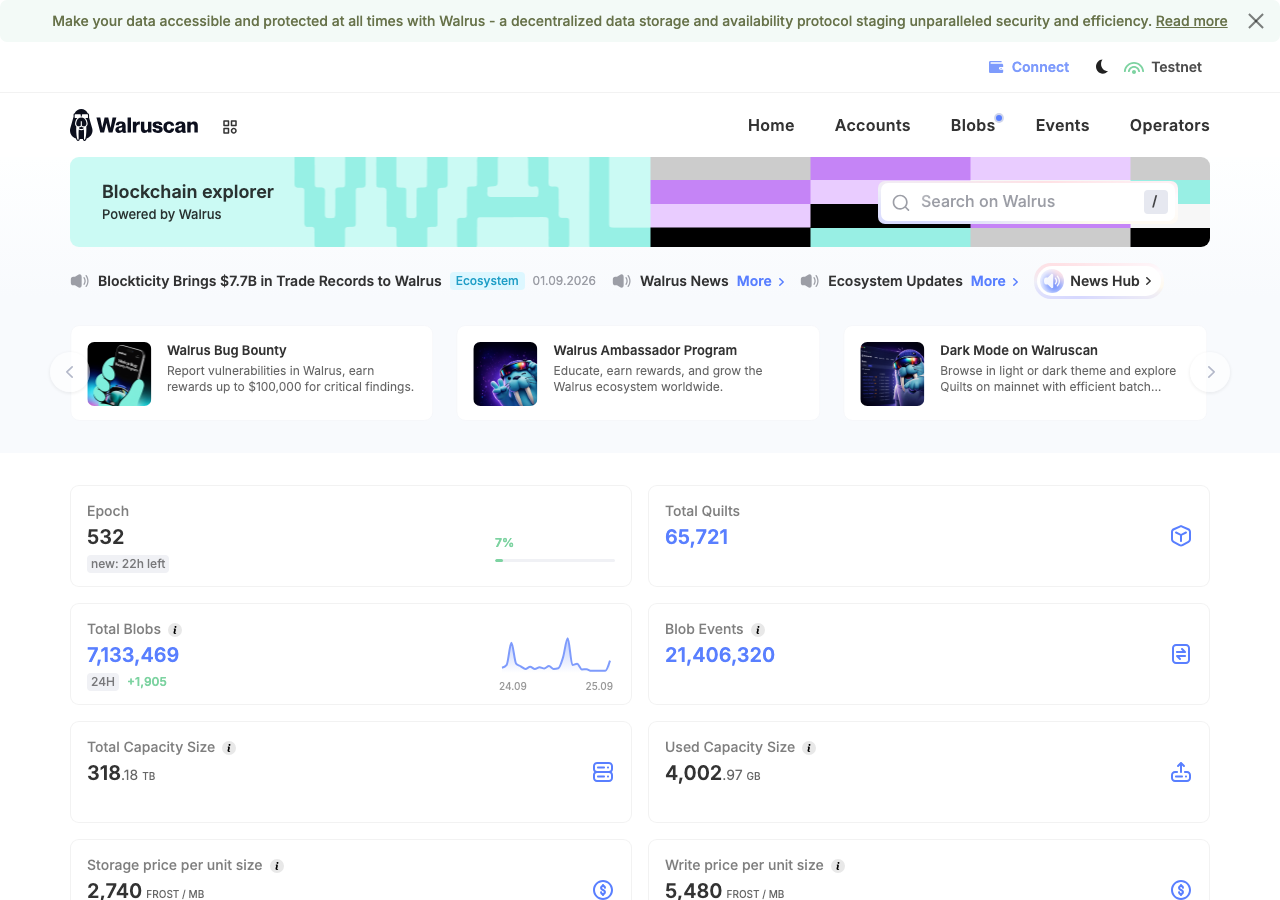
Walruscan in the browser during the run

By the numbers

11 of 12
scenarios passed, 1 failed
147
browser actions
35
screenshots
145
model calls
9.1
minutes
12
scenarios
11
passed
1
failed
0
blocked
0
issues

Walkthrough

Every scenario DeepQA drove in the browser, in plan order, with the 31 screenshots it captured along the way. A passing scenario is evidence too.

  1. S1
    Wallet Connect and Network Switch Rejection

    4 steps, 4 screenshots

    pass
    S1-1.png
    S1, Wallet Connect and Network Switch Rejection
    S1-4.png
    S1, Wallet Connect and Network Switch Rejection
    S1-7.png
    S1, Wallet Connect and Network Switch Rejection
    S1-9.png
    S1, Wallet Connect and Network Switch Rejection
    • Loaded Walruscan home page on testnet.
    • Injected wallet connected successfully with address 0xca0e7...
    • Opened network switcher popup displaying Mainnet and Testnet options.
    • Navigated to Walruscan home page on testnet.
    • Connected injected test wallet successfully with address 0xca0e7...22521a7.
    • Opened the network switcher dropdown and selected Mainnet.
    • The application switched explorer route and view seamlessly to /mainnet/home without crashing or hanging indefinitely.
  2. S2
    Global Search by Blob ID

    4 steps, 3 screenshots

    pass
    S2-1.png
    S2, Global Search by Blob ID
    S2-3.png
    S2, Global Search by Blob ID
    S2-10.png
    S2, Global Search by Blob ID
    • Navigated to Walruscan testnet home page.
    • Opened search dialog with Blob ID input field.
    • Search dropdown showed Blob result matching 9RxJ3bJIcYlU9dgxoXV4szMm5iqdT60YLKxNvlXTy-s.
    • Navigated to https://walruscan.com/testnet/home.
    • Clicked on the search bar trigger to open the search modal.
    • Entered the Blob ID '9RxJ3bJIcYlU9dgxoXV4szMm5iqdT60YLKxNvlXTy-s' into the search input.
    • Observed the search dropdown displaying the matching Blob result.
    • Selected the result and verified navigation to https://walruscan.com/testnet/blob/9RxJ3bJIcYlU9dgxoXV4szMm5iqdT60YLKxNvlXTy-s.
    • Observed the Blob detail page rendering the correct Blob ID '9RxJ3bJIcYlU9dgxoXV4szMm5iqdT60YLKxNvlXTy-s' along with associated metadata (Blob Sender, Sui Object ID, Size, Start/End Epoch).
  3. S3
    Blob Detail View Data Rendering

    2 steps, 3 screenshots

    pass
    S3-2.png
    S3, Blob Detail View Data Rendering
    S3-5.png
    S3, Blob Detail View Data Rendering
    S3-7.png
    S3, Blob Detail View Data Rendering
    • Navigated to the Blobs list page showing a table of recent blobs with Blob IDs, Sui Object IDs, Epochs, and sizes.
    • Blob detail page correctly rendered Blob ID, Blob Sender, Sui Object ID, Size, Start Epoch, End Epoch, and transaction events.
    • Navigated to the blobs list and verified that blobs are listed with accurate links.
    • Clicked on a blob item and confirmed the detail view loads promptly with full metadata including Blob ID, Blob Sender, Sui Object ID, byte size, start epoch, end epoch, and associated programmable transactions.
  4. S4
    Account Profile Lifecycle and Tabs

    4 steps, 3 screenshotson-chain

    pass
    S4-2.png
    S4, Account Profile Lifecycle and Tabs
    S4-5.png
    S4, Account Profile Lifecycle and Tabs
    S4-8.png
    S4, Account Profile Lifecycle and Tabs
    • Navigated to account blobs tab showing SUI address details, balance, and uploaded blobs list.
    • Switched to Blob Events tab and verified that event history loaded with event types, transaction digests, blob IDs, and timestamps.
    • Switched to Staking tab and verified that Staked Tokens metric and staking delegation table correctly displayed the account staking status.
    • Navigated to account profile blobs view at /testnet/account/0xa11070a3877b77355a0afbc402559cae7501c666819f05491f0337016c219366/blobs and verified list of uploaded blobs.
    • Navigated to Account Events tab and verified accurate rendering of 25k+ blob event records with transaction digests and timestamps.
    • Navigated to Account Staking tab and verified accurate display of staked tokens metric and delegation table.
  5. S5
    Global Search by Account Address

    4 steps, 3 screenshotson-chain

    fail
    S5-1.png
    S5, Global Search by Account Address
    S5-6.png
    S5, Global Search by Account Address
    S5-8.png
    S5, Global Search by Account Address
    • Global search bar only supports 'Search blob by ID', limits input length to 60 characters (truncating 66-character Sui account addresses), and pressing Enter with an account address does not navigate to the account profile page.
    • Visited https://walruscan.com/testnet/home where recent transactions and active accounts such as 0xa11070a3877b77355a0afbc402559cae7501c666819f05491f0337016c219366 are displayed.
    • Opened search modal and typed the active account address; observed input truncated to 60 characters and pressing Enter produced no navigation to the account profile.
  6. S6
    Blobs and Quilts Listing

    3 steps, 2 screenshots

    pass
    S6-2.png
    S6, Blobs and Quilts Listing
    S6-5.png
    S6, Blobs and Quilts Listing
    • Navigated to /testnet/blobs and observed the All Blobs list displaying standard blobs with Blob ID, Sui Object ID, Start Epoch, End Epoch, Size, and Create Time.
    • Clicked Quilts tab: URL navigated to /testnet/quilts, displaying 65,721 quilts with distinguishing metadata including 'Quilt' tag and 'Patches' count per entry.
    • Standard blobs list loaded on /testnet/blobs with Blob ID, Sui Object ID, Start/End Epoch, Size, and Create Time.
    • Switching to the Quilts tab loaded /testnet/quilts displaying Quilts batch storage entries with specific 'Quilt' badges and 'Patches' column data.
  7. S7
    Operators Metrics Loading

    2 steps, 2 screenshots

    pass
    S7-1.png
    S7, Operators Metrics Loading
    S7-4.png
    S7, Operators Metrics Loading
    • Navigated to the Operators page and verified that storage nodes, committee operators, top metrics (Epoch, Storage Capacity, Shards, Total Staked), and staking distributions are fully rendered without errors.
    • Loaded the Operators page (/testnet/operators) via navigation bar.
    • Verified that network metrics (Epoch 532, Storage Capacity 4/318 Tb, Shards 1,000, Total Staked ~975M WAL) loaded correctly.
    • Verified that the operators table rendered 50 items per page out of 101 operators, showing operator names, committee status, stake amount in WAL, commission %, and Sui Object IDs.
  8. S8
    Real-time Events Stream

    2 steps, 2 screenshots

    pass
    S8-1.png
    S8, Real-time Events Stream
    S8-4.png
    S8, Real-time Events Stream
    • Navigated to /testnet/events and observed the real-time blob lifecycle events stream populated with event types (Certified, Registered), transaction digests, senders, blob IDs, Sui object IDs, timestamps, and pagination controls.
    • The Blob Events table loaded over 21 million total events and rendered the most recent entries (showing Certified and Registered lifecycle events with associated transaction links, senders, and blob IDs) without errors.
  9. S9
    Active Accounts Directory

    2 steps, 2 screenshots

    pass
    S9-1.png
    S9, Active Accounts Directory
    S9-4.png
    S9, Active Accounts Directory
    • Navigated to Walruscan testnet home page.
    • Navigated to /testnet/accounts and verified that active accounts list and leaderboard populated with 12,429 accounts found, address links, and metrics.
    • Loaded testnet home page at https://walruscan.com/testnet/home.
    • Clicked the 'Accounts' navigation link leading to /testnet/accounts.
    • Observed the accounts directory and leaderboard rendering 12,429 accounts found, with full table columns (Account, Balance, Blob Events, First Seen, Last Seen) and working pagination controls.
  10. S10
    News Hub Category Filtering

    2 steps, 4 screenshots

    pass
    S10-2.png
    S10, News Hub Category Filtering
    S10-6.png
    S10, News Hub Category Filtering
    S10-11.png
    S10, News Hub Category Filtering
    S10-13.png
    S10, News Hub Category Filtering
    • Navigated to the News Hub page showing all articles.
    • Clicked the Ecosystem filter button; the list successfully updated to display only Ecosystem news articles (54 results).
    • Navigated to https://walruscan.com/mainnet/newshub/all which showed all 106 news articles across 6 pages.
    • Clicked the 'Ecosystem' category filter button, which updated the URL to /mainnet/newshub/ecosystem.
    • Observed that the articles list was filtered to show only 54 Ecosystem-related articles, each tagged with Ecosystem, and pagination updated accordingly to 3 pages.
  11. S11
    News Article Detail Navigation

    2 steps, 2 screenshots

    pass
    S11-2.png
    S11, News Article Detail Navigation
    S11-5.png
    S11, News Article Detail Navigation
    • Navigated to News Hub all articles page showing list of news cards.
    • Clicked on article 'Blockticity Brings $7.7B in Trade Records to Walrus' and verified that the article detail page (/mainnet/news/1736) loaded the full text, headings, and external links properly.
    • Successfully navigated to /mainnet/newshub/all and loaded the list of news articles.
    • Clicked an individual news article card and verified that the detail view loaded at /mainnet/news/1736 with complete article text, headings, images, and external reference links.
  12. S12
    MetaHub Landing Page Access

    1 step, 1 screenshot

    pass
    S12-2.png
    S12, MetaHub Landing Page Access
    • Navigated to https://walruscan.com/metahub and confirmed the MetaHub landing page loaded with 'Submit Project', 'Submit Site', and FAQ sections.
    • The MetaHub landing page (/metahub) resolved correctly and rendered the full interface including 'Get Listed on Walruscan', 'Submit Project', 'Submit Site', and FAQ cards without any error or 404.

Issues

No finding survived the audit. Nothing to fix from this run.

Environment limitations

These failures came from the test environment, not from the application: a credential the sandbox does not hold, a demo nobody may write to, a resource it cannot reach. They are not counted as issues.

  • Global search bar does not support searching by Account address and truncates 66-character addressesS5, high

    The input field explicitly says 'Search blob by ID', meaning it is not intended for Account addresses, making this a rejected feature request rather than a defect. Furthermore, the accompanying ERR_UNEXPECTED_PROXY_AUTH error indicates a sandbox environment failure rather than an application issue. The audit recorded the test environment as the cause, so this is a limit of the run rather than a defect of the application. The page reported 2 console errors during the scenario.

  • S1 could not exercise this: Environment limit: Resource fails to resolve. A resource failed to load with net::ERR_NAME_NOT_RESOLVED in the console. The audit recorded the test environment as the cause, so it is not counted as an issue.

Wallet activity

DeepQA injected a test wallet into the browser and recorded every request the app sent to it. Testnet funds only.

address
0xca0e75…2521a7 ↗
chain
Sui Testnet
browsers opened
2
connects
0
signing requests
0

The app connected the test wallet 0 times and asked for no signature.

Critic audit

An adversarial second pass over every finding before it reaches the report.

1
findings reviewed
0
live replays
1
withdrawn
  • F1withdrawn

    The input field explicitly says 'Search blob by ID', meaning it is not intended for Account addresses, making this a rejected feature request rather than a defect. Furthermore, the accompanying ERR_UNEXPECTED_PROXY_AUTH error indicates a sandbox environment failure rather than an application issue. The audit recorded the test environment as the cause, so this is a limit of the run rather than a defect of the application.

  • Finding F1 was withdrawn because it faults a Blob ID search bar for not supporting account addresses, which is the intended design.
  • The ERR_UNEXPECTED_PROXY_AUTH error in S5 and ERR_NAME_NOT_RESOLVED error in S1 point to sandbox environment network limitations rather than application flaws.

Report

QA report: external/walruscan.com at hosted

Testing across primary explorer workflows completed with no confirmed application defects.

The test suite exercised twelve deep-feature scenarios across Walruscan Testnet, covering Blob ID searches, blob detail views and listings, account profile lifecycle tabs, active accounts directories, operator metrics, real-time event streams, and news hub navigation.

One initial finding concerning account address queries in the global search bar was withdrawn during the audit, as the search bar is specifically designed for Blob ID lookups rather than Sui account addresses. Additionally, sandbox network resolution limits restricted full verification of external wallet connectivity without representing an issue in the application.

With eleven scenarios passing cleanly and the single raised finding withdrawn as intended behavior, no application defects remain outstanding.

Run summary
MetricCount
Scenarios executed12
Passed11
Failed1
Blocked0
Findings raised1
Issues after the audit0
Withdrawn by the audit1
Critical / high / medium / low0 / 0 / 0 / 0

Target: https://walruscan.com/testnet/home · Testing level: deep_feature · Stack: unknown

Issues

No issues survived the audit.

Environment limitations

These failures came from the test environment, not from the application: a credential the sandbox does not hold, a demo nobody may write to, a resource it cannot reach. They are not counted as issues. They record what this run could not exercise.

  • Global search bar does not support searching by Account address and truncates 66-character addresses (S5, high): The input field explicitly says 'Search blob by ID', meaning it is not intended for Account addresses, making this a rejected feature request rather than a defect. Furthermore, the accompanying ERR_UNEXPECTED_PROXY_AUTH error indicates a sandbox environment failure rather than an application issue. The audit recorded the test environment as the cause, so this is a limit of the run rather than a defect of the application. The page reported 2 console errors during the scenario.
  • S1 could not exercise this: Environment limit: Resource fails to resolve. A resource failed to load with net::ERR_NAME_NOT_RESOLVED in the console. The audit recorded the test environment as the cause, so it is not counted as an issue.
Scenario results
ScenarioPriorityResultIssues
S1 Wallet Connect and Network Switch Rejectionhighpassnone
S2 Global Search by Blob IDhighpassnone
S3 Blob Detail View Data Renderinghighpassnone
S4 Account Profile Lifecycle and Tabshighpassnone
S5 Global Search by Account Addressmediumfailnone
S6 Blobs and Quilts Listingmediumpassnone
S7 Operators Metrics Loadingmediumpassnone
S8 Real-time Events Streammediumpassnone
S9 Active Accounts Directorylowpassnone
S10 News Hub Category Filteringlowpassnone
S11 News Article Detail Navigationlowpassnone
S12 MetaHub Landing Page Accesslowpassnone
The audit

The Critic reviewed 1 finding and ran 0 live replays in the browser, each on a fresh page.

  • Finding F1 was withdrawn because it faults a Blob ID search bar for not supporting account addresses, which is the intended design.
  • The ERR_UNEXPECTED_PROXY_AUTH error in S5 and ERR_NAME_NOT_RESOLVED error in S1 point to sandbox environment network limitations rather than application flaws.
Coverage and caveats

In scope: Core explorer navigation including Blobs, Accounts, Events, and Operators; Global search functionality for Blobs and Accounts; Account profile tabs and staking details; Wallet connection and network switcher behavior; News Hub filtering and article loading; MetaHub landing page accessibility.

Not covered: Form submissions on MetaHub (no interactive forms captured in AppMap); External links to suiscan.xyz (out of origin boundaries); Transactions that require paying gas or signing (wallet is test-only, read-only analytics focus).

  • The 'net::ERR_NAME_NOT_RESOLVED' console error may be related to an external tracker or non-critical asset, but core functionality is assumed stable.
  • The injected wallet acts automatically; clicking 'Connect Wallet' will immediately bridge the test wallet without a separate auth popup.
  • Network switcher attempts to Mainnet will be rejected by the wallet as described in the intake constraints.
By the numbers
MetricValue
Scenarios11 passed, 1 failed, 0 blocked of 12 (32 planned steps)
Browser actions147 (33 clicks, 8 inputs, 27 navigations, 79 snapshots)
Screenshots35 (4 explore, 31 scenario, 0 critic), 31 captioned
Coverage13 pages, 1 forms, 5 flows, 1 console errors
Audit1 findings, 0 re-verified live, 0 confirmed, 0 promoted, 1 withdrawn
Model calls145
Tokens2,583,634 input, 9,849 output, 17,903 thinking
Time9 min
Wallet0 transactions, 0 signatures, 0 refusals on chain sui:testnet
StageCallsInputOutputThinkingSeconds
explore23347,4943,0411,58288
plan15,2882,1273,98843
test1192,223,4364,1329,112384
critique15,8073752,60922
report11,6091746126

Run log

stagecallstokenstime
Explore23352.1k1m 28s
Plan111.4k43s
Test1192.2M6m 24s
Critique18.8k22s
Report12.4k6s
Total1452.6M9m 3s
○Intake
✓Explore
✓Plan
✓Test
✓Critique
✓Report
  • 00:24:46Zexploreexplore started
  • 00:33:48ZexploreExplored /testnet/home (106 controls, 0 forms)
  • 00:33:48ZexploreExplored /testnet/blobs (31 controls, 0 forms)
  • 00:33:48ZexploreExplored /testnet/quilts (31 controls, 0 forms)
  • 00:33:48ZexploreExplored /testnet/accounts (30 controls, 0 forms)
  • 00:33:48ZexploreExplored /testnet/events (28 controls, 0 forms)
  • 00:33:48ZexploreExplored /testnet/operators (32 controls, 0 forms)
  • 00:33:48ZexploreExplored /testnet/blob/9RxJ3bJIcYlU9dgxoXV4szMm5iqdT60YLKxNvlXTy-s (44 controls, 0 forms)
  • 00:33:48ZexploreExplored /testnet/account/0xa11070a3877b77355a0afbc402559cae7501c666819f05491f0337016c219366/blobs (34 controls, 0 forms)
  • 00:33:48ZexploreExplored /testnet/account/0xa11070a3877b77355a0afbc402559cae7501c666819f05491f0337016c219366/events (34 controls, 0 forms)
  • 00:33:48ZexploreExplored /testnet/account/0xa11070a3877b77355a0afbc402559cae7501c666819f05491f0337016c219366/staking (32 controls, 0 forms)
  • 00:33:48ZexploreExplored /mainnet/newshub/all (62 controls, 0 forms)
  • 00:33:48ZexploreExplored /metahub (28 controls, 0 forms)
  • 00:33:48ZexploreExplored /testnet/news/1736 (33 controls, 0 forms)
  • 00:33:48ZexploreMapped 13 pages, 1 forms, 5 flows in 23 turns.
  • 00:33:48Zexploreexplore completed in 88s.
  • 00:33:48Zplanplan started
  • 00:33:48ZplanPlanned 12 scenarios (4 high, 4 medium, 4 low).
  • 00:33:48Zplanplan completed in 43s.
  • 00:33:48Ztesttest started
  • 00:33:48ZtestS1 executed (pass)
  • 00:33:48ZtestS2 executed (pass)
  • 00:33:48ZtestS3 executed (pass)
  • 00:33:48ZtestS4 executed (pass)
  • 00:33:48ZtestS5 executed (fail), 1 finding
  • 00:33:48ZtestS6 executed (pass)
  • 00:33:48ZtestS7 executed (pass)
  • 00:33:48ZtestS8 executed (pass)
  • 00:33:48ZtestS9 executed (pass)
  • 00:33:48ZtestS10 executed (pass)
  • 00:33:48ZtestS11 executed (pass)
  • 00:33:48ZtestS12 executed (pass)
  • 00:33:48ZtestExecuted 12 scenarios: 11 passed, 1 failed, 0 blocked, 1 finding.
  • 00:33:48Ztesttest completed in 384s.
  • 00:33:48Zcritiquecritique started
  • 00:33:48ZcritiqueReviewed 1 findings; 1 possible defect spotted in passed scenarios.
  • 00:33:48ZcritiqueAudit complete: 0 confirmed, 1 withdrawn, 0 promoted, 0 re-verified live.
  • 00:33:48Zcritique2 failures came from the test environment rather than the application. They are reported as environment limitations, not issues.
  • 00:33:48Zcritiquecritique completed in 22s.
  • 00:33:48Zreportreport started
  • 00:33:48ZreportReported 0 issues (0 critical, 0 high, 0 medium, 0 low) from 1 finding.
  • 00:33:48Zreportreport completed in 6s.

Put an agent team on your next pull request.

Connect a repo, dispatch a Run, and read an audited, evidence-backed report the same day.