Hosted appDEXArc Testnetsucceeded

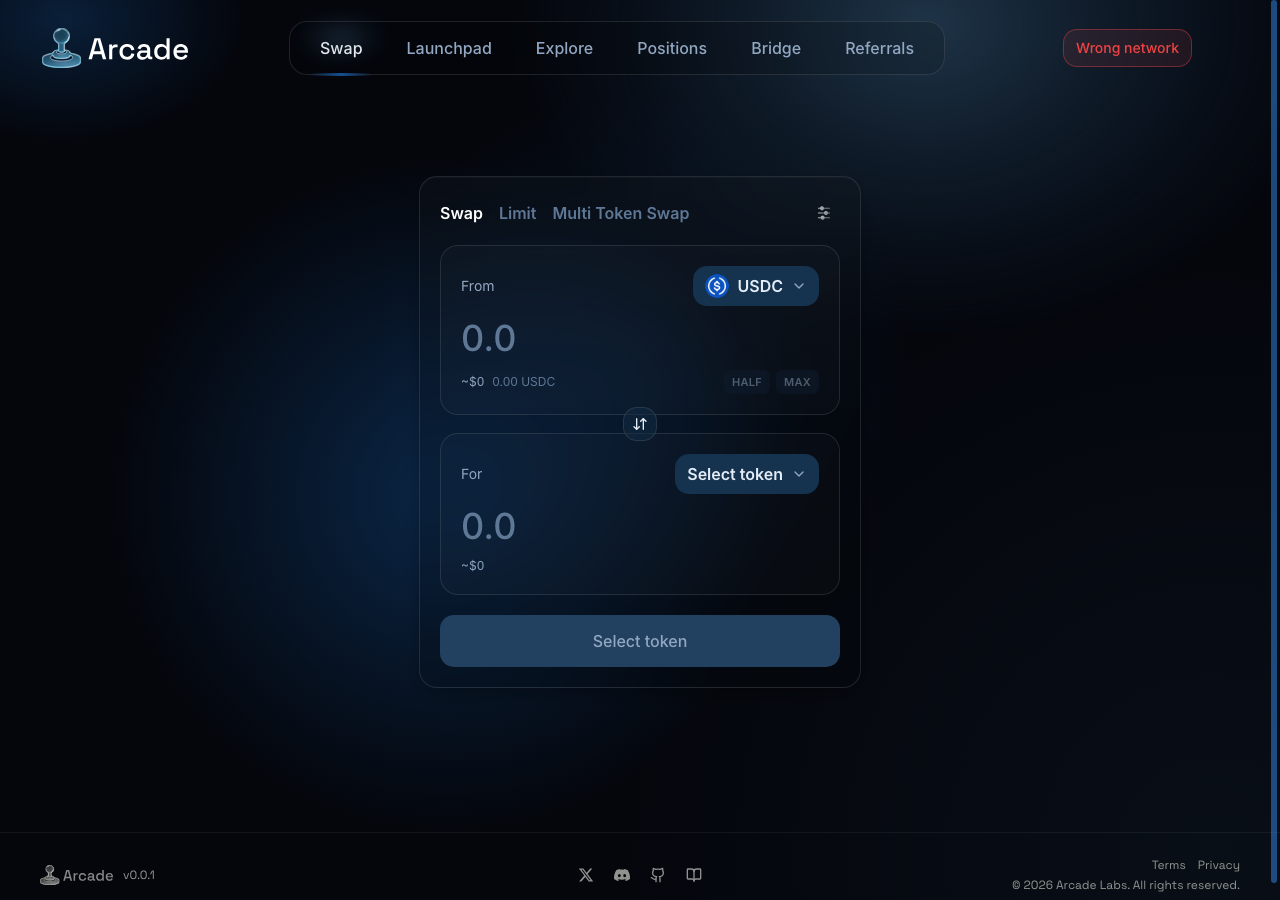
Swap USDC and tokens on Arc via the Arcade V2 AMM and V3 router.

Tested in place byDeepQA TeamonArc Testnetatwww.arcade.trading/swaponSep 17, 2026

Run #1model gemini-balanced (vertex)took 13m

7 of 12 scenarios passed, 1 failed, 4 blocked, 1 low UX issue after the audit.

Share on X
Arcade in the browser during the run

By the numbers

7 of 12
scenarios passed, 1 failed, 4 blocked
265
browser actions
34
screenshots
212
model calls
13
minutes
12
scenarios
7
passed
1
failed
4
blocked
1
issues
low1

Walkthrough

Every scenario DeepQA drove in the browser, in plan order, with the 30 screenshots it captured along the way. A passing scenario is evidence too.

  1. S1
    Bypass wrong network modal

    3 steps, 3 screenshots

    pass
    S1-1.png
    S1 · Bypass wrong network modal
    S1-3.png
    S1 · Bypass wrong network modal
    S1-6.png
    S1 · Bypass wrong network modal
    • Observed the Wrong Network modal on initial load with 'Continue anyway', 'Change wallet', and 'Switch to Arc' options.
    • Clicked 'Continue anyway', the Wrong Network dialog closed, and the Swap form became fully accessible and responsive to user input.
    • Successfully bypassed the Wrong Network modal by clicking 'Continue anyway'.
    • Verified that the Wrong Network modal was dismissed and the Swap interface became interactive, accepting input in the Amount field.
  2. S2
    Execute standard token swap

    6 steps, 2 screenshots

    blocked
    S2-3.png
    S2 · Execute standard token swap
    S2-5.png
    S2 · Execute standard token swap
    • Dismissed network dialog by clicking Continue anyway.
    • Navigated to https://www.arcade.trading/swap where a 'Wrong network' modal appeared indicating Arcade runs on Arc (chainId 5042).
    • Dismissed the network dialog via 'Continue anyway'.
    • Selected USDC as the 'From' token and AATC as the 'To' token.
    • Entered 1 USDC into the 'From Amount' field, which computed a route via Arcade V4 (27,909.39 AATC).
    • The connected test wallet has 0.00 USDC balance and is on a non-Arc network with wallet switch requests rejected by the mock provider, preventing execution of the live swap transaction.
  3. S3
    Max button reserves native USDC for gas

    3 steps, 2 screenshots

    blocked
    S3-1.png
    S3 · Max button reserves native USDC for gas
    S3-6.png
    S3 · Max button reserves native USDC for gas
    • Dismissed the network dialog on /swap; the connected test wallet is pinned to chain 5042002 while the app is configured for chain 5042, resulting in a 0.00 USDC balance and a disabled MAX button.
    • Navigated to /swap where a 'Wrong network' dialog was displayed stating Arcade runs on Arc (chainId 5042) while the connected wallet is pinned to chain 5042002.
    • Attempting to switch network failed because the mock test wallet is locked to chain 5042002.
    • Dismissed the dialog using 'Continue anyway'; USDC balance shows 0.00 USDC and MAX button remains disabled, preventing verification of the gas reserve behavior.
  4. S4
    Place a limit order

    6 steps, 3 screenshots

    blocked
    S4-2.png
    S4 · Place a limit order
    S4-4.png
    S4 · Place a limit order
    S4-13.png
    S4 · Place a limit order
    • Dismissed the wrong network dialog to access the swap interface.
    • Switched to the Limit order tab, displaying Sell, Buy, Trigger price, and Expiry controls.
    • Navigated to https://www.arcade.trading/swap and dismissed the wrong network modal.
    • Switched to the Limit tab where Sell Amount, Buy Token, Trigger Price, and Expiry controls were available.
    • Selected ARCDOG as the target token and entered 10 USDC sell amount with market trigger price.
    • Selected 1 week expiry.
    • Order submission could not be completed because the test environment wallet has 0.00 USDC balance on Arc chain and is locked to an unsupported network, disabling the submit button with 'Insufficient balance'.
  5. S5
    Schedule a DCA order

    6 steps, 2 screenshots

    pass
    S5-3.png
    S5 · Schedule a DCA order
    S5-13.png
    S5 · Schedule a DCA order
    • Navigated to https://www.arcade.trading/swap and dismissed the network prompt.
    • Switched to Limit tab and toggled to the DCA Order Form.
    • Selected USDC as the input token and ARCDOG as the target output token.
    • Filled total amount to 100 USDC, configured Number of buys to 5, and selected interval 1h.
    • The DCA summary accurately updated dynamically to 'Buys 20 USDC of ARCDOG every hourly , 5 times' with min output and slippage calculations.
    • The form validates amounts properly ('Enter amount' when 0, and 'Insufficient balance' when amount exceeds the 0 USDC test wallet balance).
  6. S6
    Execute a multi-token swap

    5 steps, 2 screenshots

    blocked
    S6-2.png
    S6 · Execute a multi-token swap
    S6-4.png
    S6 · Execute a multi-token swap
    • Dismissed wrong network modal to access swap interface.
    • Switched to Multi Token [redacted] tab.
    • Navigated to https://www.arcade.trading/swap and dismissed the network prompt.
    • Switched to the Multi Token [redacted] tab.
    • Selected ATC and ARCDOG as multi-input tokens and USDC as the target output token.
    • Attempted to input token [redacted], but the test wallet holds a balance of 0 ATC and 0 ARCDOG on this network, rendering the swap button disabled with 'Insufficient balance'.
  7. S7
    Empty from amount validation in swap

    3 steps, 3 screenshots

    pass
    S7-2.png
    S7 · Empty from amount validation in swap
    S7-4.png
    S7 · Empty from amount validation in swap
    S7-6.png
    S7 · Empty from amount validation in swap
    • Dismissed the network dialog to reveal the swap interface.
    • Selected ARCDOG as the To Token [redacted] From Amount is empty; the action button displays 'Enter amount' and is disabled.
    • Navigated to /swap and dismissed the network dialog.
    • Selected ARCDOG as the destination token [redacted] USDC as the source token.
    • Left the 'From Amount' field empty and observed that the submit button displays 'Enter amount' and is disabled.
  8. S8
    Custom slippage out of range validation

    2 steps, 2 screenshots

    fail
    S8-2.png
    S8 · Custom slippage out of range validation
    S8-4.png
    S8 · Custom slippage out of range validation
    • Navigated to https://www.arcade.trading/swap and dismissed the network dialog.
    • Opened the swap settings modal to configure custom slippage tolerance.
    • Entered a high slippage value of 60% into the 'Custom slippage tolerance' input field.
    • Observed that 60% slippage was accepted without any warning, validation error, or visual indicator highlighting it as an unsafe/excessive value.
  9. S9
    Limit order missing price validation

    5 steps, 2 screenshots

    pass
    S9-2.png
    S9 · Limit order missing price validation
    S9-4.png
    S9 · Limit order missing price validation
    • Switched to Limit tab where Limit order form is displayed.
    • Navigated to https://www.arcade.trading/swap and dismissed the network dialog by clicking Continue anyway.
    • Switched to the Limit tab and selected USDC as Token In and ARCDOG as Token [redacted]
    • When entering an amount in the sell amount field and leaving or clearing the Trigger price (Limit Price) field, the Place Order button remained disabled and did not allow submission or throw unhandled exceptions.
  10. S10
    DCA order missing interval validation

    4 steps, 2 screenshots

    pass
    S10-2.png
    S10 · DCA order missing interval validation
    S10-5.png
    S10 · DCA order missing interval validation
    • Navigated to https://www.arcade.trading/swap and dismissed the network switch prompt via 'Continue anyway'.
    • Switched to Limit orders and selected the DCA order tab.
    • Selected ARCDOG as target token and entered an amount of 100 USDC.
    • Switched DCA interval to custom and left the custom interval input empty.
    • Observed the form displays validation message 'Enter a whole number of hours (min 1).' and the action button remains disabled with 'Insufficient balance' (and invalid configuration guards).
  11. S11
    Multi-token swap missing output validation

    4 steps, 3 screenshots

    pass
    S11-1.png
    S11 · Multi-token swap missing output validation
    S11-4.png
    S11 · Multi-token swap missing output validation
    S11-13.png
    S11 · Multi-token swap missing output validation
    • Dismissed the network dialog to view the swap interface.
    • Navigated to https://www.arcade.trading/swap and dismissed the network switch dialog via 'Continue anyway'.
    • Switched to the 'Multi Token [redacted]' tab.
    • Initially, when no tokens or output were configured, the action button displayed 'Select tokens to start' and was disabled.
    • Selected multiple input tokens (USDC and ATC) and entered amounts.
    • The application automatically assigned a valid output destination token and kept the action button disabled with validation feedback ('Insufficient balance' / 'Select tokens to start') preventing invalid execution or app crash.
  12. S12
    Slippage preset selection updates state

    3 steps, 4 screenshots

    pass
    S12-2.png
    S12 · Slippage preset selection updates state
    S12-4.png
    S12 · Slippage preset selection updates state
    S12-7.png
    S12 · Slippage preset selection updates state
    S12-9.png
    S12 · Slippage preset selection updates state
    • Dismissed network modal on swap page and opened settings menu.
    • Entered 2.5 into custom slippage tolerance field.
    • Clicking 0.1% slippage preset cleared the custom slippage input and updated the selection.
    • Dismissed the initial network modal to access the swap interface.
    • Opened the swap transaction settings panel showing slippage presets (0.1%, 0.5%, 1%) and a custom input.
    • Entered a custom slippage tolerance of 2.5% into the input field.
    • Selected the 0.1% preset button and verified that the custom slippage value was immediately cleared and overridden.
    • Selected the 1% preset button and verified it registered successfully.

Issues

Findings that survived the Critic's audit. Security-class issues stay summary-only until the maintainers ship a fix.

lowpromoted ↑uxF2 · S5

Grammar and spacing issue in DCA summary text

Surfaced by the audit of S5, which the Tester passed, and reproduced live: After dismissing the network prompt and switching to the Limit > DCA Order Form, I set the total amount, target token, number of buys (5), and interval (1h). The summary text read "Buys 4 USDC of ARCDOG every hourly , 5 times.", reproducing the grammar issue and anomalous spacing before the comma.

Expected

The summary text should be grammatically correct and properly formatted (e.g., 'every 1 hour, 5 times' or 'hourly, 5 times').

Actual

The summary text displays as 'every hourly , 5 times' with incorrect phrasing and anomalous spacing before the comma.

Repro · 4 steps
  1. Navigate to swap and dismiss the network prompt.
  2. Switch to the Limit tab and toggle the DCA Order Form.
  3. Select an input and target output token.
  4. Set total amount, configure Number of buys, and select a 1h interval.
mediumwithdrawnfunctionalF1 · S8

Custom slippage tolerance accepts out-of-range/high values without warning or validation

The defect is claimed from what the tester believes the page ought to do (flag high values) rather than a failure of an implemented mechanism.

Expected

The UI should flag slippage values exceeding safe thresholds (e.g. 60%) with a warning or validation error.

Actual

The 60% slippage value is accepted silently without any warning or error indicator.

Repro · 4 steps
  1. Navigate to https://www.arcade.trading/swap and dismiss the network dialog.
  2. Click the settings cog icon to open Transaction settings.
  3. Enter 60 in the 'Custom slippage tolerance' input field.
  4. Observe the field state and validation feedback.

Wallet activity

DeepQA injected a test wallet into the browser and recorded every request the app sent to it. Testnet funds only.

address
0x649657…9255E7
chain
Arc Testnet
browsers opened
3
read requests forwarded
0
signing requests
0

Critic audit

An adversarial second pass over every finding before it reaches the report.

1
findings reviewed
1
re-verified live
1
withdrawn
  • F1withdrawn

    The defect is claimed from what the tester believes the page ought to do (flag high values) rather than a failure of an implemented mechanism.

  • F2promoted ↑

    Surfaced by the audit of S5, which the Tester passed, and reproduced live: After dismissing the network prompt and switching to the Limit > DCA Order Form, I set the total amount, target token, number of buys (5), and interval (1h). The summary text read "Buys 4 USDC of ARCDOG every hourly , 5 times.", reproducing the grammar issue and anomalous spacing before the comma.

  • Five scenarios were blocked due to the mock wallet provider's inability to switch to the required Arc network (chainId 5042) or supply sufficient test balances.
  • The test environment's mock provider must be configured to support the target network and inject funds to achieve meaningful functional coverage of order executions.

Report

QA report: external/www.arcade.trading at hosted

Arcade Trading core interface passed most validation checks, with one minor user experience defect and several execution flows blocked by wallet network constraints.

Testing covered 12 deep-feature scenarios across swap configuration, order scheduling, slippage settings, and input validation. Seven validation scenarios passed successfully, including empty input checks, DCA interval validations, and slippage preset updates. One finding regarding custom slippage validation was withdrawn during the audit, leaving a single confirmed low-severity issue.

The lone confirmed defect involves a minor user experience issue in the DCA order summary text, where improper phrasing and spacing render an awkward summary display. Additionally, four scenarios involving live token swaps, gas reserves, limit orders, and multi-token swaps were blocked because the test wallet could not switch to the required Arc chain or provide test token balances.

Overall, user interface forms and validation guards operate reliably, but end-to-end on-chain execution paths require re-testing once mock wallet network configuration and token funding are addressed.

Run summary
MetricCount
Scenarios executed12
Passed7
Failed1
Blocked4
Findings raised1
Issues after the audit1
Withdrawn by the audit1
Critical / high / medium / low0 / 0 / 0 / 1

Target: https://www.arcade.trading/swap · Testing level: deep_feature · Stack: unknown

Issues
Low severity
F2 · Grammar and spacing issue in DCA summary text

Severity: low · Type: ux · Verdict: promoted · Scenario: S5

Surfaced by the audit of S5, which the Tester passed, and reproduced live: After dismissing the network prompt and switching to the Limit > DCA Order Form, I set the total amount, target token, number of buys (5), and interval (1h). The summary text read "Buys 4 USDC of ARCDOG every hourly , 5 times.", reproducing the grammar issue and anomalous spacing before the comma.

Expected: The summary text should be grammatically correct and properly formatted (e.g., 'every 1 hour, 5 times' or 'hourly, 5 times').

Actual: The summary text displays as 'every hourly , 5 times' with incorrect phrasing and anomalous spacing before the comma.

Steps to reproduce:

  1. Navigate to swap and dismiss the network prompt.
  2. Switch to the Limit tab and toggle the DCA Order Form.
  3. Select an input and target output token.
  4. Set total amount, configure Number of buys, and select a 1h interval.
Withdrawn findings

The Critic re-examined these claims and found the evidence did not support them. They are kept here rather than deleted.

  • Custom slippage tolerance accepts out-of-range/high values without warning or validation (S8, medium): The defect is claimed from what the tester believes the page ought to do (flag high values) rather than a failure of an implemented mechanism.
Scenario results
ScenarioPriorityResultIssues
S1 Bypass wrong network modalhighpassnone
S2 Execute standard token swaphighblocked (The test wallet is connected to an unsupported network with 0.00 USDC balance and network switching to Arc chainId 5042 cannot be fulfilled by the mock wallet provider.)none
S3 Max button reserves native USDC for gashighblocked (The connected test wallet is pinned to chain 5042002 while the app expects Arc mainnet (5042), preventing chain switching and leaving the USDC balance at 0.00 with the MAX button disabled.)none
S4 Place a limit orderhighblocked (The test wallet has 0.00 balance and is on an unsupported network, preventing on-chain limit order execution.)none
S5 Schedule a DCA orderhighpassF2
S6 Execute a multi-token swaphighblocked (The test wallet balance is 0 for the selected input tokens on Arc testnet, preventing execution of the multi-token [redacted])none
S7 Empty from amount validation in swapmediumpassnone
S8 Custom slippage out of range validationmediumfailnone
S9 Limit order missing price validationmediumpassnone
S10 DCA order missing interval validationmediumpassnone
S11 Multi-token swap missing output validationmediumpassnone
S12 Slippage preset selection updates statelowpassnone
The audit

The Critic reviewed 1 finding and re-verified 1 of them live in the browser, replaying the reported steps on a fresh page.

  • Five scenarios were blocked due to the mock wallet provider's inability to switch to the required Arc network (chainId 5042) or supply sufficient test balances.
  • The test environment's mock provider must be configured to support the target network and inject funds to achieve meaningful functional coverage of order executions.
What to fix first
  1. Fix the phrasing and spacing formatting in the DCA order summary display (Issue F2).
Coverage and caveats

In scope: Standard Token Swap execution and validation; Max balance gas reservation logic for native USDC; Limit Order placement and parameter validation; DCA Order scheduling and missing-field validation; Multi-token batch swap mechanics; Slippage preset and custom value handling.

Not covered: Launchpad module (Out of scope for Swap deep feature testing); Explore/Liquidity module (Out of scope for Swap deep feature testing); Positions dashboard (Out of scope for Swap deep feature testing); Cross-chain Bridge (Out of scope for Swap deep feature testing); Referrals dashboard (Out of scope for Swap deep feature testing).

  • Deep feature testing is targeted purely at the Swap aggregator and its related modes (Limit, DCA, Multi-token).
  • The test wallet is pre-funded with native USDC on the Arc testnet.
  • Tokens other than USDC are available in the test environment to act as destination/input tokens.
  • The 'Continue anyway' button on the Wrong Network dialog successfully grants full access to the UI.
  • S2 could not be executed: The test wallet is connected to an unsupported network with 0.00 USDC balance and network switching to Arc chainId 5042 cannot be fulfilled by the mock wallet provider..
  • S3 could not be executed: The connected test wallet is pinned to chain 5042002 while the app expects Arc mainnet (5042), preventing chain switching and leaving the USDC balance at 0.00 with the MAX button disabled..
  • S4 could not be executed: The test wallet has 0.00 balance and is on an unsupported network, preventing on-chain limit order execution..
  • S6 could not be executed: The test wallet balance is 0 for the selected input tokens on Arc testnet, preventing execution of the multi-token [redacted].
By the numbers
MetricValue
Scenarios7 passed, 1 failed, 4 blocked of 12 (50 planned steps)
Browser actions265 (83 clicks, 28 inputs, 24 navigations, 130 snapshots)
Screenshots34 (4 explore, 30 scenario, 0 critic), 30 captioned
Coverage12 pages, 6 forms, 7 flows, 0 console errors
Audit1 findings, 1 re-verified live, 0 confirmed, 1 promoted, 1 withdrawn
Model calls212
Tokens1,166,314 input, 11,684 output, 17,332 thinking
Time13 min
Wallet0 transactions, 0 signatures, 0 refusals on chain 5042002
StageCallsInputOutputThinkingSeconds
explore32230,5493,6221,642152
plan15,5582,3374,49551
test169890,1184,8209,246510
critique938,4026501,94940
report11,68725503

Run log

stagecallstokenstime
Explore32235.8k2m 32s
Plan112.4k51s
Test169904.2k8m 30s
Critique941k40s
Report11.9k3s
Total2121.2M12m 37s
Intake
Explore
Plan
Test
Critique
Report
  • 16:54:13Zexploreexplore started
  • 17:06:49ZexploreExplored /swap (29 controls, 0 forms)
  • 17:06:49ZexploreExplored /launchpad (31 controls, 0 forms)
  • 17:06:49ZexploreExplored /launchpad/v4hook/create (28 controls, 0 forms)
  • 17:06:49ZexploreExplored /launchpad/v4hook/0x5238FF8E4d3D269F6693Cd9Dd49c22f94817AC9b (46 controls, 0 forms)
  • 17:06:49ZexploreExplored /explore (37 controls, 0 forms)
  • 17:06:49ZexploreExplored /positions (21 controls, 0 forms)
  • 17:06:49ZexploreExplored /bridge (14 controls, 0 forms)
  • 17:06:49ZexploreExplored /referrals (24 controls, 0 forms)
  • 17:06:49ZexploreExplored /docs (23 controls, 0 forms)
  • 17:06:49ZexploreExplored /terms (17 controls, 0 forms)
  • 17:06:49ZexploreExplored /privacy (17 controls, 0 forms)
  • 17:06:49ZexploreMapped 12 pages, 6 forms, 7 flows in 32 turns.
  • 17:06:49Zexploreexplore completed in 152s.
  • 17:06:49Zplanplan started
  • 17:06:49ZplanPlanned 12 scenarios (6 high, 5 medium, 1 low).
  • 17:06:49Zplanplan completed in 51s.
  • 17:06:49Ztesttest started
  • 17:06:49ZtestS1 executed (pass)
  • 17:06:49ZtestS2 executed (blocked)
  • 17:06:49ZtestS3 executed (blocked)
  • 17:06:49ZtestS4 executed (blocked)
  • 17:06:49ZtestS5 executed (pass)
  • 17:06:49ZtestS6 executed (blocked)
  • 17:06:49ZtestS7 executed (pass)
  • 17:06:49ZtestS8 executed (fail), 1 finding
  • 17:06:49ZtestS9 executed (pass)
  • 17:06:49ZtestS10 executed (pass)
  • 17:06:49ZtestS11 executed (pass)
  • 17:06:49ZtestS12 executed (pass)
  • 17:06:49ZtestExecuted 12 scenarios: 7 passed, 1 failed, 4 blocked, 1 finding.
  • 17:06:49Ztesttest completed in 510s.
  • 17:06:49Zcritiquecritique started
  • 17:06:49ZcritiqueReviewed 1 findings; 1 possible defect spotted in passed scenarios.
  • 17:06:49ZcritiqueRe-verified a possible defect in S5: reproduced.
  • 17:06:49ZcritiqueAudit complete: 0 confirmed, 1 withdrawn, 1 promoted, 1 re-verified live.
  • 17:06:49Zcritiquecritique completed in 40s.
  • 17:06:49Zreportreport started
  • 17:06:49ZreportReported 1 issue (0 critical, 0 high, 0 medium, 1 low) from 1 finding.
  • 17:06:49Zreportreport completed in 3s.

Put an agent team on your next pull request.

Connect a repo, dispatch a Run, and read an audited, evidence-backed report the same day.