Explore/GitHub Agent Apps Campaign/openai/openai-realtime-agents
Voice agent UISandbox, from sourcesucceeded

openai/openai-realtime-agents

openai/openai-realtime-agentsat 94c9e91

OpenAI's open-source demo of voice agent patterns on the Realtime API, with scenario and agent pickers, transcript and event log. Run from its repository in the DeepQA sandbox.

Tested byDeepQA Teamfromopenai/openai-realtime-agentsat 94c9e91onSep 20, 2026

Run #1model gemini-balanced (vertex)took 7m

8 of 10 scenarios passed, 1 failed, 1 blocked, no issues after the audit.

Share on X
openai/openai-realtime-agents in the browser during the run

By the numbers

8 of 10
scenarios passed, 1 failed, 1 blocked
94
browser actions
25
screenshots
114
model calls
6.4
minutes
10
scenarios
8
passed
1
failed
1
blocked
0
issues

Walkthrough

Every scenario DeepQA drove in the browser, in plan order, with the 22 screenshots it captured along the way. A passing scenario is evidence too.

  1. S1
    Verify initial disconnected state constraints

    2 steps, 2 screenshots

    pass
    S1-2.png
    S1 · Verify initial disconnected state constraints
    S1-5.png
    S1 · Verify initial disconnected state constraints
    • Observed the initial disconnected state: the Send message button is disabled.
    • Typed text into message input and verified the Send message button remains disabled while disconnected.
    • Navigated to http://127.0.0.1:3000/?agentConfig=chatSupervisor and checked the initial disconnected state.
    • Verified that the Send message button is disabled when not connected, both with an empty input and after typing a message.
  2. S2
    Handle connection attempts without API keys

    3 steps, 2 screenshots

    pass
    S2-2.png
    S2 · Handle connection attempts without API keys
    S2-5.png
    S2 · Handle connection attempts without API keys
    • Navigated to the chatSupervisor agent config page and checked the initial state.
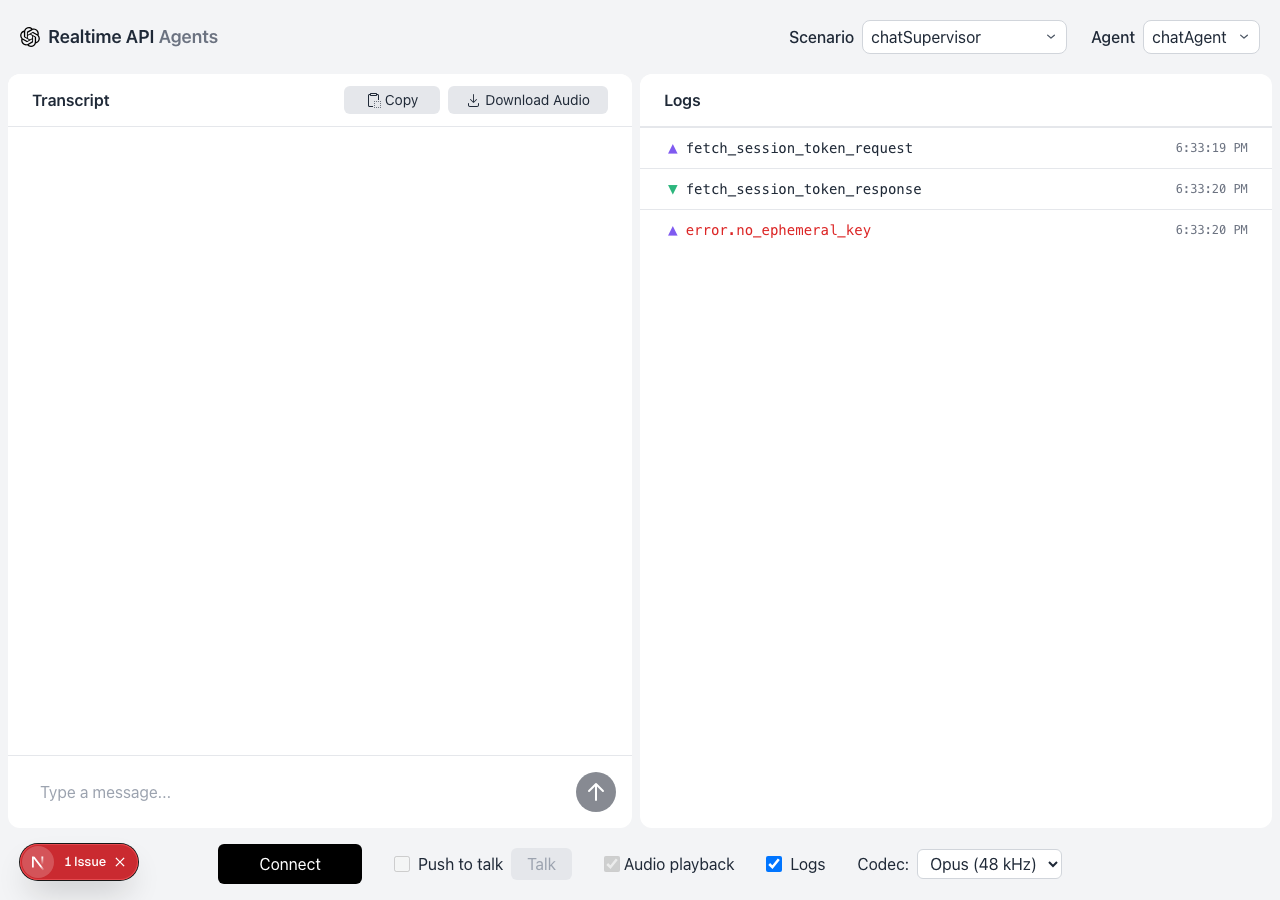
    • Clicked Connect and verified that the Logs panel displayed fetch_session_token_request, fetch_session_token_response, and error.no_ephemeral_key, returning to disconnected Connect state without crashing.
    • The application handled the connection attempt without API keys by requesting a session token, receiving no ephemeral key, and logging error.no_ephemeral_key.
    • The Connect button briefly transitioned to 'Connecting...' before cleanly reverting to 'Connect' without crashing or entering an active connected state.
  3. S3
    Sync URL with scenario configuration

    4 steps, 2 screenshots

    pass
    S3-1.png
    S3 · Sync URL with scenario configuration
    S3-4.png
    S3 · Sync URL with scenario configuration
    • Loaded http://127.0.0.1:3000/?agentConfig=chatSupervisor with scenario dropdown set to chatSupervisor and sub-agent dropdown options set to chatAgent.
    • Selecting simpleHandoff updated the browser URL to ?agentConfig=simpleHandoff and updated the Active sub-agent dropdown options to greeter and haikuWriter with greeter selected.
    • The application successfully synced the URL query parameter ?agentConfig=simpleHandoff upon selecting simpleHandoff from the scenario dropdown.
    • The active sub-agent dropdown updated its options from chatAgent to greeter|haikuWriter with greeter selected by default.
  4. S4
    Toggle the Logs panel visibility

    5 steps, 3 screenshots

    pass
    S4-1.png
    S4 · Toggle the Logs panel visibility
    S4-3.png
    S4 · Toggle the Logs panel visibility
    S4-6.png
    S4 · Toggle the Logs panel visibility
    • Initial state loaded with the Logs checkbox checked and the Logs panel visible.
    • Unchecked the Logs toggle; the Logs panel was hidden from the interface.
    • Checked the Logs toggle again; the Logs panel reappeared with all previous logs.
    • The Logs panel is visible by default when the Logs checkbox is checked.
    • Unchecking the Logs checkbox hides the Logs panel immediately.
    • Checking the Logs checkbox again restores the Logs panel and its contents.
  5. S5
    Configure push-to-talk audio input

    3 steps, 2 screenshots

    blocked
    S5-2.png
    S5 · Configure push-to-talk audio input
    S5-6.png
    S5 · Configure push-to-talk audio input
    • Navigated to chatSupervisor agent configuration page; observed initial state with disabled Push to talk checkbox and disabled Talk button.
    • Attempted to click the Push to talk checkbox, but it is disabled while disconnected, and connecting fails due to error.no_ephemeral_key in the test environment.
    • The Push to talk checkbox is disabled by default and requires an active Realtime connection.
    • Attempting to connect results in error.no_ephemeral_key, leaving the Push to talk checkbox and Talk button in a disabled state.
  6. S6
    Select an audio codec

    3 steps, 2 screenshots

    pass
    S6-1.png
    S6 · Select an audio codec
    S6-5.png
    S6 · Select an audio codec
    • Loaded page with chatSupervisor agent configuration and default opus audio codec selected.
    • Selected pcmu from Audio codec dropdown; combobox displays pcmu and URL query parameter updated to codec=pcmu.
    • Audio codec dropdown successfully updated to pcmu and retained the selected value.
  7. S7
    Switch the active sub-agent

    3 steps, 3 screenshots

    pass
    S7-2.png
    S7 · Switch the active sub-agent
    S7-9.png
    S7 · Switch the active sub-agent
    S7-14.png
    S7 · Switch the active sub-agent
    • Selected sub-agents in multi-agent configurations (such as haikuWriter in simpleHandoff and salesAgent in customerServiceRetail) and verified that the active sub-agent dropdown correctly updates and retains the chosen sub-agent.
    • Navigated to the application and inspected the agent configuration and active sub-agent dropdowns.
    • Verified in simpleHandoff that selecting 'haikuWriter' updated the active sub-agent combobox value from 'greeter' to 'haikuWriter'.
    • Verified in customerServiceRetail that selecting 'salesAgent' updated the active sub-agent combobox value from 'authentication' to 'salesAgent'.
    • Observed that the active sub-agent selection is properly updated and retained without being ignored or reset.
  8. S8
    Toggle audio playback

    3 steps, 2 screenshots

    fail
    S8-2.png
    S8 · Toggle audio playback
    S8-6.png
    S8 · Toggle audio playback
    • Navigated to http://127.0.0.1:3000/?agentConfig=chatSupervisor and found the 'Audio playback' checkbox is disabled by default.
    • Attempting to click the 'Audio playback' checkbox fails because the input element is disabled, leaving it unresponsive and unable to toggle.
    • Navigated to http://127.0.0.1:3000/?agentConfig=chatSupervisor.
    • The 'Audio playback' checkbox was rendered with the disabled attribute and could not be clicked or toggled.
  9. S9
    Copy empty transcript

    3 steps, 2 screenshots

    pass
    S9-1.png
    S9 · Copy empty transcript
    S9-3.png
    S9 · Copy empty transcript
    • Clicked Copy button with an empty transcript; the UI remained intact and fully functional without crashing.
    • Navigated to http://127.0.0.1:3000/?agentConfig=chatSupervisor where transcript was empty.
    • Clicked the Copy button on the empty transcript.
    • The application handled the action gracefully without crashing or breaking the UI.
  10. S10
    Download empty audio

    3 steps, 2 screenshots

    pass
    S10-1.png
    S10 · Download empty audio
    S10-3.png
    S10 · Download empty audio
    • Loaded http://127.0.0.1:3000/?agentConfig=chatSupervisor with chatSupervisor agent selected and Download Audio button available.
    • Clicked 'Download Audio' with no audio recorded; the application handled the action gracefully and did not crash or produce an error.
    • Navigated to http://127.0.0.1:3000/?agentConfig=chatSupervisor and confirmed page loaded properly.
    • Clicked the 'Download Audio' button when no audio had been recorded.
    • The application remained fully responsive and stable without any crash or breaking errors.

Issues

No finding survived the audit. Nothing to fix from this run.

Environment limitations

These failures came from the test environment, not from the application: a credential the sandbox does not hold, a demo nobody may write to, a resource it cannot reach. They are not counted as issues.

  • Audio playback checkbox is disabled and unresponsive to user clicksS8 · medium

    The 'Audio playback' checkbox is disabled because the application cannot connect to the Realtime API, which is caused by the sandbox lacking the API key necessary to provide an ephemeral key. The audit recorded the test environment as the cause, so this is a limit of the run rather than a defect of the application. The page reported 1 console error during the scenario.

  • S1 could not exercise this: Missing ephemeral key prevents realtime connection. The server logs an error that no ephemeral key was provided, preventing any connection-dependent features from enabling. The audit recorded the test environment as the cause, so it is not counted as an issue.
  • S9 could not exercise this: Clipboard copy blocked by denied permissions. A NotAllowedError is logged because the test sandbox denies clipboard write permissions. The audit recorded the test environment as the cause, so it is not counted as an issue.

Critic audit

An adversarial second pass over every finding before it reaches the report.

1
findings reviewed
0
re-verified live
1
withdrawn
  • F1withdrawn

    The 'Audio playback' checkbox is disabled because the application cannot connect to the Realtime API, which is caused by the sandbox lacking the API key necessary to provide an ephemeral key. The audit recorded the test environment as the cause, so this is a limit of the run rather than a defect of the application.

  • The tester failed S8 for a disabled 'Audio playback' control, contradicting S5 which correctly recognized that audio controls remain disabled when the missing API key prevents a connection.
  • The test run could not exercise any active session features because the environment was unable to provide an ephemeral key.

Report

QA report: openai/openai-realtime-agents at 94c9e91

No application defects were confirmed during testing, though live realtime session features remained unexercised due to environment limitations.

The test run evaluated disconnected state handling, URL configuration syncing, logs panel toggling, codec selection, sub-agent switching, and empty export actions across ten scenarios. Core client-side controls and state constraints functioned as expected in the disconnected state.

One finding regarding a disabled audio playback toggle was withdrawn during audit because the control is intentionally disabled prior to establishing a connection. The test environment lacked the ephemeral API key required to establish a live session, which blocked push-to-talk audio testing and prevented live audio playback from being exercised. Sandbox permission restrictions also prevented clipboard export verification.

While offline interface behaviors and disconnected error states passed inspection, verifying the full end-to-end voice and agent communication pipeline will require testing in an environment configured with valid connection credentials.

Run summary
MetricCount
Scenarios executed10
Passed8
Failed1
Blocked1
Findings raised1
Issues after the audit0
Withdrawn by the audit1
Critical / high / medium / low0 / 0 / 0 / 0

Target: http://127.0.0.1:3000 · Testing level: deep_feature · Stack: node / npm (next)

Issues

No issues survived the audit.

Environment limitations

These failures came from the test environment, not from the application: a credential the sandbox does not hold, a demo nobody may write to, a resource it cannot reach. They are not counted as issues. They record what this run could not exercise.

  • Audio playback checkbox is disabled and unresponsive to user clicks (S8, medium): The 'Audio playback' checkbox is disabled because the application cannot connect to the Realtime API, which is caused by the sandbox lacking the API key necessary to provide an ephemeral key. The audit recorded the test environment as the cause, so this is a limit of the run rather than a defect of the application. The page reported 1 console error during the scenario.
  • S1 could not exercise this: Missing ephemeral key prevents realtime connection. The server logs an error that no ephemeral key was provided, preventing any connection-dependent features from enabling. The audit recorded the test environment as the cause, so it is not counted as an issue.
  • S9 could not exercise this: Clipboard copy blocked by denied permissions. A NotAllowedError is logged because the test sandbox denies clipboard write permissions. The audit recorded the test environment as the cause, so it is not counted as an issue.
Scenario results
ScenarioPriorityResultIssues
S1 Verify initial disconnected state constraintshighpassnone
S2 Handle connection attempts without API keyshighpassnone
S3 Sync URL with scenario configurationhighpassnone
S4 Toggle the Logs panel visibilitymediumpassnone
S5 Configure push-to-talk audio inputmediumblocked (Push to talk checkbox is disabled when disconnected and session connection fails due to missing ephemeral key in the test environment.)none
S6 Select an audio codecmediumpassnone
S7 Switch the active sub-agentmediumpassnone
S8 Toggle audio playbacklowfailnone
S9 Copy empty transcriptlowpassnone
S10 Download empty audiolowpassnone
The audit

The Critic reviewed 1 finding and re-verified 0 of them live in the browser, replaying the reported steps on a fresh page.

  • The tester failed S8 for a disabled 'Audio playback' control, contradicting S5 which correctly recognized that audio controls remain disabled when the missing API key prevents a connection.
  • The test run could not exercise any active session features because the environment was unable to provide an ephemeral key.
Coverage and caveats

In scope: Client-side UI state constraints; Routing and URL synchronization; Configuration control toggles; Connection failure error handling.

Not covered: Successful audio streaming; Multi-agent message handoffs; Realtime transcript generation.

  • The test environment does not provide a valid OPENAI_API_KEY to the backend.
  • Connection attempts will deterministically fail with error.no_ephemeral_key.
  • Excluded features cannot be tested because they strictly depend on an established Realtime API websocket connection.
  • S5 could not be executed: Push to talk checkbox is disabled when disconnected and session connection fails due to missing ephemeral key in the test environment..
By the numbers
MetricValue
Scenarios8 passed, 1 failed, 1 blocked of 10 (32 planned steps)
Browser actions94 (13 clicks, 15 inputs, 14 navigations, 52 snapshots)
Screenshots25 (3 explore, 22 scenario, 0 critic), 22 captioned
Coverage1 pages, 1 forms, 4 flows, 2 console errors
Audit1 findings, 0 re-verified live, 0 confirmed, 0 promoted, 1 withdrawn
Model calls114
Tokens428,185 input, 6,616 output, 11,941 thinking
Time6 min
StageCallsInputOutputThinkingSeconds
explore2393,2901,5891,23861
plan13,1791,6341,85226
test88325,6702,7065,198263
critique14,4564802,86625
report11,5902077879

Run log

stagecallstokenstime
Explore2396.1k1m 1s
Plan16.7k26s
Test88333.6k4m 23s
Critique17.8k25s
Report12.6k9s
Total114446.7k6m 24s
Intake
Explore
Plan
Test
Critique
Report
  • 00:33:07Zexploreexplore started
  • 00:39:42ZexploreExplored / (12 controls, 0 forms)
  • 00:39:42ZexploreMapped 1 pages, 1 forms, 4 flows in 23 turns.
  • 00:39:42Zexploreexplore completed in 61s.
  • 00:39:42Zplanplan started
  • 00:39:42ZplanPlanned 10 scenarios (3 high, 4 medium, 3 low).
  • 00:39:42Zplanplan completed in 26s.
  • 00:39:42Ztesttest started
  • 00:39:42ZtestS1 executed (pass)
  • 00:39:42ZtestS2 executed (pass)
  • 00:39:42ZtestS3 executed (pass)
  • 00:39:42ZtestS4 executed (pass)
  • 00:39:42ZtestS5 executed (blocked)
  • 00:39:42ZtestS6 executed (pass)
  • 00:39:42ZtestS7 executed (pass)
  • 00:39:42ZtestS8 executed (fail), 1 finding
  • 00:39:42ZtestS9 executed (pass)
  • 00:39:42ZtestS10 executed (pass)
  • 00:39:42ZtestExecuted 10 scenarios: 8 passed, 1 failed, 1 blocked, 1 finding.
  • 00:39:42Ztesttest completed in 263s.
  • 00:39:42Zcritiquecritique started
  • 00:39:42ZcritiqueReviewed 1 findings; 2 possible defects spotted in passed scenarios.
  • 00:39:42ZcritiqueAudit complete: 0 confirmed, 1 withdrawn, 0 promoted, 0 re-verified live.
  • 00:39:42Zcritique3 failures came from the test environment rather than the application. They are reported as environment limitations, not issues.
  • 00:39:42Zcritiquecritique completed in 25s.
  • 00:39:42Zreportreport started
  • 00:39:42ZreportReported 0 issues (0 critical, 0 high, 0 medium, 0 low) from 1 finding.
  • 00:39:42Zreportreport completed in 9s.

Put an agent team on your next pull request.

Connect a repo, dispatch a Run, and read an audited, evidence-backed report the same day.