Explore/GitHub Agent Apps Campaign/rockbenben/subtitle-translator
LLM translation toolSandbox, from sourcesucceeded

rockbenben/subtitle-translator

rockbenben/subtitle-translatorat e1d801c

Open-source batch subtitle translator with many LLM and translation providers, multi-language output and provider settings. Run from its repository in the DeepQA sandbox.

Tested byDeepQA Teamfromrockbenben/subtitle-translatorat e1d801conSep 20, 2026

Run #1model gemini-balanced (vertex)took 9m

All 12 scenarios passed, no issues after the audit.

Share on X
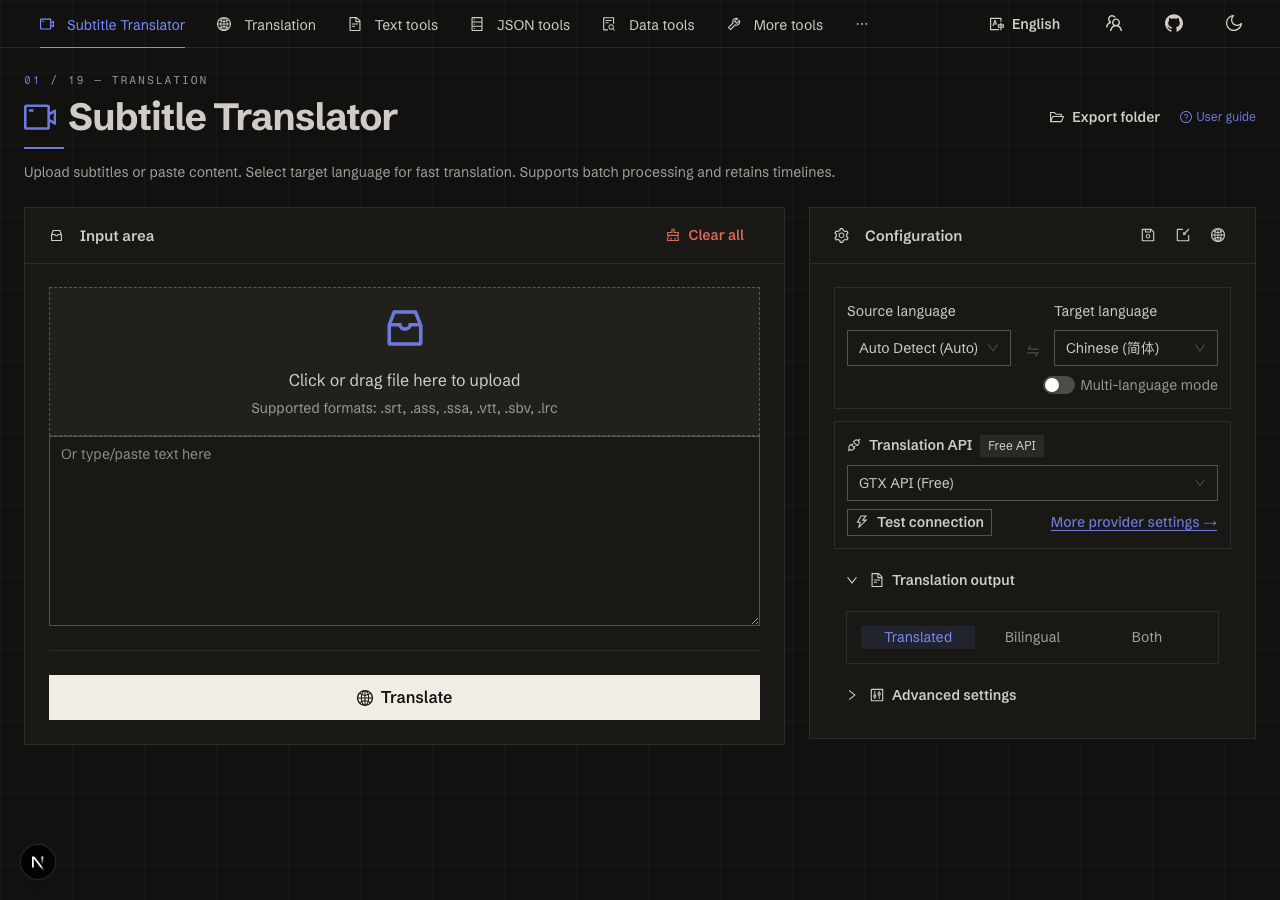
rockbenben/subtitle-translator in the browser during the run

By the numbers

12 of 12
scenarios passed
156
browser actions
40
screenshots
160
model calls
8.6
minutes
12
scenarios
12
passed
0
failed
0
blocked
0
issues

Walkthrough

Every scenario DeepQA drove in the browser, in plan order, with the 36 screenshots it captured along the way. A passing scenario is evidence too.

  1. S1
    Execute core translation workflow

    3 steps, 3 screenshots

    pass
    S1-1.png
    S1 · Execute core translation workflow
    S1-4.png
    S1 · Execute core translation workflow
    S1-7.png
    S1 · Execute core translation workflow
    • Clicked Translate button, progress indicator appeared showing translation in progress.
    • Translation completed successfully: Translation result textbox displayed '1 00:00:01,000 --> 00:00:02,000 你好世界' and bilingual review table showed source 'Hello World' and translated '你好世界'.
    • Navigated to /en and entered valid SRT subtitle text in the Input area.
    • Clicked Translate button and observed progress indicators and status update.
    • Observed translated output '1 00:00:01,000 --> 00:00:02,000 你好世界' and bilingual review table populated with translated text.
  2. S2
    Prevent translation with empty input

    3 steps, 2 screenshots

    pass
    S2-1.png
    S2 · Prevent translation with empty input
    S2-3.png
    S2 · Prevent translation with empty input
    • Navigated to /en and confirmed the Input area textarea is empty.
    • Clicked the Translate button with empty input, and a warning message 'Please enter or paste text content.' appeared with an exclamation icon.
    • The Subtitle Translator properly prevented translation when the input area was empty, displaying a warning message 'Please enter or paste text content.'.
  3. S3
    Test default translation provider connection

    3 steps, 4 screenshots

    pass
    S3-1.png
    S3 · Test default translation provider connection
    S3-4.png
    S3 · Test default translation provider connection
    S3-6.png
    S3 · Test default translation provider connection
    S3-11.png
    S3 · Test default translation provider connection
    • Opened the Translation API settings dialog showing default GTX API (Free) configuration.
    • Clicked 'Test API' button and observed a success notification stating 'GTX API (Free) - API config valid' with a check-circle icon.
    • Tested connection from the main page panel and received a '✓ Connected' status badge and success toast.
    • Successfully tested default GTX API (Free) connection via both the provider settings modal ('Test API') and the main configuration panel ('Test connection').
    • Prominent success toasts and status indicators were displayed indicating valid API configuration and successful connection.
  4. S4
    Validate API URL in provider settings

    7 steps, 4 screenshots

    pass
    S4-1.png
    S4 · Validate API URL in provider settings
    S4-4.png
    S4 · Validate API URL in provider settings
    S4-7.png
    S4 · Validate API URL in provider settings
    S4-9.png
    S4 · Validate API URL in provider settings
    • Initial page loaded at /en with Translation API configuration visible.
    • Opened Translation API provider settings; initial API URL is 'https://translate-pa.googleapis.com/v1/translateHtml'.
    • Entered 'invalid_url_test' into API URL field.
    • Clicked 'Test API' with invalid API URL; error notification 'API test failed, check config.: HTTP error! status: 404 — Endpoint or model not found — check the URL and model name' was displayed.
    • Navigated to /en and opened the 'More provider settings →' dialog.
    • Noted the initial API URL value: 'https://translate-pa.googleapis.com/v1/translateHtml'.
    • Typed 'invalid_url_test' into the 'API API URL' input field.
    • Clicked the 'Test API' button and observed a connection failure notification: 'API test failed, check config.: HTTP error! status: 404 — Endpoint or model not found — check the URL and model name'.
    • Restored the original API URL value ('https://translate-pa.googleapis.com/v1/translateHtml') in the API URL field.
  5. S5
    Clear input area

    3 steps, 3 screenshots

    pass
    S5-1.png
    S5 · Clear input area
    S5-4.png
    S5 · Clear input area
    S5-6.png
    S5 · Clear input area
    • Entered 'Sample subtitle text' into the Input area textbox.
    • Clicked the 'Clear all' button and confirmed the Input area textbox is completely emptied.
    • The 'Clear all' button completely cleared the text entered into the Input area textarea.
  6. S6
    Validate negative timeout in advanced settings

    6 steps, 4 screenshots

    pass
    S6-1.png
    S6 · Validate negative timeout in advanced settings
    S6-3.png
    S6 · Validate negative timeout in advanced settings
    S6-7.png
    S6 · Validate negative timeout in advanced settings
    S6-10.png
    S6 · Validate negative timeout in advanced settings
    • Restored the Timeout field back to its original value of 180 seconds.
    • Typing -500 into the Timeout field was rejected upon blur and automatically clamped to the minimum allowed value of 5.
    • Navigated to /en and expanded the Advanced settings section.
    • Read the initial Timeout setting value, which was 180 seconds.
    • Entered negative number -500 into the Timeout spinbutton input.
    • Observed that the input validation rejected the negative value upon blur and automatically clamped it to the minimum threshold of 5 seconds.
    • Restored the original Timeout value of 180 seconds.
  7. S7
    Update export filename pattern

    3 steps, 3 screenshots

    pass
    S7-1.png
    S7 · Update export filename pattern
    S7-4.png
    S7 · Update export filename pattern
    S7-7.png
    S7 · Update export filename pattern
    • Opened Advanced settings section showing Export filename pattern field.
    • Entered '_{target_lang}_translated' into Export filename pattern field and confirmed the field value updated and remained as '_{target_lang}_translated'.
    • Navigated to /en and toggled Advanced settings to view advanced configuration options.
    • Located the 'Export filename pattern' input field, initially displaying '{name}.{ext}'.
    • Entered '_{target_lang}_translated' into the 'Export filename pattern' field.
    • Verified that the field accepted and retained '_{target_lang}_translated' without reverting.
  8. S8
    Change target language

    3 steps, 4 screenshots

    pass
    S8-1.png
    S8 · Change target language
    S8-4.png
    S8 · Change target language
    S8-8.png
    S8 · Change target language
    S8-12.png
    S8 · Change target language
    • Navigated to /en and located the Target language combobox, currently set to Chinese (简体).
    • Selected 'Japanese (日本語)' from the target language dropdown list, and the active target language combobox updated to display 'Japanese (日本語)'.
    • Selected 'Spanish (Español)' from the dropdown list and confirmed the target language updated to 'Spanish (Español)'.
    • Navigated to /en where the default target language was set to 'Chinese (简体)'.
    • Opened the Target language combobox dropdown list and selected 'Japanese (日本語)'.
    • Verified that the Target language combobox successfully updated to display 'Japanese (日本語)'.
    • Selected another language 'Spanish (Español)' and verified the UI updated immediately to show 'Spanish (Español)' as the active target language.
  9. S9
    Toggle multi-language mode

    2 steps, 3 screenshots

    pass
    S9-1.png
    S9 · Toggle multi-language mode
    S9-3.png
    S9 · Toggle multi-language mode
    S9-5.png
    S9 · Toggle multi-language mode
    • Loaded /en page and identified the Multi-language mode switch control.
    • Clicked 'Multi-language mode' switch, which turned on, changing the Target language selector to '2 selected' and the Translate button to 'Translate (2)'.
    • Toggled 'Multi-language mode' switch off again, restoring the single target language view and 'Translate' button label.
    • Navigated to /en and located the 'Multi-language mode' toggle switch in the Configuration section.
    • Toggling the switch enabled multi-language mode, immediately updating the UI: the Target language selector showed multi-selection ('2 selected') and the translate button updated to 'Translate (2)'.
    • Toggling the switch off reverted the UI back to single target language mode ('Spanish (Español)') and 'Translate'.
  10. S10
    Toggle application theme

    2 steps, 3 screenshots

    pass
    S10-1.png
    S10 · Toggle application theme
    S10-3.png
    S10 · Toggle application theme
    S10-5.png
    S10 · Toggle application theme
    • Navigated to /en and observed the default theme with 'Toggle theme' button present.
    • Clicked the 'Toggle theme' button and confirmed the application's visual theme updates between light and dark modes smoothly.
    • Navigated to /en and confirmed the theme toggle button is available in the header.
    • Clicked the 'Toggle theme' button, which successfully toggled the UI theme between dark mode and light mode.
  11. S11
    Export configuration to file

    2 steps, 2 screenshots

    pass
    S11-1.png
    S11 · Export configuration to file
    S11-3.png
    S11 · Export configuration to file
    • Navigated to /en and located the Configuration section with Export configuration to file button.
    • Clicked 'Export configuration to file', which displayed the 'Settings exported' confirmation message and initiated the configuration file export.
    • The export configuration button on /en was clicked and successfully triggered the export with a 'Settings exported' confirmation toast and no errors.
  12. S12
    Verify Chinese localization routing

    1 step, 1 screenshot

    pass
    S12-2.png
    S12 · Verify Chinese localization routing
    • Navigated to /zh and verified that the page title is '字幕翻译器 - SRT/ASS/VTT/SBV/LRC 批量 AI 翻译与双语字幕生成' and UI elements are rendered in Chinese.
    • Navigating to /zh successfully loads the Chinese localized interface with translated headings, form labels, controls, and document title.

Issues

No finding survived the audit. Nothing to fix from this run.

Critic audit

An adversarial second pass over every finding before it reaches the report.

0
findings reviewed
1
re-verified live
0
withdrawn
    • The tester correctly verified failure states, but overlooked the fact that the invalid URL triggered a raw network error instead of being caught by form validation.
    • All scenarios passed with no findings reported by the tester, indicating good general stability of the application.
    • A possible defect in S4 ("API URL input field lacks client-side format validation") was not promoted: the live replay came back inconclusive.

    Report

    QA report: rockbenben/subtitle-translator at e1d801c

    All twelve automated test scenarios passed with zero confirmed issues across subtitle translation, settings management, and application configuration workflows.

    Testing exercised the core subtitle translation workflow, empty input validation, provider connection testing, provider API URL validation, timeout validation in advanced settings, input clearing, export filename updates, language switching, multi-language mode toggling, theme customization, configuration exports, and localization routing.

    All twelve scenarios passed without any confirmed functional defects or regressions identified during the audit. The tested feature set demonstrated consistent stability across both standard operational paths and boundary validations.

    Run summary
    MetricCount
    Scenarios executed12
    Passed12
    Failed0
    Blocked0
    Findings raised0
    Issues after the audit0
    Withdrawn by the audit0
    Critical / high / medium / low0 / 0 / 0 / 0

    Target: http://localhost:3000 · Testing level: deep_feature · Stack: node / yarn (next)

    Issues

    No issues survived the audit.

    Scenario results
    ScenarioPriorityResultIssues
    S1 Execute core translation workflowhighpassnone
    S2 Prevent translation with empty inputhighpassnone
    S3 Test default translation provider connectionhighpassnone
    S4 Validate API URL in provider settingshighpassnone
    S5 Clear input areamediumpassnone
    S6 Validate negative timeout in advanced settingsmediumpassnone
    S7 Update export filename patternmediumpassnone
    S8 Change target languagemediumpassnone
    S9 Toggle multi-language modemediumpassnone
    S10 Toggle application thememediumpassnone
    S11 Export configuration to filelowpassnone
    S12 Verify Chinese localization routinglowpassnone
    The audit

    The Critic reviewed 0 findings and re-verified 1 of them live in the browser, replaying the reported steps on a fresh page.

    • The tester correctly verified failure states, but overlooked the fact that the invalid URL triggered a raw network error instead of being caught by form validation.
    • All scenarios passed with no findings reported by the tester, indicating good general stability of the application.
    • A possible defect in S4 ("API URL input field lacks client-side format validation") was not promoted: the live replay came back inconclusive.
    Coverage and caveats

    In scope: Core translation workflow via text input; Translation provider settings and connection testing; Advanced settings validation and updates; Language configuration changes; Application localization and theme toggles.

    Not covered: File upload and import configuration functionality (excluded because native OS file picker interactions are complex to observe reliably in standard browser automation).

    • The default translation provider allows basic connectivity testing without requiring an API key
    • Translation API processing times fall within standard browser action timeouts
    • Invalid values in settings panels can be manually reverted to their previous valid states after observing validation errors
    By the numbers
    MetricValue
    Scenarios12 passed, 0 failed, 0 blocked of 12 (38 planned steps)
    Browser actions156 (37 clicks, 17 inputs, 18 navigations, 84 snapshots)
    Screenshots40 (4 explore, 36 scenario, 0 critic), 36 captioned
    Coverage2 pages, 3 forms, 3 flows, 0 console errors
    Audit0 findings, 1 re-verified live, 0 confirmed, 0 promoted, 0 withdrawn
    Model calls160
    Tokens848,617 input, 7,658 output, 15,726 thinking
    Time9 min
    StageCallsInputOutputThinkingSeconds
    explore27177,1601,6851,470104
    plan13,3431,8155,94557
    test122628,3273,5364,752273
    critique938,3634833,18973
    report11,42413937010

    Run log

    stagecallstokenstime
    Explore27180.3k1m 44s
    Plan111.1k57s
    Test122636.6k4m 33s
    Critique942k1m 13s
    Report11.9k10s
    Total160872k8m 37s
    Intake
    Explore
    Plan
    Test
    Critique
    Report
    • 04:10:36Zexploreexplore started
    • 04:19:22ZexploreExplored /en (24 controls, 1 forms)
    • 04:19:22ZexploreExplored /zh (31 controls, 2 forms)
    • 04:19:22ZexploreMapped 2 pages, 3 forms, 3 flows in 27 turns.
    • 04:19:22Zexploreexplore completed in 104s.
    • 04:19:22Zplanplan started
    • 04:19:22ZplanA scenario that changes where the application points its backend runs after the others of its priority, so a saved address cannot reach them.
    • 04:19:22ZplanPlanned 12 scenarios (4 high, 6 medium, 2 low).
    • 04:19:22Zplanplan completed in 57s.
    • 04:19:22Ztesttest started
    • 04:19:22ZtestS1 executed (pass)
    • 04:19:22ZtestS2 executed (pass)
    • 04:19:22ZtestS3 executed (pass)
    • 04:19:22ZtestS4 executed (pass)
    • 04:19:22ZtestS5 executed (pass)
    • 04:19:22ZtestS6 executed (pass)
    • 04:19:22ZtestS7 executed (pass)
    • 04:19:22ZtestS8 executed (pass)
    • 04:19:22ZtestS9 executed (pass)
    • 04:19:22ZtestS10 executed (pass)
    • 04:19:22ZtestS11 executed (pass)
    • 04:19:22ZtestS12 executed (pass)
    • 04:19:22ZtestExecuted 12 scenarios: 12 passed, 0 failed, 0 blocked, 0 findings.
    • 04:19:22Ztesttest completed in 273s.
    • 04:19:22Zcritiquecritique started
    • 04:19:22ZcritiqueReviewed 0 findings; 1 possible defect spotted in passed scenarios.
    • 04:19:22ZcritiqueRe-verified a possible defect in S4: inconclusive.
    • 04:19:22ZcritiqueAudit complete: 0 confirmed, 0 withdrawn, 0 promoted, 1 re-verified live.
    • 04:19:22Zcritiquecritique completed in 73s.
    • 04:19:22Zreportreport started
    • 04:19:22ZreportReported 0 issues (0 critical, 0 high, 0 medium, 0 low) from 0 findings.
    • 04:19:22Zreportreport completed in 10s.

    Put an agent team on your next pull request.

    Connect a repo, dispatch a Run, and read an audited, evidence-backed report the same day.